
Scrape Academic Papers from arXiv: Metadata + PDFs (Python + ProxiesAPI)
arXiv is one of the best places to collect academic paper data because:
- it has stable IDs (e.g.
2501.01234) - paper pages are consistent
- PDFs live at predictable URLs
- there’s also an official API (which you should prefer when it fits)
In this tutorial, we’ll build a scraper that:
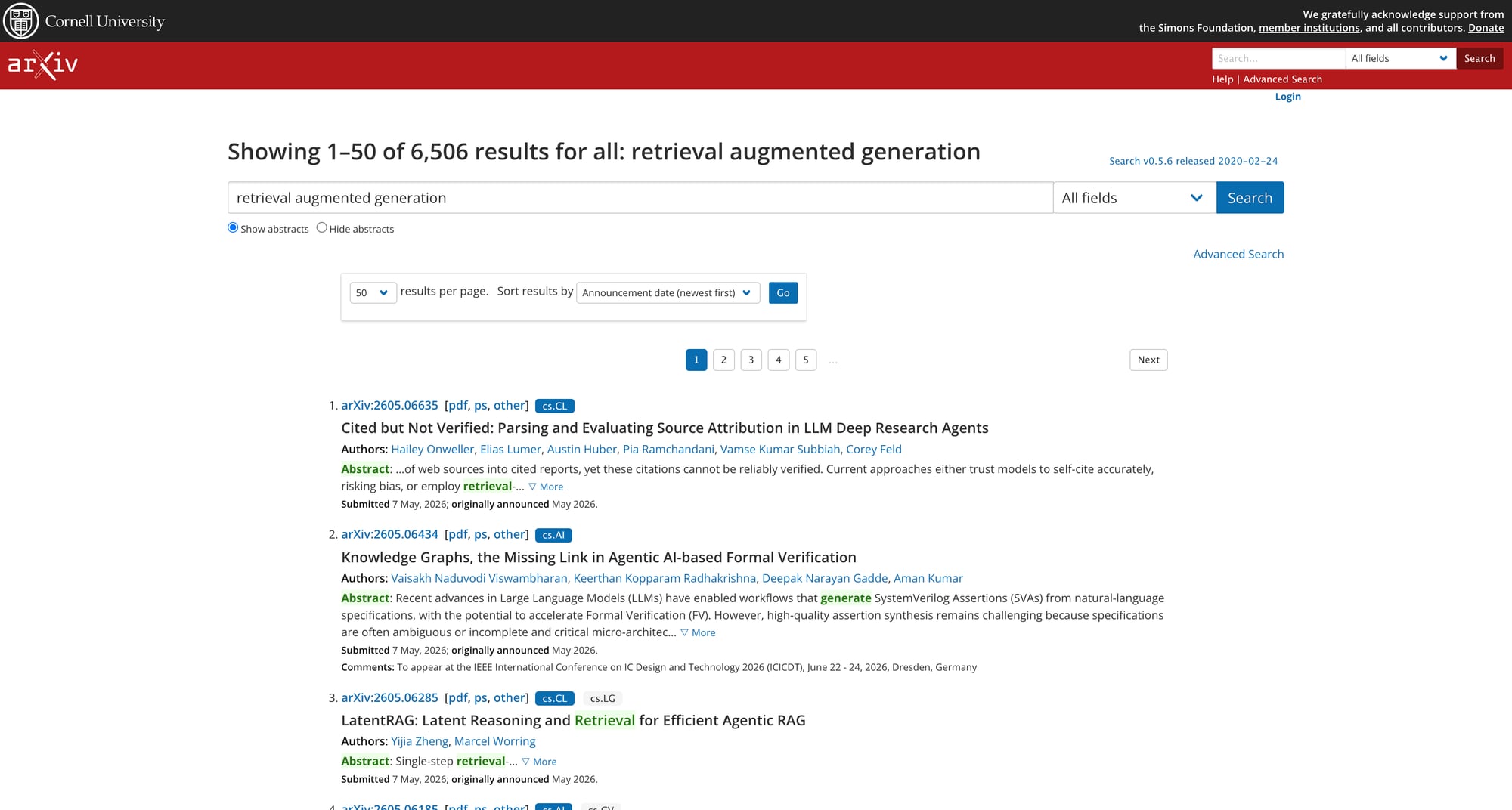
- searches arXiv for a query (via the HTML search pages)
- extracts paper IDs from results
- fetches each paper abstract page and parses:
- title
- authors
- abstract
- subjects
- submission date
- downloads PDFs to disk with safe filenames
We’ll also show a practical way to integrate ProxiesAPI for the requests layer.
arXiv is generally friendly, but at scale you’ll still hit timeouts, throttling, and flaky network paths. ProxiesAPI helps you keep the fetch layer stable while you focus on parsing metadata and PDFs.
A quick note: arXiv API vs scraping
If you only need metadata, arXiv provides an official API (Atom feed):
- API docs:
https://info.arxiv.org/help/api/ - Query endpoint:
https://export.arxiv.org/api/query?...
That API is the most stable approach.
So why scrape?
- you need page-only fields / formatting
- you want to verify content against the HTML
- you’re already crawling PDFs + want a single pipeline
We’ll do HTML scraping for IDs + abstracts and direct PDF download.
Setup
python -m venv .venv
source .venv/bin/activate
pip install requests beautifulsoup4 lxml
Step 1: Fetch HTML (with ProxiesAPI hook)
import os
import time
import requests

TIMEOUT = (10, 60)
UA = (
    "Mozilla/5.0 (Macintosh; Intel Mac OS X 10_15_7) "
    "AppleWebKit/537.36 (KHTML, like Gecko) "
    "Chrome/124.0.0.0 Safari/537.36"
)

session = requests.Session()
session.headers.update({
    "User-Agent": UA,
    "Accept": "text/html,application/xhtml+xml,application/xml;q=0.9,*/*;q=0.8",
    "Accept-Language": "en-US,en;q=0.9",
})

PROXIESAPI_KEY = os.getenv("PROXIESAPI_KEY", "")


def fetch(url: str) -> str:
    if not PROXIESAPI_KEY:
        r = session.get(url, timeout=TIMEOUT)
        r.raise_for_status()
        return r.text

    proxy_url = "https://api.proxiesapi.com"
    params = {
        "api_key": PROXIESAPI_KEY,
        "url": url,
        # optional knobs vary by provider
        # "country": "US",
        # "session": "arxiv_1",
    }
    r = session.get(proxy_url, params=params, timeout=TIMEOUT)
    r.raise_for_status()
    return r.text


def nap(i: int) -> None:
    time.sleep(0.8 + (i % 5) * 0.25)
Step 2: Search arXiv and collect paper IDs
arXiv’s HTML search is at:
https://arxiv.org/search/?query=QUERY&searchtype=all&source=header
Result rows include links like:
/abs/2501.01234
We’ll parse those.
import re
from urllib.parse import quote_plus, urljoin
from bs4 import BeautifulSoup

ARXIV = "https://arxiv.org"
ABS_RE = re.compile(r"/abs/([0-9]{4}\.[0-9]{4,5})(v\d+)?$")


def search_url(query: str, start: int = 0) -> str:
    q = quote_plus(query)
    return (
        f"{ARXIV}/search/?query={q}&searchtype=all&source=header"
        f"&abstracts=show&order=-announced_date_first&size=50&start={start}"
    )


def parse_search_ids(html: str) -> list[str]:
    soup = BeautifulSoup(html, "lxml")
    ids: list[str] = []

    for a in soup.select("li.arxiv-result a[href]"):
        href = a.get("href")
        if not href:
            continue
        # normalize to path
        if href.startswith(ARXIV):
            href = href.replace(ARXIV, "")

        m = ABS_RE.search(href)
        if m:
            ids.append(m.group(1))

    # unique, stable order
    seen = set()
    out = []
    for pid in ids:
        if pid in seen:
            continue
        seen.add(pid)
        out.append(pid)
    return out


def crawl_search(query: str, max_pages: int = 2) -> list[str]:
    all_ids: list[str] = []

    for p in range(max_pages):
        url = search_url(query, start=p * 50)
        html = fetch(url)
        batch = parse_search_ids(html)

        for pid in batch:
            if pid not in all_ids:
                all_ids.append(pid)

        print("page", p + 1, "ids", len(batch), "total", len(all_ids))
        nap(p)

    return all_ids
Step 3: Parse a paper abstract page
Paper pages live at:
- Abstract:
https://arxiv.org/abs/{id} - PDF:
https://arxiv.org/pdf/{id}.pdf
The abstract page typically contains:
- title:
h1.title - authors:
div.authors a - abstract:
blockquote.abstract - subjects:
span.primary-subject+ text after it
We’ll extract those cleanly.
from bs4 import BeautifulSoup


def clean_label_prefix(text: str, label: str) -> str:
    # arXiv uses "Title:" / "Abstract:" prefixes
    t = (text or "").strip()
    if t.lower().startswith(label.lower() + ":"):
        return t.split(":", 1)[1].strip()
    return t


def parse_abs_page(html: str, paper_id: str) -> dict:
    soup = BeautifulSoup(html, "lxml")

    title_el = soup.select_one("h1.title")
    title = clean_label_prefix(title_el.get_text(" ", strip=True) if title_el else "", "Title")

    authors = [a.get_text(" ", strip=True) for a in soup.select("div.authors a")]

    abs_el = soup.select_one("blockquote.abstract")
    abstract = clean_label_prefix(abs_el.get_text(" ", strip=True) if abs_el else "", "Abstract")

    primary = soup.select_one("span.primary-subject")
    primary_subject = primary.get_text(" ", strip=True) if primary else None

    # submission history (last updated) is inside div.submission-history
    hist = soup.select_one("div.submission-history")
    submission_history = hist.get_text(" ", strip=True) if hist else None

    return {
        "paper_id": paper_id,
        "title": title,
        "authors": authors,
        "abstract": abstract,
        "primary_subject": primary_subject,
        "submission_history": submission_history,
        "abs_url": f"https://arxiv.org/abs/{paper_id}",
        "pdf_url": f"https://arxiv.org/pdf/{paper_id}.pdf",
    }
Step 4: Download PDFs safely
PDF downloads are binary, so we’ll use stream=True, write chunks, and guard against overwriting.
from pathlib import Path


def safe_filename(s: str) -> str:
    keep = "-_.() "
    out = []
    for ch in s:
        if ch.isalnum() or ch in keep:
            out.append(ch)
        else:
            out.append("_")
    return "".join(out).strip().replace("  ", " ")


def download_pdf(paper: dict, out_dir: str = "arxiv_pdfs") -> str:
    outp = Path(out_dir)
    outp.mkdir(parents=True, exist_ok=True)

    paper_id = paper["paper_id"]
    title = paper.get("title") or paper_id

    fname = safe_filename(f"{paper_id} - {title}.pdf")
    path = outp / fname

    if path.exists() and path.stat().st_size > 0:
        return str(path)

    url = paper["pdf_url"]
    r = session.get(url, timeout=TIMEOUT, stream=True)
    r.raise_for_status()

    with open(path, "wb") as f:
        for chunk in r.iter_content(chunk_size=1024 * 64):
            if chunk:
                f.write(chunk)

    return str(path)
Step 5: Put it together (crawl → parse → download)
import json


def run(query: str, max_search_pages: int = 1, max_papers: int = 10) -> list[dict]:
    ids = crawl_search(query, max_pages=max_search_pages)
    ids = ids[:max_papers]

    papers: list[dict] = []

    for i, pid in enumerate(ids):
        html = fetch(f"https://arxiv.org/abs/{pid}")
        paper = parse_abs_page(html, pid)

        pdf_path = download_pdf(paper, out_dir="arxiv_pdfs")
        paper["pdf_path"] = pdf_path

        papers.append(paper)
        print("saved", pid, "->", pdf_path)
        nap(i)

    with open("arxiv_papers.json", "w", encoding="utf-8") as f:
        json.dump(papers, f, ensure_ascii=False, indent=2)

    print("wrote arxiv_papers.json", len(papers))
    return papers


if __name__ == "__main__":
    run(query="retrieval augmented generation", max_search_pages=1, max_papers=10)
Troubleshooting + best practices
1) Prefer the API for metadata-only use cases
If you don’t need HTML-only fields, arXiv’s API is simpler and stable.
2) Be gentle
Even if you can request fast, don’t. Add sleeps, keep max_papers reasonable, and cache.
3) Handle versions
arXiv IDs can have versions like v2. We strip them when collecting IDs, but you can store the version too if needed.
4) Where ProxiesAPI helps
arXiv is usually reliable without proxies, but ProxiesAPI can help when:
- you’re crawling many queries
- you’re downloading many PDFs (long-running job)
- your network has inconsistent routing/timeouts
QA checklist
- Search crawl returns paper IDs
- Parsed papers have title/authors/abstract
- PDF downloads write non-empty files
- Output JSON is valid and includes abs_url/pdf_url/pdf_path
- Requests use timeouts and sleeps
arXiv is generally friendly, but at scale you’ll still hit timeouts, throttling, and flaky network paths. ProxiesAPI helps you keep the fetch layer stable while you focus on parsing metadata and PDFs.