
Scrape GitHub Topic Pages with Python + ProxiesAPI
GitHub topic pages are a practical source for competitive research.
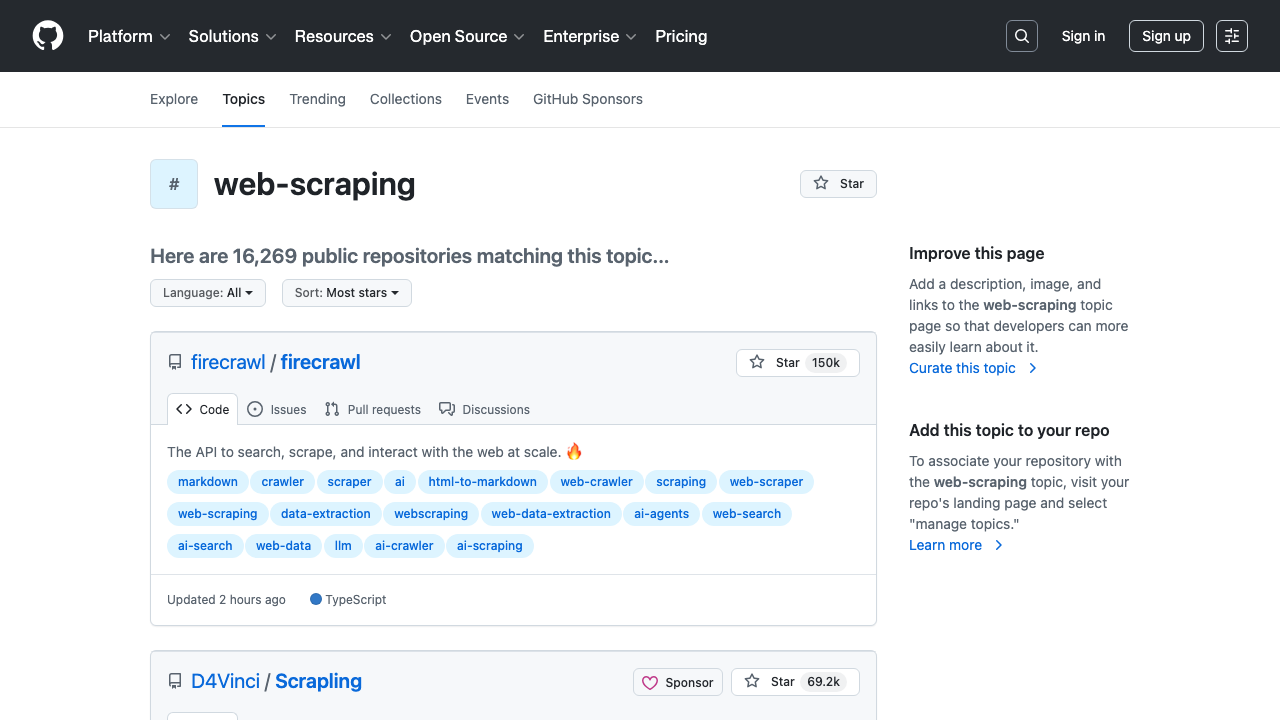
They already bundle the fields most teams care about:
- repository owner and name
- star count
- primary language
- short description
- visible topic tags
- last updated date
In this guide we will scrape a live GitHub topic page, turn the repository cards into structured rows, and export the result to CSV.
GitHub topic pages are straightforward to prototype against, but repeated category crawls still benefit from retries, pacing, and a drop-in proxy layer once your watchlist gets larger.
What we are scraping
GitHub topic pages live at URLs like:
https://github.com/topics/web-scrapinghttps://github.com/topics/machine-learninghttps://github.com/topics/browser-automation
The useful content is rendered in repository cards. On the web-scraping topic page today, each card is an article block with:
- repository links inside
h3 a - description text in
p.color-fg-muted - primary language in
span[itemprop="programmingLanguage"] - star count in
span.Counter - last updated date in
relative-time - topic chips as links that start with
/topics/
Those selectors are based on the current HTML, not guessed class names from a screenshot.
Setup
python3 -m venv .venv
source .venv/bin/activate
pip install requests beautifulsoup4 lxml pandas
We will use:
requestsfor HTTPBeautifulSoupfor parsingpandasfor CSV export
Step 1: Build a fetch helper with optional ProxiesAPI
Keep the network layer separate from the parser. That makes it easier to test locally and easier to turn on ProxiesAPI only when you need it.
from __future__ import annotations

import os
import random
import time
from typing import Optional

import requests

TIMEOUT = (10, 30)
PROXIESAPI_PROXY_URL = os.getenv("PROXIESAPI_PROXY_URL")

session = requests.Session()
session.headers.update(
    {
        "User-Agent": (
            "Mozilla/5.0 (Macintosh; Intel Mac OS X 10_15_7) "
            "AppleWebKit/537.36 (KHTML, like Gecko) "
            "Chrome/126.0.0.0 Safari/537.36"
        ),
        "Accept-Language": "en-US,en;q=0.9",
    }
)


def proxy_config() -> Optional[dict[str, str]]:
    if not PROXIESAPI_PROXY_URL:
        return None
    return {"http": PROXIESAPI_PROXY_URL, "https": PROXIESAPI_PROXY_URL}


def fetch(url: str, *, max_retries: int = 4) -> str:
    last_error = None

    for attempt in range(1, max_retries + 1):
        try:
            response = session.get(
                url,
                timeout=TIMEOUT,
                proxies=proxy_config(),
            )
            if response.status_code in (429, 500, 502, 503, 504):
                raise requests.HTTPError(f"retryable status {response.status_code}")
            response.raise_for_status()
            return response.text
        except Exception as exc:  # noqa: BLE001
            last_error = exc
            time.sleep(min(10, attempt * 2) + random.random())

    raise RuntimeError(f"failed to fetch {url}: {last_error}")
If PROXIESAPI_PROXY_URL is not set, the code hits GitHub directly. That is fine for development and light usage.
Step 2: Parse repository cards
The important detail on GitHub topic pages is that the repository title is split across two links: owner and repo name. We will join those instead of guessing from one text node.
import re
from bs4 import BeautifulSoup
from urllib.parse import urljoin

BASE = "https://github.com"


def clean(text: str | None) -> str | None:
    if not text:
        return None
    value = re.sub(r"\s+", " ", text).strip()
    return value or None


def parse_topic_page(html: str, topic_slug: str) -> list[dict]:
    soup = BeautifulSoup(html, "lxml")
    rows: list[dict] = []

    for card in soup.select("article.border"):
        repo_links = card.select("h3 a[href]")
        if len(repo_links) < 2:
            continue

        owner = clean(repo_links[0].get_text(" ", strip=True))
        repo = clean(repo_links[1].get_text(" ", strip=True))
        repo_href = repo_links[1].get("href")
        repo_url = urljoin(BASE, repo_href) if repo_href else None

        description_el = card.select_one("p.color-fg-muted")
        description = clean(description_el.get_text(" ", strip=True) if description_el else None)

        stars_el = card.select_one("span.Counter")
        stars = clean(stars_el.get_text(" ", strip=True) if stars_el else None)

        language_el = card.select_one('span[itemprop="programmingLanguage"]')
        language = clean(language_el.get_text(" ", strip=True) if language_el else None)

        updated_el = card.select_one("relative-time")
        updated = updated_el.get("datetime") if updated_el else None

        tags = []
        for tag_link in card.select('a[href^="/topics/"]'):
            tag = clean(tag_link.get_text(" ", strip=True))
            if tag and tag not in tags:
                tags.append(tag)

        rows.append(
            {
                "topic": topic_slug,
                "owner": owner,
                "repo": repo,
                "full_name": f"{owner}/{repo}" if owner and repo else None,
                "repo_url": repo_url,
                "stars_text": stars,
                "language": language,
                "updated_at": updated,
                "description": description,
                "tags": tags,
            }
        )

    return rows
This is intentionally boring. The goal is a parser that survives normal page changes, not a clever one-liner.
Step 3: Crawl multiple topic slugs
Once the parser works for one page, you can fan out across several topics and keep the same schema.
import pandas as pd


def topic_url(topic_slug: str) -> str:
    return f"{BASE}/topics/{topic_slug}"


def scrape_topics(topic_slugs: list[str]) -> pd.DataFrame:
    all_rows: list[dict] = []

    for slug in topic_slugs:
        html = fetch(topic_url(slug))
        rows = parse_topic_page(html, topic_slug=slug)
        all_rows.extend(rows)
        time.sleep(random.uniform(1.0, 2.0))

    df = pd.DataFrame(all_rows)
    if not df.empty:
        df["tag_string"] = df["tags"].apply(lambda items: ", ".join(items))
    return df


if __name__ == "__main__":
    df = scrape_topics(["web-scraping", "proxy", "crawler"])
    print(df[["full_name", "stars_text", "language"]].head(10).to_string(index=False))
    df.to_csv("github_topic_repos.csv", index=False)
    print("saved github_topic_repos.csv rows:", len(df))
Example output shape:
                      full_name stars_text   language
         firecrawl/firecrawl       150k TypeScript
    psf/requests-html            14.0k      Python
    scrapegraph-ai/Scrapegraph-ai 19.6k     Python
Why this dataset is useful
A GitHub topic crawl is a good primitive for:
- startup landscape monitoring
- finding fast-rising open source competitors
- building lead lists for developer tools
- tagging repos by language or sub-topic
If you run it weekly, you can diff:
- new repos entering the first page
- star growth on watched repos
- topic overlap between categories
That turns a simple scrape into a repeatable niche-watch pipeline.
Practical caveats
- Topic pages are public HTML, but they are still part of GitHub's main site. Keep request volume conservative.
- Do not assume
span.Counteris permanently the only star selector. Re-check the page if GitHub changes the card layout. - Some cards may omit a description or primary language. Your parser should tolerate missing fields.
- If you expand beyond a few topic pages, add caching and only refresh pages that actually matter to your workflow.
Where ProxiesAPI fits
You probably do not need ProxiesAPI for one topic page.
You may want it when you start:
- checking many topic slugs on a schedule
- re-running crawls across multiple markets or accounts
- combining GitHub collection with several other public sources in the same pipeline
The important part is architectural: ProxiesAPI stays in the fetch layer, so your parser and export logic do not change.
Wrap-up
GitHub topic pages are one of the cleaner places to build an open source watchlist:
- the content is visible in HTML
- the repository cards already group the right metadata
- the crawl stays understandable and cheap
Start with one topic, save the CSV, inspect the rows, and only then expand the watchlist.
GitHub topic pages are straightforward to prototype against, but repeated category crawls still benefit from retries, pacing, and a drop-in proxy layer once your watchlist gets larger.