
Scrape GitHub Trending Repositories with Python
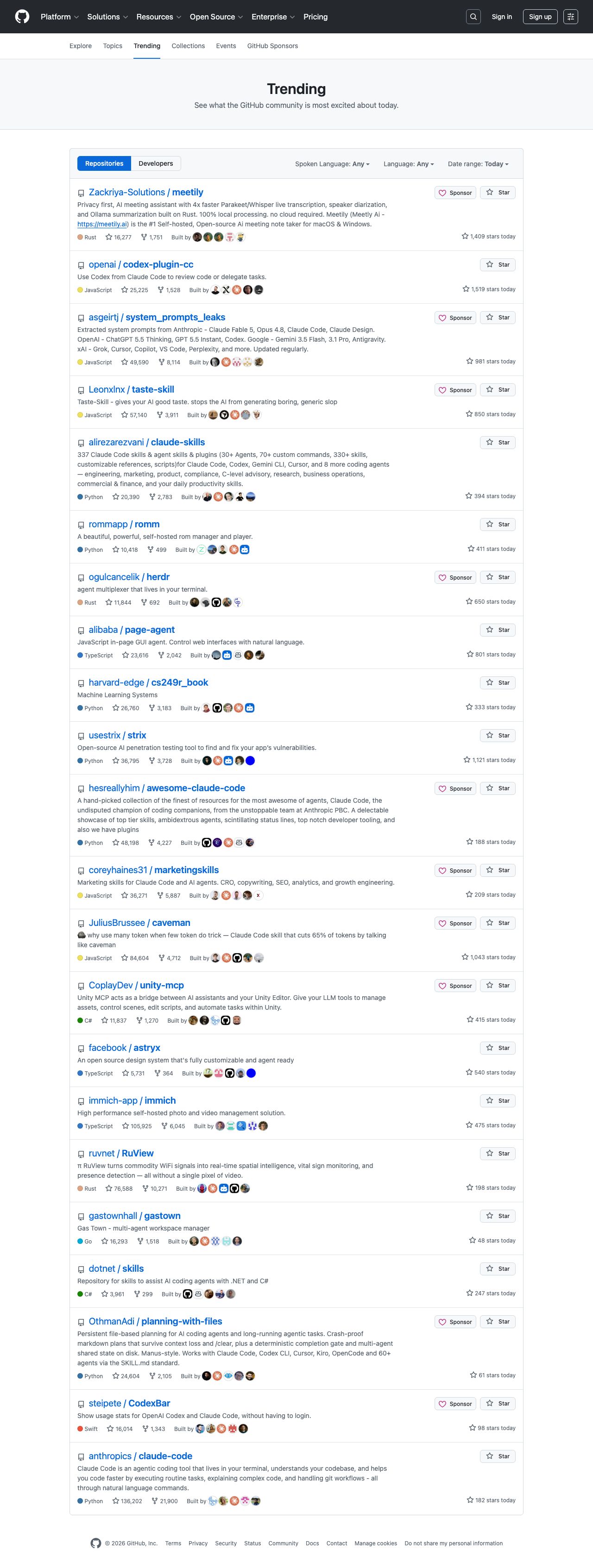
GitHub Trending is one of the simplest high-signal pages you can scrape for developer-market research. In a single request you can see which repositories are spiking, what languages are getting attention, and which projects deserve a closer look.
In this guide we will build a scraper that:
- fetches the public Trending page
- extracts repository name, URL, description, language, total stars, forks, and stars today
- saves a dated snapshot you can compare over time
- exports both CSV and JSON
- keeps the fetch layer ready for ProxiesAPI when you need more reliability
GitHub Trending is easy to test by hand. The moment you run it every day across languages and time windows, a stable fetch layer matters more than the parser. ProxiesAPI fits cleanly into that layer.
What we are scraping
The base page is:
https://github.com/trending
Useful filters are available through query parameters:
- language filter:
?l=python - time range:
?since=daily,?since=weekly,?since=monthly
At the time of writing, each repository card is rendered as an article.Box-row. Inside that card, the selectors that matter are:
h2 afor the repo pathpfor the short description[itemprop="programmingLanguage"]for the language badgea.Link--mutedlinks for total stars and forksspan.d-inline-block.float-sm-rightfor "stars today"
That is enough to build a dependable parser without guessing.
Setup
python3 -m venv .venv
source .venv/bin/activate
pip install requests beautifulsoup4 lxml
If you want proxy-backed fetches later:
export PROXIESAPI_KEY="YOUR_KEY"
Step 1: Build a reusable fetch layer
Even for a friendly page like Trending, do not hard-code raw requests.get() calls everywhere. Keep fetching in one place so you can add retries, timeouts, or ProxiesAPI without touching the parser.
from __future__ import annotations

import os
import random
import time
from urllib.parse import quote

import requests

PROXIESAPI_KEY = os.getenv("PROXIESAPI_KEY", "").strip()
TIMEOUT = (10, 30)

HEADERS = {
    "User-Agent": (
        "Mozilla/5.0 (Macintosh; Intel Mac OS X 10_15_7) "
        "AppleWebKit/537.36 (KHTML, like Gecko) "
        "Chrome/126.0.0.0 Safari/537.36"
    ),
    "Accept-Language": "en-US,en;q=0.9",
}


class HttpClient:
    def __init__(self) -> None:
        self.session = requests.Session()
        self.session.headers.update(HEADERS)

    def _url(self, target_url: str, use_proxiesapi: bool) -> str:
        if not use_proxiesapi or not PROXIESAPI_KEY:
            return target_url
        return (
            "http://api.proxiesapi.com/?key="
            f"{quote(PROXIESAPI_KEY, safe='')}&url={quote(target_url, safe='')}"
        )

    def get_html(self, target_url: str, *, use_proxiesapi: bool = False, retries: int = 4) -> str:
        last_error = None

        for attempt in range(1, retries + 1):
            try:
                response = self.session.get(
                    self._url(target_url, use_proxiesapi=use_proxiesapi),
                    timeout=TIMEOUT,
                )
                if response.status_code in (429, 500, 502, 503, 504):
                    raise requests.HTTPError(
                        f"transient status {response.status_code}",
                        response=response,
                    )
                response.raise_for_status()
                return response.text
            except Exception as exc:
                last_error = exc
                time.sleep(min(2 ** attempt, 8) + random.random())

        raise RuntimeError(f"failed to fetch {target_url}: {last_error}")
Step 2: Parse the Trending cards
The parser below is defensive about optional fields. Some repositories do not show a language or description, and you do not want one missing badge to break the run.
from dataclasses import asdict, dataclass
import re
from urllib.parse import urljoin

from bs4 import BeautifulSoup

BASE = "https://github.com"


def parse_int(text: str) -> int | None:
    match = re.search(r"(\d[\d,]*)", text or "")
    if not match:
        return None
    return int(match.group(1).replace(",", ""))


@dataclass
class TrendingRepo:
    rank: int
    repo: str
    url: str
    description: str | None
    language: str | None
    stars_total: int | None
    forks_total: int | None
    stars_today: int | None


def parse_trending(html: str) -> list[TrendingRepo]:
    soup = BeautifulSoup(html, "lxml")
    rows: list[TrendingRepo] = []

    for idx, card in enumerate(soup.select("article.Box-row"), start=1):
        link = card.select_one("h2 a")
        if not link:
            continue

        href = link.get("href", "")
        repo_name = " ".join(link.get_text(" ", strip=True).split())
        repo_name = repo_name.replace(" / ", "/")

        desc_el = card.select_one("p")
        language_el = card.select_one('[itemprop="programmingLanguage"]')
        muted_links = card.select("a.Link--muted")
        today_el = card.select_one("span.d-inline-block.float-sm-right")

        rows.append(
            TrendingRepo(
                rank=idx,
                repo=repo_name,
                url=urljoin(BASE, href),
                description=desc_el.get_text(" ", strip=True) if desc_el else None,
                language=language_el.get_text(strip=True) if language_el else None,
                stars_total=parse_int(muted_links[0].get_text(" ", strip=True)) if len(muted_links) >= 1 else None,
                forks_total=parse_int(muted_links[1].get_text(" ", strip=True)) if len(muted_links) >= 2 else None,
                stars_today=parse_int(today_el.get_text(" ", strip=True)) if today_el else None,
            )
        )

    return rows
Quick smoke test:
client = HttpClient()
html = client.get_html("https://github.com/trending?since=daily")
repos = parse_trending(html)
print("repos:", len(repos))
print(asdict(repos[0]))
Typical output:
repos: 25
{'rank': 1, 'repo': 'owner/project', 'url': 'https://github.com/owner/project', ...}
Step 3: Save a daily snapshot
The real value is not today's page by itself. The value is the history. Save a dated file every time you run the scraper so you can answer questions like:
- Which repos trended for three days in a row?
- Which languages are overrepresented this week?
- Which repo gained the most "stars today" delta this month?
from datetime import datetime, timezone
import csv
import json
from pathlib import Path


def save_snapshot(rows: list[TrendingRepo], out_dir: str = "data/github_trending") -> tuple[Path, Path]:
    stamp = datetime.now(timezone.utc).strftime("%Y-%m-%d")
    folder = Path(out_dir)
    folder.mkdir(parents=True, exist_ok=True)

    csv_path = folder / f"github-trending-{stamp}.csv"
    json_path = folder / f"github-trending-{stamp}.json"

    dict_rows = [asdict(row) for row in rows]

    with csv_path.open("w", newline="", encoding="utf-8") as fh:
        writer = csv.DictWriter(fh, fieldnames=list(dict_rows[0].keys()))
        writer.writeheader()
        writer.writerows(dict_rows)

    with json_path.open("w", encoding="utf-8") as fh:
        json.dump(dict_rows, fh, ensure_ascii=False, indent=2)

    return csv_path, json_path
Step 4: Add filters for language and time range
Trending becomes much more useful when you parameterize the query instead of scraping only the default page.
from urllib.parse import urlencode


def trending_url(*, language: str | None = None, since: str = "daily") -> str:
    params = {"since": since}
    if language:
        params["l"] = language
    return "https://github.com/trending?" + urlencode(params)


def scrape_snapshot(language: str | None = None, since: str = "daily") -> list[TrendingRepo]:
    client = HttpClient()
    html = client.get_html(trending_url(language=language, since=since))
    return parse_trending(html)


python_daily = scrape_snapshot(language="python", since="daily")
weekly_global = scrape_snapshot(since="weekly")
That lets you create multiple comparable feeds without rewriting the parser.
Full runnable script
from dataclasses import asdict


def main() -> None:
    rows = scrape_snapshot(language="python", since="daily")
    csv_path, json_path = save_snapshot(rows)
    print(f"saved {len(rows)} repos")
    print(csv_path)
    print(json_path)
    print(asdict(rows[0]))


if __name__ == "__main__":
    main()
When ProxiesAPI helps
For one direct request to github.com/trending, you may not need a proxy at all. ProxiesAPI becomes useful when:
- you scrape multiple language variants on a schedule
- you collect other GitHub pages in the same job
- you want retries and network handling to stay in one place
The important engineering choice is that the parser never changes. Only the fetch URL changes.
Practical extensions
- Keep one snapshot per day and diff it against yesterday's file.
- Add a SQLite table if you want trend charts instead of flat files.
- Capture the repository topic tags and contributing developer avatars if you need richer metadata.
- Run separate jobs for
daily,weekly, andmonthlybecause those surfaces answer different questions.
If your goal is developer-intent monitoring, this pattern is enough: fetch, parse, save snapshots, compare over time. Everything after that is analysis, not scraping.
GitHub Trending is easy to test by hand. The moment you run it every day across languages and time windows, a stable fetch layer matters more than the parser. ProxiesAPI fits cleanly into that layer.