
Scrape Products from Amazon (Python) — Title, Price, Rating + Pagination
Amazon is one of the most-requested scraping targets because product data is structured and valuable:
- titles + URLs for discovery
- prices for monitoring
- ratings + review counts for popularity signals
- pagination for scale
But it’s also one of the easiest places to get blocked.
In this tutorial, we’ll build a practical Amazon search-results scraper in Python that extracts:
titleproduct_urlasinprice(best-effort)rating+rating_count(best-effort)- across multiple pages
We’ll use server-rendered HTML (no browser automation) and structure the code so you can later plug in ProxiesAPI at the network layer.
Amazon is aggressive about bot detection. ProxiesAPI won’t magically bypass everything, but it gives you a consistent proxy layer and rotation so your scraper can retry intelligently instead of dying on the first 503/CAPTCHA.
Important note (CAPTCHAs + legality + ToS)
Amazon may show:
- CAPTCHAs
- “Robot Check” pages
- 503 / throttling
- localized experiences
Scraping may violate Amazon’s Terms of Service and can have legal/compliance implications depending on your use case and jurisdiction.
This guide focuses on:
- how to parse the HTML you receive
- how to detect blocks
- how to build a scraper that fails safely
Use it responsibly.
What we’re scraping (Amazon search structure)
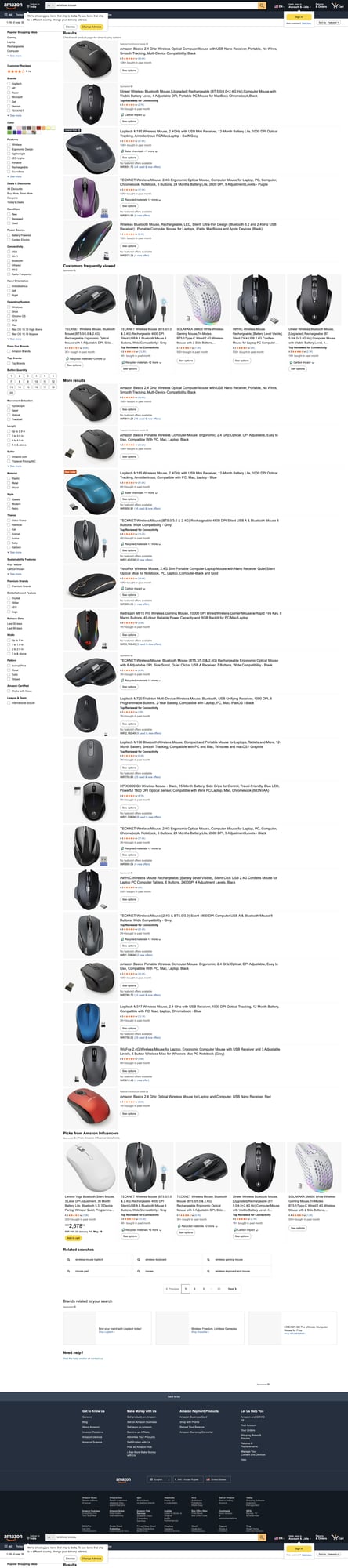
We’ll scrape a search results URL like:
https://www.amazon.com/s?k=wireless+mouse
On typical Amazon SERPs, each product card is a div with:
data-component-type="s-search-result"data-asin="..."
That’s your anchor.
Pagination usually appears as a list with a.s-pagination-item links and a page= parameter.
Quick sanity check (HTML returned)
curl -A "Mozilla/5.0" -s "https://www.amazon.com/s?k=wireless+mouse" | head -n 20
If you see a “Robot Check” form or something like /errors/validateCaptcha, you’re blocked. Don’t waste time parsing those pages.
Setup
python3 -m venv .venv
source .venv/bin/activate
pip install requests beautifulsoup4 lxml
We’ll use:
requestsfor HTTPBeautifulSoup(lxml)for parsing
Step 1: A fetch() wrapper with timeouts + retries
Amazon is flaky for bots. You want:
- timeouts (never hang)
- retry with backoff
- block detection
Here’s a minimal but production-shaped wrapper:
import random
import time
from dataclasses import dataclass

import requests

TIMEOUT = (10, 30)  # connect, read

USER_AGENTS = [
    # Keep a small, realistic UA pool (don’t go crazy)
    "Mozilla/5.0 (Macintosh; Intel Mac OS X 10_15_7) AppleWebKit/537.36 (KHTML, like Gecko) Chrome/124.0 Safari/537.36",
    "Mozilla/5.0 (Windows NT 10.0; Win64; x64) AppleWebKit/537.36 (KHTML, like Gecko) Chrome/124.0 Safari/537.36",
]


@dataclass
class FetchResult:
    url: str
    status_code: int
    text: str


def looks_blocked(html: str) -> bool:
    if not html:
        return True
    needles = [
        "Robot Check",
        "Enter the characters you see below",
        "/errors/validateCaptcha",
        "Sorry, we just need to make sure you're not a robot",
    ]
    h = html.lower()
    return any(n.lower() in h for n in needles)


def fetch(session: requests.Session, url: str, max_retries: int = 4) -> FetchResult:
    last_exc = None

    for attempt in range(1, max_retries + 1):
        try:
            headers = {
                "User-Agent": random.choice(USER_AGENTS),
                "Accept-Language": "en-US,en;q=0.9",
                "Accept": "text/html,application/xhtml+xml,application/xml;q=0.9,*/*;q=0.8",
                "Connection": "keep-alive",
            }

            # --- ProxiesAPI integration point ---
            # If ProxiesAPI gives you an HTTP proxy URL (or rotating endpoint),
            # wire it here. Example shape (DO NOT hardcode credentials):
            # proxies = {"http": PROXY_URL, "https": PROXY_URL}
            # r = session.get(url, headers=headers, timeout=TIMEOUT, proxies=proxies)
            # -----------------------------------

            r = session.get(url, headers=headers, timeout=TIMEOUT)

            text = r.text or ""

            # treat obvious block pages as retryable
            if r.status_code in (429, 503) or looks_blocked(text):
                raise RuntimeError(f"blocked_or_throttled status={r.status_code}")

            r.raise_for_status()
            return FetchResult(url=url, status_code=r.status_code, text=text)

        except Exception as e:
            last_exc = e
            sleep_s = min(12, 1.5 ** attempt) + random.random()
            print(f"attempt {attempt}/{max_retries} failed: {e} — sleeping {sleep_s:.1f}s")
            time.sleep(sleep_s)

    raise RuntimeError(f"failed to fetch after {max_retries} retries: {url}") from last_exc
That wrapper is intentionally honest:
- it doesn’t claim it can bypass CAPTCHAs
- it just helps you retry and detect blocks
Step 2: Parse product cards from the HTML
Now we parse the search-result cards.
Common useful fields:
data-asin(stable product identifier)- title link under
h2 a - rating often under
i.a-icon-star-small(varies) - price often under
span.a-price > span.a-offscreen(varies)
Because Amazon’s DOM varies by category and experiment, we’ll implement:
- primary selectors
- fallbacks
- graceful
None
import re
from bs4 import BeautifulSoup
from urllib.parse import urljoin

BASE = "https://www.amazon.com"


def parse_price(text: str):
    if not text:
        return None
    # e.g. "$19.99" → 19.99
    m = re.search(r"([0-9]+(?:\.[0-9]{2})?)", text.replace(",", ""))
    return float(m.group(1)) if m else None


def parse_int(text: str):
    if not text:
        return None
    m = re.search(r"(\d[\d,]*)", text)
    return int(m.group(1).replace(",", "")) if m else None


def parse_rating(text: str):
    if not text:
        return None
    # e.g. "4.5 out of 5 stars" → 4.5
    m = re.search(r"(\d+(?:\.\d+)?)\s*out of\s*5", text)
    return float(m.group(1)) if m else None


def parse_search_page(html: str):
    soup = BeautifulSoup(html, "lxml")

    results = []
    for card in soup.select('div[data-component-type="s-search-result"]'):
        asin = card.get("data-asin") or None
        if not asin:
            continue

        title_a = card.select_one("h2 a")
        title = title_a.get_text(" ", strip=True) if title_a else None
        href = title_a.get("href") if title_a else None
        product_url = urljoin(BASE, href) if href else None

        # price (best-effort)
        price = None
        price_el = card.select_one("span.a-price > span.a-offscreen")
        if price_el:
            price = parse_price(price_el.get_text(strip=True))

        # rating
        rating = None
        rating_count = None

        rating_el = card.select_one("i.a-icon-star-small span.a-icon-alt") or card.select_one(
            "i.a-icon-star span.a-icon-alt"
        )
        if rating_el:
            rating = parse_rating(rating_el.get_text(" ", strip=True))

        count_el = card.select_one('span[aria-label$="ratings"]')
        if count_el:
            rating_count = parse_int(count_el.get("aria-label", ""))
        else:
            # common fallback: a link next to the rating
            count_link = card.select_one('a[href*="customerReviews"] span')
            if count_link:
                rating_count = parse_int(count_link.get_text(" ", strip=True))

        results.append(
            {
                "asin": asin,
                "title": title,
                "product_url": product_url,
                "price": price,
                "rating": rating,
                "rating_count": rating_count,
            }
        )

    return results
Tip: log a few parsed rows early
When scraping Amazon, your #1 debugging tool is:
- print the first 3 parsed items
- confirm they look sane
Step 3: Find the next page URL (pagination)
Amazon pagination links vary, but you usually have a page= query parameter.
We’ll implement two approaches:
- Prefer a “Next” button.
- Fallback: if you know the page number, construct
&page=N.
from bs4 import BeautifulSoup
from urllib.parse import urljoin, urlparse, parse_qs


def find_next_page_url(html: str):
    soup = BeautifulSoup(html, "lxml")

    # Approach 1: explicit Next link
    next_a = soup.select_one("a.s-pagination-next")
    if next_a and next_a.get("href"):
        return urljoin(BASE, next_a.get("href"))

    return None


def set_page(url: str, page: int) -> str:
    # Simple fallback: append/replace page parameter
    parsed = urlparse(url)
    q = parse_qs(parsed.query)
    q["page"] = [str(page)]

    # rebuild query manually
    parts = []
    for k, vals in q.items():
        for v in vals:
            parts.append(f"{k}={v}")

    base = f"{parsed.scheme}://{parsed.netloc}{parsed.path}"
    return base + "?" + "&".join(parts)
Step 4: Crawl multiple pages (dedupe by ASIN)
Now we combine everything:
- fetch first page
- parse cards
- resolve next page
- repeat
import json


def crawl_amazon_search(start_url: str, pages: int = 3):
    session = requests.Session()
    seen = set()
    out = []

    url = start_url

    for i in range(1, pages + 1):
        print(f"\n=== page {i}: {url}")
        res = fetch(session, url)

        batch = parse_search_page(res.text)
        print("items parsed:", len(batch))

        for item in batch:
            asin = item.get("asin")
            if not asin or asin in seen:
                continue
            seen.add(asin)
            out.append(item)

        # try “Next”
        nxt = find_next_page_url(res.text)
        if nxt:
            url = nxt
        else:
            # fallback: if next not found, try forcing &page=
            url = set_page(start_url, i + 1)

    return out


if __name__ == "__main__":
    start = "https://www.amazon.com/s?k=wireless+mouse"
    items = crawl_amazon_search(start, pages=5)

    with open("amazon_results.json", "w", encoding="utf-8") as f:
        json.dump(items, f, ensure_ascii=False, indent=2)

    print("\nunique items:", len(items))
    print("first item:", items[0] if items else None)
This gives you a clean JSON file you can feed into:
- a price-monitoring job
- a data warehouse
- a product discovery tool
Making it more stable (practical anti-block checklist)
Amazon stability is a systems problem:
- Throttle: don’t hit 10 req/sec on a single IP.
- Retries: treat 503/429 as retryable.
- Detect blocks: don’t parse CAPTCHA pages.
- Rotate IPs: proxies can help reduce per-IP rate.
- Persist progress: so a mid-run failure doesn’t waste work.
Where ProxiesAPI fits
ProxiesAPI typically fits at the fetch() layer:
- you keep your parsing/crawling logic the same
- you swap the network path to use a rotating proxy endpoint
- you track success/failure by proxy session
If you’re getting blocked constantly, consider moving up the stack:
- use a browser-based approach (Playwright)
- reduce request volume
- or switch to an approved data provider
QA checklist
- You’re scraping search results, not product detail pages
- Each row has a non-empty
asin+title - Pagination increases unique ASIN count
- You stop/slow down when block pages appear
- You store results in a file/DB for repeatable runs
Next upgrades
- Add SQLite storage keyed by
asin - Add incremental refresh (only re-fetch changed categories)
- Crawl product detail pages (specs, variations) carefully
- Add Playwright fallback when HTML is gated
Amazon is aggressive about bot detection. ProxiesAPI won’t magically bypass everything, but it gives you a consistent proxy layer and rotation so your scraper can retry intelligently instead of dying on the first 503/CAPTCHA.