
Soft-Block Detection for Web Scraping (Python): Catch ‘HTTP 200 but Wrong Page’
The most dangerous scraping failure mode isn’t a 403.
It’s this:
- the request returns HTTP 200
- your parser runs
- you export “data”…
- but the HTML was actually a consent screen, access-denied page, or a JavaScript placeholder
That’s a soft block.
This post shows a practical, production approach to catching soft blocks before they poison your dataset.
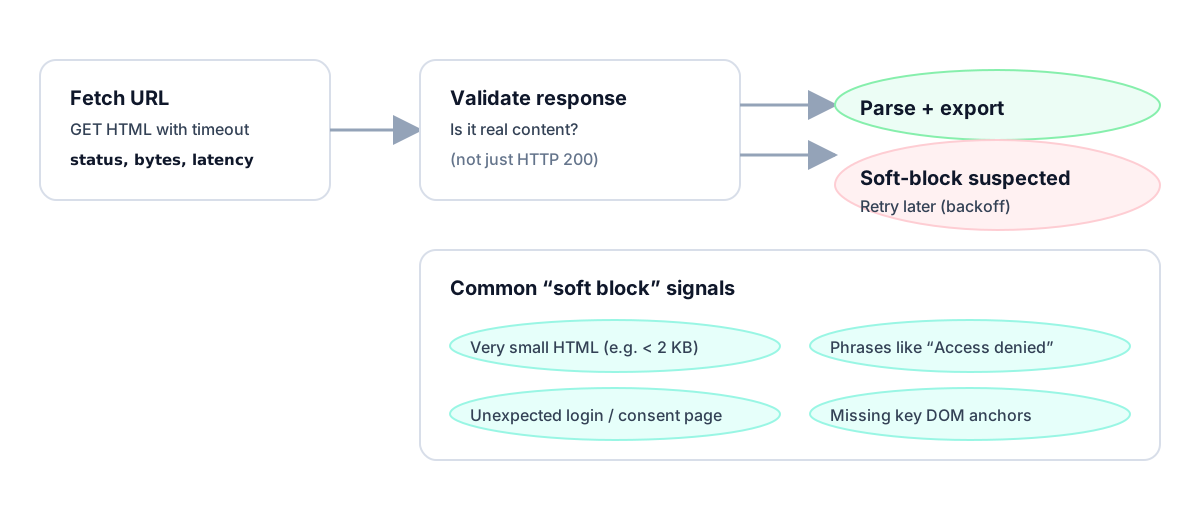
When you run scrapers at scale, the real problem isn’t parsing — it’s silently accepting junk as success. ProxiesAPI helps reduce variance, but you still need validation.
What a soft-block looks like
Common patterns:
- tiny HTML response (e.g. a few KB)
- keywords like “access denied”, “unusual traffic”, “enable JavaScript”
- a login wall
- missing DOM anchors you always expect
The key: treat “200 OK” as untrusted until you validate the body.
Step 1: Separate fetch from validate
import re
import requests

TIMEOUT = (10, 30)
UA = "Mozilla/5.0 (compatible; ProxiesAPIGuidesBot/1.0; +https://www.proxiesapi.com/)"

session = requests.Session()


def fetch_html(url: str) -> tuple[int, str]:
    r = session.get(url, timeout=TIMEOUT, headers={"User-Agent": UA})
    return r.status_code, r.text
Step 2: Heuristic validators
A good validator is:
- cheap
- deterministic
- domain-aware when possible
Start with these:
SOFT_BLOCK_PATTERNS = [
    r"access denied",
    r"unusual traffic",
    r"verify you are human",
    r"enable javascript",
    r"captcha",
]


def looks_soft_blocked(html: str) -> bool:
    if not html:
        return True

    # tiny pages are rarely real content pages
    if len(html) < 2000:
        return True

    low = html.lower()
    return any(re.search(p, low) for p in SOFT_BLOCK_PATTERNS)
Add DOM anchor checks (stronger)
If you know what “real” looks like, assert it.
Example: GitHub Trending should contain Trending and multiple repo cards.
def validate_github_trending(html: str) -> bool:
    low = html.lower()
    if "trending" not in low:
        return False
    if "box-row" not in low and "article" not in low:
        return False
    return True
Step 3: Fail fast + retry later
The right behavior is not “parse whatever you got”.
It’s:
- mark the fetch as failed
- backoff
- retry later
import time
import random


def backoff(attempt: int, base: float = 0.8, cap: float = 30.0) -> float:
    exp = min(cap, base * (2 ** (attempt - 1)))
    return exp + random.uniform(0, exp * 0.2)


def fetch_validated(url: str, validate_fn=None, attempts: int = 4) -> str:
    last = None

    for a in range(1, attempts + 1):
        status, html = fetch_html(url)

        if status >= 500 or status == 429:
            last = f"retryable status {status}"
            time.sleep(backoff(a))
            continue

        if status != 200:
            raise RuntimeError(f"non-200: {status}")

        if looks_soft_blocked(html):
            last = "soft-block heuristics"
            time.sleep(backoff(a))
            continue

        if validate_fn and not validate_fn(html):
            last = "anchor validation failed"
            time.sleep(backoff(a))
            continue

        return html

    raise RuntimeError(f"failed after {attempts} attempts: {last}")
ProxiesAPI usage (canonical)
Soft-block detection still matters when using a proxy API.
curl "http://api.proxiesapi.com/?key=API_KEY&url=https://example.com"
You validate the returned HTML the same way.
QA checklist
- Any “200 but wrong page” is treated as failure
- You can explain every rule in your validator
- You log the failure reason (tiny HTML vs anchor missing)
When you run scrapers at scale, the real problem isn’t parsing — it’s silently accepting junk as success. ProxiesAPI helps reduce variance, but you still need validation.