
Steam Deal Tracker: Scrape Daily Specials + Price Drops (Python + ProxiesAPI)
Steam is a goldmine for deal + price-drop tracking.
The catch: if you’re tracking daily, you need a scraper that is:
- consistent (same HTML every run)
- paginated (deals span many pages)
- resilient (timeouts + retries)
- stateful (so you can compare today vs yesterday)
In this guide we’ll build a Steam deal tracker that:
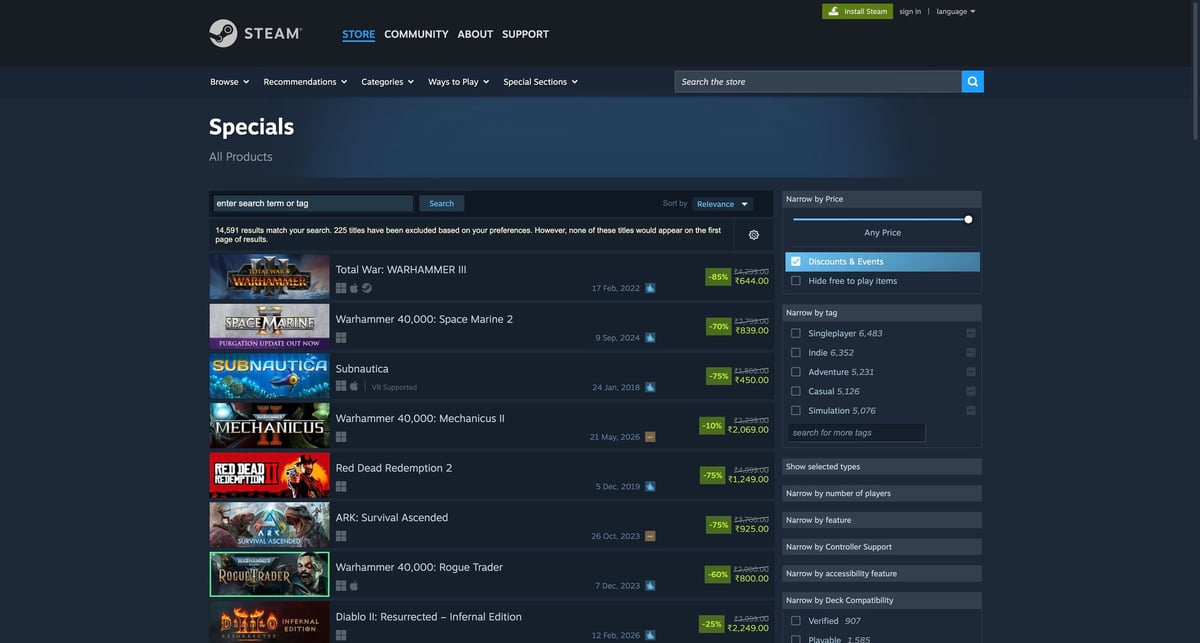
- scrapes Steam “Specials” (discounted games)
- paginates through results
- extracts
appid, title, discount, and prices - stores daily snapshots (CSV)
- flags real price drops
Steam pages can be spiky: rate limits, geo variance, and occasional blocks. ProxiesAPI gives you a reliable fetch layer so your price tracker doesn’t randomly break mid-run.
What we’re scraping (Steam structure)
We’ll use the specials search listing:
https://store.steampowered.com/search/?specials=1
Steam’s search results are rendered server-side.
Each result is typically an anchor like:
a.search_result_row
Inside you’ll find:
- the title:
span.title - price block:
div.search_priceordiv.discount_final_price - discount:
div.search_discount span - app id: from the URL path
/app/<appid>/...ordata-ds-appid
Setup
python -m venv .venv
source .venv/bin/activate
pip install requests beautifulsoup4 lxml pandas
ProxiesAPI fetch layer (reusable)
ProxiesAPI works by fetching the target URL through their endpoint:
http://api.proxiesapi.com/?auth_key=YOUR_KEY&url=https://example.com
Here’s a small fetch() helper you can reuse across sites.
import os
import time
import random
import urllib.parse
import requests

PROXIESAPI_KEY = os.environ.get("PROXIESAPI_KEY", "")
TIMEOUT = (10, 40)  # connect, read

session = requests.Session()


def proxiesapi_url(target_url: str) -> str:
    if not PROXIESAPI_KEY:
        raise RuntimeError("Set PROXIESAPI_KEY in your environment")

    return (
        "http://api.proxiesapi.com/?auth_key="
        + urllib.parse.quote(PROXIESAPI_KEY, safe="")
        + "&url="
        + urllib.parse.quote(target_url, safe="")
    )


def fetch(url: str, *, use_proxiesapi: bool = True, max_retries: int = 4) -> str:
    last_err = None

    for attempt in range(1, max_retries + 1):
        try:
            final_url = proxiesapi_url(url) if use_proxiesapi else url
            r = session.get(
                final_url,
                timeout=TIMEOUT,
                headers={
                    "User-Agent": (
                        "Mozilla/5.0 (Macintosh; Intel Mac OS X 10_15_7) "
                        "AppleWebKit/537.36 (KHTML, like Gecko) "
                        "Chrome/123.0 Safari/537.36"
                    ),
                    "Accept-Language": "en-US,en;q=0.9",
                },
            )
            r.raise_for_status()

            html = r.text
            if not html or len(html) < 3000:
                raise RuntimeError(f"Suspiciously small HTML ({len(html)} bytes)")

            return html

        except Exception as e:
            last_err = e
            sleep_s = min(10, (2 ** (attempt - 1))) + random.random()
            time.sleep(sleep_s)

    raise RuntimeError(f"Fetch failed after {max_retries} attempts: {last_err}")
Step 1: Build the specials URL + pagination
Steam’s search pagination can be controlled with query params like:
start(offset)count(page size)
Example:
https://store.steampowered.com/search/?specials=1&start=0&count=50https://store.steampowered.com/search/?specials=1&start=50&count=50
We’ll crawl until we get no results.
Step 2: Parse deal rows (real selectors)
import re
from bs4 import BeautifulSoup

BASE = "https://store.steampowered.com"


def parse_appid(href: str | None) -> str | None:
    if not href:
        return None
    m = re.search(r"/app/(\d+)", href)
    return m.group(1) if m else None


def normalize_price(text: str) -> str | None:
    t = (text or "").replace("\xa0", " ").strip()
    t = re.sub(r"\s+", " ", t)
    return t or None


def parse_search_page(html: str) -> list[dict]:
    soup = BeautifulSoup(html, "lxml")

    rows = soup.select("a.search_result_row")
    out = []

    for row in rows:
        href = row.get("href")
        appid = row.get("data-ds-appid") or parse_appid(href)

        title_el = row.select_one("span.title")
        title = title_el.get_text(strip=True) if title_el else None

        discount_el = row.select_one("div.search_discount span")
        discount = discount_el.get_text(strip=True) if discount_el else None

        # price formats vary; this covers most Steam listing layouts
        original_el = row.select_one("div.search_price strike")
        original_price = normalize_price(original_el.get_text(" ", strip=True) if original_el else "")

        final_el = row.select_one("div.discount_final_price, div.search_price")
        final_price = normalize_price(final_el.get_text(" ", strip=True) if final_el else "")

        out.append(
            {
                "appid": appid,
                "title": title,
                "discount": discount,
                "original_price": original_price,
                "final_price": final_price,
                "url": href,
            }
        )

    # drop obviously broken rows
    return [r for r in out if r.get("appid") and r.get("title")]
Step 3: Crawl multiple pages
from datetime import date


def build_url(start: int, count: int = 50) -> str:
    return f"{BASE}/search/?specials=1&start={start}&count={count}"


def crawl_specials(max_pages: int = 30, count: int = 50) -> list[dict]:
    all_rows: list[dict] = []
    seen = set()

    for page in range(max_pages):
        start = page * count
        url = build_url(start=start, count=count)
        html = fetch(url, use_proxiesapi=True)
        batch = parse_search_page(html)

        if not batch:
            break

        for row in batch:
            key = row["appid"]
            if key in seen:
                continue
            seen.add(key)
            all_rows.append(row)

    for r in all_rows:
        r["snapshot_date"] = date.today().isoformat()

    return all_rows
Step 4: Save a daily snapshot (CSV)
This is the simplest “database” that still works: append a new daily snapshot and compare later.
import os
import pandas as pd


def save_snapshot(rows: list[dict], out_dir: str = "data") -> str:
    os.makedirs(out_dir, exist_ok=True)

    df = pd.DataFrame(rows)
    snap_date = df["snapshot_date"].iloc[0] if not df.empty else "unknown"
    path = os.path.join(out_dir, f"steam_specials_{snap_date}.csv")
    df.to_csv(path, index=False, encoding="utf-8")
    return path
Step 5: Detect price drops (today vs yesterday)
We’ll compare final_price across two CSVs by appid.
Steam price strings include currency symbols and locale formatting, so for “good enough” tracking:
- keep the raw string for display
- also extract a numeric
final_price_valuefor comparisons when possible
import glob
import math


def parse_price_value(price: str | None) -> float | None:
    if not price:
        return None
    cleaned = re.sub(r"[^0-9.,]", "", price)
    if not cleaned:
        return None
    cleaned = cleaned.replace(",", "")
    try:
        return float(cleaned)
    except ValueError:
        return None


def latest_snapshots(pattern: str = "data/steam_specials_*.csv") -> tuple[str, str] | None:
    files = sorted(glob.glob(pattern))
    if len(files) < 2:
        return None
    return files[-2], files[-1]


def price_drops(prev_csv: str, curr_csv: str) -> pd.DataFrame:
    prev = pd.read_csv(prev_csv)
    curr = pd.read_csv(curr_csv)

    prev["final_value"] = prev["final_price"].apply(parse_price_value)
    curr["final_value"] = curr["final_price"].apply(parse_price_value)

    merged = curr.merge(
        prev[["appid", "final_price", "final_value"]],
        on="appid",
        how="left",
        suffixes=("_today", "_yesterday"),
    )

    def is_drop(row) -> bool:
        a = row.get("final_value_yesterday")
        b = row.get("final_value_today")
        if a is None or b is None or math.isnan(a) or math.isnan(b):
            return False
        return b < a

    dropped = merged[merged.apply(is_drop, axis=1)].copy()
    dropped["delta"] = dropped["final_value_today"] - dropped["final_value_yesterday"]
    return dropped.sort_values("delta")
Full script (put it together)
Save as steam_deal_tracker.py and run daily (cron / GitHub Actions / serverless job).
if __name__ == "__main__":
    rows = crawl_specials(max_pages=20, count=50)
    print("rows:", len(rows))

    path = save_snapshot(rows)
    print("wrote:", path)

    pair = latest_snapshots()
    if not pair:
        print("Need at least 2 snapshots to detect drops.")
        raise SystemExit(0)

    prev_csv, curr_csv = pair
    drops = price_drops(prev_csv, curr_csv)
    print("drops:", len(drops))

    if not drops.empty:
        print(drops[["appid", "title", "final_price_yesterday", "final_price_today", "delta"]].head(20))
Notes + practical gotchas
- Steam prices can vary by region/currency. For consistent tracking, keep your runs anchored to one locale (same headers + same region).
- Not every listing shows an “original price” strike-through.
- If you plan to crawl deep, add a small sleep between pages and cap concurrency.
QA checklist
-
parse_search_page()returns 20–50 items for the first page - At least 2 snapshot CSVs exist in
data/ -
dropslooks reasonable (spot-check 3 games in a browser)
Steam pages can be spiky: rate limits, geo variance, and occasional blocks. ProxiesAPI gives you a reliable fetch layer so your price tracker doesn’t randomly break mid-run.