
Scrape Steam Game Prices + Reviews (Search Results) with Python + ProxiesAPI
Steam’s Store search pages are a great “real world” scraping target:
- consistent server-rendered HTML for the core results list
- structured pricing blocks (including discounts)
- review summaries embedded in attributes
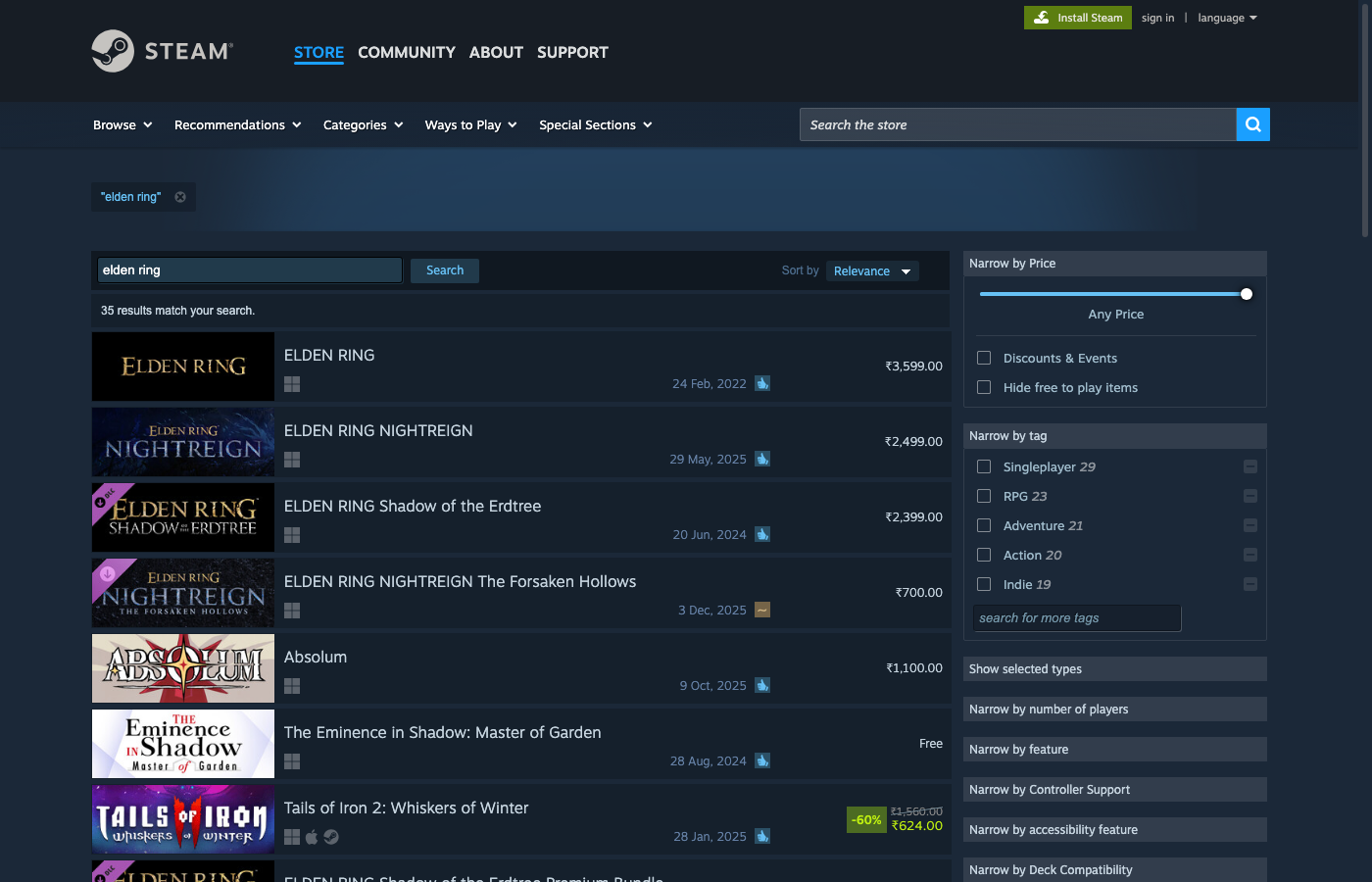
In this guide we’ll build a production-style Steam search scraper in Python that:
- fetches the real Steam search HTML
- extracts:
appid, title, price, discount, review label, review % and review count - exports a clean CSV (and optional JSON)
Steam pages are public, but they still throttle and vary by region/currency. ProxiesAPI fits cleanly into your fetch layer so retries and rotation are a small change — not a rewrite of your parser.
What we’re scraping (Steam search structure)
Steam search lives at:
- search:
https://store.steampowered.com/search/?term=elden%20ring - pagination:
https://store.steampowered.com/search/?term=the&page=2
Each result row is an <a> tag with class search_result_row and useful attributes:
href→ app URLdata-ds-appid→ the app id
The row contains:
- title:
span.title - review summary:
span.search_review_summary(withdata-tooltip-html) - pricing:
.discount_block/.discount_final_price
Terminal sanity check
curl -sL "https://store.steampowered.com/search/?term=elden%20ring" | rg -n "search_result_row|discount_final_price|search_review_summary" | head
Setup
python -m venv .venv
source .venv/bin/activate
pip install requests beautifulsoup4 lxml
ProxiesAPI: a clean fetch layer
ProxiesAPI fetches the target through their endpoint:
http://api.proxiesapi.com/?auth_key=YOUR_KEY&url=https://example.com
We’ll wrap that once, then keep everything else as normal requests + HTML parsing.
import os
import time
import random
import urllib.parse
import requests

PROXIESAPI_KEY = os.environ.get("PROXIESAPI_KEY", "")
TIMEOUT = (10, 40)  # connect, read

session = requests.Session()


def proxiesapi_url(target_url: str) -> str:
    if not PROXIESAPI_KEY:
        raise RuntimeError("Set PROXIESAPI_KEY in your environment")

    return (
        "http://api.proxiesapi.com/?auth_key="
        + urllib.parse.quote(PROXIESAPI_KEY, safe="")
        + "&url="
        + urllib.parse.quote(target_url, safe="")
    )


def fetch(url: str, *, use_proxiesapi: bool = True, max_retries: int = 4) -> str:
    last_err = None

    for attempt in range(1, max_retries + 1):
        try:
            final_url = proxiesapi_url(url) if use_proxiesapi else url
            r = session.get(
                final_url,
                timeout=TIMEOUT,
                headers={
                    "User-Agent": (
                        "Mozilla/5.0 (Macintosh; Intel Mac OS X 10_15_7) "
                        "AppleWebKit/537.36 (KHTML, like Gecko) "
                        "Chrome/123.0 Safari/537.36"
                    ),
                    "Accept-Language": "en-US,en;q=0.9",
                },
            )
            r.raise_for_status()

            html = r.text
            if not html or len(html) < 2000:
                raise RuntimeError(f"Suspiciously small HTML ({len(html)} bytes)")

            return html

        except Exception as e:
            last_err = e
            time.sleep(min(10, (2 ** (attempt - 1))) + random.random())

    raise RuntimeError(f"Fetch failed after {max_retries} attempts: {last_err}")
Step 1: Parse Steam search result rows
Steam’s result list is a set of anchor tags:
- selector:
a.search_result_row data-ds-appidcontains the Steam app idhrefcontains the app URL
Review info is embedded as HTML inside the data-tooltip-html attribute, for example:
Very Positive<br>94% of the 427,532 user reviews for this game are positive.
We’ll parse that defensively (Steam changes wording by locale).
import re
from bs4 import BeautifulSoup
RE_REVIEW = re.compile(r"(\\d+)%.*?([0-9][0-9,\\.]*)\\s+user reviews", re.IGNORECASE)
def parse_review_tooltip(tooltip_html: str) -> tuple[str | None, int | None]:
"""Returns (percent_positive, review_count) when present."""
if not tooltip_html:
return None, None
text = (
tooltip_html.replace("<br>", " ")
.replace("<br>", " ")
.replace(" ", " ")
)
m = RE_REVIEW.search(text)
if not m:
return None, None
percent = m.group(1)
count_raw = m.group(2).replace(",", "").replace(".", "")
try:
return percent, int(count_raw)
except ValueError:
return percent, None
def parse_price(row) -> dict:
"""Extract final/original price and discount percent when present."""
out = {"price_final": None, "price_original": None, "discount_pct": None}
pct = row.select_one(".discount_pct")
if pct:
out["discount_pct"] = pct.get_text(strip=True)
orig = row.select_one(".discount_original_price")
if orig:
out["price_original"] = orig.get_text(strip=True)
final = row.select_one(".discount_final_price")
if final:
out["price_final"] = final.get_text(strip=True)
return out
def parse_search_results(search_html: str) -> list[dict]:
soup = BeautifulSoup(search_html, "lxml")
rows = soup.select("a.search_result_row")
results = []
for row in rows:
appid = row.get("data-ds-appid")
url = row.get("href")
title_el = row.select_one("span.title")
title = title_el.get_text(strip=True) if title_el else None
review_el = row.select_one("span.search_review_summary")
review_bucket = None
review_pct = None
review_count = None
if review_el:
tooltip = review_el.get("data-tooltip-html", "") or ""
review_pct, review_count = parse_review_tooltip(tooltip)
classes = set(review_el.get("class", []))
classes.discard("search_review_summary")
review_bucket = next(iter(classes), None)
price = parse_price(row)
results.append({
"appid": appid,
"title": title,
"url": url,
"price_final": price["price_final"],
"price_original": price["price_original"],
"discount_pct": price["discount_pct"],
"review_pct_positive": review_pct,
"review_count": review_count,
"review_bucket": review_bucket,
})
return results
Step 2: Scrape a query and export CSV
import csv
import json
from urllib.parse import quote_plus


def steam_search_url(term: str, *, page: int = 1, lang: str = "english") -> str:
    return (
        "https://store.steampowered.com/search/?term="
        + quote_plus(term)
        + f"&supportedlang={quote_plus(lang)}&page={page}"
    )


def export_csv(rows: list[dict], path: str) -> None:
    if not rows:
        raise RuntimeError("No rows to export")

    fieldnames = list(rows[0].keys())
    with open(path, "w", newline="", encoding="utf-8") as f:
        w = csv.DictWriter(f, fieldnames=fieldnames)
        w.writeheader()
        w.writerows(rows)


if __name__ == "__main__":
    url = steam_search_url("elden ring", page=1)
    html = fetch(url, use_proxiesapi=True)
    rows = parse_search_results(html)

    export_csv(rows, "steam-search.csv")
    with open("steam-search.json", "w", encoding="utf-8") as f:
        json.dump(rows, f, ensure_ascii=False, indent=2)

    print(f"exported {len(rows)} rows")
Common gotchas (and how to keep it robust)
- Currency varies by region: treat prices as strings (normalize later if needed).
- Discount layout differs: always read both original + final when present.
- Review tooltip wording changes: use regex + fallbacks; don’t hardcode sentences.
- Pagination exists (
page=), but don’t hammer it — cache results and pace requests.
Where ProxiesAPI fits (no hype)
Steam isn’t the hardest target — but as soon as you run scheduled jobs, scrape many search terms, or follow result links to detail pages, you’ll hit throttling and inconsistent responses.
Keeping your scraper architecture clean (fetch → parse → export) means ProxiesAPI is a small change in the fetch layer.
Steam pages are public, but they still throttle and vary by region/currency. ProxiesAPI fits cleanly into your fetch layer so retries and rotation are a small change — not a rewrite of your parser.