
Scrape Book Reviews and Ratings from Goodreads
Goodreads book pages pack a lot of useful signals into one URL:
- average rating
- total ratings
- total reviews
- title and author metadata
- long-form reader reviews
The nice part is that much of this data is already present in machine-readable JSON, so you do not have to depend entirely on brittle visual selectors.
Book pages are heavy, localized, and sometimes inconsistent under repeated requests. ProxiesAPI helps keep your request layer steady so you can focus on extracting the actual ratings and review data.
The target page
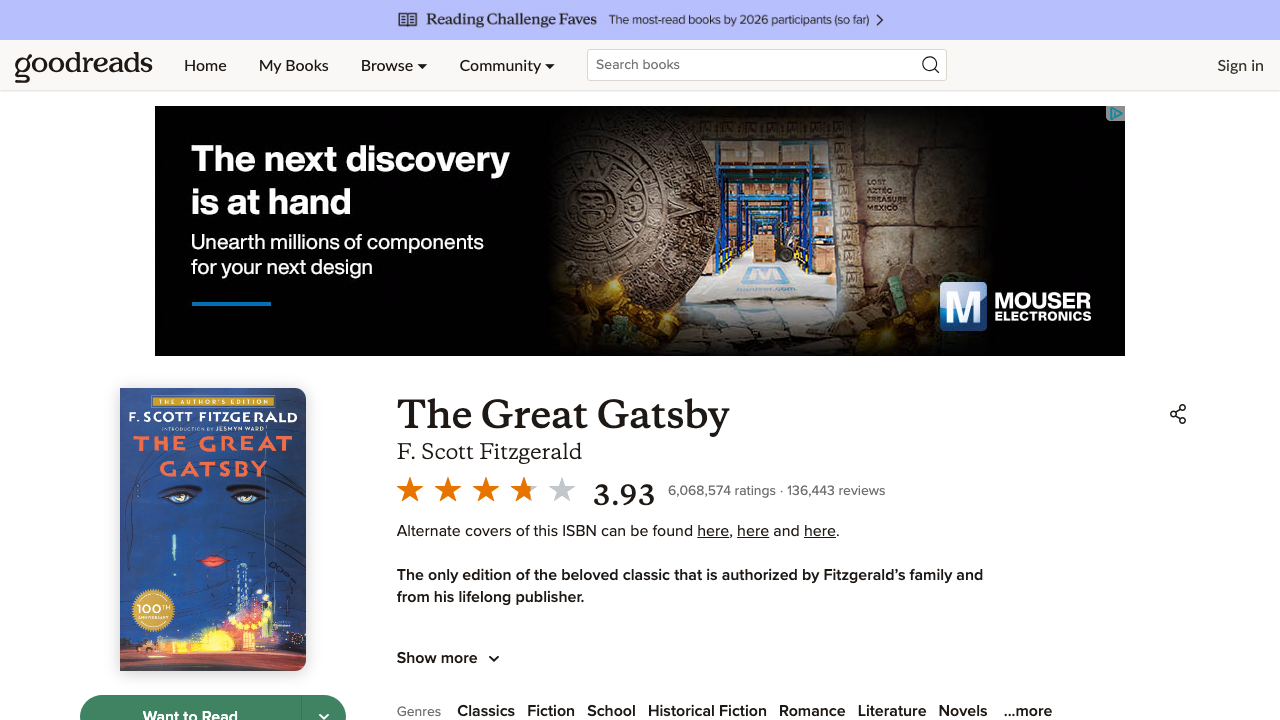
A standard Goodreads book page looks like this:
https://www.goodreads.com/book/show/4671.The_Great_Gatsby
In the HTML you can typically find two strong data sources:
application/ld+jsonfor book metadata and aggregate rating#__NEXT_DATA__for page state, including review objects
That is the combination we will use.
Setup
python3 -m venv .venv
source .venv/bin/activate
pip install requests beautifulsoup4 lxml
Set your API key:
export PROXIESAPI_KEY="YOUR_KEY"
Step 1: Fetch the page through ProxiesAPI
from __future__ import annotations

import json
import os
import random
import time
from urllib.parse import quote

import requests

API_KEY = os.environ["PROXIESAPI_KEY"]
TIMEOUT = (10, 30)

session = requests.Session()
session.headers.update({
    "User-Agent": (
        "Mozilla/5.0 (Macintosh; Intel Mac OS X 10_15_7) "
        "AppleWebKit/537.36 (KHTML, like Gecko) "
        "Chrome/125.0.0.0 Safari/537.36"
    ),
    "Accept-Language": "en-US,en;q=0.9",
})


def proxied(target_url: str) -> str:
    return f"http://api.proxiesapi.com/?key={API_KEY}&url={quote(target_url, safe='')}"


def fetch_html(url: str, attempts: int = 4) -> str:
    last_error: Exception | None = None
    for attempt in range(1, attempts + 1):
        time.sleep(random.uniform(0.8, 1.5))
        try:
            response = session.get(proxied(url), timeout=TIMEOUT)
            if response.status_code in (403, 429, 500, 502, 503, 504):
                raise RuntimeError(f"retryable status {response.status_code}")
            response.raise_for_status()
            return response.text
        except Exception as exc:  # noqa: BLE001
            last_error = exc
            time.sleep(min(10, attempt * 1.8))
    raise RuntimeError(f"failed to fetch {url}") from last_error
This gives you one stable fetch path for both ad-hoc tests and repeatable dataset jobs.
Step 2: Parse the JSON-LD block for ratings
Goodreads usually exposes a Book schema block with aggregateRating.
from bs4 import BeautifulSoup


def extract_book_schema(html: str) -> dict:
    soup = BeautifulSoup(html, "lxml")
    for script in soup.select('script[type="application/ld+json"]'):
        raw = script.string or script.get_text()
        if not raw:
            continue
        data = json.loads(raw)
        if isinstance(data, dict) and data.get("@type") == "Book":
            return data
    raise ValueError("Book JSON-LD not found")


def parse_rating_block(schema: dict) -> dict:
    aggregate = schema.get("aggregateRating") or {}
    author = schema.get("author") or []
    first_author = author[0]["name"] if author and isinstance(author, list) else None

    return {
        "title": schema.get("name"),
        "author": first_author,
        "average_rating": aggregate.get("ratingValue"),
        "rating_count": aggregate.get("ratingCount"),
        "review_count": aggregate.get("reviewCount"),
        "canonical_url": schema.get("url"),
        "image": schema.get("image"),
    }
This is the most stable place to get the headline numbers.
Step 3: Parse review objects from __NEXT_DATA__
The current Goodreads page includes a large #__NEXT_DATA__ script. Inside it are many typed objects, including review payloads.
def find_review_objects(node, out: list[dict]) -> None:
    if isinstance(node, dict):
        if node.get("__typename") == "Review":
            out.append(node)
        for value in node.values():
            find_review_objects(value, out)
    elif isinstance(node, list):
        for item in node:
            find_review_objects(item, out)


def extract_next_data(html: str) -> dict:
    soup = BeautifulSoup(html, "lxml")
    script = soup.select_one("#__NEXT_DATA__")
    if not script:
        raise ValueError("__NEXT_DATA__ not found")
    raw = script.string or script.get_text()
    return json.loads(raw)


def parse_reviews(next_data: dict, limit: int = 5) -> list[dict]:
    review_nodes: list[dict] = []
    find_review_objects(next_data, review_nodes)

    rows = []
    seen = set()

    for review in review_nodes:
        review_id = review.get("id")
        if not review_id or review_id in seen:
            continue
        seen.add(review_id)

        creator = review.get("creator") or {}
        text = (review.get("text") or "").replace("<br>", " ").replace("\\n", " ")
        text = " ".join(text.split())

        if not text:
            continue

        rows.append({
            "review_id": review_id,
            "user_ref": creator.get("__ref"),
            "rating": review.get("rating"),
            "likes": review.get("likeCount"),
            "comment_count": review.get("commentCount"),
            "snippet": text[:420] + ("..." if len(text) > 420 else ""),
        })

        if len(rows) >= limit:
            break

    return rows
Why this is useful:
- the review text is already serialized in the page state
- you can avoid depending on ever-changing review card class names
- the parser still works even if Goodreads changes the visible wrapper layout
Step 4: Build one clean record per book
def scrape_goodreads_book(url: str) -> dict:
    html = fetch_html(url)
    schema = extract_book_schema(html)
    next_data = extract_next_data(html)

    record = parse_rating_block(schema)
    record["top_reviews"] = parse_reviews(next_data, limit=5)
    return record


if __name__ == "__main__":
    url = "https://www.goodreads.com/book/show/4671.The_Great_Gatsby"
    data = scrape_goodreads_book(url)
    print(json.dumps(data, indent=2, ensure_ascii=False))
Expected output shape:
{
  "title": "The Great Gatsby",
  "author": "F. Scott Fitzgerald",
  "average_rating": "3.94",
  "rating_count": "5000000",
  "review_count": "136000",
  "canonical_url": "https://www.goodreads.com/book/show/41733839-the-great-gatsby",
  "top_reviews": [
    {
      "review_id": "...",
      "rating": 5,
      "likes": 236,
      "snippet": "Re-read update August 2020 ..."
    }
  ]
}
Optional: export a CSV review sample
If you want a flat file for quick analysis:
import csv


def write_reviews_csv(path: str, reviews: list[dict]) -> None:
    if not reviews:
        return
    with open(path, "w", newline="", encoding="utf-8") as handle:
        writer = csv.DictWriter(handle, fieldnames=list(reviews[0].keys()))
        writer.writeheader()
        writer.writerows(reviews)


payload = scrape_goodreads_book("https://www.goodreads.com/book/show/4671.The_Great_Gatsby")
write_reviews_csv("gatsby-reviews.csv", payload["top_reviews"])
This is handy for sentiment checks, topic clustering, or QA.
Practical advice
1. Keep concurrency low
Goodreads pages are heavy and highly personalized. Do not spray hundreds of simultaneous requests.
2. Prefer machine-readable blocks first
Start with JSON-LD and __NEXT_DATA__. Only fall back to visible DOM selectors when you truly need something those blocks do not contain.
3. Normalize HTML inside reviews
Review text often includes <br> tags, links, and embedded images. Clean it before storing or vectorizing it.
4. Cache raw HTML while iterating
The fastest way to debug Goodreads parsing is to save one sample page locally and tune the parser against that file.
Wrap-up
This scraper works well because it uses the two strongest data sources on the page:
- JSON-LD for ratings and metadata
__NEXT_DATA__for serialized review objects
That gives you a real Goodreads review dataset without building a fragile click-heavy browser workflow.
Book pages are heavy, localized, and sometimes inconsistent under repeated requests. ProxiesAPI helps keep your request layer steady so you can focus on extracting the actual ratings and review data.