
Scrape Book Data from Goodreads (Titles, Authors, Ratings, and Reviews)
Goodreads has one of the richest “public web” book datasets: titles, authors, rating distributions, review counts, series, genres, and more.
In this tutorial we’ll build a real Python scraper that:
- starts from a Goodreads list page (e.g. Best Books Ever)
- extracts book URLs
- visits each book page and extracts:
- title
- author
- average rating
- rating count
- review count
- publication year (when available)
- exports clean JSON + CSV
- uses ProxiesAPI as the network layer
And we’ll include a screenshot of the page we’re parsing.
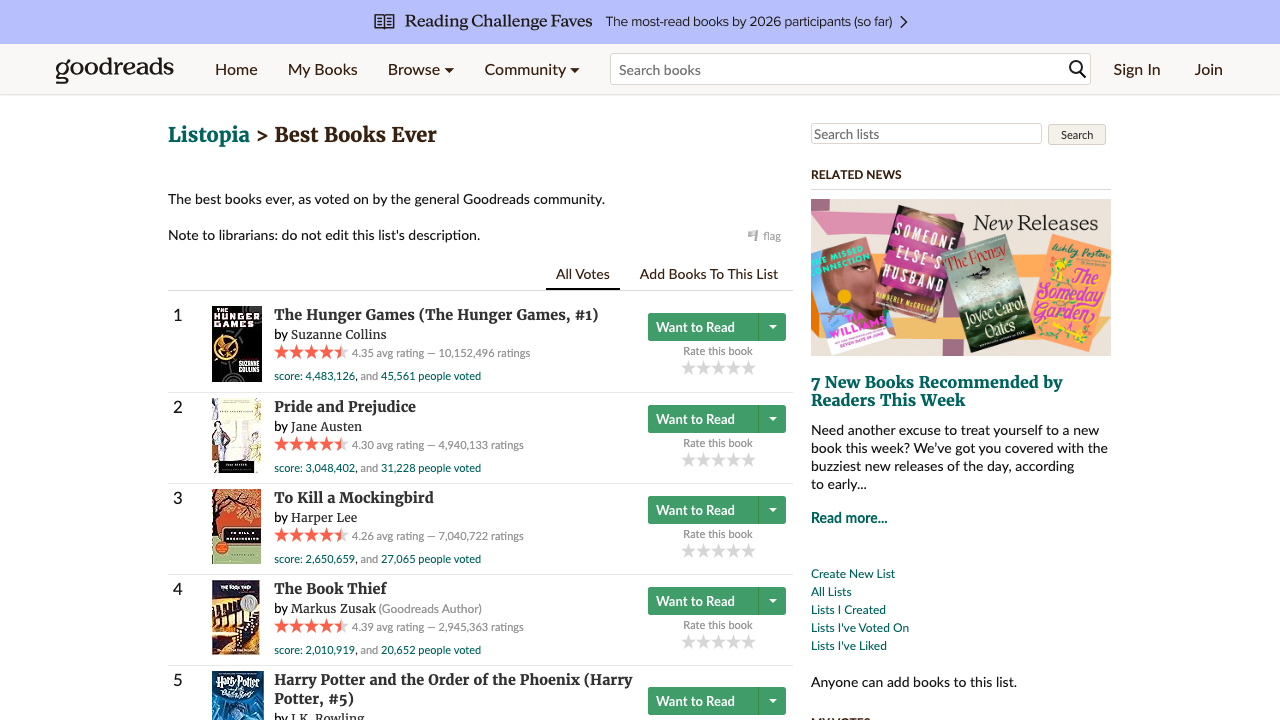
Goodreads pages are big and requests add up fast when you scrape lists → books → series. ProxiesAPI belongs in your fetch layer so you can add retries/rotation without changing your parser.
First: a note on stability (Goodreads is in the Green List)
This blog’s whitelist marks Goodreads as a site that returns full HTML reliably through ProxiesAPI (at the time the whitelist was generated).
That said:
- Goodreads may show different markup to different locales
- the DOM changes over time
- some content is loaded lazily
So we’ll write:
- a small fetch wrapper with retries
- parsers with sensible fallbacks
Setup
python -m venv .venv
source .venv/bin/activate
pip install requests beautifulsoup4 lxml pandas
ProxiesAPI fetch wrapper (reuse everywhere)
ProxiesAPI endpoint format:
http://api.proxiesapi.com/?auth_key=YOUR_KEY&url=https://www.goodreads.com/...
Here’s a robust fetch function with:
- timeouts
- retries + exponential backoff
- basic “HTML too small” detection
import os
import time
import random
import urllib.parse
import requests

PROXIESAPI_KEY = os.environ.get("PROXIESAPI_KEY", "")
TIMEOUT = (10, 45)

session = requests.Session()


def proxiesapi_url(target_url: str) -> str:
    if not PROXIESAPI_KEY:
        raise RuntimeError("Set PROXIESAPI_KEY in your environment")

    return (
        "http://api.proxiesapi.com/?auth_key="
        + urllib.parse.quote(PROXIESAPI_KEY, safe="")
        + "&url="
        + urllib.parse.quote(target_url, safe="")
    )


def fetch(url: str, *, use_proxiesapi: bool = True, max_retries: int = 4) -> str:
    last_err = None

    for attempt in range(1, max_retries + 1):
        try:
            final_url = proxiesapi_url(url) if use_proxiesapi else url
            r = session.get(
                final_url,
                timeout=TIMEOUT,
                headers={
                    "User-Agent": (
                        "Mozilla/5.0 (Macintosh; Intel Mac OS X 10_15_7) "
                        "AppleWebKit/537.36 (KHTML, like Gecko) "
                        "Chrome/123.0 Safari/537.36"
                    ),
                    "Accept-Language": "en-US,en;q=0.9",
                },
            )
            r.raise_for_status()

            html = r.text
            if not html or len(html) < 2000:
                raise RuntimeError(f"Suspiciously small HTML ({len(html)} bytes)")

            return html

        except Exception as e:
            last_err = e
            time.sleep(min(12, 2 ** (attempt - 1)) + random.random())

    raise RuntimeError(f"Fetch failed after {max_retries} attempts: {last_err}")
Step 1: extract book URLs from a Goodreads list
A very common starting point is the “Best Books Ever” list:
https://www.goodreads.com/list/show/1.Best_Books_Ever
List pages usually include book title links like:
/book/show/4671.The_Great_Gatsby
So we’ll extract anchors where href contains /book/show/.
from bs4 import BeautifulSoup
from urllib.parse import urljoin

BASE = "https://www.goodreads.com"


def extract_book_urls(list_html: str) -> list[str]:
    soup = BeautifulSoup(list_html, "lxml")

    seen = set()
    out = []

    for a in soup.select('a[href*="/book/show/"]'):
        href = a.get("href")
        if not href:
            continue

        # Sometimes the same book appears multiple times on a list page.
        abs_url = urljoin(BASE, href)
        abs_url = abs_url.split("?")[0].split("#")[0]

        if abs_url in seen:
            continue
        seen.add(abs_url)
        out.append(abs_url)

    return out
Sanity check:
start = "https://www.goodreads.com/list/show/1.Best_Books_Ever"
html = fetch(start)
urls = extract_book_urls(html)
print("books found:", len(urls))
print(urls[:5])
Step 2: parse a Goodreads book page (title, author, rating, counts)
Goodreads book pages can be large and the markup changes, so we’ll use:
- primary selectors
- fallbacks
- and a bit of regex for numbers
Typical fields:
- Title: often in
h1near the top - Author: often in an anchor to
/author/show/or a contributor element - Average rating: a numeric like
4.12 - Rating count: “1,234,567 ratings”
- Review count: “12,345 reviews”
import re
from bs4 import BeautifulSoup


def clean_text(s: str | None) -> str | None:
    if not s:
        return None
    return re.sub(r"\s+", " ", s).strip() or None


def parse_int(text: str | None) -> int | None:
    if not text:
        return None
    m = re.search(r"(\d[\d,]*)", text)
    return int(m.group(1).replace(",", "")) if m else None


def parse_float(text: str | None) -> float | None:
    if not text:
        return None
    m = re.search(r"(\d+(?:\.\d+)?)", text)
    return float(m.group(1)) if m else None


def parse_book(html: str, url: str) -> dict:
    soup = BeautifulSoup(html, "lxml")

    page_title = clean_text(soup.title.get_text(" ", strip=True) if soup.title else None)

    # Title
    title = None
    h1 = soup.select_one("h1")
    if h1:
        title = clean_text(h1.get_text(" ", strip=True))

    # Author: try common author link pattern
    author = None
    author_a = soup.select_one('a[href*="/author/show/"]')
    if author_a:
        author = clean_text(author_a.get_text(" ", strip=True))

    # Average rating: look for a numeric element near "Rating"
    avg_rating = None
    # Goodreads often includes numeric text like "4.27"; pick first plausible 0-5 float
    floats = []
    for el in soup.select("span, div"):
        t = el.get_text(" ", strip=True)
        if not t:
            continue
        if len(t) > 6:
            continue
        f = parse_float(t)
        if f is not None and 0.0 < f <= 5.0:
            floats.append(f)
    if floats:
        # choose a value with typical 2-decimal precision if possible
        avg_rating = sorted(floats, key=lambda x: abs(x - 4.0))[0]

    # Counts: search for text containing "ratings" / "reviews"
    rating_count = None
    review_count = None

    for el in soup.select("span, a, div"):
        t = el.get_text(" ", strip=True)
        if not t:
            continue
        low = t.lower()
        if "ratings" in low and rating_count is None:
            n = parse_int(t)
            if n is not None:
                rating_count = n
        if "reviews" in low and review_count is None:
            n = parse_int(t)
            if n is not None:
                review_count = n

    # Publication year (best-effort)
    pub_year = None
    text_blob = soup.get_text(" ", strip=True)
    m = re.search(r"Published\s+\w+\s+\d{1,2},\s+(\d{4})", text_blob)
    if m:
        pub_year = int(m.group(1))

    return {
        "url": url,
        "page_title": page_title,
        "title": title,
        "author": author,
        "avg_rating": avg_rating,
        "rating_count": rating_count,
        "review_count": review_count,
        "publication_year": pub_year,
    }
A key point: we store page_title so if parsing fails you can quickly see whether you got a real book page or a consent/bot page.
Step 3: crawl a list and export JSON + CSV
import json
import pandas as pd


def scrape_list(list_url: str, limit: int = 25) -> list[dict]:
    list_html = fetch(list_url)
    book_urls = extract_book_urls(list_html)

    out = []
    for i, url in enumerate(book_urls[:limit], start=1):
        html = fetch(url)
        data = parse_book(html, url)
        out.append(data)

        print(f"[{i}/{min(limit, len(book_urls))}]", data.get("title"), "—", data.get("author"), data.get("avg_rating"))
        time.sleep(0.8 + random.random())

    return out


if __name__ == "__main__":
    LIST_URL = "https://www.goodreads.com/list/show/1.Best_Books_Ever"
    rows = scrape_list(LIST_URL, limit=30)

    with open("goodreads_books.json", "w", encoding="utf-8") as f:
        json.dump(rows, f, ensure_ascii=False, indent=2)

    pd.DataFrame(rows).to_csv("goodreads_books.csv", index=False)

    print("saved goodreads_books.json and goodreads_books.csv", len(rows))
Troubleshooting
1) You’re getting a consent page or interstitial
Symptoms:
page_titledoesn’t look like a book page- HTML is very small
- key fields are missing across many books
Fixes:
- slow down (
time.sleep(2-4s)) - increase retries
- crawl in smaller batches (e.g. 50/night)
2) Author parsing is wrong
Some pages have multiple contributors. Instead of “first author link”, refine by selecting the author block near the title.
A robust approach is to:
- locate the title
h1 - search nearby siblings for
/author/show/
3) Want genres, series, or ISBN?
Those fields exist on some pages but not all.
Add them as optional fields and never assume they exist.
Where ProxiesAPI fits (no overclaims)
Goodreads might work fine for a couple pages from your own IP.
But as soon as you build pipelines like:
- scrape list pages → discover 1000 books
- scrape books → discover author pages
- scrape authors → discover more books
…your failure rate goes up.
ProxiesAPI is useful because it turns “network instability” into a configurable layer:
- retries
- rotation
- consistent fetch format
Your parser stays the same.
QA checklist
- List page yields book URLs
- At least 10 books return title + author
- Counts are integers, not strings
- You export both JSON + CSV
- You’re rate limiting (don’t burst)
Goodreads pages are big and requests add up fast when you scrape lists → books → series. ProxiesAPI belongs in your fetch layer so you can add retries/rotation without changing your parser.