
Scrape Funda.nl Property Listings with Python (Search + Pagination + Detail Pages)
Funda.nl is one of the most popular real-estate portals in the Netherlands. It’s a perfect “real world” scraping target because you need to handle:
- search result pages (with filters)
- pagination
- de-duplication
- detail pages (where the rich data lives)
In this guide we’ll build a production-shaped Python scraper that:
- fetches Funda search pages
- paginates until it runs out of results (with hard safety limits)
- extracts listing URLs + basic card fields
- visits each listing detail page and extracts structured fields
- exports JSONL/CSV
We’ll keep it honest: site structures change. The key is writing selectors that are explainable and easy to update.
Funda pages can be sensitive to repetitive traffic and geo/rate limits. ProxiesAPI helps you keep the network layer stable as you scale search pages + detail pages to thousands of listings.
What we’re scraping (site shape)
Funda has:
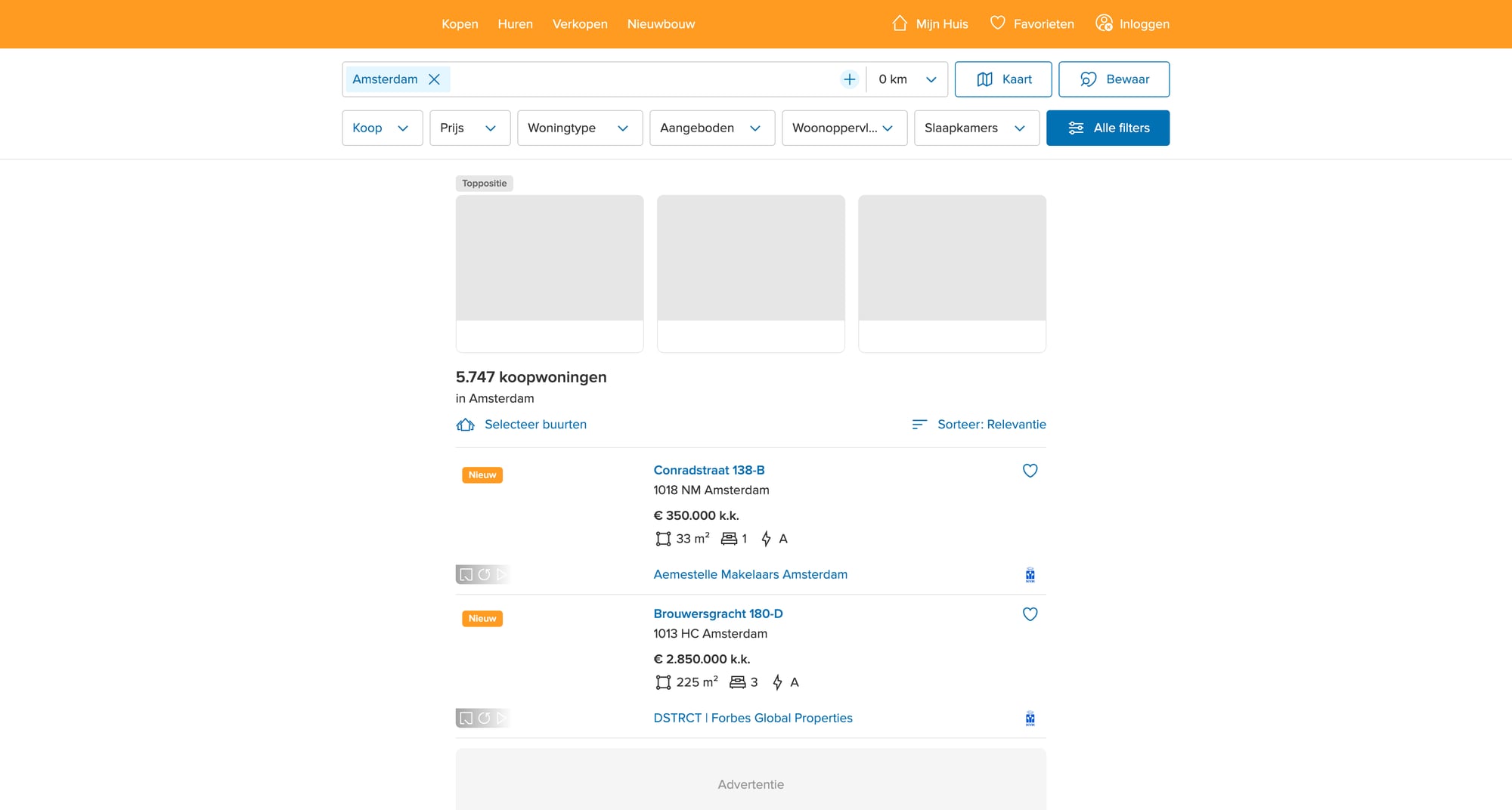
- Search results for a city/area + filters (price, size, property type)
- Listing detail pages for each property
Typical flow:
- Start from a search URL (you can create this manually in your browser)
- On each results page, collect listing links
- Follow each listing and extract fields (address, price, bedrooms, area, features, agent)
Legal + operational note
Always review the site’s Terms of Service and respect robots/rate limits. For data you plan to resell or use commercially, get legal advice.
Setup
python -m venv .venv
source .venv/bin/activate
pip install requests beautifulsoup4 lxml pandas
We’ll use:
requestsfor HTTPBeautifulSoup(lxml)for parsingpandas(optional) for CSV
Step 1: A fetch layer you can swap to ProxiesAPI
Scrapers fail most often at the network layer (timeouts, blocks, inconsistent responses). So we’ll isolate fetching.
from __future__ import annotations

import os
import time
import random
from urllib.parse import urljoin

import requests

BASE = "https://www.funda.nl"
TIMEOUT = (10, 30)  # connect, read

session = requests.Session()

DEFAULT_HEADERS = {
    "User-Agent": (
        "Mozilla/5.0 (Macintosh; Intel Mac OS X 10_15_7) "
        "AppleWebKit/537.36 (KHTML, like Gecko) "
        "Chrome/123.0.0.0 Safari/537.36"
    ),
    "Accept-Language": "en-US,en;q=0.9,nl;q=0.8",
}


def polite_sleep(min_s: float = 0.7, max_s: float = 1.8) -> None:
    time.sleep(random.uniform(min_s, max_s))


def fetch(url: str) -> str:
    """Fetch HTML. If you use ProxiesAPI, this is the only function you change."""

    # Option A (direct):
    r = session.get(url, headers=DEFAULT_HEADERS, timeout=TIMEOUT)

    # Option B (ProxiesAPI):
    # If ProxiesAPI provides a proxy endpoint or an API fetch endpoint in your account,
    # wire it here. Keep the rest of the scraper unchanged.
    # Example patterns (illustrative; use the exact method from your ProxiesAPI docs):
    #
    # PROXY = os.environ.get("PROXIESAPI_HTTP_PROXY")
    # proxies = {"http": PROXY, "https": PROXY} if PROXY else None
    # r = session.get(url, headers=DEFAULT_HEADERS, proxies=proxies, timeout=TIMEOUT)

    r.raise_for_status()
    return r.text
If you later need retries, add them here (with exponential backoff).
Step 2: Pick a stable search URL
The easiest way is:
- Open Funda in your browser
- Set the area (e.g., Amsterdam)
- Apply a filter (e.g., “for sale”)
- Copy the URL from the address bar
You’ll end up with a URL that looks like a city path plus query params.
In code, we’ll treat it as a start_url.
Step 3: Parse search result cards (URLs + summary fields)
Funda’s DOM changes over time, so don’t rely on one fragile CSS class.
A practical strategy:
- find result containers that contain links to
/koop/(buy) or/huur/(rent) - from those links, build absolute URLs
- also parse nearby text for price/title when present
import re
from bs4 import BeautifulSoup


def absolute(href: str) -> str:
    return href if href.startswith("http") else urljoin(BASE, href)


def parse_search_page(html: str) -> tuple[list[dict], str | None]:
    """Return (listings, next_page_url)."""

    soup = BeautifulSoup(html, "lxml")

    listings: list[dict] = []

    # Heuristic: listing links usually contain /koop/ or /huur/ and end with a slash.
    anchors = soup.select("a[href]")
    for a in anchors:
        href = a.get("href") or ""
        if not href.startswith("/"):
            continue
        if "/koop/" not in href and "/huur/" not in href:
            continue
        if "#" in href:
            continue

        url = absolute(href)

        # Basic de-dup within page; we’ll also de-dup globally.
        listings.append({
            "url": url,
            "card_text": a.get_text(" ", strip=True) or None,
        })

    # De-dup URLs while preserving order
    seen = set()
    uniq = []
    for it in listings:
        if it["url"] in seen:
            continue
        seen.add(it["url"])
        uniq.append(it)

    # Try to find a "next" link. Many sites use rel="next".
    next_link = soup.select_one('a[rel="next"][href]')
    next_url = absolute(next_link.get("href")) if next_link else None

    return uniq, next_url
This “wide net” approach often catches extra navigation links. That’s OK because we’ll validate listing pages in the detail parser.
Step 4: Parse a listing detail page
On detail pages you want stable fields. Commonly available:
- full address
- price
- living area (m²)
- plot area (m²)
- number of rooms
- energy label
- agent/broker
We’ll implement parsing defensively:
- Try a few selectors
- If missing, keep
None
from bs4 import BeautifulSoup


def text_or_none(el) -> str | None:
    if not el:
        return None
    t = el.get_text(" ", strip=True)
    return t if t else None


def parse_listing_detail(html: str, url: str) -> dict:
    soup = BeautifulSoup(html, "lxml")

    # Examples of robust-ish strategies:
    # - use <h1> for title/address
    # - find price by searching for currency-like patterns

    h1 = soup.select_one("h1")
    title = text_or_none(h1)

    # Price: look for elements that contain €
    price = None
    for el in soup.select("*[class], *[data-test], p, span, div"):
        t = el.get_text(" ", strip=True)
        if "€" in t and len(t) < 60:
            price = t
            break

    # Key-value features: many property sites show a definition list or a table.
    features = {}

    # Definition lists
    for dl in soup.select("dl"):
        dts = dl.select("dt")
        dds = dl.select("dd")
        if len(dts) != len(dds) or len(dts) == 0:
            continue
        for dt, dd in zip(dts, dds):
            k = dt.get_text(" ", strip=True)
            v = dd.get_text(" ", strip=True)
            if k and v:
                features[k] = v

    # Fallback: table rows
    for tr in soup.select("table tr"):
        tds = tr.select("td")
        if len(tds) >= 2:
            k = tds[0].get_text(" ", strip=True)
            v = tds[1].get_text(" ", strip=True)
            if k and v and k not in features:
                features[k] = v

    return {
        "url": url,
        "title": title,
        "price": price,
        "features": features,
    }
This parser is intentionally “generic” because Funda’s markup can change and may differ across listing types.
If you want very stable extraction, a better long-term strategy is to:
- locate the JSON embedded in the page (often in a
<script type="application/ld+json">or a Next.js state script) - parse it and use its fields
Step 5: Crawl search → pagination → details
Now we wire it all together with safety controls:
max_pagesto avoid infinite loopsmax_listingsto cap run size- de-dup URLs
import json


def crawl(start_url: str, max_pages: int = 10, max_listings: int = 200) -> list[dict]:
    out: list[dict] = []
    seen_urls: set[str] = set()

    url = start_url
    pages = 0

    while url and pages < max_pages and len(out) < max_listings:
        pages += 1
        print(f"[search] page {pages}: {url}")
        html = fetch(url)
        listings, next_url = parse_search_page(html)

        print(f"  found {len(listings)} candidate links")

        for it in listings:
            if len(out) >= max_listings:
                break

            u = it["url"]
            if u in seen_urls:
                continue
            seen_urls.add(u)

            polite_sleep()

            try:
                detail_html = fetch(u)
            except Exception as e:
                print("  [detail] failed", u, e)
                continue

            data = parse_listing_detail(detail_html, u)

            # Minimal validation: if we can’t find a title, it might not be a listing.
            if not data.get("title"):
                continue

            out.append(data)
            print(f"  [detail] ok: {data.get('title')}")

        url = next_url
        polite_sleep(1.0, 2.5)

    return out


if __name__ == "__main__":
    START_URL = "https://www.funda.nl/koop/amsterdam/"  # replace with your filtered URL

    rows = crawl(START_URL, max_pages=5, max_listings=50)
    print("listings:", len(rows))

    with open("funda_listings.jsonl", "w", encoding="utf-8") as f:
        for r in rows:
            f.write(json.dumps(r, ensure_ascii=False) + "\n")

    print("wrote funda_listings.jsonl")
Making selectors actually stable
A quick checklist that saves hours:
- Prefer attributes like
data-*when present (sites use them for testing) - Prefer semantic tags:
h1,dl dt/dd,script[type="application/ld+json"] - Avoid long “CSS class chains” that look auto-generated
- Validate by spot-checking 3–5 pages
- Log missing fields so you know what broke
Where ProxiesAPI fits
Real-estate crawls tend to:
- hit the same domain repeatedly
- trigger rate limits
- face geo restrictions
ProxiesAPI is useful when you:
- increase crawl speed and parallelism
- crawl multiple cities and filters
- run scheduled refreshes (daily/weekly)
Keep the integration limited to the fetch() layer so you can swap proxy settings, rotate identities, or add retries without rewriting your parsers.
QA checklist
- Search parsing finds listing URLs (print first 5)
- Pagination stops correctly (no infinite loop)
- Detail parsing returns non-empty
titlefor most rows - Output file is valid JSONL
- Run size capped with
max_pages/max_listings
Next upgrades
- Extract structured JSON embedded in listing pages (often more stable than HTML)
- Store runs in SQLite with
last_seentimestamps - Add incremental crawling (only new listings)
- Add concurrency with
httpx+asyncioonce your network layer is stable
Funda pages can be sensitive to repetitive traffic and geo/rate limits. ProxiesAPI helps you keep the network layer stable as you scale search pages + detail pages to thousands of listings.