
Scrape GitHub Issue Search Results into a Triage Queue
GitHub has an API, and if you already have an authenticated integration you should use it.
But there are still good reasons to scrape GitHub issue-search pages:
- you want to prototype without tokens
- you want one script that works from a bookmarked search URL
- you want a quick CSV for weekly bug triage
In this guide we will turn GitHub's issue-search UI into a lightweight triage queue.
The scraper will collect:
- title
- issue URL and number
- labels
- author
- opened timestamp
- comment count
- a simple priority bucket based on labels and activity
Mandatory screenshot of the page we will parse:
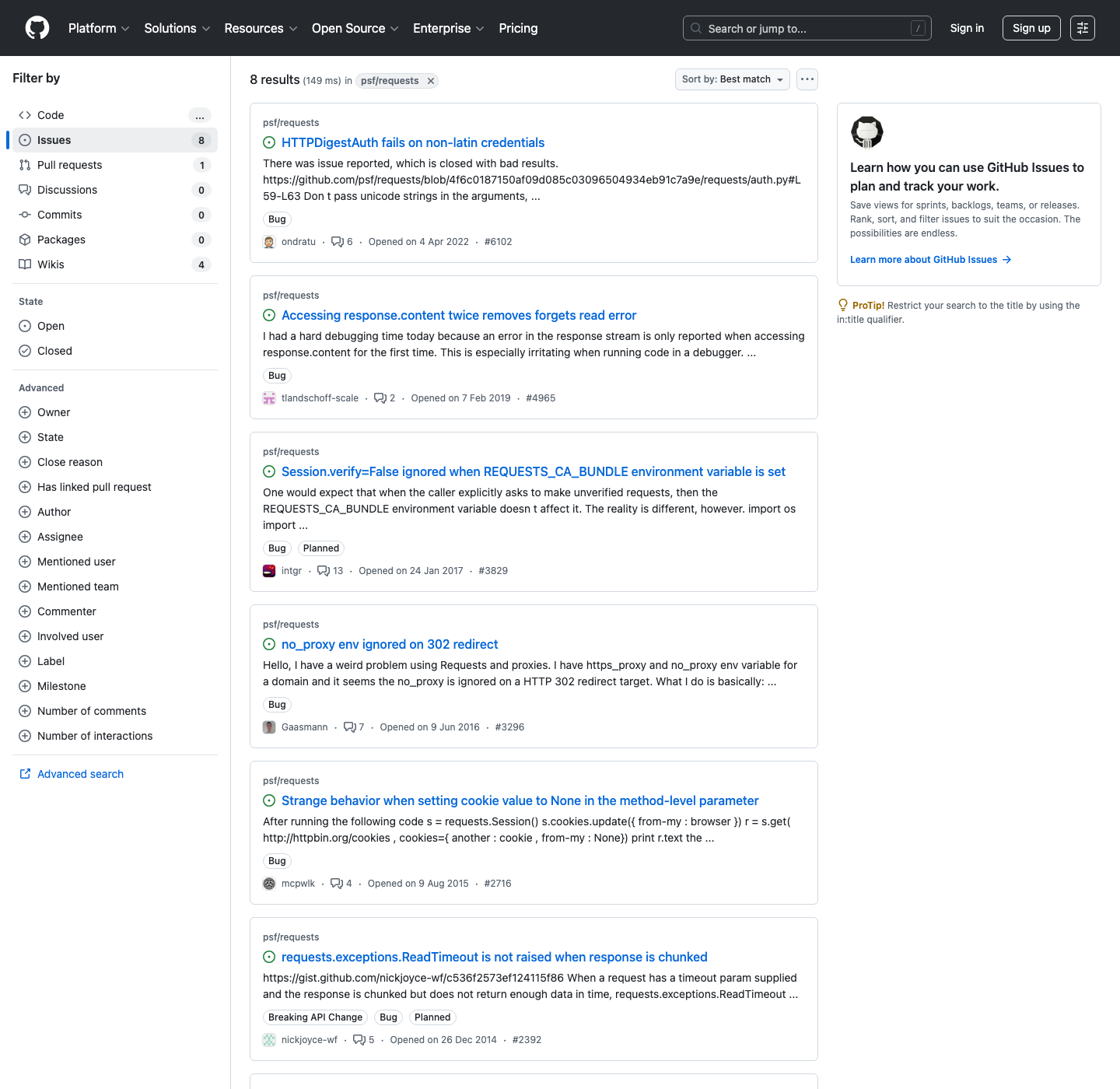
GitHub issue search is friendly at small volume, but repeated org-wide exports can still hit rate and reliability friction. ProxiesAPI gives you a clean fetch wrapper so your parser stays unchanged.
The kind of URL we want
GitHub search pages are already expressive, so the easiest pattern is:
- build the search in the browser
- copy the URL
- let the scraper follow pagination
Example:
https://github.com/search?q=is%3Aissue+label%3Abug+state%3Aopen+repo%3Apsf%2Frequests&type=issues
That means product managers, support teams, and engineers can share the search definition without touching code.
Setup
python3 -m venv .venv
source .venv/bin/activate
pip install requests beautifulsoup4 lxml pandas
We will use:
requestsfor HTTPBeautifulSoupfor parsingpandasfor CSV export
Step 1: Build a fetch helper
The parser should not care whether you go direct or through ProxiesAPI. Keep that decision in one place.
from __future__ import annotations

import os
import random
import time
from urllib.parse import quote

import requests

PROXIESAPI_KEY = os.getenv("PROXIESAPI_KEY", "")
TIMEOUT = (10, 40)

session = requests.Session()
session.headers.update({
    "User-Agent": (
        "Mozilla/5.0 (Macintosh; Intel Mac OS X 10_15_7) "
        "AppleWebKit/537.36 (KHTML, like Gecko) "
        "Chrome/124.0.0.0 Safari/537.36"
    ),
    "Accept-Language": "en-US,en;q=0.9",
})


def proxiesapi_url(target_url: str) -> str:
    if not PROXIESAPI_KEY:
        raise RuntimeError("Set PROXIESAPI_KEY before enabling ProxiesAPI")
    return (
        "https://api.proxiesapi.com/?auth_key="
        + quote(PROXIESAPI_KEY, safe="")
        + "&url="
        + quote(target_url, safe="")
    )


def fetch(url: str, *, use_proxiesapi: bool = False, max_retries: int = 4) -> str:
    last_err = None
    for attempt in range(1, max_retries + 1):
        try:
            final_url = proxiesapi_url(url) if use_proxiesapi else url
            resp = session.get(final_url, timeout=TIMEOUT)
            resp.raise_for_status()
            html = resp.text or ""
            if "search-results-page" not in html and "ListItem-module__listItem" not in html:
                raise RuntimeError("Unexpected search HTML; login wall or layout change suspected")
            return html
        except Exception as exc:
            last_err = exc
            time.sleep((1.6 ** attempt) + random.random())
    raise RuntimeError(f"Failed to fetch {url}: {last_err}")
Step 2: Understand the current GitHub markup
GitHub's issue-search page is React-heavy, but the server-rendered HTML still contains the fields we need.
The stable hooks I found on the current page are:
- result title links:
a[data-testid="issue-pr-title-link"] - each result row: nearest
<li role="listitem"> - labels:
span.prc-Token-IssueLabel-2IazM - timestamps:
relative-time
That is enough to avoid brittle text scraping.
Step 3: Parse a page of issue search results
import re
from typing import Any
from urllib.parse import urljoin

from bs4 import BeautifulSoup, Tag

BASE_URL = "https://github.com"


def issue_number_from_href(href: str | None) -> int | None:
    if not href:
        return None
    match = re.search(r"/issues/(\\d+)", href)
    return int(match.group(1)) if match else None


def parse_comment_count(row: Tag) -> int:
    text = row.get_text(" ", strip=True)
    match = re.search(r"\\b(\\d+)\\b\\s*$", text)
    return int(match.group(1)) if match else 0


def parse_results_page(html: str) -> tuple[list[dict[str, Any]], str | None]:
    soup = BeautifulSoup(html, "lxml")
    rows: list[dict[str, Any]] = []

    for title_link in soup.select('a[data-testid="issue-pr-title-link"]'):
        card = title_link.find_parent("li")
        if not card:
            continue

        href = title_link.get("href")
        url = urljoin(BASE_URL, href) if href else None

        author_link = card.select_one('a[data-testid="github-avatar"]')
        author = author_link.get("aria-label") if author_link else None
        if author and author.startswith("@"):
            author = author[1:]

        labels = [
            span.get_text(" ", strip=True)
            for span in card.select("span.prc-Token-IssueLabel-2IazM")
        ]

        opened = None
        time_tag = card.select_one("relative-time")
        if time_tag and time_tag.get("datetime"):
            opened = time_tag["datetime"]

        rows.append({
            "number": issue_number_from_href(href),
            "title": title_link.get_text(" ", strip=True),
            "url": url,
            "labels": labels,
            "author": author,
            "opened_at": opened,
            "comments": parse_comment_count(card),
        })

    next_link = soup.select_one('a[rel="next"]')
    next_url = urljoin(BASE_URL, next_link.get("href")) if next_link and next_link.get("href") else None
    return rows, next_url
Why parse from the search page instead of issue detail pages?
Because triage usually starts with breadth, not depth.
You want to answer:
- which bugs are still open
- which ones have lots of discussion
- which labels keep appearing
That is exactly what the list page is for.
Step 4: Turn results into a triage queue
Once we have rows, we can add a simple priority classifier.
def triage_bucket(labels: list[str], comments: int) -> str:
    label_text = " ".join(labels).lower()

    if "security" in label_text or "regression" in label_text:
        return "urgent"
    if "bug" in label_text and comments >= 5:
        return "high"
    if comments >= 2:
        return "medium"
    return "normal"


def crawl_issue_search(start_url: str, *, max_pages: int = 5, use_proxiesapi: bool = False) -> list[dict]:
    all_rows: list[dict] = []
    seen: set[str] = set()
    url = start_url
    pages = 0

    while url and pages < max_pages:
        pages += 1
        html = fetch(url, use_proxiesapi=use_proxiesapi)
        batch, next_url = parse_results_page(html)

        for row in batch:
            key = row.get("url")
            if not key or key in seen:
                continue
            seen.add(key)
            row["priority"] = triage_bucket(row["labels"], row["comments"])
            row["labels"] = ",".join(row["labels"])
            all_rows.append(row)

        url = next_url
        time.sleep(0.8 + random.random())

    return all_rows
Step 5: Export the queue to CSV
import pandas as pd


if __name__ == "__main__":
    search_url = (
        "https://github.com/search?"
        "q=is%3Aissue+label%3Abug+state%3Aopen+repo%3Apsf%2Frequests"
        "&type=issues"
    )

    rows = crawl_issue_search(search_url, max_pages=3, use_proxiesapi=False)
    df = pd.DataFrame(rows).sort_values(["priority", "comments"], ascending=[True, False])
    df.to_csv("github-triage-queue.csv", index=False)

    print(df[["number", "priority", "comments", "title"]].head(10).to_string(index=False))
The CSV is now immediately useful for:
- weekly triage reviews
- bug-bash prep
- backlog cleanup
- finding old bug clusters by label
A practical extension: group by label
If you want a fast “what keeps breaking?” report:
label_counts = (
    df.assign(label=df["labels"].str.split(","))
      .explode("label")
      .query("label != ''")
      .groupby("label")
      .size()
      .sort_values(ascending=False)
)

print(label_counts.head(10))
That tells you where the queue is accumulating:
Bugneeds-reproplanneddocs
...or whatever labels the repo actually uses.
Where ProxiesAPI fits
For one repo and one search, GitHub usually behaves well.
ProxiesAPI becomes more useful when you:
- scrape many saved searches across an org
- refresh the queue on a schedule
- run from multiple workers
- want a cleaner retry layer without touching parser code
In that case, this stays the same:
rows = crawl_issue_search(search_url, max_pages=5, use_proxiesapi=True)
That is the pattern you want in production: transport changes, parser stays stable.
Common failure modes
1) GitHub changes CSS class names
Prefer data hooks and semantic tags where available:
data-testidrelative-timerel="next"
2) Empty results because the query changed
Always print the first page count before assuming the parser broke.
3) You need authenticated results
Private repos and personalized filters are a different problem. Use the API or a logged-in browser session instead.
4) Comment count parsing feels fragile
If GitHub changes the trailing metadata layout, fall back to zero and keep the export running. Do not let one decorative field crash the crawl.
Final takeaway
GitHub issue search pages are a great source for quick operational exports because the URL already contains the triage logic.
The pattern is simple:
- save the search URL
- parse the current result cards
- follow pagination
- attach a lightweight priority heuristic
- export a CSV your team can sort immediately
That gets you from “someone should clean up this bug queue” to a real triage artifact in one script.
GitHub issue search is friendly at small volume, but repeated org-wide exports can still hit rate and reliability friction. ProxiesAPI gives you a clean fetch wrapper so your parser stays unchanged.