
Scrape GitHub Issues (Labels, States, Pagination) Into CSV
GitHub has a great API — but sometimes you still want to scrape HTML:
- you’re prototyping without auth tokens
- you want the same code path to work for “any repo URL”
- you’re building a lightweight internal triage exporter
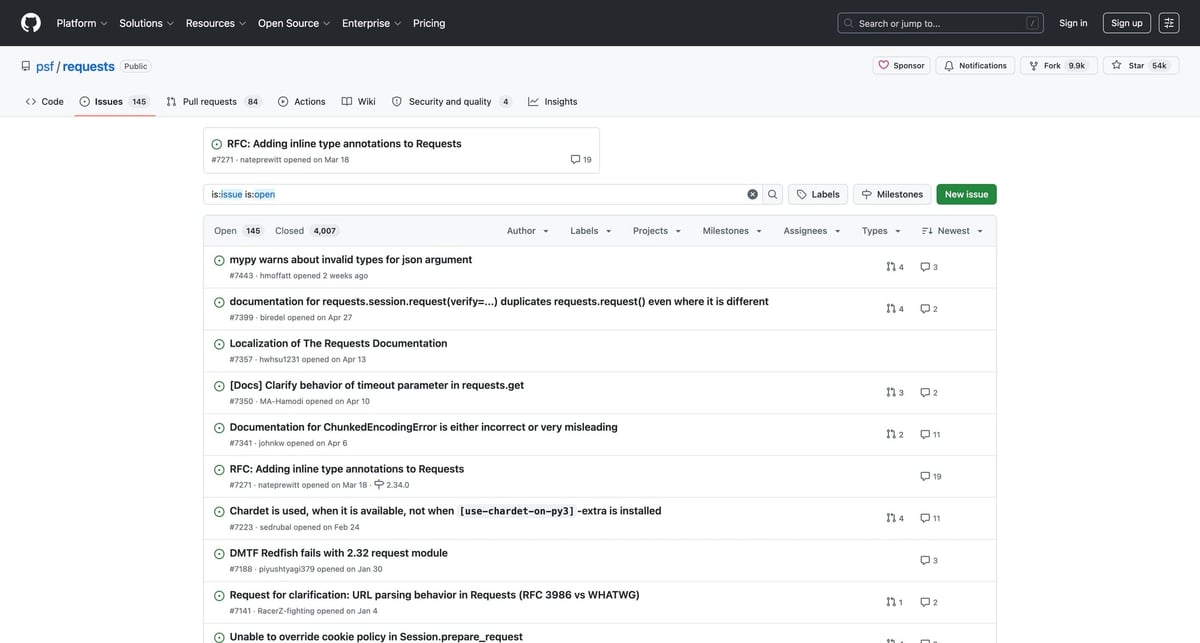
In this tutorial we’ll scrape GitHub Issues HTML into a clean CSV, including:
- issue number + title + URL
- state (open/closed)
- labels
- author + timestamps
- pagination (follow rel="next")
Mandatory screenshot (this is the list UI we’ll scrape):
Scale issue crawling reliably with ProxiesAPI
GitHub is usually stable — until you crawl lots of repos or pages. ProxiesAPI fits as a fetch-layer wrapper so retries and rotation are one small change, not a rewrite.
What we’re scraping (URLs)
Issues list pages look like:
- https://github.com/OWNER/REPO/issues
- filtered: https://github.com/OWNER/REPO/issues?q=is%3Aissue+is%3Aopen
- pagination: ...&page=2
Example repo:
Setup
python3 -m venv .venv
source .venv/bin/activate
pip install requests beautifulsoup4 lxml pandas
Fetch layer (with optional ProxiesAPI)
import os
import time
import random
import urllib.parse
import requests

PROXIESAPI_KEY = os.environ.get("PROXIESAPI_KEY", "")
TIMEOUT = (10, 40)

session = requests.Session()


def proxiesapi_url(target_url: str) -> str:
    if not PROXIESAPI_KEY:
        raise RuntimeError("Set PROXIESAPI_KEY in your environment")
    return (
        "http://api.proxiesapi.com/?auth_key="
        + urllib.parse.quote(PROXIESAPI_KEY, safe="")
        + "&url="
        + urllib.parse.quote(target_url, safe="")
    )


def fetch(url: str, *, use_proxiesapi: bool = False, max_retries: int = 4) -> str:
    last_err = None
    for attempt in range(1, max_retries + 1):
        try:
            final_url = proxiesapi_url(url) if use_proxiesapi else url
            r = session.get(
                final_url,
                timeout=TIMEOUT,
                headers={
                    "User-Agent": (
                        "Mozilla/5.0 (Macintosh; Intel Mac OS X 10_15_7) "
                        "AppleWebKit/537.36 (KHTML, like Gecko) "
                        "Chrome/123.0 Safari/537.36"
                    ),
                    "Accept-Language": "en-US,en;q=0.9",
                },
            )
            r.raise_for_status()
            html = r.text or ""
            if len(html) < 2000:
                raise RuntimeError(f"Suspiciously small HTML ({len(html)} bytes)")
            return html
        except Exception as e:
            last_err = e
            time.sleep(min(10, (2 ** (attempt - 1))) + random.random())
    raise RuntimeError(f"Fetch failed after {max_retries} attempts: {last_err}")
Parse issues from one page
import re
from bs4 import BeautifulSoup
from urllib.parse import urljoin


def parse_issue_number(url: str) -> int | None:
    m = re.search(r"/issues/(\d+)", url or "")
    return int(m.group(1)) if m else None


def parse_issues_page(html: str, *, base_url: str = "https://github.com") -> tuple[list[dict], str | None]:
    soup = BeautifulSoup(html, "lxml")

    rows = []
    for row in soup.select("div[js-issue-row]"):
        title_a = row.select_one('a[data-hovercard-type="issue"]')
        if not title_a:
            continue

        title = title_a.get_text(" ", strip=True)
        href = title_a.get("href")
        url = urljoin(base_url, href) if href else None

        labels = [a.get_text(" ", strip=True) for a in row.select("a.IssueLabel")]

        author = None
        author_a = row.select_one('a[data-hovercard-type="user"]')
        if author_a:
            author = author_a.get_text(" ", strip=True)

        updated_at = None
        time_node = row.select_one("relative-time")
        if time_node and time_node.get("datetime"):
            updated_at = time_node.get("datetime")

        rows.append(
            {
                "number": parse_issue_number(url or ""),
                "title": title,
                "url": url,
                "labels": ",".join(labels),
                "author": author,
                "updated_at": updated_at,
                "state": "open",
            }
        )

    next_link = soup.select_one('a[rel="next"]')
    next_url = urljoin(base_url, next_link.get("href")) if next_link and next_link.get("href") else None

    return rows, next_url
Crawl multiple pages (pagination)
def crawl_issues(start_url: str, *, max_pages: int = 10, use_proxiesapi: bool = False) -> list[dict]:
    all_rows = []
    seen = set()

    url = start_url
    pages = 0

    while url and pages < max_pages:
        pages += 1
        html = fetch(url, use_proxiesapi=use_proxiesapi)
        batch, next_url = parse_issues_page(html)

        for row in batch:
            key = row.get("url")
            if not key or key in seen:
                continue
            seen.add(key)
            all_rows.append(row)

        url = next_url
        time.sleep(0.8 + random.random())

    return all_rows
Export to CSV
import pandas as pd


if __name__ == "__main__":
    start = "https://github.com/psf/requests/issues?q=is%3Aissue+is%3Aopen"
    rows = crawl_issues(start, max_pages=5, use_proxiesapi=False)

    df = pd.DataFrame(rows)
    df.to_csv("github_issues.csv", index=False)

    print("issues:", len(df))
    print(df.head(3).to_string(index=False))
Where ProxiesAPI fits
ProxiesAPI is most useful when:
- you crawl lots of pages over time (daily exports)
- you crawl many repos (org-wide triage)
- you’re seeing transient 403/429 responses at scale
It won’t replace the need for rate limiting and robust parsing — but it can make the network layer boring and consistent.
Scale issue crawling reliably with ProxiesAPI
GitHub is usually stable — until you crawl lots of repos or pages. ProxiesAPI fits as a fetch-layer wrapper so retries and rotation are one small change, not a rewrite.
Related guides
Scrape GitHub Repository Contributors and Commit Activity with Python
Turn GitHub's public contributors and commit charts into a lightweight engineering-health dataset with Python, CSV export, and practical retry patterns.
tutorial#python#github#web-scraping
Scrape GitHub Repository Stars, Forks, and Topics with Python
Parse public GitHub repository pages into a compact market-intel dataset with stars, forks, topics, and README headings.
tutorial#python#github#web-scraping
Scrape GitHub Topic Pages with Python + ProxiesAPI
Collect repository cards, stars, languages, repo URLs, and update timestamps from GitHub topic pages into a niche-watch dataset.
tutorial#python#github#web-scraping
Scrape GitHub Trending Repositories with Python
Build a daily GitHub Trending dataset with Python: collect repository names, languages, star counts, and URLs, then export clean CSV or JSON with an optional ProxiesAPI fetch layer.
tutorial#python#github#web-scraping