
Scrape GitHub Releases
GitHub releases are one of the cleanest public data sources in software:
- version tags
- published dates
- release notes
- downloadable assets
That makes them useful for:
- dependency monitoring
- competitor release tracking
- internal dashboards
- “what changed?” alerts for tools your team depends on
In this tutorial we will scrape a real GitHub Releases page with Python and extract:
- release tag
- release title
- published timestamp
- notes text
- asset names and download URLs
We will also keep the parser defensive, because GitHub’s HTML changes over time.
Watching one repo is easy. Watching dozens on a schedule is where flaky networking shows up. ProxiesAPI gives you a stable fetch layer when your release monitor grows.
The target URL
Every public repo has a releases page at:
https://github.com/<owner>/<repo>/releases
Example:
https://github.com/openai/openai-python/releases
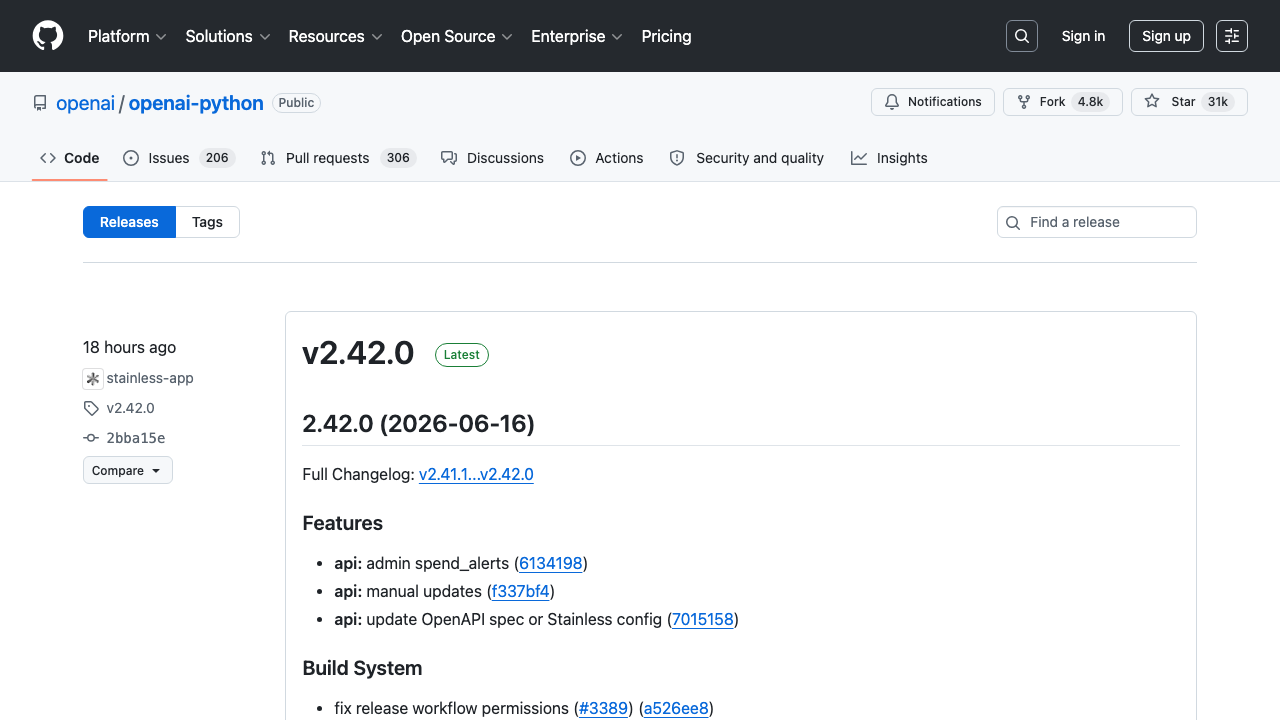
If you load that page today, you will see version headings, changelog snippets, timestamps, and asset links. That is exactly what we will parse.
Setup
python -m venv .venv
source .venv/bin/activate
pip install requests beautifulsoup4 lxml
We will use:
requestsfor HTTPBeautifulSoupwithlxmlfor parsing
Step 1: Fetch the releases page
Start with a small fetch helper that gives you timeouts and a real User-Agent.
from __future__ import annotations

import requests

TIMEOUT = (10, 30)
UA = "Mozilla/5.0 (compatible; ProxiesAPIGuidesBot/1.0; +https://www.proxiesapi.com/)"

session = requests.Session()
session.headers.update({"User-Agent": UA})


def fetch_html(url: str) -> str:
    r = session.get(url, timeout=TIMEOUT)
    r.raise_for_status()
    return r.text


url = "https://github.com/openai/openai-python/releases"
html = fetch_html(url)
print("html bytes:", len(html))
print(html[:200])
Sanity check in the terminal:
curl -s https://github.com/openai/openai-python/releases | head -n 20
You should see a normal HTML document.
Step 2: Understand the page structure
GitHub does not guarantee a public HTML contract for releases pages, so do not hard-code one brittle selector and call it done.
The page usually contains:
- links to release pages such as
/openai/openai-python/releases/tag/v2.41.0 relative-timeelements for publication timestamps- markdown-rendered release notes
- asset links under each release
The reliable strategy is:
- find each release block by locating a release-tag link
- walk outward to the nearest section/article container
- extract fields with fallbacks
That keeps the scraper alive when cosmetic classes change.
Step 3: Parse release blocks
from bs4 import BeautifulSoup
from urllib.parse import urljoin


def clean_text(node) -> str:
    if not node:
        return ""
    return " ".join(node.get_text("\n", strip=True).split())


def parse_releases(html: str, repo_url: str) -> list[dict]:
    soup = BeautifulSoup(html, "lxml")
    out: list[dict] = []
    seen = set()

    tag_links = soup.select('a[href*="/releases/tag/"]')

    for link in tag_links:
        href = link.get("href", "")
        if not href or href in seen:
            continue
        seen.add(href)

        block = (
            link.find_parent("section")
            or link.find_parent("article")
            or link.find_parent("div")
        )
        if block is None:
            continue

        tag = link.get_text(" ", strip=True)
        release_url = urljoin(repo_url, href)

        heading = block.find(["h1", "h2", "h3"])
        title = heading.get_text(" ", strip=True) if heading else tag

        time_el = block.select_one("relative-time, time")
        published = None
        if time_el:
            published = time_el.get("datetime") or time_el.get_text(" ", strip=True)

        notes_container = (
            block.select_one('[data-test-selector="release-body"]')
            or block.select_one(".markdown-body")
            or block
        )
        notes = clean_text(notes_container)

        assets = []
        for asset_link in block.select('a[href*="/releases/download/"]'):
            asset_href = asset_link.get("href", "")
            if not asset_href:
                continue
            assets.append({
                "name": asset_link.get_text(" ", strip=True),
                "url": urljoin(repo_url, asset_href),
            })

        out.append({
            "tag": tag,
            "title": title,
            "published": published,
            "release_url": release_url,
            "notes": notes,
            "assets": assets,
        })

    return out
Run it:
repo_url = "https://github.com/openai/openai-python"
rows = parse_releases(html, repo_url)
print("releases:", len(rows))
print(rows[0])
Typical output:
releases: 10
{'tag': 'v2.41.0', 'title': '2.41.0 (2026-06-03)', 'published': '2026-06-03T22:39:00Z', ...}
Step 4: Extract just the fields you care about
For monitoring, you usually do not need the entire HTML blob. Keep a clean record shape.
import json
from pathlib import Path


def normalize_release(row: dict) -> dict:
    return {
        "tag": row["tag"],
        "title": row["title"],
        "published": row["published"],
        "release_url": row["release_url"],
        "asset_count": len(row["assets"]),
        "asset_names": [a["name"] for a in row["assets"]],
        "notes_preview": row["notes"][:500],
    }


normalized = [normalize_release(r) for r in rows]
Path("github_releases.json").write_text(
    json.dumps(normalized, ensure_ascii=False, indent=2),
    encoding="utf-8",
)
print("wrote github_releases.json")
This gives you a file that is easy to diff between runs.
Step 5: Detect newly published releases
If you run this daily, compare the latest snapshot against the previous one.
from pathlib import Path
import json


def load_json(path: str) -> list[dict] | None:
    p = Path(path)
    if not p.exists():
        return None
    return json.loads(p.read_text("utf-8"))


current = normalized
previous = load_json("github_releases_prev.json")

if previous:
    old_tags = {item["tag"] for item in previous}
    new_releases = [item for item in current if item["tag"] not in old_tags]
    print("new tags:", [r["tag"] for r in new_releases])

Path("github_releases_prev.json").write_text(
    json.dumps(current, ensure_ascii=False, indent=2),
    encoding="utf-8",
)
That is enough for a Slack alert, email digest, or internal changelog bot.
Step 6: Add a stable fallback
GitHub also exposes Atom feeds for releases:
https://github.com/openai/openai-python/releases.atom
The page scraper is useful because it exposes notes and assets the way humans see them, but the Atom feed is a good fallback for discovery if the HTML changes.
A pragmatic production setup is:
- use Atom to detect “a new release exists”
- fetch the release page for the full notes and asset list
That reduces how often you need to parse large HTML pages.
Using ProxiesAPI
GitHub is usually friendly, but monitors that track many repositories can still benefit from a stable network layer.
curl "http://api.proxiesapi.com/?key=API_KEY&url=https://github.com/openai/openai-python/releases"
Python version:
from urllib.parse import urlencode


def proxiesapi_url(target_url: str, api_key: str) -> str:
    return "http://api.proxiesapi.com/?" + urlencode({
        "key": api_key,
        "url": target_url,
    })


html = fetch_html(
    proxiesapi_url(
        "https://github.com/openai/openai-python/releases",
        "YOUR_API_KEY",
    )
)
The rest of the parser stays exactly the same.
Practical tips
1) Parse defensively
Do not assume one class name will survive forever. Prefer:
- href patterns like
/releases/tag/ - semantic tags like
relative-time - multiple fallbacks for notes blocks
2) Keep notes separate from summaries
Store the raw notes text, but also store a short preview field for dashboards. That makes diffing and alerting cheaper.
3) Validate the result
If a page returns 200 but you parse zero releases, treat that as a failure. That is often selector drift or a soft block, not “no releases”.
4) Avoid over-fetching
If the repo only releases monthly, hitting it every minute is noise. Match your schedule to the target.
Final script
Here is the smallest end-to-end version you can drop into a monitor:
import json

repo_url = "https://github.com/openai/openai-python"
html = fetch_html(f"{repo_url}/releases")
releases = parse_releases(html, repo_url)

if not releases:
    raise RuntimeError("No releases parsed; possible layout change or soft block")

with open("github_releases.json", "w", encoding="utf-8") as f:
    json.dump(releases, f, ensure_ascii=False, indent=2)

print("saved", len(releases), "releases")
If you want a simple release watcher, this is one of the cleanest places to start.
Watching one repo is easy. Watching dozens on a schedule is where flaky networking shows up. ProxiesAPI gives you a stable fetch layer when your release monitor grows.