
Scrape GitHub Repository Data
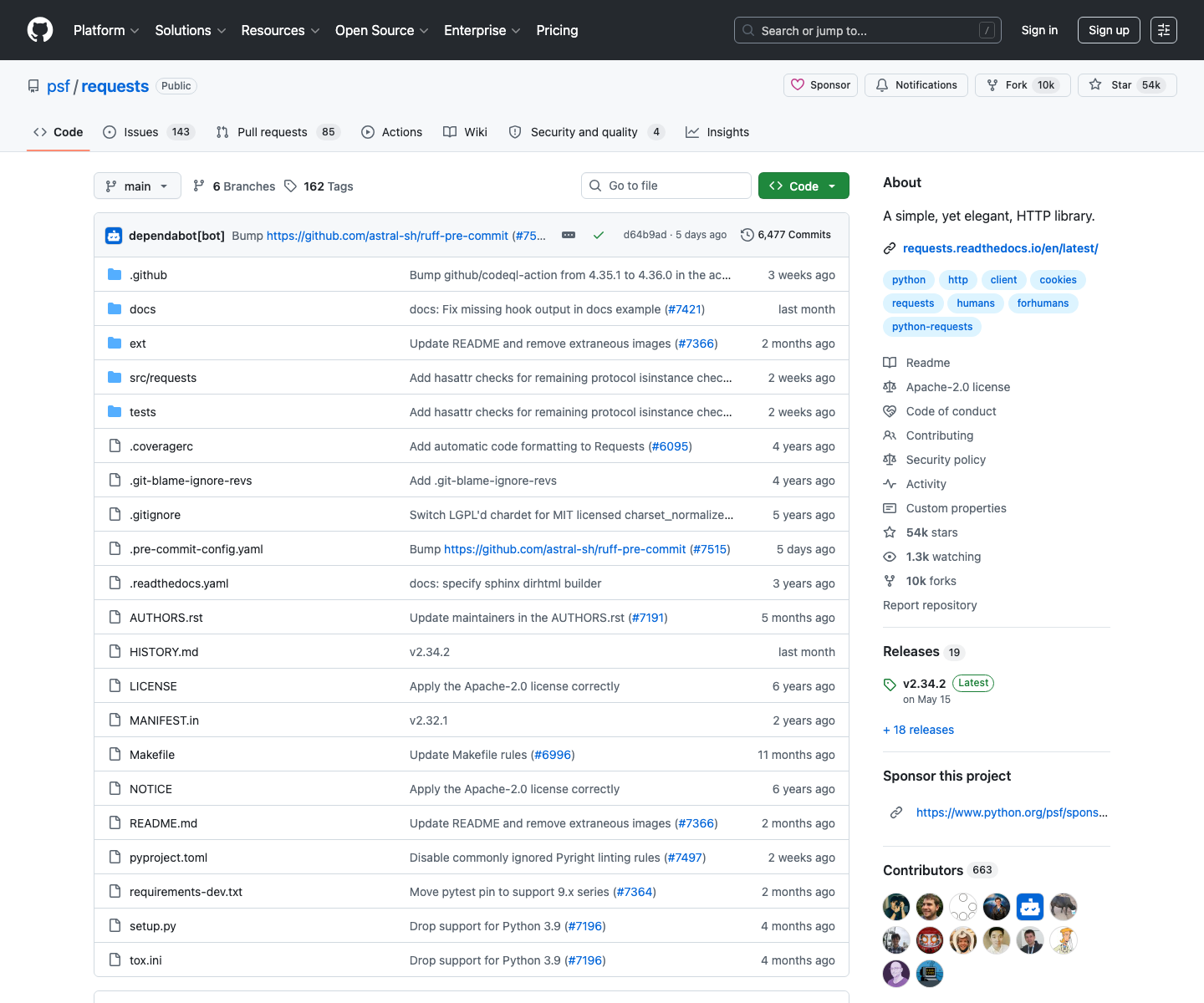
GitHub already has a public API, so why scrape the HTML at all? Because for fast competitor research, HTML is often the shortest path to the exact information humans see on the page: repo name, stars, forks, topics, release cadence, and last-updated metadata.
In this tutorial we will build a Python scraper that:
- fetches repository pages directly
- extracts repo identity, stars, forks, topics, and last release date
- handles GitHub-style abbreviated counts like
1.3k - exports rows to CSV for further analysis
- keeps ProxiesAPI isolated to the fetch layer
GitHub is often easy to parse at low volume, but research workflows can balloon into hundreds of pages and detail requests. ProxiesAPI gives you a cleaner way to add retries and rotation without rebuilding your scraper.
What to scrape on a repository page
For market and competitor research, the HTML repository page is usually enough. A good baseline record contains:
ownerrepostarsforkstopicslatest_release_taglatest_release_date
GitHub’s markup changes occasionally, so the safest strategy is to rely on stable patterns:
- star link:
a[href$="/stargazers"] - fork link:
a[href$="/forks"] - topics:
a.topic-tag - release tag:
a[href*="/releases/tag/"] - release date:
relative-time
Those selectors are much less brittle than trying to anchor to one giant layout container.
Setup
python3 -m venv .venv
source .venv/bin/activate
pip install requests beautifulsoup4 lxml
We will scrape repository pages such as:
https://github.com/psf/requestshttps://github.com/pallets/flaskhttps://github.com/fastapi/fastapi
That is enough to build a useful comparison sheet for tools in the same category.
Step 1: Fetch HTML with retries and optional ProxiesAPI
import os
import random
import re
import time
from urllib.parse import quote

import requests

TIMEOUT = (10, 40)
UA = "Mozilla/5.0 (Macintosh; Intel Mac OS X 10_15_7) AppleWebKit/537.36 (KHTML, like Gecko) Chrome/126.0 Safari/537.36"

session = requests.Session()
session.headers.update({"User-Agent": UA, "Accept-Language": "en-US,en;q=0.9"})


def proxiesapi_url(target_url: str) -> str:
    key = os.environ.get("PROXIESAPI_KEY")
    if not key:
        return target_url
    return f"http://api.proxiesapi.com/?auth_key={quote(key)}&url={quote(target_url, safe='')}"


def fetch_html(target_url: str, max_retries: int = 4) -> str:
    last_error = None
    for attempt in range(1, max_retries + 1):
        try:
            response = session.get(proxiesapi_url(target_url), timeout=TIMEOUT)
            response.raise_for_status()
            if len(response.text) < 5000:
                raise ValueError("unexpectedly short HTML")
            return response.text
        except Exception as exc:
            last_error = exc
            if attempt == max_retries:
                break
            time.sleep(min(10, 1.7 ** attempt) + random.uniform(0, 0.5))
    raise RuntimeError(f"failed to fetch {target_url}: {last_error}")
If your workflow is just a few repositories, direct requests may be enough. If you are pulling dozens or hundreds of pages repeatedly, ProxiesAPI becomes useful because you can keep the scraping logic unchanged and only swap the transport.
Step 2: Count parser for GitHub-style abbreviations
GitHub often shows counts as 915, 1.3k, or 2.1m. Normalize those before exporting.
def parse_count(text: str | None) -> int | None:
    if not text:
        return None

    value = text.lower().replace(",", "").strip()
    match = re.search(r"([0-9]*\.?[0-9]+)\s*([km])?", value)
    if not match:
        return None

    number = float(match.group(1))
    suffix = match.group(2)

    if suffix == "k":
        return int(number * 1_000)
    if suffix == "m":
        return int(number * 1_000_000)
    return int(number)
That one helper makes your CSV sortable again.
Step 3: Parse one repository page
from urllib.parse import urlparse
from bs4 import BeautifulSoup


def first_text(soup: BeautifulSoup, selectors: list[str]) -> str | None:
    for selector in selectors:
        node = soup.select_one(selector)
        if node:
            text = " ".join(node.get_text(" ", strip=True).split())
            if text:
                return text
    return None


def parse_repo_page(repo_url: str, html: str) -> dict:
    soup = BeautifulSoup(html, "lxml")

    parts = urlparse(repo_url).path.strip("/").split("/")
    owner, repo = parts[:2]

    stars_text = first_text(soup, ['a[href$="/stargazers"] strong', 'a[href$="/stargazers"]'])
    forks_text = first_text(soup, ['a[href$="/forks"] strong', 'a[href$="/forks"]'])
    release_tag = first_text(soup, ['a[href*="/releases/tag/"]'])

    release_time = soup.select_one("relative-time")
    topics = [
        " ".join(tag.get_text(" ", strip=True).split())
        for tag in soup.select("a.topic-tag")
    ]

    return {
        "owner": owner,
        "repo": repo,
        "repo_url": repo_url,
        "stars": parse_count(stars_text),
        "forks": parse_count(forks_text),
        "topics": ", ".join(topics),
        "latest_release_tag": release_tag,
        "latest_release_date": release_time.get("datetime") if release_time else None,
    }
Why scrape per-repository pages instead of just the search page? Because the repository page gives you cleaner topic tags and release metadata, which are usually the first things you want in competitor research.
Step 4: Crawl a list of repositories and export CSV
import csv


def scrape_repositories(repo_urls: list[str]) -> list[dict]:
    rows = []
    for repo_url in repo_urls:
        html = fetch_html(repo_url)
        rows.append(parse_repo_page(repo_url, html))
    return rows


def write_csv(path: str, rows: list[dict]) -> None:
    fieldnames = [
        "owner",
        "repo",
        "repo_url",
        "stars",
        "forks",
        "topics",
        "latest_release_tag",
        "latest_release_date",
    ]
    with open(path, "w", newline="", encoding="utf-8") as f:
        writer = csv.DictWriter(f, fieldnames=fieldnames)
        writer.writeheader()
        for row in rows:
            writer.writerow(row)


if __name__ == "__main__":
    targets = [
        "https://github.com/psf/requests",
        "https://github.com/pallets/flask",
        "https://github.com/fastapi/fastapi",
    ]
    rows = scrape_repositories(targets)
    write_csv("github_repos.csv", rows)
    print(f"wrote {len(rows)} rows to github_repos.csv")
Sample output columns:
| owner | repo | stars | forks | topics | latest_release_tag |
|---|---|---|---|---|---|
| psf | requests | 53000 | 9500 | python, http, requests | v2.32.5 |
That is already enough to compare maturity, adoption, and scope across competing repositories.
When HTML scraping is the right call
Use repository-page scraping when:
- you want exactly what users see
- you only need lightweight research
- you prefer one scraping stack across many sites
Use the GitHub API when:
- you need authenticated access
- you want issue, PR, or release pagination at scale
- you need long-term schema stability
That tradeoff looks like this:
| Approach | Best for | Main tradeoff |
|---|---|---|
| HTML scraping | fast competitor scans, visible metadata | selectors can drift |
| GitHub API | structured bulk extraction | more endpoint-specific code |
The important point is not to overcomplicate the first version. If your actual job is market research, a clean HTML-first scraper often gets you to answers faster.
GitHub is often easy to parse at low volume, but research workflows can balloon into hundreds of pages and detail requests. ProxiesAPI gives you a cleaner way to add retries and rotation without rebuilding your scraper.