
Scrape GitHub Trending Developers with Python
GitHub Trending Developers is a handy page when you want a quick leaderboard of who is shipping popular work in a language right now.
For recruiting, competitor research, OSS scouting, or creator tracking, the page is useful because it already bundles:
- display name
- username
- avatar image
- language context
- the developer's currently highlighted popular repository
In this guide we will turn that page into a small daily dataset you can save as JSON or CSV.
Mandatory screenshot of the page we will parse:
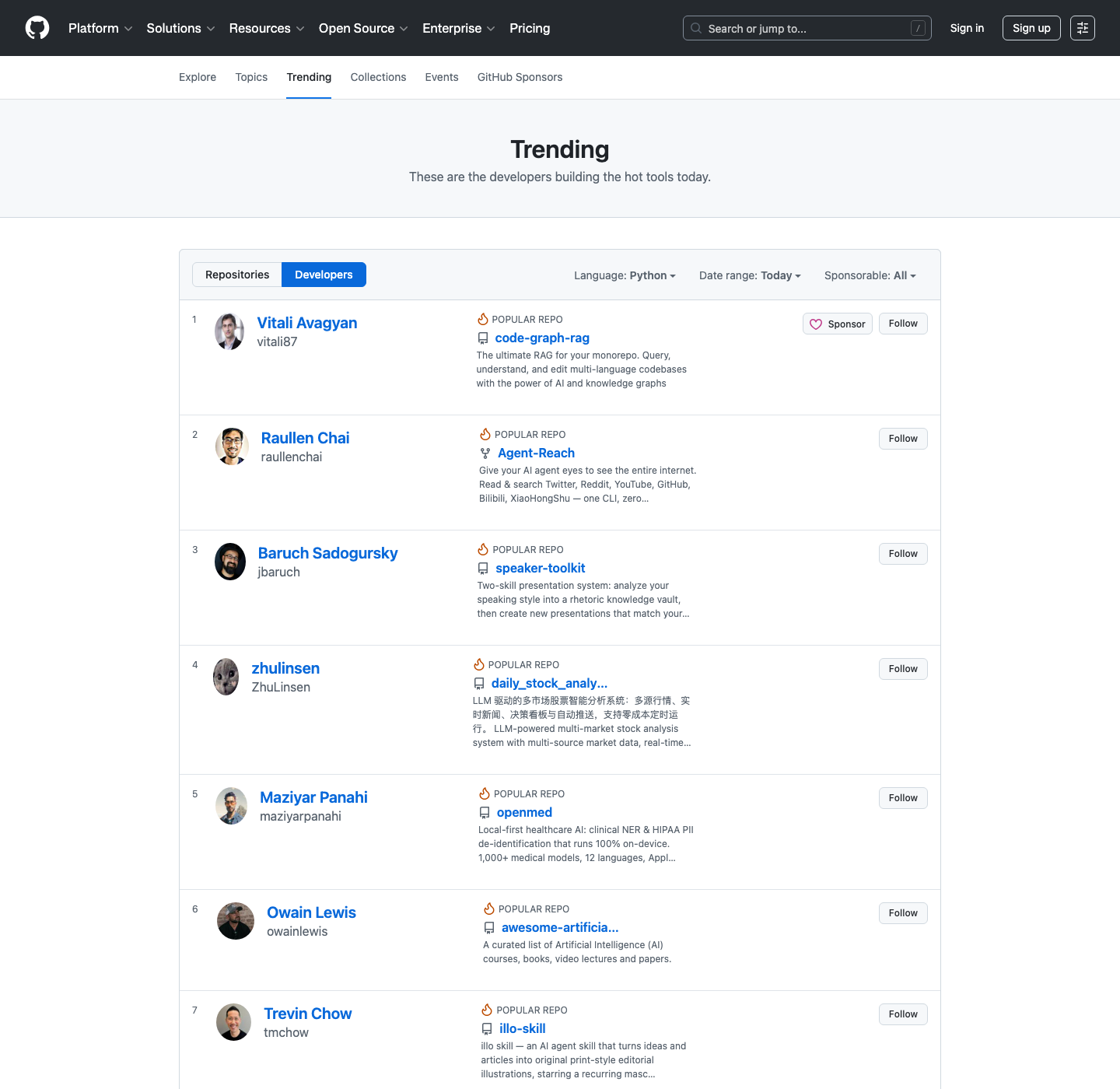
GitHub trending pages are lightweight, but trend monitoring usually grows into repo, issue, and profile crawls. ProxiesAPI gives you a clean fetch layer before that wider job becomes flaky.
The page structure we care about
Today the language-specific page lives at:
https://github.com/trending/developers/python?since=daily
The useful server-rendered hooks on the current page are:
- each developer card:
article.Box-row - display name:
h1.h3 a - username:
p.f4 a - avatar:
img.avatar-user - highlighted repo name:
h1.h4 a
That is enough to collect a clean leaderboard without clicking into individual profiles.
Quick HTML sanity check:
curl -L -s "https://github.com/trending/developers/python?since=daily" | head -n 20
If you save the page locally and inspect one row, you should see an article with class Box-row d-flex containing both the person block and the highlighted repo block.
Setup
python3 -m venv .venv
source .venv/bin/activate
pip install requests beautifulsoup4 lxml pandas
We will use:
requestsfor fetchingBeautifulSoupfor parsingpandasfor CSV export
Step 1: Build a fetch helper with optional ProxiesAPI
The parser should not care whether you fetch directly or via a managed proxy layer.
from __future__ import annotations

import os
import random
import time
from urllib.parse import quote

import requests

PROXIESAPI_KEY = os.getenv("PROXIESAPI_KEY", "").strip()
TIMEOUT = (10, 40)

session = requests.Session()
session.headers.update(
    {
        "User-Agent": (
            "Mozilla/5.0 (Macintosh; Intel Mac OS X 10_15_7) "
            "AppleWebKit/537.36 (KHTML, like Gecko) "
            "Chrome/137.0.0.0 Safari/537.36"
        ),
        "Accept-Language": "en-US,en;q=0.9",
    }
)


def proxiesapi_url(target_url: str) -> str:
    if not PROXIESAPI_KEY:
        return target_url
    return (
        "https://api.proxiesapi.com/?auth_key="
        + quote(PROXIESAPI_KEY, safe="")
        + "&url="
        + quote(target_url, safe="")
    )


def fetch(url: str, retries: int = 4) -> str:
    last_exc = None

    for attempt in range(1, retries + 1):
        try:
            response = session.get(proxiesapi_url(url), timeout=TIMEOUT)
            response.raise_for_status()
            html = response.text or ""
            if "TRENDING_DEVELOPERS_PAGE" not in html and "article.Box-row" not in html:
                raise RuntimeError("unexpected GitHub trending markup returned")
            return html
        except Exception as exc:
            last_exc = exc
            time.sleep(min(8, (1.7 ** attempt) + random.random()))

    raise RuntimeError(f"failed to fetch {url}: {last_exc}")
For a single check, direct fetch is usually fine. The ProxiesAPI wrapper matters when this turns into a recurring enrichment job across several languages or when you chain it with other GitHub pages.
Step 2: Parse one developer card
The page is still server-rendered enough that we can avoid brittle visual scraping.
from urllib.parse import urljoin

from bs4 import BeautifulSoup, Tag

BASE_URL = "https://github.com"


def text_or_none(node: Tag | None) -> str | None:
    if not node:
        return None
    text = node.get_text(" ", strip=True)
    return text or None


def absolute_url(href: str | None) -> str | None:
    return urljoin(BASE_URL + "/", href) if href else None


def parse_developer_card(card: Tag) -> dict:
    profile_link = card.select_one("h1.h3 a")
    username_link = card.select_one("p.f4 a")
    avatar = card.select_one("img.avatar-user")
    repo_link = card.select_one("h1.h4 a")
    repo_desc = card.select_one("article p")

    return {
        "rank": text_or_none(card.select_one('a[href^="#pa-"]')),
        "name": text_or_none(profile_link),
        "username": text_or_none(username_link),
        "profile_url": absolute_url(profile_link.get("href") if profile_link else None),
        "avatar_url": avatar.get("src") if avatar else None,
        "popular_repo": text_or_none(repo_link),
        "popular_repo_url": absolute_url(repo_link.get("href") if repo_link else None),
        "popular_repo_description": text_or_none(repo_desc),
    }
The repo description field is especially useful because it tells you why the developer is trending today without another request.
Step 3: Parse the whole leaderboard
def parse_trending_developers(html: str) -> list[dict]:
    soup = BeautifulSoup(html, "lxml")
    cards = soup.select("article.Box-row")

    developers = []
    for card in cards:
        row = parse_developer_card(card)
        if row["username"]:
            developers.append(row)

    return developers
Run it:
url = "https://github.com/trending/developers/python?since=daily"
html = fetch(url)
rows = parse_trending_developers(html)

print("developers:", len(rows))
print(rows[0])
Typical output:
developers: 25
{'rank': '1', 'name': 'Vitali Avagyan', 'username': 'vitali87', ...}
Step 4: Wrap it in a reusable script
This version adds metadata and lets you switch languages.
from datetime import datetime, timezone


def scrape_language(language: str = "python", since: str = "daily") -> list[dict]:
    url = f"https://github.com/trending/developers/{language}?since={since}"
    html = fetch(url)
    rows = parse_trending_developers(html)

    scraped_at = datetime.now(timezone.utc).isoformat()
    for row in rows:
        row["language"] = language
        row["since"] = since
        row["scraped_at"] = scraped_at

    return rows
Step 5: Export to JSON and CSV
import json
import pandas as pd

rows = scrape_language("python", "daily")

with open("github_trending_developers_python.json", "w", encoding="utf-8") as f:
    json.dump(rows, f, ensure_ascii=False, indent=2)

pd.DataFrame(rows).to_csv("github_trending_developers_python.csv", index=False)

print("saved", len(rows), "developers")
That gives you a file you can diff from day to day or load into a dashboard.
A few practical notes
- GitHub has APIs for many things, but the trending page itself is a presentation surface, so HTML parsing is the most direct route.
- Do not assume the CSS utility classes are permanent. Keep your parsing logic isolated in one function so selector updates are cheap.
- If you monitor multiple languages, add a short pause between requests and store snapshots so you can debug changes later.
When to move beyond this simple script
This pattern is enough if you only need a daily leaderboard.
Move to a broader workflow when you want to:
- compare developers across languages
- crawl the highlighted repos for stars or topics
- enrich profiles with followers, company, or location
- watch trend changes over time
At that point, keeping fetch logic separate from parse logic pays off. You can change the transport layer without rewriting the extraction code.
Final script
from __future__ import annotations

import json
import os
import random
import time
from datetime import datetime, timezone
from urllib.parse import quote, urljoin

import pandas as pd
import requests
from bs4 import BeautifulSoup, Tag

PROXIESAPI_KEY = os.getenv("PROXIESAPI_KEY", "").strip()
TIMEOUT = (10, 40)
BASE_URL = "https://github.com"

session = requests.Session()
session.headers.update(
    {
        "User-Agent": (
            "Mozilla/5.0 (Macintosh; Intel Mac OS X 10_15_7) "
            "AppleWebKit/537.36 (KHTML, like Gecko) "
            "Chrome/137.0.0.0 Safari/537.36"
        ),
        "Accept-Language": "en-US,en;q=0.9",
    }
)


def proxiesapi_url(target_url: str) -> str:
    if not PROXIESAPI_KEY:
        return target_url
    return (
        "https://api.proxiesapi.com/?auth_key="
        + quote(PROXIESAPI_KEY, safe="")
        + "&url="
        + quote(target_url, safe="")
    )


def fetch(url: str, retries: int = 4) -> str:
    last_exc = None
    for attempt in range(1, retries + 1):
        try:
            response = session.get(proxiesapi_url(url), timeout=TIMEOUT)
            response.raise_for_status()
            html = response.text or ""
            if "TRENDING_DEVELOPERS_PAGE" not in html and "article.Box-row" not in html:
                raise RuntimeError("unexpected GitHub trending markup returned")
            return html
        except Exception as exc:
            last_exc = exc
            time.sleep(min(8, (1.7 ** attempt) + random.random()))
    raise RuntimeError(f"failed to fetch {url}: {last_exc}")


def text_or_none(node: Tag | None) -> str | None:
    if not node:
        return None
    text = node.get_text(" ", strip=True)
    return text or None


def absolute_url(href: str | None) -> str | None:
    return urljoin(BASE_URL + "/", href) if href else None


def parse_developer_card(card: Tag) -> dict:
    profile_link = card.select_one("h1.h3 a")
    username_link = card.select_one("p.f4 a")
    avatar = card.select_one("img.avatar-user")
    repo_link = card.select_one("h1.h4 a")
    repo_desc = card.select_one("article p")

    return {
        "rank": text_or_none(card.select_one('a[href^="#pa-"]')),
        "name": text_or_none(profile_link),
        "username": text_or_none(username_link),
        "profile_url": absolute_url(profile_link.get("href") if profile_link else None),
        "avatar_url": avatar.get("src") if avatar else None,
        "popular_repo": text_or_none(repo_link),
        "popular_repo_url": absolute_url(repo_link.get("href") if repo_link else None),
        "popular_repo_description": text_or_none(repo_desc),
    }


def parse_trending_developers(html: str) -> list[dict]:
    soup = BeautifulSoup(html, "lxml")
    return [
        parse_developer_card(card)
        for card in soup.select("article.Box-row")
        if text_or_none(card.select_one("p.f4 a"))
    ]


def scrape_language(language: str = "python", since: str = "daily") -> list[dict]:
    url = f"https://github.com/trending/developers/{language}?since={since}"
    rows = parse_trending_developers(fetch(url))
    scraped_at = datetime.now(timezone.utc).isoformat()
    for row in rows:
        row["language"] = language
        row["since"] = since
        row["scraped_at"] = scraped_at
    return rows


if __name__ == "__main__":
    rows = scrape_language("python", "daily")
    with open("github_trending_developers_python.json", "w", encoding="utf-8") as f:
        json.dump(rows, f, ensure_ascii=False, indent=2)
    pd.DataFrame(rows).to_csv("github_trending_developers_python.csv", index=False)
    print("saved", len(rows), "developers")
That is enough to turn GitHub Trending Developers into a repeatable language leaderboard dataset.
GitHub trending pages are lightweight, but trend monitoring usually grows into repo, issue, and profile crawls. ProxiesAPI gives you a clean fetch layer before that wider job becomes flaky.