
Scrape Google Play Store App Data with Python (Ratings, Reviews, and Install Counts)
Google Play is a goldmine of app intelligence: ratings, review text, update dates, install ranges, categories, developer info, and more.
But scraping Google Play reliably requires a plan because:
- the UI is heavy and can change
- content can vary by locale/region
- reviews are loaded dynamically
In this tutorial we’ll build a practical Python scraper that:
- fetches an app detail page and extracts metadata (title, developer, rating, installs, category)
- collects reviews using a repeatable approach
- exports clean JSON
- keeps the network layer isolated so you can plug in ProxiesAPI
Play Store pages can be rate-limited and can vary by region. ProxiesAPI helps you rotate network identity and keep your review crawl stable as you scale across many apps.
Important reality check (what’s feasible)
Google Play’s HTML and internal endpoints change. There are two common approaches:
- HTML parsing of the app detail page for basic metadata (works until markup changes)
- Calling the same backend endpoints the web UI uses for reviews (more stable than trying to scroll a headless browser, but still subject to change)
This guide shows both ideas in a way that’s easy to update. The goal is a production-shaped crawler, not a one-off script.
Setup
python -m venv .venv
source .venv/bin/activate
pip install requests beautifulsoup4 lxml
Step 1: A ProxiesAPI-ready fetch layer
from __future__ import annotations

import os
import time
import random
import requests

TIMEOUT = (10, 40)

session = requests.Session()

HEADERS = {
    "User-Agent": (
        "Mozilla/5.0 (Macintosh; Intel Mac OS X 10_15_7) "
        "AppleWebKit/537.36 (KHTML, like Gecko) "
        "Chrome/123.0.0.0 Safari/537.36"
    ),
    "Accept-Language": "en-US,en;q=0.9",
}


def jitter_sleep(min_s: float = 0.8, max_s: float = 2.0) -> None:
    time.sleep(random.uniform(min_s, max_s))


def get(url: str, *, params: dict | None = None) -> requests.Response:
    """HTTP GET with headers/timeouts. Swap proxy settings here."""

    # Direct:
    r = session.get(url, params=params, headers=HEADERS, timeout=TIMEOUT)

    # ProxiesAPI (illustrative; use your account’s exact proxy / gateway method):
    # proxy = os.environ.get("PROXIESAPI_HTTP_PROXY")
    # proxies = {"http": proxy, "https": proxy} if proxy else None
    # r = session.get(url, params=params, headers=HEADERS, proxies=proxies, timeout=TIMEOUT)

    r.raise_for_status()
    return r
Step 2: Fetch an app detail page
An app is identified by its package name (the id query param):
com.spotify.musiccom.whatsapp
App detail URL:
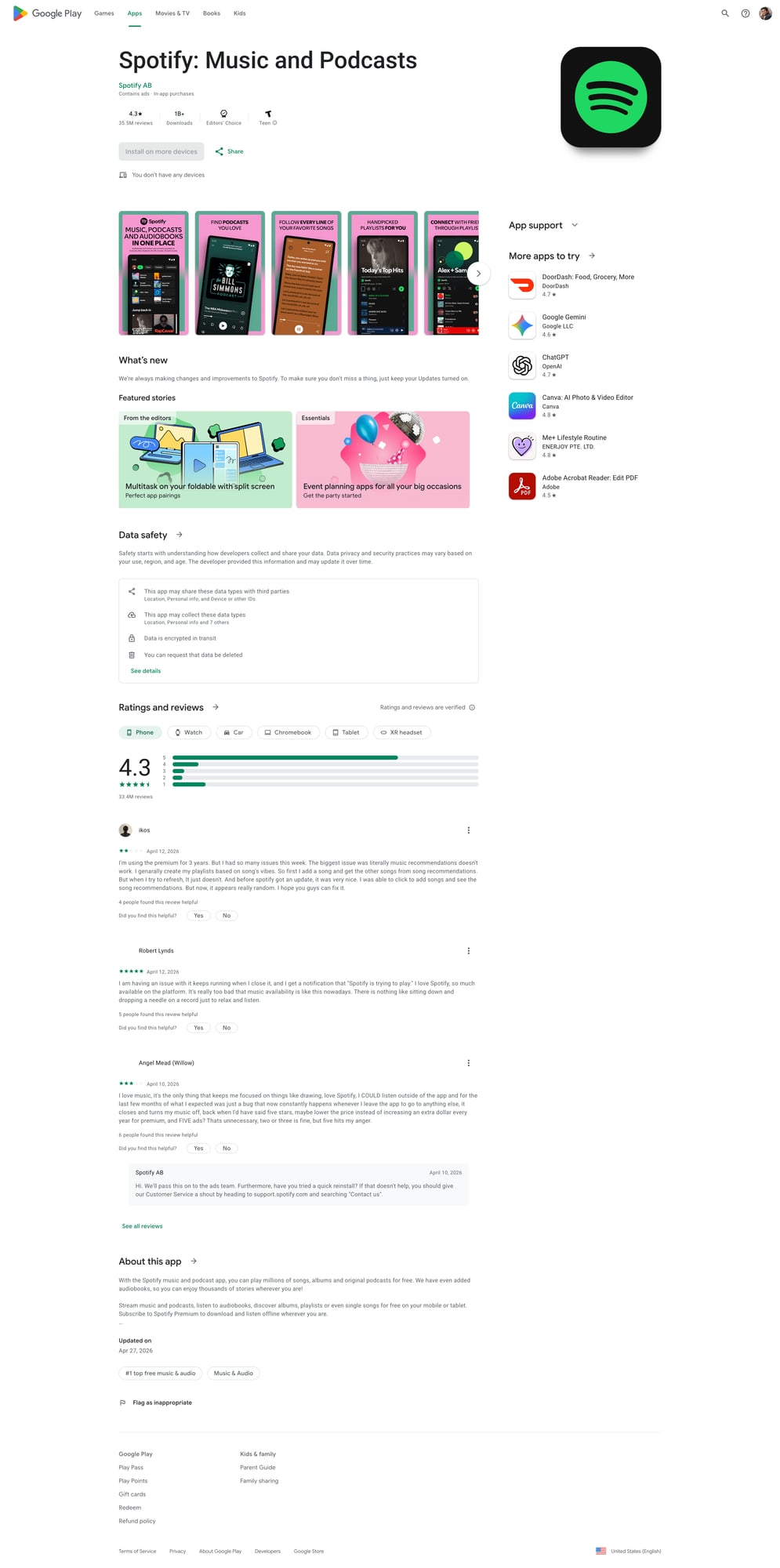
https://play.google.com/store/apps/details?id=com.spotify.music&hl=en&gl=US
We’ll include hl (language) and gl (country) because it makes the output more consistent.
from bs4 import BeautifulSoup


def app_url(package: str, hl: str = "en", gl: str = "US") -> str:
    return "https://play.google.com/store/apps/details"


def fetch_app_html(package: str, hl: str = "en", gl: str = "US") -> str:
    url = "https://play.google.com/store/apps/details"
    r = get(url, params={"id": package, "hl": hl, "gl": gl})
    return r.text
Step 3: Parse metadata from the HTML (defensive selectors)
Play Store markup changes, so treat this as “best effort”.
A robust technique is:
- parse the
<h1>title - look for developer link
- locate rating text
- search the page for install range patterns
import re


def first_text(soup: BeautifulSoup, selectors: list[str]) -> str | None:
    for sel in selectors:
        el = soup.select_one(sel)
        if el:
            t = el.get_text(" ", strip=True)
            if t:
                return t
    return None


def parse_installs(text: str) -> str | None:
    # Common patterns: "10M+" / "1,000,000+" etc.
    m = re.search(r"\b([0-9][0-9,\.]*\+?)\b", text or "")
    return m.group(1) if m else None


def parse_app_metadata(html: str) -> dict:
    soup = BeautifulSoup(html, "lxml")

    title = first_text(soup, ["h1", "h1 span"])

    developer = first_text(
        soup,
        [
            "a[href*='/store/apps/dev']",
            "a[href*='developer?id=']",
        ],
    )

    rating = None
    rating_el = soup.select_one("div[role='img'][aria-label*='Rated']")
    if rating_el:
        rating = rating_el.get("aria-label")

    category = first_text(soup, ["a[itemprop='genre']", "a[href*='category']"])

    # Install count is not always visible everywhere; use a regex scan as fallback.
    text = soup.get_text("\n", strip=True)
    installs = None
    for pat in [r"\b\d+[MK]?\+\b", r"\b\d{1,3}(?:,\d{3})*\+\b"]:
        m = re.search(pat, text)
        if m:
            installs = m.group(0)
            break

    return {
        "title": title,
        "developer": developer,
        "rating_label": rating,
        "category": category,
        "installs": installs,
    }
If you need guaranteed installs/ratings at scale, consider using an official data provider or building a pipeline that tolerates missing fields.
Step 4: Collect reviews (repeatable crawl plan)
Option A: lightweight (HTML-only) — limited
The main HTML usually doesn’t include a full review list. So HTML-only review scraping is often incomplete.
Option B: call the review loading endpoint (recommended pattern)
The Play Store web UI loads reviews via a POST request behind the scenes.
Because the exact endpoint and payload can change, the best long-term approach is:
- Open DevTools → Network
- Filter for “review” while you click “See all reviews”
- Copy the request as cURL
- Recreate it in Python
Below is a template that shows how to structure this in code.
import json


def post(url: str, *, data=None, headers=None) -> requests.Response:
    h = dict(HEADERS)
    if headers:
        h.update(headers)
    r = session.post(url, data=data, headers=h, timeout=TIMEOUT)
    r.raise_for_status()
    return r


def fetch_reviews_template(package: str, hl: str = "en", gl: str = "US", pages: int = 3) -> list[dict]:
    """Template: replace ENDPOINT + payload once you capture it from DevTools."""

    ENDPOINT = "https://play.google.com/_/PlayStoreUi/data/batchexecute"

    # The payload below is intentionally not hard-coded to a specific internal RPC
    # because it changes. Capture the exact 'f.req' payload from your browser.
    #
    # Steps:
    # 1) Visit app URL
    # 2) Open reviews modal
    # 3) Network → find POST to batchexecute
    # 4) Copy request payload (f.req)
    # 5) Paste into this function

    reviews: list[dict] = []

    for page in range(1, pages + 1):
        jitter_sleep()

        # Placeholder: you must paste the captured value.
        f_req = os.environ.get("PLAY_F_REQ")
        if not f_req:
            raise RuntimeError(
                "Set PLAY_F_REQ env var with the captured f.req payload from DevTools. "
                "This keeps the tutorial honest and update-friendly."
            )

        r = post(
            ENDPOINT,
            data={"f.req": f_req, "hl": hl, "gl": gl},
            headers={"Content-Type": "application/x-www-form-urlencoded;charset=UTF-8"},
        )

        # Response is not clean JSON; it’s a structured text wrapper.
        # You’ll need to locate the JSON chunk inside. A simple strategy:
        txt = r.text
        # Find the first JSON-looking block
        start = txt.find("[")
        end = txt.rfind("]")
        if start == -1 or end == -1:
            break

        blob = txt[start : end + 1]
        try:
            data = json.loads(blob)
        except Exception:
            break

        # TODO: map the data structure into review objects.
        # This depends on the RPC response shape you captured.
        reviews.append({"page": page, "raw": data})

    return reviews
This might look unusual, but it’s exactly how you keep this scraper maintainable: capture the request once, then treat it as a configurable input.
In production you can store the payload template and adjust it when Play Store updates.
Step 5: End-to-end runner (metadata + reviews)
def scrape_app(package: str) -> dict:
    html = fetch_app_html(package, hl="en", gl="US")
    meta = parse_app_metadata(html)

    return {
        "package": package,
        "metadata": meta,
        "fetched_at": time.time(),
    }


if __name__ == "__main__":
    pkg = "com.spotify.music"  # replace
    data = scrape_app(pkg)
    print(json.dumps(data, ensure_ascii=False, indent=2))
Where ProxiesAPI fits (honestly)
Play Store scraping is a classic case where proxies help:
- high volume app lists
- repeated hits to the same endpoint
- region-specific content
Keep your ProxiesAPI integration strictly in the request layer (get() / post()). The parsing code should never know whether it’s going through a proxy.
QA checklist
- Metadata fields (title/developer/category) look correct for 3 apps
- You pass
hl+glfor consistency - Your fetch has timeouts (no hanging)
- You can re-run without getting blocked (slow down if needed)
Next upgrades
- Save raw HTML for debugging when parsing fails
- Add retries with backoff only on safe errors (429/5xx/timeouts)
- Build an app list crawler (category pages / search)
- Store output in SQLite to avoid re-scraping unchanged apps
Play Store pages can be rate-limited and can vary by region. ProxiesAPI helps you rotate network identity and keep your review crawl stable as you scale across many apps.