
Scrape Business Reviews from Yelp
Yelp is a goldmine of real-world signals: reviews, ratings, categories, and business metadata.
In this tutorial you’ll build a practical Yelp scraper in Python that:
- crawls a Yelp search page (e.g. “pizza in San Francisco”)
- extracts business URLs from the results
- visits each business page and collects review snippets + key fields
- writes outputs to JSON + CSV
Yelp pages are heavier than hobby targets. When you add pagination, detail pages, and retries, ProxiesAPI helps stabilize your fetch layer so your scraper can keep moving.
Important note (read this once)
Yelp actively defends against automated scraping. The goal of this guide is to show clean parsing + resilient crawling patterns (timeouts, retries, pacing, and stable selectors).
Be respectful:
- follow the site’s Terms of Service
- keep request volume low
- add delays and caching
- don’t scrape personal data
What we’re scraping (URLs and structure)
We’ll use two page types:
- Search results
Example:
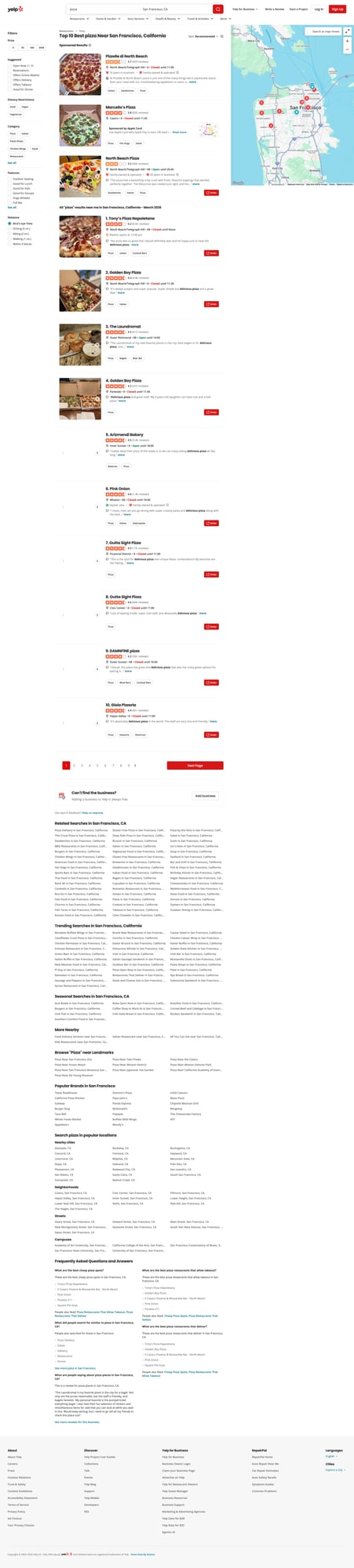
https://www.yelp.com/search?find_desc=pizza&find_loc=San%20Francisco%2C%20CA
On this page, the results contain links that look like:
/biz/tonys-pizza-napoletana-san-francisco?osq=pizza
- Business pages
Example:
https://www.yelp.com/biz/tonys-pizza-napoletana-san-francisco
On business pages we’ll extract:
- business name
- rating (when present)
- review count (when present)
- a few recent review snippets (text + rating + date when available)
Because Yelp can change markup, we’ll use multiple fallbacks in our selectors and always sanity-check.
Setup
python -m venv .venv
source .venv/bin/activate
pip install requests beautifulsoup4 lxml
We’ll use:
requestsfor HTTPBeautifulSoup(lxml)for robust parsing
Step 1: Fetching HTML with retries + timeouts
A “real” scraper does not hang forever or crash on one transient 503.
import random
import time
from typing import Optional

import requests

TIMEOUT = (10, 30)  # connect, read

session = requests.Session()
session.headers.update({
    "User-Agent": (
        "Mozilla/5.0 (Macintosh; Intel Mac OS X 10_15_7) "
        "AppleWebKit/537.36 (KHTML, like Gecko) "
        "Chrome/124.0.0.0 Safari/537.36"
    )
})


def fetch_html(url: str, *, max_retries: int = 4, backoff_base: float = 1.5) -> str:
    """Fetch HTML with retries and jitter.

    Raises requests.HTTPError for non-retriable errors.
    """
    last_err: Optional[Exception] = None

    for attempt in range(1, max_retries + 1):
        try:
            r = session.get(url, timeout=TIMEOUT)

            # Retry a few common transient status codes
            if r.status_code in (429, 500, 502, 503, 504):
                raise requests.HTTPError(f"{r.status_code} transient", response=r)

            r.raise_for_status()
            return r.text

        except Exception as e:
            last_err = e
            # exponential backoff with jitter
            sleep_s = (backoff_base ** attempt) + random.random()
            time.sleep(sleep_s)

    raise RuntimeError(f"Failed to fetch after {max_retries} attempts: {url} ({last_err})")
Step 2: Fetch via ProxiesAPI (drop-in)
ProxiesAPI lets you request a URL through their proxy layer.
cURL example
API_KEY="YOUR_API_KEY"
TARGET="https://www.yelp.com/search?find_desc=pizza&find_loc=San%20Francisco%2C%20CA"

curl "http://api.proxiesapi.com/?key=${API_KEY}&url=${TARGET}" | head -n 20
Python helper
import os
import urllib.parse

PROXIESAPI_KEY = os.getenv("PROXIESAPI_KEY", "API_KEY")


def proxiesapi_url(target_url: str) -> str:
    return "http://api.proxiesapi.com/?" + urllib.parse.urlencode({
        "key": PROXIESAPI_KEY,
        "url": target_url,
    })


def fetch_html_via_proxiesapi(target_url: str) -> str:
    gateway = proxiesapi_url(target_url)
    return fetch_html(gateway)
From this point onward, you can swap fetch_html(url) with fetch_html_via_proxiesapi(url).
Step 3: Parse business URLs from a Yelp search page
On the results page, we want to capture /biz/... links and dedupe them.
from bs4 import BeautifulSoup

BASE = "https://www.yelp.com"


def parse_search_business_urls(html: str) -> list[str]:
    soup = BeautifulSoup(html, "lxml")

    urls: list[str] = []
    seen = set()

    # Most organic results include /biz/ links.
    # We avoid /adredir and other redirectors.
    for a in soup.select('a[href^="/biz/"]'):
        href = a.get("href")
        if not href:
            continue

        # Strip querystring to normalize
        biz_path = href.split("?")[0]
        full = BASE + biz_path

        if full in seen:
            continue
        seen.add(full)
        urls.append(full)

    return urls
Quick sanity check
search_url = "https://www.yelp.com/search?find_desc=pizza&find_loc=San%20Francisco%2C%20CA"
html = fetch_html_via_proxiesapi(search_url)

biz_urls = parse_search_business_urls(html)
print("businesses:", len(biz_urls))
print(biz_urls[:5])
Typical output:
businesses: 10
['https://www.yelp.com/biz/tonys-pizza-napoletana-san-francisco', ...]
Step 4: Parse business details + review snippets
Yelp markup can vary, so we’ll prioritize:
- the canonical business name (from the page
<h1>) - rating + review count when present
- a handful of review snippets (best-effort)
import re


def text_or_none(el):
    return el.get_text(" ", strip=True) if el else None


def parse_float(text: str):
    m = re.search(r"(\d+(?:\.\d+)?)", text or "")
    return float(m.group(1)) if m else None


def parse_int(text: str):
    m = re.search(r"(\d+)", text or "")
    return int(m.group(1)) if m else None


def parse_business_page(html: str, url: str) -> dict:
    soup = BeautifulSoup(html, "lxml")

    name = text_or_none(soup.select_one("h1"))

    # Rating is often embedded in aria-label text like "4.2 star rating"
    rating = None
    rating_el = soup.select_one('[aria-label$="star rating"], [aria-label*="star rating"]')
    if rating_el:
        rating = parse_float(rating_el.get("aria-label", ""))

    # Review count is often near "reviews" text
    review_count = None
    for el in soup.select("span, a"):
        t = el.get_text(" ", strip=True)
        if t and "review" in t.lower():
            # Matches "8.6k reviews" or "459 reviews"
            if re.search(r"\d", t):
                # handle k shorthand
                t2 = t.lower().replace(",", "")
                mk = re.search(r"(\d+(?:\.\d+)?)\s*k\s+reviews", t2)
                if mk:
                    review_count = int(float(mk.group(1)) * 1000)
                    break

                mi = re.search(r"(\d+)\s+reviews", t2)
                if mi:
                    review_count = int(mi.group(1))
                    break

    # Review snippets: Yelp can render these in several ways.
    # We'll look for common containers that include readable text.
    snippets: list[dict] = []

    # Try common review text spans
    for block in soup.select("span[lang]"):
        txt = block.get_text(" ", strip=True)
        if not txt:
            continue
        # Heuristic: review snippets are usually longer than navigation labels.
        if len(txt) < 60:
            continue
        snippets.append({"text": txt})
        if len(snippets) >= 5:
            break

    return {
        "url": url,
        "name": name,
        "rating": rating,
        "review_count": review_count,
        "review_snippets": snippets,
    }
Terminal run (typical)
u = biz_urls[0]
page = fetch_html_via_proxiesapi(u)
data = parse_business_page(page, u)
print(data["name"], data["rating"], data["review_count"])
print("snippets:", len(data["review_snippets"]))
print(data["review_snippets"][0]["text"][:120])
Example output:
Tony’s Pizza Napoletana 4.2 8600
snippets: 5
The pizza was so good that I would definitely wait and be happy just to have the delicious pizza...
Step 5: Add pagination to your search crawl
Yelp search uses a start= query parameter.
Example:
- page 1:
.../search?... - page 2:
.../search?...&start=10 - page 3:
.../search?...&start=20
We’ll crawl N pages and collect business URLs.
from urllib.parse import urlencode, urlparse, parse_qs, urlunparse


def with_start_param(url: str, start: int) -> str:
    u = urlparse(url)
    q = parse_qs(u.query)
    q["start"] = [str(start)]
    new_query = urlencode(q, doseq=True)
    return urlunparse((u.scheme, u.netloc, u.path, u.params, new_query, u.fragment))


def crawl_search(search_url: str, pages: int = 3) -> list[str]:
    all_urls: list[str] = []
    seen = set()

    for i in range(pages):
        start = i * 10
        url = with_start_param(search_url, start)
        html = fetch_html_via_proxiesapi(url)
        batch = parse_search_business_urls(html)

        for b in batch:
            if b in seen:
                continue
            seen.add(b)
            all_urls.append(b)

        print("page", i + 1, "start", start, "batch", len(batch), "total", len(all_urls))

        # polite delay
        time.sleep(2 + random.random())

    return all_urls
Step 6: Full scraper (search → businesses → export)
import csv
import json


def scrape_yelp(search_url: str, pages: int = 2, max_businesses: int = 20) -> list[dict]:
    biz_urls = crawl_search(search_url, pages=pages)
    biz_urls = biz_urls[:max_businesses]

    out: list[dict] = []

    for idx, url in enumerate(biz_urls, start=1):
        print(f"[{idx}/{len(biz_urls)}] business", url)
        html = fetch_html_via_proxiesapi(url)
        out.append(parse_business_page(html, url))

        time.sleep(2 + random.random())

    return out


def export_json(path: str, rows: list[dict]) -> None:
    with open(path, "w", encoding="utf-8") as f:
        json.dump(rows, f, ensure_ascii=False, indent=2)


def export_csv(path: str, rows: list[dict]) -> None:
    # Flatten snippets into a single field for CSV
    flat = []
    for r in rows:
        snippets = " | ".join([s.get("text", "") for s in r.get("review_snippets", [])])
        flat.append({
            "url": r.get("url"),
            "name": r.get("name"),
            "rating": r.get("rating"),
            "review_count": r.get("review_count"),
            "review_snippets": snippets,
        })

    fieldnames = ["url", "name", "rating", "review_count", "review_snippets"]
    with open(path, "w", newline="", encoding="utf-8") as f:
        w = csv.DictWriter(f, fieldnames=fieldnames)
        w.writeheader()
        w.writerows(flat)


if __name__ == "__main__":
    search_url = "https://www.yelp.com/search?find_desc=pizza&find_loc=San%20Francisco%2C%20CA"
    rows = scrape_yelp(search_url, pages=2, max_businesses=15)

    export_json("yelp_businesses.json", rows)
    export_csv("yelp_businesses.csv", rows)

    print("done", len(rows))
QA checklist
- Search parsing returns a realistic number of
/biz/URLs - Business page parsing yields a non-empty
namefor most rows - Review snippet heuristic returns at least 1 long snippet for some pages
- Export files open cleanly
Where ProxiesAPI fits (honestly)
Yelp can be inconsistent for direct scraping: transient blocks, heavy markup, and frequent changes.
ProxiesAPI doesn’t “magically” solve everything — but it helps your crawler keep moving by stabilizing the request layer as you add:
- pagination
- more business pages
- retries
- long-running jobs
If you want to go further, the next upgrades are caching (to avoid refetching), a URL queue, and storing results in SQLite for incremental refreshes.
Yelp pages are heavier than hobby targets. When you add pagination, detail pages, and retries, ProxiesAPI helps stabilize your fetch layer so your scraper can keep moving.