
Scrape IMDb Search Results and Title Metadata with Python
IMDb is a good example of a target that looks easy at first and gets awkward once you automate it at scale.
For this workflow we want two things:
- search result cards for a keyword like
batman - richer title metadata from each matching movie or series page
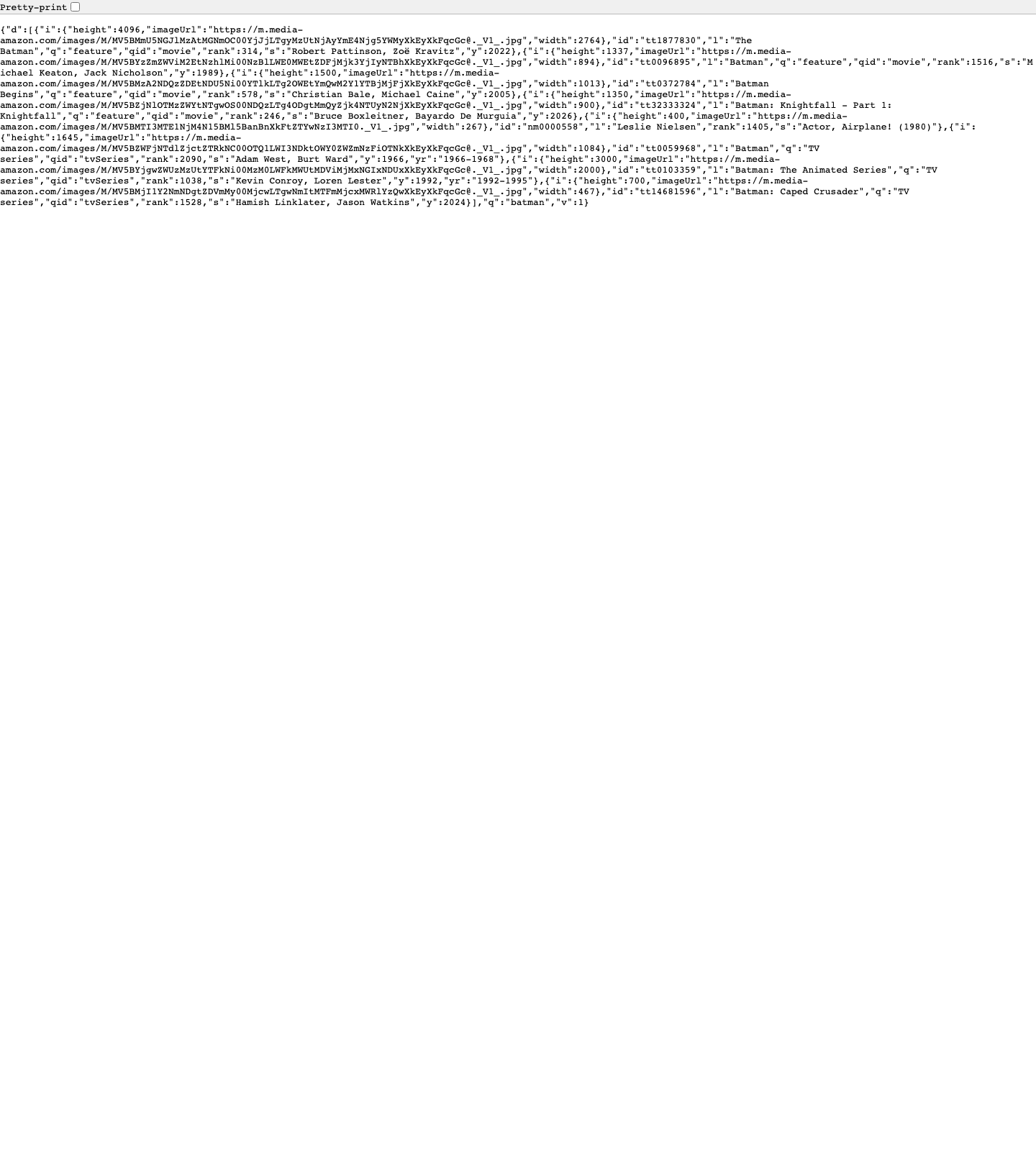
The catch is that IMDb does not always serve usable HTML to plain requests.get() calls. In this environment, direct requests to imdb.com/title/... returned empty 202 responses, while a headless browser hit 403 Forbidden. The part that did respond consistently was IMDb's search suggestion endpoint:
https://v3.sg.media-imdb.com/suggestion/x/batman.json
So the most practical pipeline is:
- fetch search suggestions from the IMDb suggestion JSON endpoint
- normalize those result cards into title ids and URLs
- fetch title pages through ProxiesAPI
- parse stable structured data from
application/ld+json
That gives you a real dataset without pretending IMDb is a friendly static HTML site.
In this environment, plain requests to IMDb title pages returned 202 or 403 responses. ProxiesAPI fits neatly as the fetch-layer wrapper so you can keep the parser code and stabilize the network layer.
What we are scraping
For a search like "batman", IMDb's suggestion payload returns compact result cards with fields such as:
- title id
- label / title
- year
- title type
- cast snippet
- image URL
Then each title page can provide richer metadata like:
- canonical URL
- aggregate rating
- genre list
- year / date published
- duration
That split is useful because it keeps the first stage cheap and the second stage selective.
Setup
python3 -m venv .venv
source .venv/bin/activate
pip install requests beautifulsoup4 lxml
Set your API key:
export PROXIESAPI_KEY="YOUR_KEY"
Step 1: Fetch IMDb search result cards from the suggestion endpoint
IMDb's suggestion endpoint is predictable:
- the path segment after
/suggestion/is usually the first character of the query - the file name is
{query}.json
For batman, that becomes:
https://v3.sg.media-imdb.com/suggestion/b/batman.json
Here is a reusable fetcher:
from __future__ import annotations

import csv
import json
import os
import re
from dataclasses import dataclass, asdict
from typing import Any
from urllib.parse import quote

import requests
from bs4 import BeautifulSoup

TIMEOUT = (10, 30)
IMDB_BASE = "https://www.imdb.com"

session = requests.Session()
session.headers.update(
    {
        "User-Agent": (
            "Mozilla/5.0 (Macintosh; Intel Mac OS X 10_15_7) "
            "AppleWebKit/537.36 (KHTML, like Gecko) "
            "Chrome/137.0.0.0 Safari/537.36"
        ),
        "Accept-Language": "en-US,en;q=0.9",
    }
)


def imdb_suggestion_url(query: str) -> str:
    q = query.strip().lower().replace(" ", "_")
    if not q:
        raise ValueError("query cannot be empty")
    return f"https://v3.sg.media-imdb.com/suggestion/{q[0]}/{quote(q)}.json"


def fetch_json(url: str) -> dict[str, Any]:
    r = session.get(url, timeout=TIMEOUT)
    r.raise_for_status()
    return r.json()
Normalize the search cards into something useful:
@dataclass
class SearchCard:
    imdb_id: str
    title: str
    title_type: str | None
    year: int | None
    cast: str | None
    rank: int | None
    image_url: str | None
    title_url: str


def parse_search_cards(payload: dict[str, Any]) -> list[SearchCard]:
    cards: list[SearchCard] = []

    for item in payload.get("d", []):
        imdb_id = item.get("id")
        title = item.get("l")
        if not imdb_id or not title:
            continue

        cards.append(
            SearchCard(
                imdb_id=imdb_id,
                title=title,
                title_type=item.get("q"),
                year=item.get("y") if isinstance(item.get("y"), int) else None,
                cast=item.get("s"),
                rank=item.get("rank") if isinstance(item.get("rank"), int) else None,
                image_url=(item.get("i") or {}).get("imageUrl"),
                title_url=f"{IMDB_BASE}/title/{imdb_id}/",
            )
        )

    return cards
Quick test:
payload = fetch_json(imdb_suggestion_url("batman"))
cards = parse_search_cards(payload)

print("cards:", len(cards))
for card in cards[:5]:
    print(asdict(card))
Typical output:
cards: 13
{'imdb_id': 'tt1877830', 'title': 'The Batman', 'title_type': 'feature', 'year': 2022, ...}
{'imdb_id': 'tt0096895', 'title': 'Batman', 'title_type': 'feature', 'year': 1989, ...}
{'imdb_id': 'tt0372784', 'title': 'Batman Begins', 'title_type': 'feature', 'year': 2005, ...}
Step 2: Route title page requests through ProxiesAPI
This is the important part.
The suggestion endpoint is enough for a light search dataset, but the richer fields usually live on the title page. In this environment, direct title-page requests were not reliable, so the fetch layer below uses ProxiesAPI when PROXIESAPI_KEY is set.
def build_proxiesapi_url(target_url: str) -> str:
    api_key = os.getenv("PROXIESAPI_KEY", "").strip()
    if not api_key:
        return target_url
    return (
        "https://api.proxiesapi.com/?auth_key="
        + quote(api_key, safe="")
        + "&url="
        + quote(target_url, safe="")
    )


def fetch_html(url: str) -> str:
    r = session.get(build_proxiesapi_url(url), timeout=TIMEOUT)
    r.raise_for_status()
    html = r.text or ""
    if len(html) < 500:
        raise RuntimeError(f"unexpectedly small response for {url}: {len(html)} bytes")
    return html
If you test without PROXIESAPI_KEY, you may see 202, empty bodies, or intermittent blocks. That is not a parser bug. It is a fetch-layer problem.
Step 3: Parse stable metadata from the title page
Presentation classes on IMDb can move around. application/ld+json is usually the best first target because it exposes structured fields like:
nameurlgenredatePublisheddurationaggregateRating.ratingValue
def extract_ld_json(soup: BeautifulSoup) -> list[dict[str, Any]]:
    blocks: list[dict[str, Any]] = []

    for node in soup.select('script[type="application/ld+json"]'):
        text = node.string or node.get_text(strip=True)
        if not text:
            continue
        try:
            data = json.loads(text)
        except json.JSONDecodeError:
            continue

        if isinstance(data, dict):
            blocks.append(data)
        elif isinstance(data, list):
            blocks.extend(x for x in data if isinstance(x, dict))

    return blocks


def parse_iso_duration(value: str | None) -> str | None:
    if not value:
        return None
    m = re.fullmatch(r"PT(?:(\\d+)H)?(?:(\\d+)M)?", value)
    if not m:
        return value
    hours = int(m.group(1) or 0)
    minutes = int(m.group(2) or 0)
    parts = []
    if hours:
        parts.append(f"{hours}h")
    if minutes:
        parts.append(f"{minutes}m")
    return " ".join(parts) or "0m"


def parse_title_metadata(html: str, imdb_id: str) -> dict[str, Any]:
    soup = BeautifulSoup(html, "lxml")
    blocks = extract_ld_json(soup)

    for obj in blocks:
        obj_type = obj.get("@type")
        if obj_type not in {"Movie", "TVSeries", "TVMiniSeries", "TVEpisode"}:
            continue

        rating = None
        aggregate = obj.get("aggregateRating")
        if isinstance(aggregate, dict):
            rating = aggregate.get("ratingValue")

        genre = obj.get("genre")
        if isinstance(genre, str):
            genres = [genre]
        elif isinstance(genre, list):
            genres = [g for g in genre if isinstance(g, str)]
        else:
            genres = []

        return {
            "imdb_id": imdb_id,
            "canonical_url": obj.get("url") or f"{IMDB_BASE}/title/{imdb_id}/",
            "title": obj.get("name"),
            "year": (obj.get("datePublished") or "")[:4] or None,
            "genres": genres,
            "rating": rating,
            "duration": parse_iso_duration(obj.get("duration")),
        }

    raise RuntimeError(f"no structured title metadata found for {imdb_id}")
Step 4: Join search results with title-page metadata
def enrich_cards(cards: list[SearchCard], limit: int | None = None) -> list[dict[str, Any]]:
    rows: list[dict[str, Any]] = []

    for card in cards[: limit or len(cards)]:
        html = fetch_html(card.title_url)
        meta = parse_title_metadata(html, card.imdb_id)
        row = asdict(card)
        row.update(meta)
        rows.append(row)

    return rows


def write_csv(rows: list[dict[str, Any]], path: str) -> None:
    if not rows:
        return

    fieldnames = [
        "imdb_id",
        "title",
        "title_type",
        "year",
        "cast",
        "rank",
        "image_url",
        "title_url",
        "canonical_url",
        "genres",
        "rating",
        "duration",
    ]

    with open(path, "w", newline="", encoding="utf-8") as f:
        writer = csv.DictWriter(f, fieldnames=fieldnames)
        writer.writeheader()
        for row in rows:
            row = row.copy()
            row["genres"] = ", ".join(row.get("genres") or [])
            writer.writerow(row)


def main() -> None:
    payload = fetch_json(imdb_suggestion_url("batman"))
    cards = parse_search_cards(payload)
    rows = enrich_cards(cards, limit=10)
    write_csv(rows, "imdb_batman_search_titles.csv")
    print("wrote", len(rows), "rows")


if __name__ == "__main__":
    main()
Example output schema:
imdb_id,title,title_type,year,cast,rank,title_url,canonical_url,genres,rating,duration
tt1877830,The Batman,feature,2022,"Robert Pattinson, Zoë Kravitz",314,https://www.imdb.com/title/tt1877830/,...,"Action, Crime, Drama",7.8,2h 56m
Why this approach is more reliable than scraping random HTML classes
For IMDb, there are three layers of stability:
sg.media-imdb.comsearch suggestion JSON for the initial result set- title ids like
tt0372784as the permanent join key - structured data blocks on the title page for ratings, genres, and canonical URLs
That is much more durable than anchoring everything to whatever CSS class happens to wrap the headline today.
Practical tips
- Cache title pages locally during development so you do not re-fetch the same titles over and over.
- Retry only the fetch layer. If parsing fails on a cached HTML file, retries will not help.
- Use the search stage to shortlist titles first, then enrich only the ids you actually need.
- Expect some titles to have different
@typevalues such asMovievsTVSeries.
When to use ProxiesAPI here
Use direct requests when:
- you are experimenting with the suggestion endpoint only
- you are validating your parsing logic against a saved HTML fixture
Use ProxiesAPI when:
- title pages return
202,403, or empty HTML - you need to enrich dozens or hundreds of search hits
- you want retries and a more consistent fetch path without rebuilding your parser
The big idea is simple: treat search-result discovery and title-page enrichment as separate stages. Once you do that, IMDb becomes much easier to scrape cleanly.
In this environment, plain requests to IMDb title pages returned 202 or 403 responses. ProxiesAPI fits neatly as the fetch-layer wrapper so you can keep the parser code and stabilize the network layer.