
Scrape IMDb Top Box Office and Release Data with Python
IMDb’s Top Box Office chart is a compact weekly movie dataset:
- current theatrical winners
- weekend gross
- lifetime domestic gross
- release age in weeks
- title URLs you can enrich later
That makes it useful for movie newsletters, release trackers, and “what’s gaining momentum this weekend?” dashboards.
The current page is browser-rendered enough that a plain requests.get() is not the most reliable path. In practice, the stable approach is:
- open the page in a browser context
- wait for the title links to appear
- parse the card text around each title
- export a small, clean dataset
IMDb pages can be inconsistent when you fetch them directly. ProxiesAPI lets you keep the same Playwright parser while swapping in a more resilient proxy layer when volume or blocking becomes the problem.
What we’re scraping
Target page:
https://www.imdb.com/chart/boxoffice/
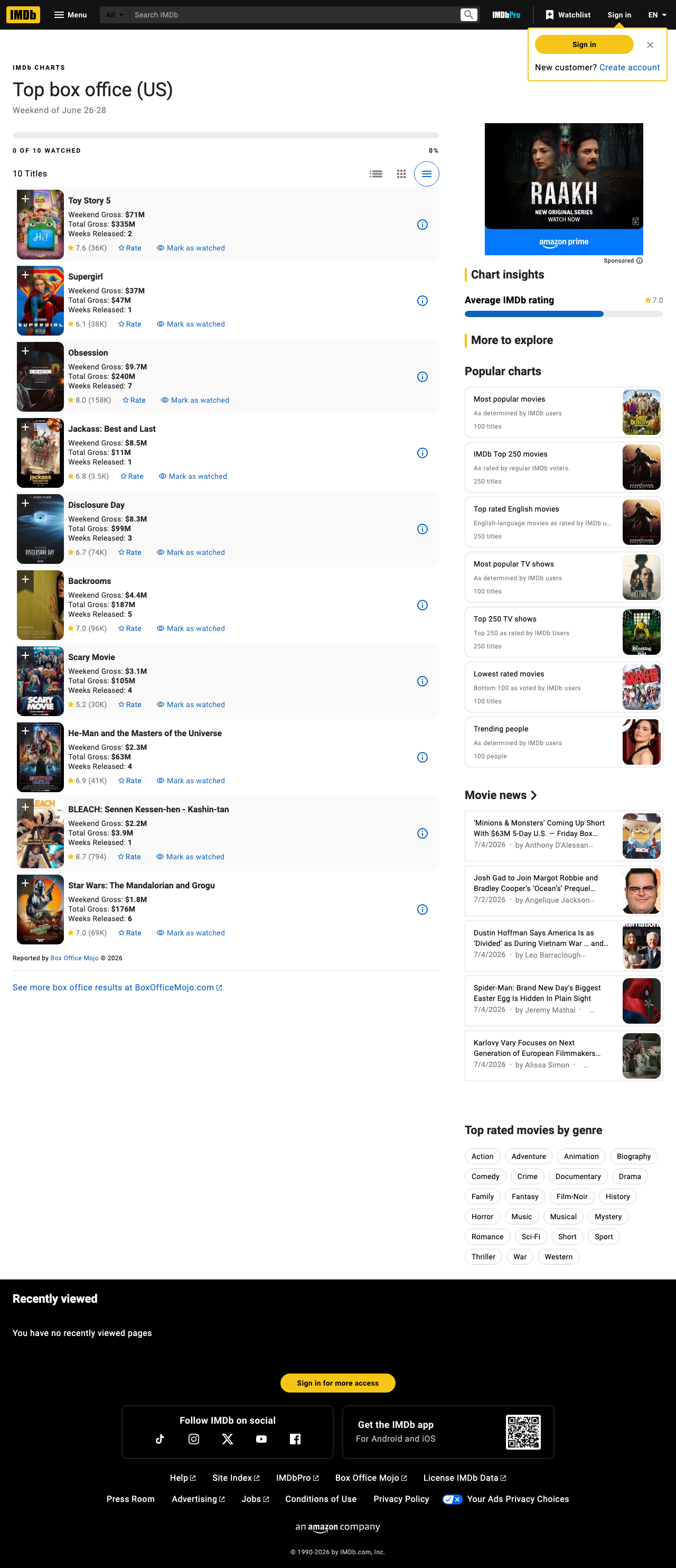
At the time of writing, each visible title card exposes the fields we care about directly in the rendered text:
- movie title
- title URL
Weekend GrossTotal GrossWeeks Released
From the live page shown above, the first few rows look like this:
Toy Story 5
Weekend Gross: $71M
Total Gross: $335M
Weeks Released: 2

Supergirl
Weekend Gross: $37M
Total Gross: $47M
Weeks Released: 1
That is enough to build a solid weekly snapshot.
Setup
python3 -m venv .venv
source .venv/bin/activate

pip install playwright
playwright install chromium
Why Playwright here?
- the page is more reliable in a real browser context
- waiting for selectors is straightforward
- screenshots and debugging are built in
- adding a proxy later is one line of config
ProxiesAPI with Playwright
If you want the browser traffic to run through ProxiesAPI, pass the proxy server when launching Chromium.
export PROXIESAPI_PROXY_URL="http://USERNAME:PASSWORD@gw.proxiesapi.com:8080"
If you leave that variable unset, the scraper still runs without a proxy.
Step 1: Launch a browser and fetch the page
import os
from contextlib import contextmanager
from playwright.sync_api import sync_playwright

IMDB_BOX_OFFICE_URL = "https://www.imdb.com/chart/boxoffice/"


@contextmanager
def open_page():
    proxy_url = os.getenv("PROXIESAPI_PROXY_URL")

    with sync_playwright() as p:
        browser = p.chromium.launch(
            headless=True,
            proxy={"server": proxy_url} if proxy_url else None,
        )
        page = browser.new_page(viewport={"width": 1440, "height": 2200})
        page.goto(IMDB_BOX_OFFICE_URL, wait_until="networkidle", timeout=120_000)
        try:
            page.wait_for_selector('a[href^="/title/tt"]', timeout=120_000)
            yield browser, page
        finally:
            browser.close()
The critical line is the selector wait:
page.wait_for_selector('a[href^="/title/tt"]', timeout=120_000)
That tells us the real movie links are on the page before we try to parse anything.
Step 2: Extract the chart rows from the rendered DOM
Instead of guessing fragile CSS class names, we anchor on the title URLs and parse the nearby text.
import re
from urllib.parse import urljoin

BASE_URL = "https://www.imdb.com"

MONEY_RE = re.compile(r"\$[0-9.,]+(?:[MK])?")
WEEKS_RE = re.compile(r"Weeks Released:\s*(\d+)", re.I)


def parse_box_office(page) -> list[dict]:
    raw_rows = page.locator('a[href^="/title/tt"]').evaluate_all(
        """
        (anchors) => {
          const rows = [];
          const seen = new Set();

          for (const anchor of anchors) {
            const href = anchor.getAttribute("href");
            if (!href || seen.has(href)) continue;

            let card = anchor.closest("li");
            if (!card) {
              let node = anchor.parentElement;
              while (node && node !== document.body) {
                const text = (node.innerText || "").trim();
                if (text.includes("Weekend Gross:") && text.includes("Total Gross:")) {
                  card = node;
                  break;
                }
                node = node.parentElement;
              }
            }

            const text = (card?.innerText || "").replace(/\\s+/g, " ").trim();
            if (!text.includes("Weekend Gross:") || !text.includes("Total Gross:")) continue;

            seen.add(href);
            rows.push({
              title: (anchor.innerText || "").trim(),
              href,
              card_text: text,
            });
          }

          return rows;
        }
        """
    )

    rows = []
    for idx, row in enumerate(raw_rows, start=1):
        text = row["card_text"]
        amounts = MONEY_RE.findall(text)
        weeks_match = WEEKS_RE.search(text)

        rows.append(
            {
                "rank": idx,
                "title": row["title"],
                "title_url": urljoin(BASE_URL, row["href"]),
                "weekend_gross": amounts[0] if len(amounts) >= 1 else None,
                "total_gross": amounts[1] if len(amounts) >= 2 else None,
                "weeks_released": int(weeks_match.group(1)) if weeks_match else None,
            }
        )

    return rows
Why this pattern works:
- title links are stable enough to anchor on
- the gross values are visible text, so regex is fine
- we avoid hashed class names that can change without warning
Step 3: Save a validation screenshot
For A-track tutorials, a screenshot is not decoration. It is proof that the page structure you describe actually existed when you wrote the scraper.
def save_screenshot(page, path: str) -> None:
    page.screenshot(path=path, full_page=True)
Use something like:
save_screenshot(
    page,
    "public/images/posts/scrape-imdb-top-box-office-and-release-data-python/site-screenshot.png",
)
That makes future selector debugging much faster.
Step 4: Export to CSV
import csv


def write_csv(rows: list[dict], path: str) -> None:
    fieldnames = [
        "rank",
        "title",
        "title_url",
        "weekend_gross",
        "total_gross",
        "weeks_released",
    ]

    with open(path, "w", newline="", encoding="utf-8") as f:
        writer = csv.DictWriter(f, fieldnames=fieldnames)
        writer.writeheader()
        writer.writerows(rows)
Full script
import csv
import os
import re
from contextlib import contextmanager
from urllib.parse import urljoin

from playwright.sync_api import sync_playwright

IMDB_BOX_OFFICE_URL = "https://www.imdb.com/chart/boxoffice/"
BASE_URL = "https://www.imdb.com"
MONEY_RE = re.compile(r"\$[0-9.,]+(?:[MK])?")
WEEKS_RE = re.compile(r"Weeks Released:\s*(\d+)", re.I)


@contextmanager
def open_page():
    proxy_url = os.getenv("PROXIESAPI_PROXY_URL")
    with sync_playwright() as p:
        browser = p.chromium.launch(
            headless=True,
            proxy={"server": proxy_url} if proxy_url else None,
        )
        page = browser.new_page(viewport={"width": 1440, "height": 2200})
        page.goto(IMDB_BOX_OFFICE_URL, wait_until="networkidle", timeout=120_000)
        page.wait_for_selector('a[href^="/title/tt"]', timeout=120_000)
        try:
            yield page
        finally:
            browser.close()


def parse_box_office(page) -> list[dict]:
    raw_rows = page.locator('a[href^="/title/tt"]').evaluate_all(
        """
        (anchors) => {
          const rows = [];
          const seen = new Set();

          for (const anchor of anchors) {
            const href = anchor.getAttribute("href");
            if (!href || seen.has(href)) continue;

            let card = anchor.closest("li");
            if (!card) {
              let node = anchor.parentElement;
              while (node && node !== document.body) {
                const text = (node.innerText || "").trim();
                if (text.includes("Weekend Gross:") && text.includes("Total Gross:")) {
                  card = node;
                  break;
                }
                node = node.parentElement;
              }
            }

            const text = (card?.innerText || "").replace(/\\s+/g, " ").trim();
            if (!text.includes("Weekend Gross:") || !text.includes("Total Gross:")) continue;

            seen.add(href);
            rows.push({
              title: (anchor.innerText || "").trim(),
              href,
              card_text: text,
            });
          }

          return rows;
        }
        """
    )

    rows = []
    for idx, row in enumerate(raw_rows, start=1):
        text = row["card_text"]
        amounts = MONEY_RE.findall(text)
        weeks_match = WEEKS_RE.search(text)

        rows.append(
            {
                "rank": idx,
                "title": row["title"],
                "title_url": urljoin(BASE_URL, row["href"]),
                "weekend_gross": amounts[0] if len(amounts) >= 1 else None,
                "total_gross": amounts[1] if len(amounts) >= 2 else None,
                "weeks_released": int(weeks_match.group(1)) if weeks_match else None,
            }
        )

    return rows


def write_csv(rows: list[dict], path: str) -> None:
    fieldnames = [
        "rank",
        "title",
        "title_url",
        "weekend_gross",
        "total_gross",
        "weeks_released",
    ]
    with open(path, "w", newline="", encoding="utf-8") as f:
        writer = csv.DictWriter(f, fieldnames=fieldnames)
        writer.writeheader()
        writer.writerows(rows)


if __name__ == "__main__":
    with open_page() as page:
        rows = parse_box_office(page)
        page.screenshot(
            path="imdb-top-box-office.png",
            full_page=True,
        )

    write_csv(rows, "imdb_top_box_office.csv")

    print("rows:", len(rows))
    for row in rows[:5]:
        print(row)
Typical output:
rows: 10
{'rank': 1, 'title': 'Toy Story 5', 'title_url': 'https://www.imdb.com/title/tt14513804/', 'weekend_gross': '$71M', 'total_gross': '$335M', 'weeks_released': 2}
{'rank': 2, 'title': 'Supergirl', 'title_url': 'https://www.imdb.com/title/tt5950044/', 'weekend_gross': '$37M', 'total_gross': '$47M', 'weeks_released': 1}
{'rank': 3, 'title': 'Obsession', 'title_url': 'https://www.imdb.com/title/tt21434030/', 'weekend_gross': '$9.7M', 'total_gross': '$240M', 'weeks_released': 7}
Practical notes
1. Expect layout drift
IMDb occasionally changes card nesting. If the parser breaks, keep the same anchor:
a[href^="/title/tt"]
Then adjust only the “walk up to the container” logic.
2. Store snapshots weekly
This dataset is most useful over time. Save one CSV per weekend, not one forever-overwritten file.
Good naming:
imdb_top_box_office_2026-07-04.csv
3. Validate before trusting the numbers
For chart pages like this, the fastest validation is:
- compare screenshot vs CSV row count
- spot-check the first 3 titles
- make sure each row has both gross fields
If those pass, you usually have a trustworthy weekly snapshot.
4. Enrich later, not in the first pass
Start with the chart. Then, only if you need more fields, visit each title page to add:
- release date
- MPAA rating
- genres
- runtime
That keeps the first scraper fast and easy to debug.
When to use this pattern
This IMDb box office scraper is a good fit when you need:
- a quick weekend movie leaderboard
- a compact theatrical performance dataset
- title URLs for later enrichment
- a browser-first workflow that still stays simple
If your raw HTTP fetches are flaky, do not rewrite the parser first. Keep the parser and upgrade the transport layer. That is the exact kind of problem ProxiesAPI is useful for.
IMDb pages can be inconsistent when you fetch them directly. ProxiesAPI lets you keep the same Playwright parser while swapping in a more resilient proxy layer when volume or blocking becomes the problem.