
Scrape Flight Prices from Google Flights (Python + ProxiesAPI)
Google Flights is one of the best places to see real-world airfare pricing — and one of the harder places to scrape reliably.
Why it’s harder:
- it’s heavily JavaScript-driven (you won’t get useful HTML with plain
requests) - the UI changes and can A/B test selectors
- it’s sensitive to aggressive crawling (you’ll hit blocks faster than “friendly HTML” sites)
In this tutorial we’ll build a practical Google Flights scraper that:
- opens a route (origin → destination)
- selects departure date (optionally return)
- extracts the visible price cards (airline, times, stops, price)
- retries safely
- exports to CSV/JSON
- shows where ProxiesAPI fits in (without pretending it magically bypasses everything)
We’ll use Playwright + Python to render the page and scrape from the DOM.
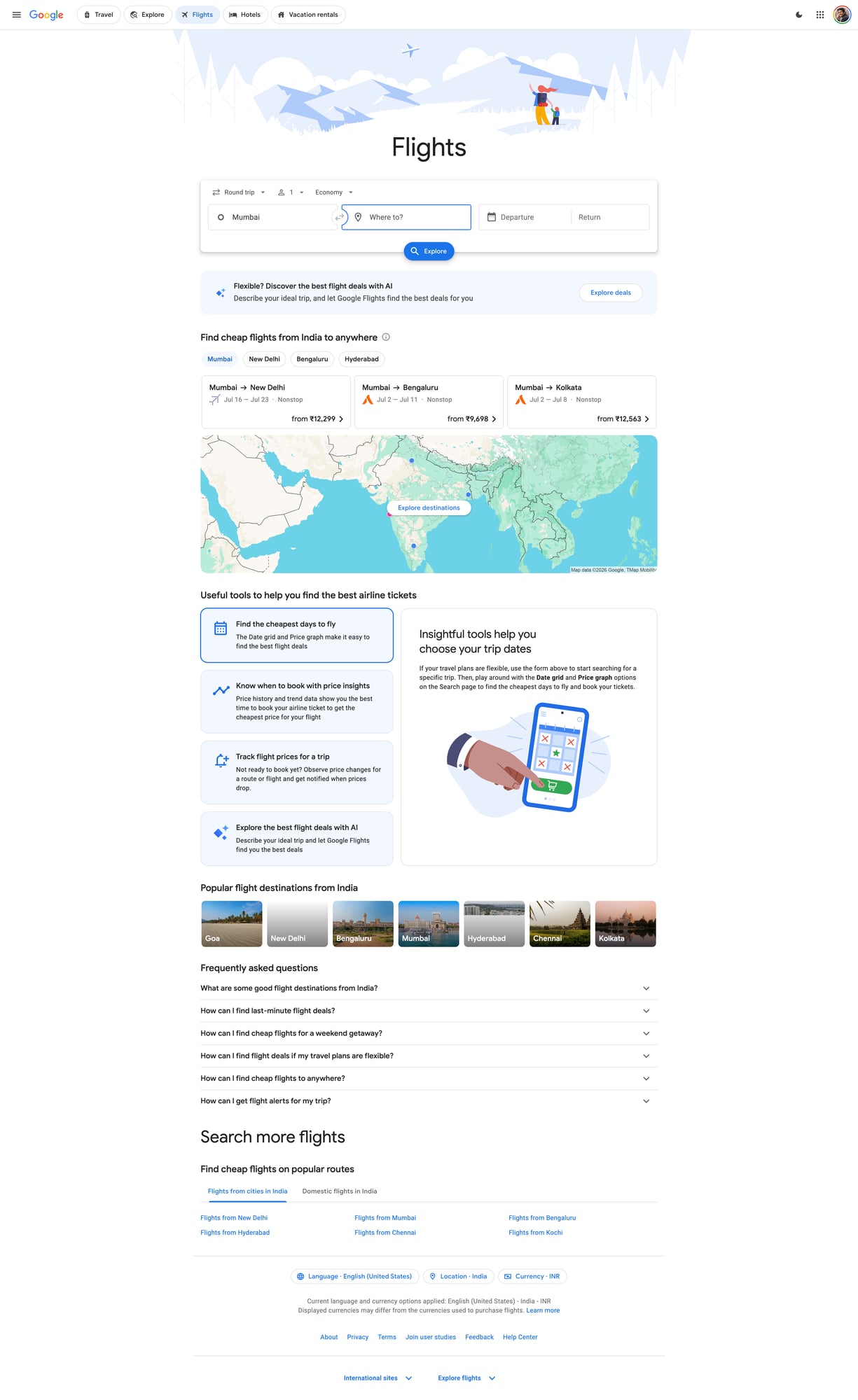
Google Flights is a dynamic, high-change target. ProxiesAPI helps you spread load, rotate IPs, and keep your crawling layer reliable as you scale routes, dates, and refresh frequency.
Important note (read this first)
Google’s properties can enforce bot detection and rate limits. Scraping may violate a site’s Terms of Service depending on your use case.
This guide is for educational purposes and for building robust scraping engineering skills (timeouts, retries, data models, pacing). If you need guaranteed access for a production use-case, consider official/partner APIs.
What we’re scraping
We’ll target a Google Flights results URL pattern that opens a route + date.
In practice, Google Flights URLs can look like:
https://www.google.com/travel/flights?hl=en#flt=DEL.BOM.2026-05-10;c:INR;e:1;sd:1;t:f
The exact hash structure can vary, but you don’t need to fully reverse-engineer it if you automate the UI steps (fill origin/destination/date) and then scrape cards.
Data we’ll extract per flight
- airline name
- departure time
- arrival time
- number of stops
- duration
- price (currency + amount)
Setup
python -m venv .venv
source .venv/bin/activate
pip install playwright pandas
playwright install
Why Playwright:
- it renders the JS app reliably
- it gives you stable waiting primitives
- it can take screenshots (mandatory for A-track)
Step 1: Launch a browser and open Google Flights
Create scrape_google_flights.py:
from __future__ import annotations

import csv
import json
import re
import time
from dataclasses import asdict, dataclass
from typing import Optional

from playwright.sync_api import sync_playwright, TimeoutError as PWTimeout


@dataclass
class FlightResult:
    airline: Optional[str]
    depart_time: Optional[str]
    arrive_time: Optional[str]
    stops: Optional[str]
    duration: Optional[str]
    price: Optional[str]


def norm_space(s: str) -> str:
    return re.sub(r"\s+", " ", (s or "").strip())


def safe_text(el) -> Optional[str]:
    if not el:
        return None
    try:
        return norm_space(el.inner_text())
    except Exception:
        return None


def goto_with_retries(page, url: str, tries: int = 3, base_sleep: float = 2.0) -> None:
    last = None
    for i in range(1, tries + 1):
        try:
            page.goto(url, wait_until="domcontentloaded", timeout=60_000)
            return
        except Exception as e:
            last = e
            time.sleep(base_sleep * i)
    raise last


def main():
    # Example route/date; you can parameterize these.
    url = "https://www.google.com/travel/flights?hl=en"

    with sync_playwright() as p:
        browser = p.chromium.launch(headless=True)
        context = browser.new_context(
            viewport={"width": 1400, "height": 900},
            locale="en-US",
            user_agent=(
                "Mozilla/5.0 (Macintosh; Intel Mac OS X 10_15_7) "
                "AppleWebKit/537.36 (KHTML, like Gecko) "
                "Chrome/124.0.0.0 Safari/537.36"
            ),
        )
        page = context.new_page()

        goto_with_retries(page, url)

        # Wait for the Flights UI shell.
        page.wait_for_timeout(2000)

        # Screenshot the landing page (useful for debugging)
        page.screenshot(path="google-flights-home.jpg", full_page=True)

        context.close()
        browser.close()


if __name__ == "__main__":
    main()
Run:
python scrape_google_flights.py
At this point you should have google-flights-home.jpg (a quick sanity check).
Step 2: Automate the UI (origin, destination, date)
Google Flights is a component-heavy UI. The safest approach is:
- click the “Where from?” field and type an airport/city code (e.g.
DEL) - select the first suggestion
- do the same for “Where to?” (
BOM) - open the date picker and choose a departure date
Selectors can change, so we’ll rely on accessible labels/roles as much as possible.
from playwright.sync_api import expect


def set_route_and_date(page, origin: str, dest: str, depart_yyyy_mm_dd: str):
    # Open origin field
    # Note: labels can vary by locale; keep your locale en-US.
    page.get_by_role("combobox").first.click()

    # Google Flights often has multiple comboboxes; we search by placeholder-ish text.
    # Fallback: click text.
    try:
        page.get_by_text("Where from?").click(timeout=2000)
    except Exception:
        pass

    # Fill origin
    page.keyboard.press("Control+A")
    page.keyboard.type(origin, delay=50)
    page.wait_for_timeout(800)
    page.keyboard.press("Enter")

    # Fill destination
    try:
        page.get_by_text("Where to?").click(timeout=2000)
    except Exception:
        # Tab often moves focus from origin to destination
        page.keyboard.press("Tab")

    page.keyboard.press("Control+A")
    page.keyboard.type(dest, delay=50)
    page.wait_for_timeout(800)
    page.keyboard.press("Enter")

    # Open date picker
    # In many builds there’s a button with text like "Departure".
    page.get_by_text("Departure").click(timeout=5000)

    # Choose date. Google uses aria-labels like "May 10, 2026".
    y, m, d = depart_yyyy_mm_dd.split("-")
    # Build a best-effort label; you may need to adapt for month names.
    # For reliability, you can instead navigate the calendar UI.
    target = depart_yyyy_mm_dd

    # Try clicking a cell containing the day number after ensuring correct month is visible.
    # Minimal approach: click the day number; for real production use, implement month nav.
    page.get_by_role("grid").get_by_text(str(int(d))).first.click(timeout=10_000)

    # Close date picker
    page.get_by_role("button", name="Done").click(timeout=5000)

    # Trigger search if required
    try:
        page.get_by_role("button", name=re.compile("Search", re.I)).click(timeout=3000)
    except Exception:
        pass

    # Wait for results to load
    page.wait_for_timeout(4000)
This is intentionally a “good enough” automation scaffold. In production you’d:
- implement calendar month navigation
- harden selectors using
page.get_by_role(..., name=...) - add detection for “no flights found” and for block/interstitial pages
Step 3: Extract flight cards from the results
Once results load, you’ll typically see a scrollable list of cards.
We’ll use CSS selectors that work on many builds:
- container list:
div[role="list"]or similar - card: often
div[role="listitem"]
Then read text blocks and parse.
def parse_results(page, limit: int = 25) -> list[FlightResult]:
    out: list[FlightResult] = []

    # Best-effort: wait for list items
    try:
        page.wait_for_selector("div[role='listitem']", timeout=20_000)
    except PWTimeout:
        return out

    cards = page.locator("div[role='listitem']")
    n = min(cards.count(), limit)

    for i in range(n):
        card = cards.nth(i)

        # These subselectors are heuristic; verify with Playwright inspector.
        airline = safe_text(card.locator("div[aria-label*='Airline']").first)
        if not airline:
            # Fallback: first strong-ish text line
            airline = safe_text(card.locator("span").first)

        times = safe_text(card.locator("span").filter(has_text=re.compile(r"\d{1,2}:\d{2}"))).first)
        price = safe_text(card.locator("span").filter(has_text=re.compile(r"₹|\$|€"))).first)

        # Duration/stops often show like "2 hr 5 min" and "Nonstop" / "1 stop"
        duration = safe_text(card.locator("span").filter(has_text=re.compile(r"hr|min"))).first)
        stops = safe_text(card.locator("span").filter(has_text=re.compile(r"Nonstop|stop", re.I))).first)

        out.append(FlightResult(
            airline=airline,
            depart_time=times,  # keep raw; you can split later
            arrive_time=None,
            stops=stops,
            duration=duration,
            price=price,
        ))

    return out
Because the UI changes, treat these selectors as a starting point, not a promise.
The key engineering pattern is stable:
- wait for an element that means “results exist”
- locate cards
- extract a small set of fields
- log failures and keep going
Step 4: End-to-end script (route → scrape → export)
Here’s a full script you can run and adapt:
from __future__ import annotations

import csv
import json
from dataclasses import asdict

from playwright.sync_api import sync_playwright


def export_csv(rows, path: str):
    if not rows:
        return
    with open(path, "w", newline="", encoding="utf-8") as f:
        w = csv.DictWriter(f, fieldnames=list(rows[0].keys()))
        w.writeheader()
        for r in rows:
            w.writerow(r)


def export_json(rows, path: str):
    with open(path, "w", encoding="utf-8") as f:
        json.dump(rows, f, ensure_ascii=False, indent=2)


def run(origin: str, dest: str, depart: str):
    url = "https://www.google.com/travel/flights?hl=en"

    with sync_playwright() as p:
        browser = p.chromium.launch(headless=True)
        context = browser.new_context(viewport={"width": 1400, "height": 900}, locale="en-US")
        page = context.new_page()

        page.goto(url, wait_until="domcontentloaded", timeout=60_000)
        page.wait_for_timeout(2000)

        set_route_and_date(page, origin=origin, dest=dest, depart_yyyy_mm_dd=depart)

        # Mandatory screenshot (A-track)
        page.screenshot(path="google-flights-results.jpg", full_page=True)

        results = parse_results(page, limit=30)
        rows = [asdict(r) for r in results]

        export_csv(rows, "flights.csv")
        export_json(rows, "flights.json")

        context.close()
        browser.close()

    return rows


if __name__ == "__main__":
    data = run("DEL", "BOM", "2026-05-10")
    print("scraped", len(data), "results")
You now have:
google-flights-results.jpgflights.csvflights.json
Where ProxiesAPI fits
For a JS-heavy site like Google Flights, you typically use proxies at one of two layers:
- Browser traffic (Playwright running through a proxy)
- Pre-/post-flight requests (e.g. downloading auxiliary HTML/JSON endpoints)
Option A: Run Playwright through a proxy
Playwright supports proxy settings at browser launch.
If ProxiesAPI gives you an HTTP proxy endpoint, you can pass it like:
browser = p.chromium.launch(
    headless=True,
    proxy={
        "server": "http://YOUR_PROXIESAPI_PROXY:PORT",
        "username": "YOUR_USER",
        "password": "YOUR_PASS",
    },
)
Keep it honest:
- proxies don’t remove the need for pacing
- rotating IPs helps reduce correlated failures
- if you slam the site with browser sessions, you’ll still get blocked
Option B: Use ProxiesAPI as the fetch layer (when HTML is available)
On sites where requests works, a proxy-backed fetch is simple:
import requests

r = requests.get(
    "https://example.com",
    proxies={"http": "http://YOUR_PROXY", "https": "http://YOUR_PROXY"},
    timeout=(10, 30),
)
Google Flights specifically is not a great candidate for plain-HTML scraping — hence Playwright.
Reliability checklist
- Use a real viewport + locale (reduce UI variability)
- Use timeouts everywhere (no hanging)
- Add retries around navigation and selector waits
- Keep request rate low (sleep between routes)
- Take screenshots when selectors fail (debug faster)
Next upgrades
- make the calendar selection deterministic (month navigation + exact date labels)
- scroll the results list and collect more than the first screen
- run multiple routes/dates with a queue (and a backoff policy)
- store results in SQLite so refresh runs only update deltas
Google Flights is a dynamic, high-change target. ProxiesAPI helps you spread load, rotate IPs, and keep your crawling layer reliable as you scale routes, dates, and refresh frequency.