
Scrape Trustpilot Company Search Results and Ratings with Python
Trustpilot search results are a practical discovery layer.
Instead of starting from one known company page, you can search a market term like hosting, vpn, or tax software and collect:
- company names
- Trustpilot profile URLs
- visible star ratings
- review counts
- visible location text
That is enough to build lead lists, reputation snapshots, or a queue of companies to crawl in more detail later.
Trustpilot search pages can challenge or rate-limit repetitive traffic. ProxiesAPI gives you a cleaner transport layer so you can keep the parser logic while making the crawl more resilient.
Target pattern
Search URL format:
https://www.trustpilot.com/search?query=hosting
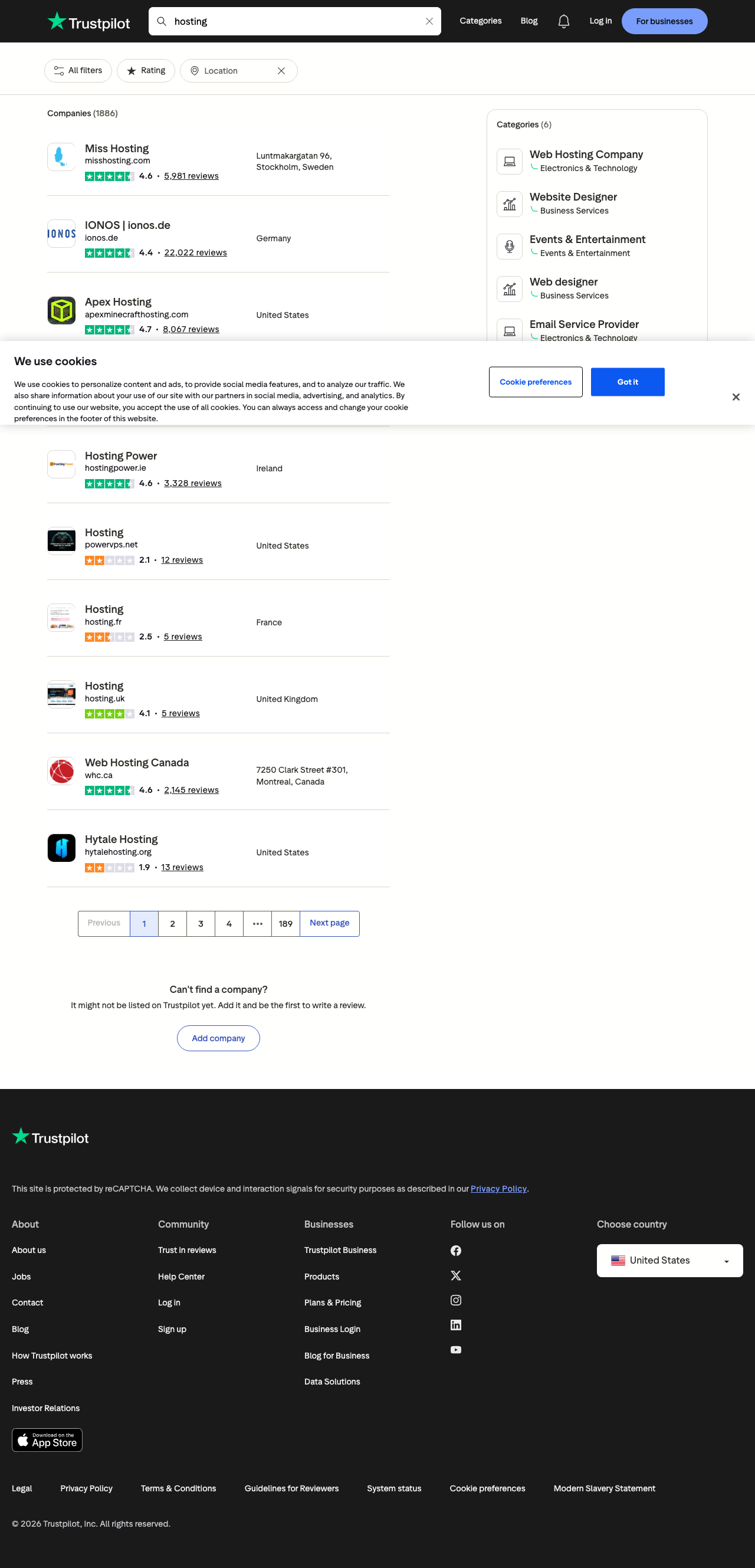
On the live page above, the left column contains the company cards we care about. A typical card exposes:
- company name
- website/domain text
- numeric rating
- review count
- country or city/location text
Examples visible in the screenshot:
Miss Hosting      4.6   5,981 reviews   Stockholm, Sweden
IONOS | ionos.de  4.4  22,022 reviews   Germany
Apex Hosting      4.7   8,067 reviews   United States
That gives us a clean first-pass dataset without scraping the full review pages yet.
Why use a browser here?
Trustpilot search pages are exactly the kind of target where browser automation is more reliable than a bare HTTP request:
- bot checks can appear
- cookie banners can hide content
- the visible result cards are easiest to validate in a real page
So we’ll use Playwright, wait for result links, dismiss the cookie prompt if it appears, and then parse the surrounding card text.
Setup
python3 -m venv .venv
source .venv/bin/activate

pip install playwright
playwright install chromium
Optional proxy layer:
export PROXIESAPI_PROXY_URL="http://USERNAME:PASSWORD@gw.proxiesapi.com:8080"
Step 1: Open the search page and wait for result cards
import os
from contextlib import contextmanager
from playwright.sync_api import sync_playwright


@contextmanager
def open_search_page(query: str):
    proxy_url = os.getenv("PROXIESAPI_PROXY_URL")
    url = f"https://www.trustpilot.com/search?query={query}"

    with sync_playwright() as p:
        browser = p.chromium.launch(
            headless=True,
            proxy={"server": proxy_url} if proxy_url else None,
        )
        page = browser.new_page(viewport={"width": 1440, "height": 2400})
        page.goto(url, wait_until="networkidle", timeout=120_000)
        try:
            # Cookie banner appears often on Trustpilot.
            got_it = page.locator('button:has-text("Got it")')
            if got_it.count():
                got_it.first.click()

            page.wait_for_selector('a[href^="/review/"]', timeout=120_000)
            yield browser, page
        finally:
            browser.close()
The important selector is:
'a[href^="/review/"]'
Those anchors point to Trustpilot company profile pages and are the most stable result anchor on this page type.
Step 2: Parse nearby card text instead of hashed classes
Trustpilot changes class names frequently, so we avoid them.
We will:
- find each
/review/link in the main results area - walk up to the nearest compact container with
reviewstext - parse rating, review count, and location from the visible text
import re
from urllib.parse import urljoin

BASE_URL = "https://www.trustpilot.com"
RATING_RE = re.compile(r"\\b(\\d\\.\\d)\\b")
REVIEWS_RE = re.compile(r"([\\d,]+)\\s+reviews", re.I)


def parse_search_results(page, query: str) -> list[dict]:
    raw_rows = page.locator('main a[href^="/review/"]').evaluate_all(
        """
        (anchors) => {
          const rows = [];
          const seen = new Set();

          for (const anchor of anchors) {
            const href = anchor.getAttribute("href");
            if (!href || seen.has(href)) continue;

            let card = anchor.closest("article");
            if (!card) {
              let node = anchor.parentElement;
              while (node && node !== document.body) {
                const text = (node.innerText || "").trim();
                if (text.includes("reviews") && text.length < 500) {
                  card = node;
                  break;
                }
                node = node.parentElement;
              }
            }

            const text = (card?.innerText || "").replace(/\\s+/g, " ").trim();
            if (!text.includes("reviews")) continue;

            seen.add(href);
            rows.push({
              name: (anchor.innerText || "").trim(),
              href,
              card_text: text,
              lines: (card?.innerText || "")
                .split("\\n")
                .map((line) => line.trim())
                .filter(Boolean),
            });
          }

          return rows;
        }
        """
    )

    rows = []
    for row in raw_rows:
        text = row["card_text"]
        rating_match = RATING_RE.search(text)
        review_match = REVIEWS_RE.search(text)

        lines = row["lines"]
        location = None
        for line in lines:
            if "reviews" in line.lower():
                continue
            if line == row["name"]:
                continue
            if line.lower() in row["href"].lower():
                continue
            if len(line) > 2:
                location = line
                break

        rows.append(
            {
                "query": query,
                "company_name": row["name"],
                "profile_url": urljoin(BASE_URL, row["href"]),
                "rating": float(rating_match.group(1)) if rating_match else None,
                "review_count": int(review_match.group(1).replace(",", "")) if review_match else None,
                "location_text": location,
            }
        )

    return rows
This is intentionally a visible-text parser. For search result pages, visible text is often more stable than deeply nested markup.
Step 3: Export to CSV
import csv


def write_csv(rows: list[dict], path: str) -> None:
    fieldnames = [
        "query",
        "company_name",
        "profile_url",
        "rating",
        "review_count",
        "location_text",
    ]
    with open(path, "w", newline="", encoding="utf-8") as f:
        writer = csv.DictWriter(f, fieldnames=fieldnames)
        writer.writeheader()
        writer.writerows(rows)
Full script
import csv
import os
import re
from contextlib import contextmanager
from urllib.parse import quote_plus, urljoin

from playwright.sync_api import sync_playwright

BASE_URL = "https://www.trustpilot.com"
RATING_RE = re.compile(r"\\b(\\d\\.\\d)\\b")
REVIEWS_RE = re.compile(r"([\\d,]+)\\s+reviews", re.I)


@contextmanager
def open_search_page(query: str):
    proxy_url = os.getenv("PROXIESAPI_PROXY_URL")
    url = f"{BASE_URL}/search?query={quote_plus(query)}"

    with sync_playwright() as p:
        browser = p.chromium.launch(
            headless=True,
            proxy={"server": proxy_url} if proxy_url else None,
        )
        page = browser.new_page(viewport={"width": 1440, "height": 2400})
        page.goto(url, wait_until="networkidle", timeout=120_000)

        got_it = page.locator('button:has-text("Got it")')
        if got_it.count():
            got_it.first.click()

        page.wait_for_selector('main a[href^="/review/"]', timeout=120_000)
        try:
            yield page
        finally:
            browser.close()


def parse_search_results(page, query: str) -> list[dict]:
    raw_rows = page.locator('main a[href^="/review/"]').evaluate_all(
        """
        (anchors) => {
          const rows = [];
          const seen = new Set();

          for (const anchor of anchors) {
            const href = anchor.getAttribute("href");
            if (!href || seen.has(href)) continue;

            let card = anchor.closest("article");
            if (!card) {
              let node = anchor.parentElement;
              while (node && node !== document.body) {
                const text = (node.innerText || "").trim();
                if (text.includes("reviews") && text.length < 500) {
                  card = node;
                  break;
                }
                node = node.parentElement;
              }
            }

            const text = (card?.innerText || "").replace(/\\s+/g, " ").trim();
            if (!text.includes("reviews")) continue;

            seen.add(href);
            rows.push({
              name: (anchor.innerText || "").trim(),
              href,
              card_text: text,
              lines: (card?.innerText || "")
                .split("\\n")
                .map((line) => line.trim())
                .filter(Boolean),
            });
          }

          return rows;
        }
        """
    )

    rows = []
    for row in raw_rows:
        text = row["card_text"]
        rating_match = RATING_RE.search(text)
        review_match = REVIEWS_RE.search(text)

        location = None
        for line in row["lines"]:
            if "reviews" in line.lower():
                continue
            if line == row["name"]:
                continue
            if line.lower() in row["href"].lower():
                continue
            if len(line) > 2:
                location = line
                break

        rows.append(
            {
                "query": query,
                "company_name": row["name"],
                "profile_url": urljoin(BASE_URL, row["href"]),
                "rating": float(rating_match.group(1)) if rating_match else None,
                "review_count": int(review_match.group(1).replace(",", "")) if review_match else None,
                "location_text": location,
            }
        )

    return rows


def write_csv(rows: list[dict], path: str) -> None:
    fieldnames = [
        "query",
        "company_name",
        "profile_url",
        "rating",
        "review_count",
        "location_text",
    ]
    with open(path, "w", newline="", encoding="utf-8") as f:
        writer = csv.DictWriter(f, fieldnames=fieldnames)
        writer.writeheader()
        writer.writerows(rows)


if __name__ == "__main__":
    query = "hosting"

    with open_search_page(query) as page:
        rows = parse_search_results(page, query)
        page.screenshot(path="trustpilot-search-results.png", full_page=True)

    write_csv(rows, "trustpilot_search_results.csv")

    print("rows:", len(rows))
    for row in rows[:5]:
        print(row)
Typical output:
rows: 10
{'query': 'hosting', 'company_name': 'Miss Hosting', 'profile_url': 'https://www.trustpilot.com/review/misshosting.com', 'rating': 4.6, 'review_count': 5981, 'location_text': 'Stockholm, Sweden'}
{'query': 'hosting', 'company_name': 'IONOS | ionos.de', 'profile_url': 'https://www.trustpilot.com/review/ionos.de', 'rating': 4.4, 'review_count': 22022, 'location_text': 'Germany'}
Practical advice
1. Search is a discovery step, not the final crawl
The search page is perfect for:
- finding profile URLs
- collecting a rating snapshot
- prioritizing which companies deserve full review-page crawls
It is not the best place to extract deep review text. Use the company profile pages for that.
2. Keep the query in every row
If you search multiple terms like:
hostingproject managementvpn
you want the original query preserved in the exported dataset for later grouping.
3. Expect occasional cookie or challenge interruptions
That is normal on sites like Trustpilot. The parser should:
- wait for result links
- dismiss the cookie banner when present
- fail fast if no company links appear
4. Validate count and top rows after every parser change
A quick smoke test is enough:
- row count is non-zero
- first result names match the screenshot
- ratings and review counts are populated
If those three checks pass, the scraper is usually healthy.
When to use this pattern
This Trustpilot scraper is a strong fit when you need:
- company discovery for a vertical
- a reputation shortlist before deeper crawling
- a CSV of ratings and review counts by search term
- a browser-based workflow that can scale with a proxy later
The nice thing about the setup is that the parser is simple. If the fetch layer gets flaky, you usually do not need a rewrite. You just run the same script through ProxiesAPI.
Trustpilot search pages can challenge or rate-limit repetitive traffic. ProxiesAPI gives you a cleaner transport layer so you can keep the parser logic while making the crawl more resilient.