
How to Scrape npm Package Pages with Python
npm package pages are useful if you want quick metadata for:
- version monitoring
- package cataloging
- dependency research
- ecosystem dashboards
In this tutorial, we’ll scrape a package page, inspect the structure, and extract the fields you actually need into structured output.
Once you monitor many npm packages on a schedule, reliability matters more than the parsing logic. ProxiesAPI helps keep the fetch side predictable.
Target URL
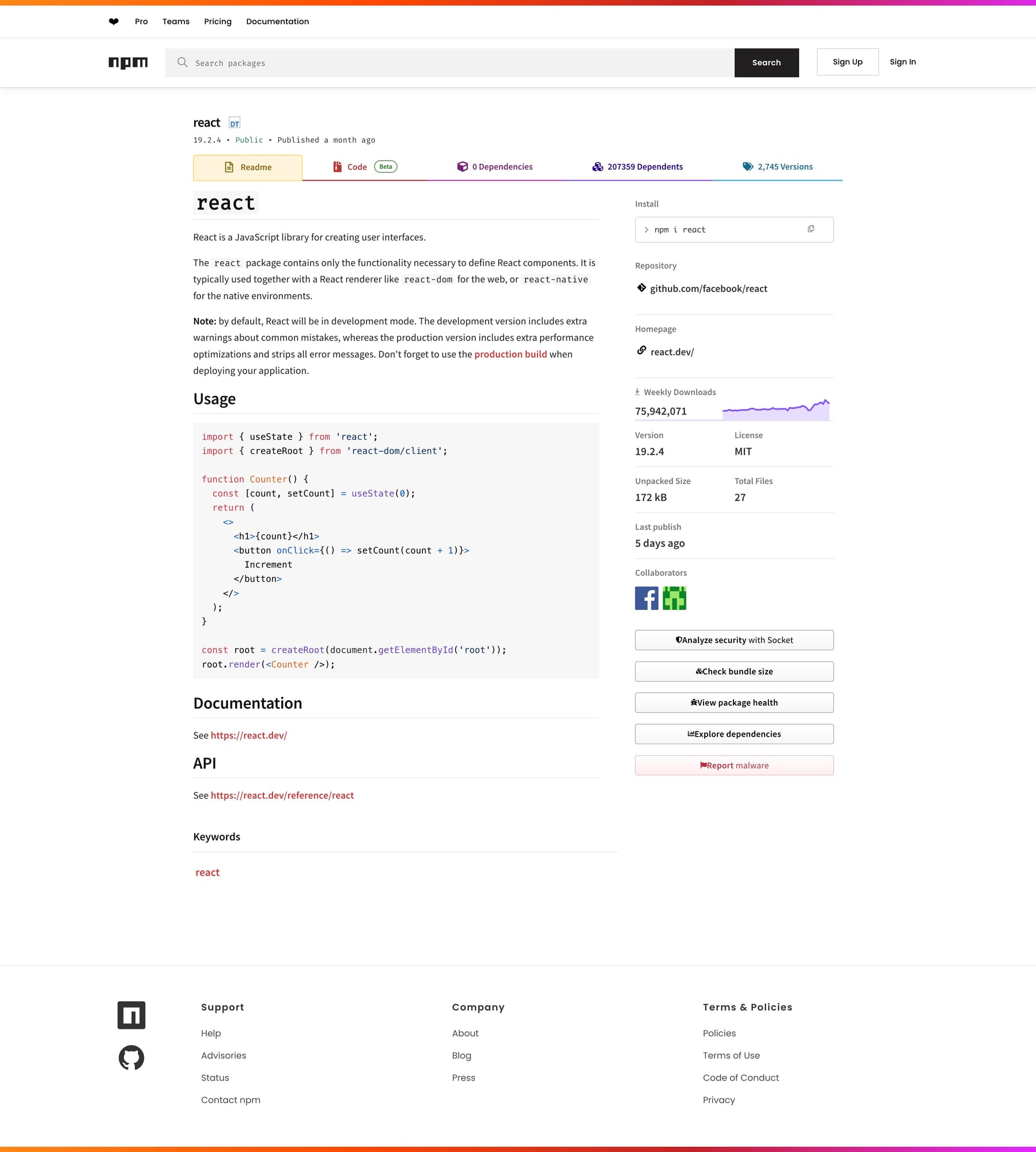
https://www.npmjs.com/package/react
We’ll use react as the example package.
Setup
python -m venv .venv
source .venv/bin/activate
pip install requests beautifulsoup4 lxml
Step 1: Fetch the HTML
import requests

URL = "https://www.npmjs.com/package/react"
TIMEOUT = (10, 30)
UA = "Mozilla/5.0 (compatible; ProxiesAPIGuidesBot/1.0; +https://www.proxiesapi.com/)"

html = requests.get(URL, timeout=TIMEOUT, headers={"User-Agent": UA}).text
print(len(html))
print(html[:300])
As always, inspect the page before guessing selectors.
Step 2: Understand the page structure
npm package pages usually expose core metadata near the top:
- package name
- current version
- short description
- install command
- side-panel or metadata blocks
Modern package sites sometimes mix visible HTML with app-rendered data, so the most robust pattern is:
- verify the visible DOM
- extract a few stable fields first
- avoid overfitting to a single CSS class if the page is framework-heavy
Step 3: Extract the package name
from bs4 import BeautifulSoup

soup = BeautifulSoup(html, "lxml")

h1 = soup.select_one("h1")
package_name = h1.get_text(" ", strip=True) if h1 else None
print(package_name)
This is intentionally simple: get the visible package header before trying to be clever.
Step 4: Extract version and description
Depending on the package page markup, the version may appear close to the title or in a metadata block.
A practical approach is to inspect the first few prominent text blocks.
for tag in soup.select("main h1, main h2, main p")[:10]:
    print(tag.get_text(" ", strip=True))
Once identified, narrow the selector down. If the page changes often, you may prefer text-pattern extraction over brittle deep class chains.
Example defensive version finder:
version = None
for el in soup.select("span, p, div"):
    text = el.get_text(" ", strip=True)
    if text.startswith("v") and len(text) < 20:
        version = text
        break

print(version)
And a simple description pull:
description = None
for p in soup.select("p"):
    text = p.get_text(" ", strip=True)
    if text and len(text) > 20:
        description = text
        break

print(description)
Step 5: Extract useful metadata blocks
For package tracking, these fields are often useful:
- homepage / repo links
- weekly downloads linkouts
- license text
- install command
You can inspect visible anchors first:
links = []
for a in soup.select("a[href]"):
    text = a.get_text(" ", strip=True)
    href = a.get("href")
    if text and href:
        links.append({"text": text, "href": href})

print(links[:20])
This gives you a quick map of what the page exposes before you build narrower selectors.
Step 6: Build the scraper function
import requests
from bs4 import BeautifulSoup


def scrape_npm_package(url: str) -> dict:
    html = requests.get(
        url,
        timeout=(10, 30),
        headers={"User-Agent": "Mozilla/5.0 (compatible; ProxiesAPIGuidesBot/1.0; +https://www.proxiesapi.com/)"},
    ).text

    soup = BeautifulSoup(html, "lxml")

    h1 = soup.select_one("h1")
    package_name = h1.get_text(" ", strip=True) if h1 else None

    version = None
    for el in soup.select("span, p, div"):
        text = el.get_text(" ", strip=True)
        if text.startswith("v") and len(text) < 20:
            version = text
            break

    description = None
    for p in soup.select("p"):
        text = p.get_text(" ", strip=True)
        if text and len(text) > 20:
            description = text
            break

    links = []
    for a in soup.select("a[href]"):
        text = a.get_text(" ", strip=True)
        href = a.get("href")
        if text and href:
            links.append({"text": text, "href": href})

    return {
        "url": url,
        "package_name": package_name,
        "version": version,
        "description": description,
        "links": links[:20],
    }


if __name__ == "__main__":
    data = scrape_npm_package("https://www.npmjs.com/package/react")
    print(data)
Example output
{
  "url": "https://www.npmjs.com/package/react",
  "package_name": "react",
  "version": "v19.0.0",
  "description": "React is a JavaScript library for building user interfaces.",
  "links": [
    {"text": "Homepage", "href": "..."},
    {"text": "Repository", "href": "..."}
  ]
}
Common gotchas
1. Framework-heavy pages
npm pages can be more app-like than old-school content pages. Sometimes the visible DOM is enough; sometimes you need to pivot to embedded data or browser rendering.
2. Text-pattern fallback is useful
For fields like version, pattern matching is often more resilient than a super-deep CSS chain.
3. Test on multiple packages
Popular packages, tiny packages, and deprecated packages may render slightly differently.
Export to JSON
import json

with open("npm_package.json", "w", encoding="utf-8") as f:
    json.dump(data, f, indent=2, ensure_ascii=False)
Selector summary
| Field | Selector / rule |
|---|---|
| Package name | h1 |
| Version | text-pattern scan over span, p, div |
| Description | first meaningful p |
| Links | a[href] |
Scaling note
If you monitor package pages at small scale, direct requests are usually enough.
If you scrape many packages on a schedule, or mix npm with less stable targets, the request layer becomes the first thing that breaks.
def fetch_with_proxy(url: str) -> str:
    proxy_url = f"http://api.proxiesapi.com/?key=YOUR_API_KEY&url={url}"
    return requests.get(proxy_url).text
If you're building a scraping project that needs to scale beyond a few hundred pages, check out Proxies API — we handle proxy rotation, browser fingerprinting, CAPTCHAs, and automatic retries so you can focus on the data extraction logic. Start with 1,000 free API calls.
Once you monitor many npm packages on a schedule, reliability matters more than the parsing logic. ProxiesAPI helps keep the fetch side predictable.