
Scrape Book Reviews and Ratings from Goodreads
Scraping Goodreads “book metadata” is easy.
Scraping actual review text + ratings (at scale) is where things get interesting: pages are large, review sections paginate via cursor links, and stability matters.
In this tutorial we’ll build a real Python scraper that:
- fetches a Goodreads book page
- extracts summary counts from the page itself:
- average rating
- rating count
- review count
- extracts the first page of community reviews:
- reviewer
- rating (1–5)
- review date (when present)
- review text
- paginates using the More reviews cursor link
- exports to CSV
- uses ProxiesAPI in the network layer (optional, but recommended for scale)
Goodreads pages are heavy, and review crawling multiplies requests quickly. Put ProxiesAPI in your fetch layer so retries/rotation don’t force you to rewrite your BeautifulSoup parsing code.
What we’re scraping (and how pagination works)
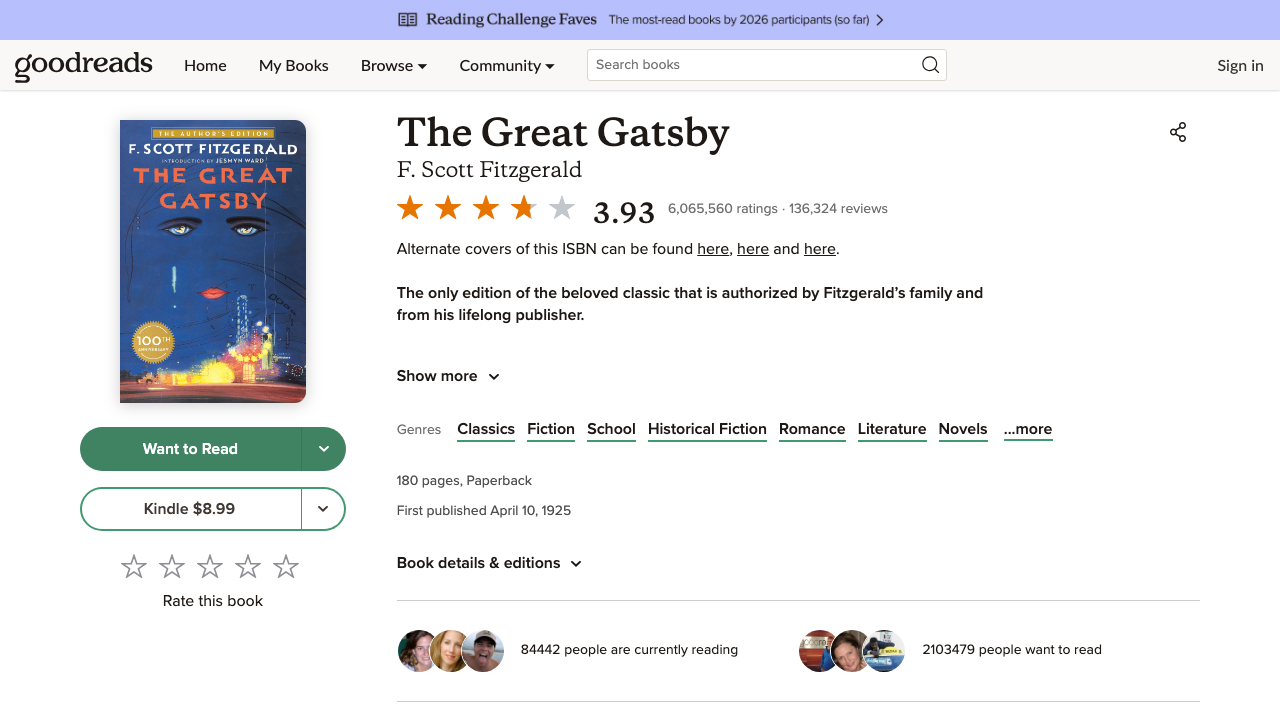
A Goodreads book page looks like:
The review section contains many article.ReviewCard blocks.
Pagination is not always a simple ?page=2.
Instead, Goodreads often provides a cursor link like:
- /book/show/4671/reviews?reviewFilters=...
That reviewFilters value encodes a cursor (an “after” token). The key idea:
- scrape the first page
- find the “More reviews” link
- request that link to get the next page
- repeat until you have enough reviews
Setup
python3 -m venv .venv
source .venv/bin/activate
pip install requests beautifulsoup4 lxml
Step 1: Fetch HTML with requests (timeouts + UA)
from __future__ import annotations

import re
import time
from urllib.parse import urljoin, urlencode

import requests

BASE = "https://www.goodreads.com"
TIMEOUT = (10, 30)
UA = (
    "Mozilla/5.0 (Macintosh; Intel Mac OS X 10_15_7) "
    "AppleWebKit/537.36 (KHTML, like Gecko) "
    "Chrome/123.0.0.0 Safari/537.36"
)

session = requests.Session()
session.headers.update(
    {
        "User-Agent": UA,
        "Accept-Language": "en-US,en;q=0.9",
    }
)


def fetch_html(url: str) -> str:
    r = session.get(url, timeout=TIMEOUT)
    r.raise_for_status()
    return r.text
Step 2: Extract rating and review counts from JSON-LD
Goodreads exposes the headline numbers in a structured-data block. That is the most stable way to capture:
ratingValueratingCountreviewCount
import json
from bs4 import BeautifulSoup


def extract_book_summary(html: str) -> dict:
    soup = BeautifulSoup(html, "lxml")
    script = soup.select_one('script[type="application/ld+json"]')
    if not script or not script.string:
        return {}

    data = json.loads(script.string)
    agg = data.get("aggregateRating") or {}
    author = data.get("author") or []

    return {
        "title": data.get("name"),
        "author": author[0].get("name") if author and isinstance(author[0], dict) else None,
        "rating_value": agg.get("ratingValue"),
        "rating_count": agg.get("ratingCount"),
        "review_count": agg.get("reviewCount"),
        "url": data.get("url"),
    }
This keeps your “big numbers” stable even if the visible review layout changes.
Step 3: Parse review cards (rating + reviewer + date + text)
On many Goodreads book pages, reviews are rendered as:
article.ReviewCard
Useful fields in/around each ReviewCard:
- reviewer name:
article[aria-label^="Review by ..."](aria label) - rating:
span.RatingStarswith an aria label like"Rating 5 out of 5" - date: text like
"March 17, 2023"somewhere inside the card - review text:
div.ReviewText
We’ll parse conservatively:
- treat missing fields as
None - clean/normalize to plain strings
from bs4 import BeautifulSoup


DATE_RE = re.compile(r"\b[A-Z][a-z]+\s+\d{1,2},\s+\d{4}\b")
RATING_RE = re.compile(r"(\d+)\s+out\s+of\s+5")


def parse_rating(card) -> int | None:
    stars = card.select_one("span.RatingStars[aria-label]")
    if not stars:
        return None
    m = RATING_RE.search(stars.get("aria-label") or "")
    return int(m.group(1)) if m else None


def parse_date_text(card) -> str | None:
    text = card.get_text("\n", strip=True)
    m = DATE_RE.search(text)
    return m.group(0) if m else None


def parse_book_reviews(html: str) -> tuple[list[dict], str | None]:
    soup = BeautifulSoup(html, "lxml")

    reviews: list[dict] = []
    for card in soup.select("article.ReviewCard"):
        aria = card.get("aria-label") or ""
        reviewer = None
        if aria.lower().startswith("review by "):
            reviewer = aria[len("Review by ") :].strip() or None

        rating = parse_rating(card)
        date_text = parse_date_text(card)

        review_text_el = card.select_one("div.ReviewText")
        review_text = review_text_el.get_text(" ", strip=True) if review_text_el else None

        # reviewer profile link (useful for de-duping)
        profile_a = card.select_one("a[href*='/user/show/']")
        profile_url = profile_a.get("href") if profile_a else None
        profile_url = urljoin(BASE, profile_url) if profile_url else None

        if not reviewer and not review_text:
            continue

        reviews.append(
            {
                "reviewer": reviewer,
                "profile_url": profile_url,
                "rating": rating,
                "date": date_text,
                "review_text": review_text,
            }
        )

    # Cursor pagination: find the "More reviews" link
    more_a = soup.find("a", string=re.compile(r"More reviews", re.I))
    more_href = more_a.get("href") if more_a else None
    next_url = urljoin(BASE, more_href) if more_href else None

    return reviews, next_url
Step 4: Crawl multiple pages via the cursor link
We’ll:
- scrape the first page
- keep requesting
next_urluntil:- we collected
max_reviews, or - there is no next cursor link
- we collected
def crawl_reviews(book_url: str, *, max_reviews: int = 200, sleep_s: float = 1.0) -> list[dict]:
    all_reviews: list[dict] = []
    seen_profiles: set[str] = set()

    url = book_url
    while url and len(all_reviews) < max_reviews:
        html = fetch_html(url)
        batch, next_url = parse_book_reviews(html)

        for r in batch:
            key = r.get("profile_url") or r.get("reviewer") or ""
            if key and key in seen_profiles:
                continue
            if key:
                seen_profiles.add(key)
            all_reviews.append(r)
            if len(all_reviews) >= max_reviews:
                break

        url = next_url
        time.sleep(sleep_s)

    return all_reviews


book = "https://www.goodreads.com/book/show/4671.The_Great_Gatsby"
html = fetch_html(book)
summary = extract_book_summary(html)
reviews, next_url = parse_book_reviews(html)

all_reviews = reviews[:]
seen_profiles = {r.get("profile_url") for r in reviews if r.get("profile_url")}

while next_url and len(all_reviews) < 120:
    batch_html = fetch_html(next_url)
    batch, next_url = parse_book_reviews(batch_html)
    for r in batch:
        key = r.get("profile_url") or r.get("reviewer") or ""
        if key and key in seen_profiles:
            continue
        if key:
            seen_profiles.add(key)
        all_reviews.append(r)
        if len(all_reviews) >= 120:
            break
    time.sleep(1.0)

print(summary)
print("reviews:", len(all_reviews))
print(all_reviews[0])
Step 5: Export reviews to CSV
import csv


def write_csv(path: str, rows: list[dict]) -> None:
    if not rows:
        raise ValueError("no rows to write")

    fieldnames = list(rows[0].keys())
    with open(path, "w", newline="", encoding="utf-8") as f:
        w = csv.DictWriter(f, fieldnames=fieldnames)
        w.writeheader()
        w.writerows(rows)


write_csv("goodreads_reviews.csv", all_reviews)
Step 6: Use ProxiesAPI (recommended for scale)
If you start crawling multiple books, you’ll generate a lot of requests quickly. This is exactly where ProxiesAPI helps.
ProxiesAPI is a wrapper URL:
curl "http://api.proxiesapi.com/?key=API_KEY&url=https://www.goodreads.com/book/show/4671.The_Great_Gatsby" | head
In Python, wrap the target URL before calling your existing fetch_html():
def proxiesapi_wrap(target_url: str, api_key: str) -> str:
    base = "http://api.proxiesapi.com/"
    return base + "?" + urlencode({"key": api_key, "url": target_url})


API_KEY = "API_KEY"
book = "https://www.goodreads.com/book/show/4671.The_Great_Gatsby"

wrapped = proxiesapi_wrap(book, API_KEY)
html = fetch_html(wrapped)
batch, _ = parse_book_reviews(html)
print("batch:", len(batch))
Again: your parser stays the same.
Common mistakes (Goodreads reviews)
1) Assuming ?page=2 exists
Goodreads review pagination is often cursor-based. Always follow the “More reviews” link if it exists.
2) Not de-duping
When you paginate and retry, duplicates happen. Use profile URL (or reviewer name) as a best-effort key.
3) Over-trusting one selector
Goodreads markup changes. Use graceful fallbacks:
aria-labelfor reviewer name- regex for date text
aria-labelfor rating
4) Crawling too fast
Add a small sleep. Your goal is stable collection, not maximum QPS.
Goodreads pages are heavy, and review crawling multiplies requests quickly. Put ProxiesAPI in your fetch layer so retries/rotation don’t force you to rewrite your BeautifulSoup parsing code.