
Scrape Product Data from Target.com (Title, Price, Availability) with Python + ProxiesAPI
Target product pages are a classic e-commerce scraping target:
- price monitoring (competitive intel)
- availability tracking (in-stock/out-of-stock)
- catalog enrichment (titles, brand, bullets)
In this tutorial we’ll build a production-minded Target.com PDP scraper in Python that extracts:
- product title
- current price (including sale price when present)
- availability / stock messaging
- canonical URL
- TCIN (Target Catalog Item Number) when available
We’ll also add:
- timeouts + retries + backoff
- defensive parsing (no single “magic selector”)
- export to JSON and CSV
- a network layer that is easy to route through ProxiesAPI
Retail sites often rate-limit, geo-fence, or vary markup. ProxiesAPI helps keep your fetch layer stable so your parser sees consistent HTML when you scale beyond a handful of pages.
Important notes (read before you scrape)
- Terms & policies: Review Target’s terms and robots.txt. This guide is for educational use.
- Volatility: Retail HTML changes. We’ll parse using multiple signals (meta tags + JSON-LD + visible text) rather than one brittle selector.
- Be kind: Add delays, cache responses, and avoid hammering product pages.
What we’re scraping (Target PDP anatomy)
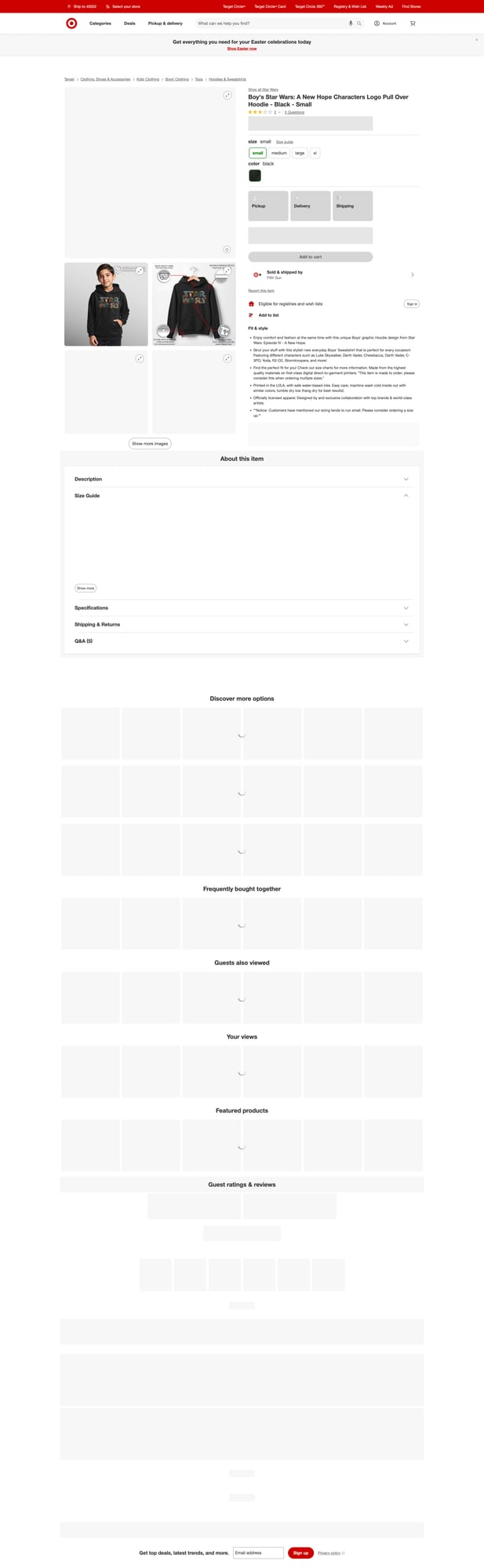
A Target product detail page (PDP) typically contains:
- A visible title (often in an
h1) - Price (may show a regular price, a sale price, or range)
- Availability messaging (in stock, out of stock, shipping/pickup options)
- Structured data in the HTML:
link[rel=canonical]- JSON-LD (
<script type="application/ld+json">) - sometimes embedded product JSON
When possible, structured data is the best first choice because it tends to be more stable.
Setup
Create a small Python project:
python3 -m venv .venv
source .venv/bin/activate
pip install requests beautifulsoup4 lxml
We’ll use:
requestsfor HTTPBeautifulSoup(lxml)for robust HTML parsing
Step 1: Build a fetch layer (timeouts, retries, and optional ProxiesAPI)
The biggest difference between a toy scraper and a scraper you can run daily is the network layer.
We want:
- connect/read timeouts (never hang)
- retry on transient errors (429/5xx)
- small jittered backoff
- headers that look like a normal browser
- an easy place to route traffic through ProxiesAPI
from __future__ import annotations

import os
import random
import time
from typing import Optional

import requests

TIMEOUT = (10, 30)  # connect, read

DEFAULT_HEADERS = {
    "User-Agent": (
        "Mozilla/5.0 (Macintosh; Intel Mac OS X 10_15_7) "
        "AppleWebKit/537.36 (KHTML, like Gecko) "
        "Chrome/123.0.0.0 Safari/537.36"
    ),
    "Accept": "text/html,application/xhtml+xml,application/xml;q=0.9,*/*;q=0.8",
    "Accept-Language": "en-US,en;q=0.9",
}


class FetchError(RuntimeError):
    pass


def sleep_backoff(attempt: int) -> None:
    # exponential-ish backoff with jitter
    base = min(2 ** attempt, 16)
    jitter = random.uniform(0.2, 0.8)
    time.sleep(base + jitter)


def fetch_html(url: str, *, proxiesapi_url: Optional[str] = None, max_retries: int = 4) -> str:
    """Fetch HTML from url.

    If proxiesapi_url is provided, we send the request through ProxiesAPI.

    Example pattern (you configure this to match your ProxiesAPI account):

        PROXIESAPI_URL=https://app.proxiesapi.com/api/v1?...&url={url}

    You can also implement ProxiesAPI via an HTTP proxy in `proxies=`.
    """

    session = requests.Session()

    # If your ProxiesAPI is “URL as a parameter” style, build it here.
    target = url
    if proxiesapi_url:
        target = proxiesapi_url.format(url=url)

    last_exc = None
    for attempt in range(max_retries + 1):
        try:
            r = session.get(target, headers=DEFAULT_HEADERS, timeout=TIMEOUT)

            # Common transient statuses
            if r.status_code in (429, 500, 502, 503, 504):
                raise FetchError(f"Transient HTTP {r.status_code}")

            r.raise_for_status()
            return r.text

        except (requests.RequestException, FetchError) as e:
            last_exc = e
            if attempt >= max_retries:
                break
            sleep_backoff(attempt)

    raise FetchError(f"Failed to fetch after retries: {url} ({last_exc})")


if __name__ == "__main__":
    # Example: set a URL template if you have it
    # export PROXIESAPI_URL_TEMPLATE='https://YOUR_PROXIESAPI_ENDPOINT?url={url}'
    tpl = os.getenv("PROXIESAPI_URL_TEMPLATE")

    test_url = "https://www.target.com/p/-/A-87417144"  # example PDP-like URL
    html = fetch_html(test_url, proxiesapi_url=tpl)
    print("bytes:", len(html))
    print(html[:200])
Why the ProxiesAPI integration is written this way
Different ProxiesAPI accounts / plans often support different integration modes:
- Fetch URL style:
https://...proxiesapi...&url={target} - Proxy style: set an HTTP proxy in
requests
So instead of hardcoding an endpoint we can’t verify, we keep it explicit:
- set
PROXIESAPI_URL_TEMPLATEto your account’s template - the rest of the scraper stays unchanged
Step 2: Parse the PDP (title, price, availability, canonical, TCIN)
We’ll parse using multiple fallbacks in this order:
- Canonical URL via
link[rel=canonical] - JSON-LD product schema (often contains name + offers)
- Visible HTML selectors as a fallback
from __future__ import annotations

import json
import re
from dataclasses import dataclass, asdict
from typing import Any, Optional

from bs4 import BeautifulSoup


@dataclass
class TargetProduct:
    url: str
    canonical_url: Optional[str]
    tcin: Optional[str]
    title: Optional[str]
    price: Optional[float]
    currency: Optional[str]
    availability: Optional[str]


def _first_text(el) -> Optional[str]:
    if not el:
        return None
    return el.get_text(" ", strip=True) or None


def parse_tcin_from_url(url: str) -> Optional[str]:
    # Target PDP URLs sometimes include an item id like /A-87417144
    m = re.search(r"/A-(\d+)", url)
    return m.group(1) if m else None


def parse_jsonld_product(soup: BeautifulSoup) -> dict[str, Any] | None:
    scripts = soup.select('script[type="application/ld+json"]')
    for sc in scripts:
        raw = sc.string
        if not raw:
            continue
        try:
            data = json.loads(raw)
        except Exception:
            continue

        # JSON-LD can be a dict, list, or @graph
        candidates: list[dict[str, Any]] = []

        if isinstance(data, dict):
            if "@graph" in data and isinstance(data["@graph"], list):
                candidates.extend([x for x in data["@graph"] if isinstance(x, dict)])
            candidates.append(data)
        elif isinstance(data, list):
            candidates.extend([x for x in data if isinstance(x, dict)])

        for obj in candidates:
            t = (obj.get("@type") or "").lower()
            if t == "product" or (isinstance(obj.get("@type"), list) and "Product" in obj.get("@type")):
                return obj

    return None


def parse_target_pdp(html: str, url: str) -> TargetProduct:
    soup = BeautifulSoup(html, "lxml")

    canonical = None
    can_el = soup.select_one('link[rel="canonical"]')
    if can_el:
        canonical = can_el.get("href")

    # JSON-LD
    jsonld = parse_jsonld_product(soup)

    title = None
    price = None
    currency = None
    availability = None

    if jsonld:
        title = jsonld.get("name") or title
        offers = jsonld.get("offers")
        if isinstance(offers, dict):
            # Schema.org often uses price/priceCurrency/availability
            if offers.get("price") is not None:
                try:
                    price = float(offers.get("price"))
                except Exception:
                    price = None
            currency = offers.get("priceCurrency") or currency
            availability = offers.get("availability") or availability
        elif isinstance(offers, list) and offers:
            # pick the first offer with a price
            for off in offers:
                if not isinstance(off, dict):
                    continue
                if off.get("price") is None:
                    continue
                try:
                    price = float(off.get("price"))
                except Exception:
                    price = None
                currency = off.get("priceCurrency") or currency
                availability = off.get("availability") or availability
                break

    # Fallback selectors (may change; keep these as best-effort)
    if not title:
        title = _first_text(soup.select_one("h1"))

    # Price fallback: look for common price containers / meta
    if price is None:
        # Some pages expose og:price or similar; treat as best-effort
        meta = soup.select_one('meta[property="product:price:amount"], meta[property="og:price:amount"]')
        if meta and meta.get("content"):
            try:
                price = float(meta.get("content"))
            except Exception:
                price = None

    if not currency:
        meta_cur = soup.select_one('meta[property="product:price:currency"], meta[property="og:price:currency"]')
        if meta_cur and meta_cur.get("content"):
            currency = meta_cur.get("content")

    # Availability fallback: search for an in-stock / out-of-stock phrase
    if not availability:
        text = soup.get_text(" ", strip=True).lower()
        if "out of stock" in text:
            availability = "out of stock"
        elif "in stock" in text:
            availability = "in stock"

    # TCIN best-effort
    tcin = parse_tcin_from_url(canonical or url)

    return TargetProduct(
        url=url,
        canonical_url=canonical,
        tcin=tcin,
        title=title,
        price=price,
        currency=currency,
        availability=availability,
    )


if __name__ == "__main__":
    # Minimal smoke test
    from fetch import fetch_html  # if you split files; otherwise import your function

    url = "https://www.target.com/p/-/A-87417144"
    html = fetch_html(url)
    product = parse_target_pdp(html, url)
    print(asdict(product))
A few honest notes:
- On modern retail sites, HTML parsing can be brittle if content is heavily client-rendered.
- JSON-LD + canonical/meta tags are usually the most stable.
- If Target changes the page significantly, you may need to adjust fallbacks.
Step 3: Crawl multiple products and export JSON/CSV
Now let’s turn this into a practical pipeline:
- read a list of Target product URLs (or TCINs)
- fetch each page
- parse into a structured object
- export to JSON and CSV
from __future__ import annotations

import csv
import json
import os
from dataclasses import asdict
from typing import Iterable

# reuse: fetch_html, parse_target_pdp, TargetProduct


def export_json(path: str, rows: list[TargetProduct]) -> None:
    with open(path, "w", encoding="utf-8") as f:
        json.dump([asdict(r) for r in rows], f, ensure_ascii=False, indent=2)


def export_csv(path: str, rows: list[TargetProduct]) -> None:
    fieldnames = [
        "url",
        "canonical_url",
        "tcin",
        "title",
        "price",
        "currency",
        "availability",
    ]

    with open(path, "w", newline="", encoding="utf-8") as f:
        w = csv.DictWriter(f, fieldnames=fieldnames)
        w.writeheader()
        for r in rows:
            w.writerow(asdict(r))


def scrape_targets(urls: Iterable[str]) -> list[TargetProduct]:
    tpl = os.getenv("PROXIESAPI_URL_TEMPLATE")

    out: list[TargetProduct] = []
    for url in urls:
        html = fetch_html(url, proxiesapi_url=tpl)
        out.append(parse_target_pdp(html, url))
    return out


if __name__ == "__main__":
    urls = [
        "https://www.target.com/p/-/A-87417144",
        # add more product URLs here
    ]

    rows = scrape_targets(urls)
    export_json("target_products.json", rows)
    export_csv("target_products.csv", rows)

    print("wrote", len(rows), "products")
Debugging: when price or availability is missing
If your parsed output has price=None or availability=None, do this:
- Save the raw HTML for that URL to disk and inspect it.
- Search for
ld+json,availability,priceCurrency, andprice. - Confirm the page is returning real HTML, not a “bot block” page.
A simple helper:
from pathlib import Path

def save_debug_html(url: str, html: str) -> str:
    safe = url.replace("https://", "").replace("http://", "").replace("/", "_")
    path = Path("debug") / f"{safe}.html"
    path.parent.mkdir(parents=True, exist_ok=True)
    path.write_text(html, encoding="utf-8")
    return str(path)
If you’re intermittently seeing different markup, that’s exactly where a proxy-backed fetch layer (and consistent geo) can help.
QA checklist
-
fetch_html()uses timeouts and retries - Parser uses JSON-LD first, then fallbacks
- Output rows have sane title + canonical_url
- Price parses to a number (float)
- CSV exports with correct headers
Next upgrades
- Add caching (ETag / Last-Modified) so you don’t re-fetch unchanged pages
- Store results in SQLite for daily snapshots and diffing
- Add structured availability mapping (in stock / out of stock / preorder)
Where ProxiesAPI fits (honestly)
You can scrape a handful of pages without proxies.
But retail scraping gets painful as you scale:
- rate limits
- geo-dependent responses
- intermittent blocks and CAPTCHAs
ProxiesAPI helps by making your network layer more reliable and configurable so your parsing logic can stay focused on the HTML.
Retail sites often rate-limit, geo-fence, or vary markup. ProxiesAPI helps keep your fetch layer stable so your parser sees consistent HTML when you scale beyond a handful of pages.