
How to Scrape PyPI Project Pages with Python
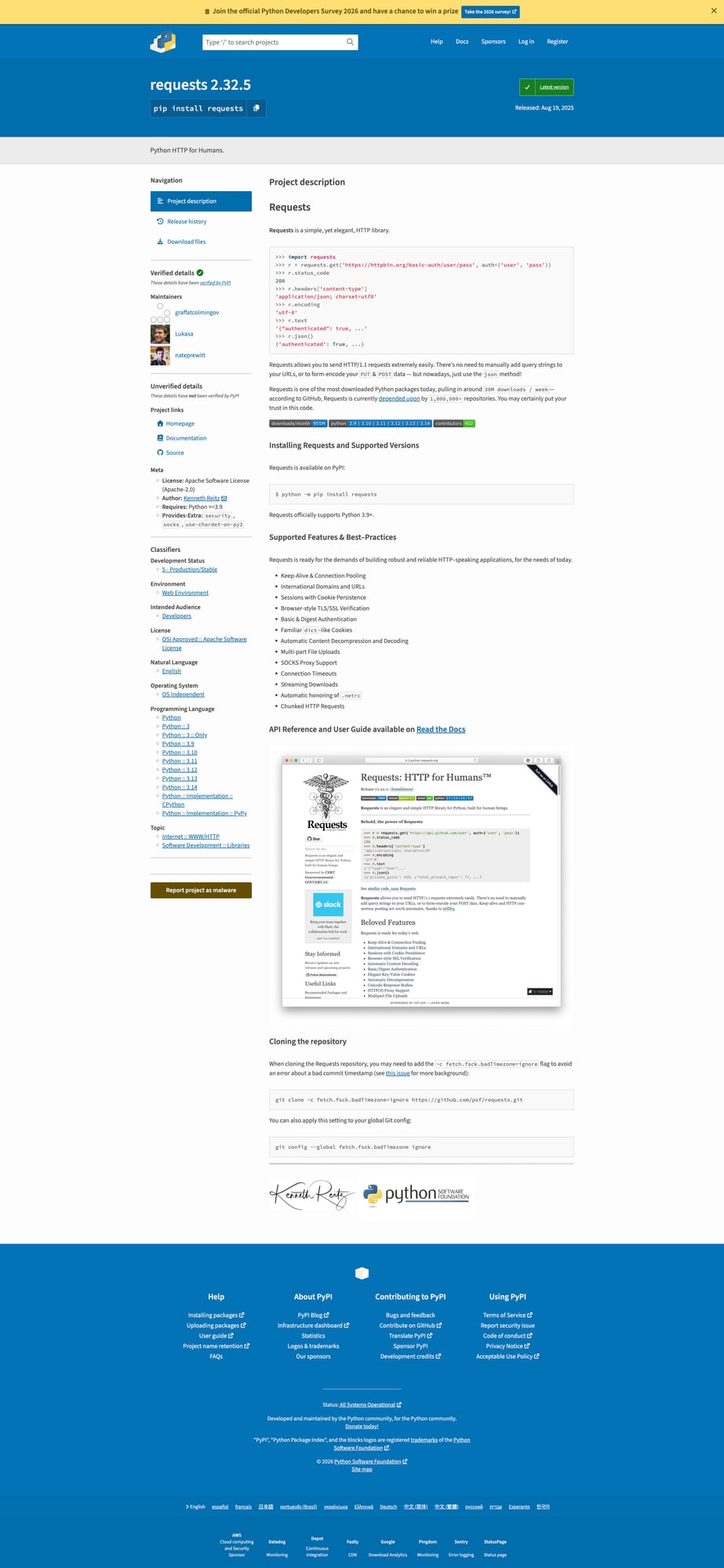
PyPI project pages are a compact source of package metadata:
- latest version
- summary / description
- project URLs
- classifiers
- release history links
This tutorial shows how to scrape a PyPI project page with Python and BeautifulSoup, extract the fields you actually care about, and export them into structured JSON.
If you’re collecting package metadata across many projects on a schedule, the fetch layer becomes the fragile part. ProxiesAPI helps keep those HTTP requests predictable.
Target URL
https://pypi.org/project/requests/
We’ll use requests as the example package, but the same scraper pattern works for other PyPI project pages.
Setup
python -m venv .venv
source .venv/bin/activate
pip install requests beautifulsoup4 lxml
Step 1: Fetch the HTML
import requests

URL = "https://pypi.org/project/requests/"
TIMEOUT = (10, 30)
UA = "Mozilla/5.0 (compatible; ProxiesAPIGuidesBot/1.0; +https://www.proxiesapi.com/)"

html = requests.get(URL, timeout=TIMEOUT, headers={"User-Agent": UA}).text
print(len(html))
print(html[:300])
This gives us raw HTML we can inspect before we guess selectors.
Step 2: Inspect the DOM
On a PyPI project page, the key metadata is usually near the top:
- package name
- current version
- one-line summary
- side-panel metadata
- classifiers lower on the page
The exact markup can change over time, so the safe approach is:
- extract the obvious high-signal fields first
- keep selectors narrow and readable
- use defensive fallbacks where possible
Step 3: Extract the package name and version
from bs4 import BeautifulSoup

soup = BeautifulSoup(html, "lxml")

name = soup.select_one("h1.package-header__name").get_text(" ", strip=True)
print(name)
PyPI combines the package name and version in the header, so you’ll usually parse this into parts.
header_text = soup.select_one("h1.package-header__name").get_text(" ", strip=True)
parts = header_text.split()
package_name = parts[0]
version = parts[-1]

print(package_name)
print(version)
Example output:
requests
2.32.3
Step 4: Extract the summary
summary = soup.select_one("p.package-header__summary")
summary_text = summary.get_text(" ", strip=True) if summary else None
print(summary_text)
This gives you the one-line description shown under the package header.
Step 5: Extract project URLs and metadata
PyPI project pages often include a metadata sidebar with:
- homepage
- documentation link
- source repo
- author / maintainers
- license
A practical strategy is to collect the visible key-value rows and normalize them later.
sidebar = soup.select("div.sidebar-section")
for block in sidebar[:5]:
    print(block.get_text(" ", strip=True)[:200])
For a more structured pull, you can extract labeled links:
project_links = {}
for a in soup.select("a.vertical-tabs__tab, a[href]"):
    text = a.get_text(" ", strip=True)
    href = a.get("href")
    if text and href and text.lower() in {"homepage", "documentation", "source", "release history"}:
        project_links[text] = href

print(project_links)
Step 6: Extract classifiers
Classifiers are one of the most useful fields on PyPI because they help categorize packages by:
- supported Python versions
- license
- topic
- development status
classifiers = []
for li in soup.select(".sidebar-section li"):
    text = li.get_text(" ", strip=True)
    if "::" in text:
        classifiers.append(text)

print(classifiers[:10])
You won’t always get a perfectly isolated classifier list with one selector, so it’s fine to filter by the :: pattern if the DOM is mixed.
Step 7: Put it all together
import requests
from bs4 import BeautifulSoup


def scrape_pypi_project(url: str) -> dict:
    html = requests.get(
        url,
        timeout=(10, 30),
        headers={"User-Agent": "Mozilla/5.0 (compatible; ProxiesAPIGuidesBot/1.0; +https://www.proxiesapi.com/)"},
    ).text

    soup = BeautifulSoup(html, "lxml")

    header = soup.select_one("h1.package-header__name")
    header_text = header.get_text(" ", strip=True) if header else ""
    parts = header_text.split()

    package_name = parts[0] if parts else None
    version = parts[-1] if len(parts) >= 2 else None

    summary = soup.select_one("p.package-header__summary")
    summary_text = summary.get_text(" ", strip=True) if summary else None

    classifiers = []
    for li in soup.select(".sidebar-section li"):
        text = li.get_text(" ", strip=True)
        if "::" in text:
            classifiers.append(text)

    return {
        "url": url,
        "package_name": package_name,
        "version": version,
        "summary": summary_text,
        "classifiers": classifiers,
    }


if __name__ == "__main__":
    data = scrape_pypi_project("https://pypi.org/project/requests/")
    print(data)
Example output
{
  "url": "https://pypi.org/project/requests/",
  "package_name": "requests",
  "version": "2.32.3",
  "summary": "Python HTTP for Humans.",
  "classifiers": [
    "Development Status :: 5 - Production/Stable",
    "Intended Audience :: Developers",
    "License :: OSI Approved :: Apache Software License"
  ]
}
Common gotchas
1. Header parsing is combined
The package name and version often live in the same header string, so don’t assume separate selectors exist.
2. Classifiers may need filtering
Depending on the page structure, the easiest path is sometimes “collect candidate list items, then filter by ::”.
3. Don’t overfit to one package
Always test on a few packages with different amounts of metadata before you productionize the scraper.
Export to JSON
import json

with open("pypi_project.json", "w", encoding="utf-8") as f:
    json.dump(data, f, indent=2, ensure_ascii=False)
Selector summary
| Field | Selector / rule |
|---|---|
| Package header | h1.package-header__name |
| Summary | p.package-header__summary |
| Classifiers | .sidebar-section li filtered by :: |
When to use a Proxy API
For one-off scraping, direct requests are fine.
For larger monitoring jobs — scraping hundreds or thousands of package pages on a schedule — the request layer becomes the fragile part.
def fetch_with_proxy(url: str) -> str:
    proxy_url = f"http://api.proxiesapi.com/?key=YOUR_API_KEY&url={url}"
    return requests.get(proxy_url).text
If you're building a scraping project that needs to scale beyond a few hundred pages, check out Proxies API — we handle proxy rotation, browser fingerprinting, CAPTCHAs, and automatic retries so you can focus on the data extraction logic. Start with 1,000 free API calls.
If you’re collecting package metadata across many projects on a schedule, the fetch layer becomes the fragile part. ProxiesAPI helps keep those HTTP requests predictable.