
How to Scrape the Python Docs Module Index with Python
The Python docs module index is a great source if you want to build:
- searchable module catalogs
- language reference helpers
- docs-side search features
- internal developer tools
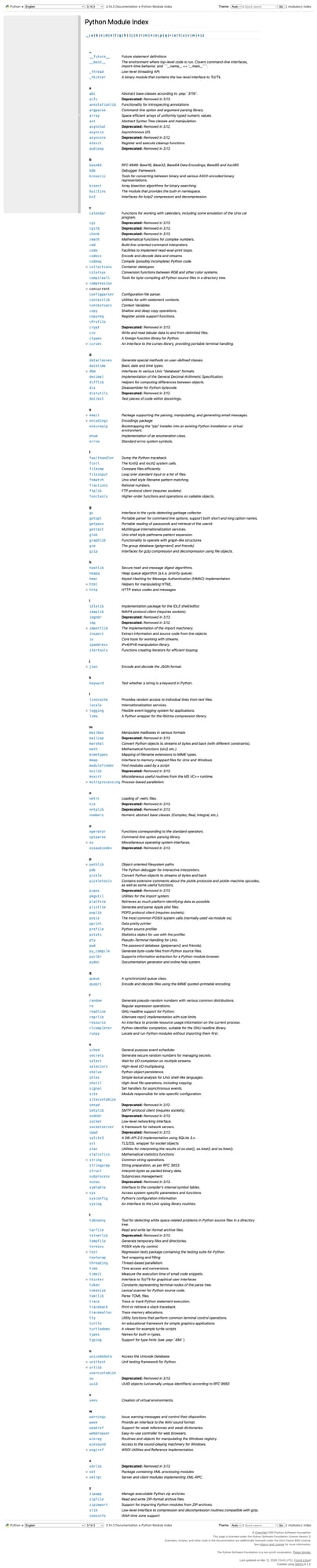
In this guide, we’ll scrape the Python module index page and extract module names and links into a clean dataset.
Static documentation targets are often easy to scrape at small scale. At larger scale, a clean request layer matters just as much as the parser.
Target URL
https://docs.python.org/3/py-modindex.html
Setup
python -m venv .venv
source .venv/bin/activate
pip install requests beautifulsoup4 lxml
Step 1: Fetch the HTML
import requests

URL = "https://docs.python.org/3/py-modindex.html"
TIMEOUT = (10, 30)
UA = "Mozilla/5.0 (compatible; ProxiesAPIGuidesBot/1.0; +https://www.proxiesapi.com/)"

html = requests.get(URL, timeout=TIMEOUT, headers={"User-Agent": UA}).text
print(len(html))
print(html[:300])
Step 2: Inspect the page structure
The Python docs are usually well-structured HTML, which makes them a good target for reliable scraping.
For the module index, we mainly care about:
- module names
- links to module pages
- optional descriptions or grouping rows
The page is structured more like a table/index than an article, so your parsing strategy should reflect that.
Step 3: Find module links
from bs4 import BeautifulSoup

soup = BeautifulSoup(html, "lxml")

links = []
for a in soup.select('a[href]'):
    href = a.get('href')
    text = a.get_text(' ', strip=True)
    if href and text:
        links.append((text, href))

print(links[:20])
This first pass helps you see the raw structure before filtering to actual modules.
Step 4: Filter to module index entries
The module index includes many links that are not actual module entries, so you’ll usually filter by:
- location within the main content area
- link shape
- surrounding table/index structure
A simple practical filter is to stay inside the main docs body and collect likely module references.
modules = []
for a in soup.select("main a[href]"):
    text = a.get_text(" ", strip=True)
    href = a.get("href")
    if text and href and href.endswith(".html"):
        modules.append({"module": text, "href": href})

print(modules[:20])
That still won’t be perfect, but it gives you a structured base to refine.
Step 5: Normalize links
Since the Python docs use relative links, normalize them into full URLs.
from urllib.parse import urljoin

base = "https://docs.python.org/3/"
for item in modules[:10]:
    item["url"] = urljoin(base, item["href"])

print(modules[:10])
Step 6: Full scraper
import requests
from bs4 import BeautifulSoup
from urllib.parse import urljoin


def scrape_python_module_index(url: str) -> list[dict]:
    html = requests.get(
        url,
        timeout=(10, 30),
        headers={"User-Agent": "Mozilla/5.0 (compatible; ProxiesAPIGuidesBot/1.0; +https://www.proxiesapi.com/)"},
    ).text

    soup = BeautifulSoup(html, "lxml")
    base = "https://docs.python.org/3/"

    modules = []
    for a in soup.select("main a[href]"):
        text = a.get_text(" ", strip=True)
        href = a.get("href")
        if text and href and href.endswith(".html"):
            modules.append({
                "module": text,
                "href": href,
                "url": urljoin(base, href),
            })

    return modules


if __name__ == "__main__":
    data = scrape_python_module_index("https://docs.python.org/3/py-modindex.html")
    print(data[:20])
    print(f"Total rows: {len(data)}")
Example output
[
  {"module": "abc", "href": "library/abc.html", "url": "https://docs.python.org/3/library/abc.html"},
  {"module": "argparse", "href": "library/argparse.html", "url": "https://docs.python.org/3/library/argparse.html"},
  {"module": "asyncio", "href": "library/asyncio.html", "url": "https://docs.python.org/3/library/asyncio.html"}
]
Export to CSV
import csv

with open("python_module_index.csv", "w", newline="", encoding="utf-8") as f:
    writer = csv.DictWriter(f, fieldnames=["module", "href", "url"])
    writer.writeheader()
    writer.writerows(data)
Common gotchas
1. The first filter is usually broad
Your first extraction will include extra docs links. That’s normal. Start broad, then tighten.
2. Relative URLs need normalization
If you don’t normalize links early, your downstream dataset becomes annoying to use.
3. Table/index pages are different from article pages
Don’t reuse article-page heading logic for index pages. They need a simpler link-and-row mindset.
Selector summary
| Field | Selector / rule |
|---|---|
| Candidate docs links | main a[href] |
| Module rows | filtered links ending in .html |
| Full URL | urljoin(base, href) |
Scaling note
Docs pages are often some of the cleanest scraping targets on the web.
But if you crawl a large docs corpus repeatedly, you still want a dependable fetch layer.
def fetch_with_proxy(url: str) -> str:
    proxy_url = f"http://api.proxiesapi.com/?key=YOUR_API_KEY&url={url}"
    return requests.get(proxy_url).text
If you're building a scraping project that needs to scale beyond a few hundred pages, check out Proxies API — we handle proxy rotation, browser fingerprinting, CAPTCHAs, and automatic retries so you can focus on the data extraction logic. Start with 1,000 free API calls.
Static documentation targets are often easy to scrape at small scale. At larger scale, a clean request layer matters just as much as the parser.