
Scrape Stack Overflow User Profiles and Badges with Python
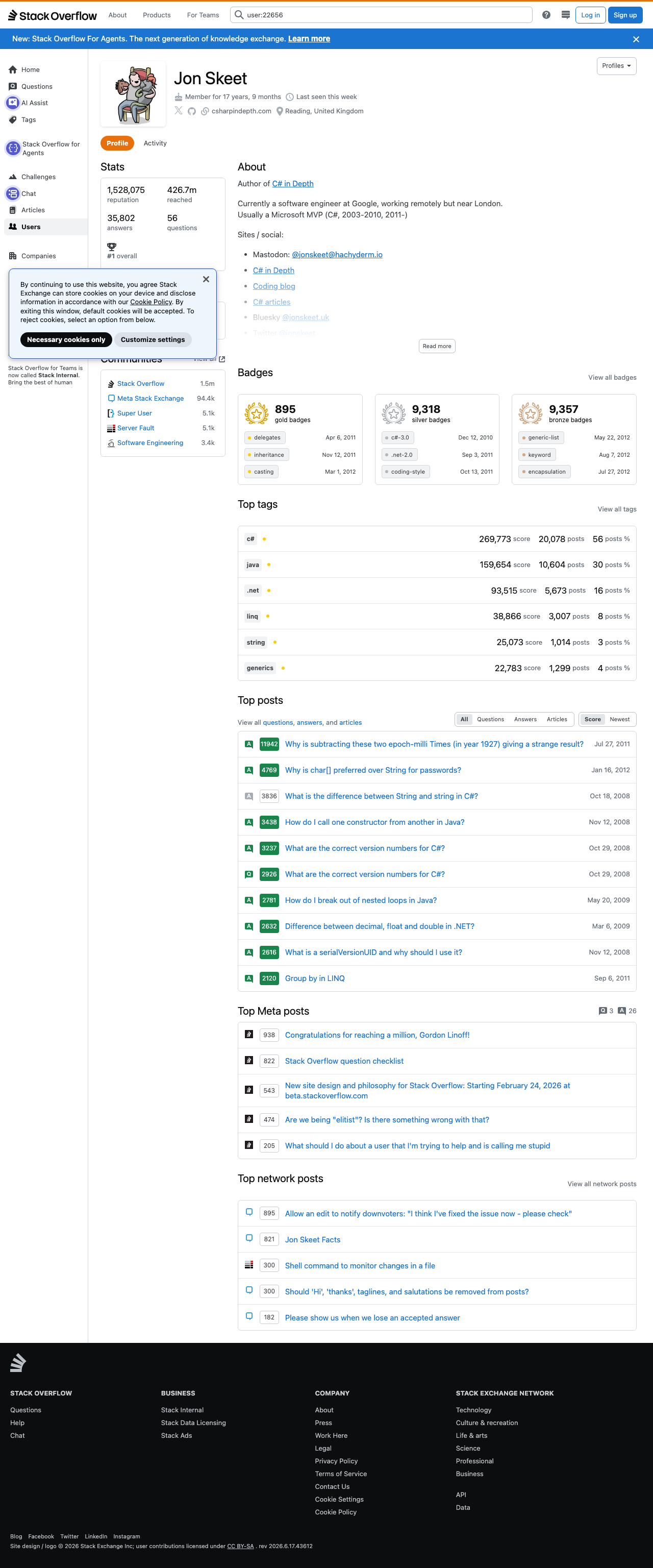
Public Stack Overflow profiles are rich, structured pages. A single user page can tell you:
- reputation and overall stats
- gold, silver, and bronze badge counts
- top tags with post counts and tag-specific score
- community participation across the Stack Exchange network
That makes user profiles useful for hiring research, community analysis, expert discovery, or building a lightweight “developer influence” dataset.
In this guide we’ll scrape a real public profile page, extract the fields above, and export them to JSON and CSV.
A few user pages are easy. Thousands of profile fetches across hiring, research, or community analytics are where retry logic, proxy rotation, and IP reputation start to matter. ProxiesAPI plugs into the same `requests` code you already have.
What we’re scraping
We’ll use a public user page like:
https://stackoverflow.com/users/22656/jon-skeet
The HTML is still mostly server-rendered, which is what makes this target practical without a browser automation stack for the core scrape.
From the live page source, these areas are especially useful:
#statscontains the reputation, answers, questions, and reach figures- the badges section contains gold, silver, and bronze counts
#top-tagscontains per-tag score, post counts, and post share
That gives us stable extraction targets with normal requests plus BeautifulSoup.
Setup
python3 -m venv .venv
source .venv/bin/activate
pip install requests beautifulsoup4 lxml tenacity
We’ll use:
requestsfor HTTPBeautifulSoupwithlxmlfor parsingtenacityfor retry/backoff
Step 1: Build a fetch layer with retries
Create stack_overflow_profiles.py:
from __future__ import annotations

import json
import os
import random
import re
import time
from dataclasses import asdict, dataclass
from typing import Any

import requests
from bs4 import BeautifulSoup
from tenacity import retry, stop_after_attempt, wait_exponential

BASE = "https://stackoverflow.com"
TIMEOUT = (10, 30)
HEADERS = {
    "User-Agent": (
        "Mozilla/5.0 (Macintosh; Intel Mac OS X 10_15_7) "
        "AppleWebKit/537.36 (KHTML, like Gecko) "
        "Chrome/126.0.0.0 Safari/537.36"
    ),
    "Accept": "text/html,application/xhtml+xml,application/xml;q=0.9,*/*;q=0.8",
    "Accept-Language": "en-US,en;q=0.9",
}

session = requests.Session()
session.headers.update(HEADERS)


def build_proxies() -> dict[str, str] | None:
    proxy = os.getenv("PROXIESAPI_PROXY")
    if not proxy:
        return None
    return {"http": f"http://{proxy}", "https": f"http://{proxy}"}


PROXIES = build_proxies()


def sleep_jitter(low: float = 0.4, high: float = 1.2) -> None:
    time.sleep(random.uniform(low, high))


@retry(stop=stop_after_attempt(5), wait=wait_exponential(multiplier=1, min=1, max=16))
def fetch_html(url: str) -> str:
    response = session.get(url, timeout=TIMEOUT, proxies=PROXIES)
    response.raise_for_status()

    html = response.text
    if "User " not in html or "Stack Overflow" not in html:
        raise RuntimeError("Unexpected response body; possible interstitial or block page")
    return html
Where ProxiesAPI fits
The important part is that nothing in the parser changes when you scale up. You only add:
PROXIES = {
    "http": "http://YOUR_PROXIESAPI_PROXY",
    "https": "http://YOUR_PROXIESAPI_PROXY",
}

response = session.get(url, timeout=TIMEOUT, proxies=PROXIES)
That means you can start with direct requests for low volume, then route through ProxiesAPI later when your crawl gets larger.
Step 2: Parse the profile stats card
On the live page, the stats block lives under #stats. Each stat item renders a numeric value plus a label like reputation, answers, or questions.
We’ll normalize values like 1,528,075 and 426.7m.
MULTIPLIERS = {
    "k": 1_000,
    "m": 1_000_000,
    "b": 1_000_000_000,
}


def parse_compact_number(text: str) -> float | int | None:
    if not text:
        return None

    cleaned = text.strip().lower().replace(",", "")
    match = re.fullmatch(r"(\d+(?:\.\d+)?)([kmb])?", cleaned)
    if not match:
        return None

    number = float(match.group(1))
    suffix = match.group(2)
    if suffix:
        number *= MULTIPLIERS[suffix]

    return int(number) if number.is_integer() else number


def parse_stats(soup: BeautifulSoup) -> dict[str, Any]:
    stats_card = soup.select_one("#stats .s-card")
    stats: dict[str, Any] = {}
    if not stats_card:
        return stats

    for item in stats_card.select("div.flex--item"):
        value_el = item.select_one(".fs-body3")
        if not value_el:
            continue

        value_text = value_el.get_text(" ", strip=True)
        raw_text = item.get_text(" ", strip=True)
        label = raw_text.replace(value_text, "", 1).strip().lower()

        if not label:
            continue

        key = label.replace(" ", "_")
        stats[key] = parse_compact_number(value_text)

    return stats
Typical output for the example profile looks like:
{
  "reputation": 1528075,
  "reached": 426700000,
  "answers": 35802,
  "questions": 56
}
Step 3: Parse badge counts
The public profile page includes separate cards for gold, silver, and bronze badges. The count is rendered in a bold numeric block followed by a caption like gold badges.
This is a case where a small regex over the raw HTML is simpler than forcing a brittle DOM traversal:
BADGE_RE = re.compile(
    r'<div class="fs-title fw-bold fc-black-600">\s*([\d,]+)\s*</div>\s*'
    r'<div class="fs-caption">\s*(gold|silver|bronze) badges',
    re.IGNORECASE,
)


def parse_badge_counts(html: str) -> dict[str, int]:
    counts = {"gold": 0, "silver": 0, "bronze": 0}
    for count_text, badge_type in BADGE_RE.findall(html):
        counts[badge_type.lower()] = int(count_text.replace(",", ""))
    return counts
This is one of those pragmatic scraping choices that is worth making. If the exact visual nesting changes but the text pattern remains stable, the regex version can survive longer than a deeply coupled CSS selector chain.
Step 4: Parse top tags
The top tags block is more structured. Each row in #top-tags gives us:
- tag name
- tag-specific score
- post count
- post percentage
def to_int(text: str) -> int | None:
    text = text.replace(",", "").strip()
    return int(text) if text.isdigit() else None


def parse_top_tags(soup: BeautifulSoup) -> list[dict[str, Any]]:
    rows = soup.select("#top-tags .p12")
    tags: list[dict[str, Any]] = []

    for row in rows:
        tag_link = row.select_one("a.s-tag")
        if not tag_link:
            continue

        metric_values = [el.get_text(" ", strip=True) for el in row.select(".fs-body3")]
        if len(metric_values) < 3:
            continue

        tags.append(
            {
                "tag": tag_link.get_text(" ", strip=True),
                "score": to_int(metric_values[0]),
                "posts": to_int(metric_values[1]),
                "posts_pct": to_int(metric_values[2]),
            }
        )

    return tags
Because Stack Overflow puts the tag table directly in the HTML, there is no need to run JavaScript to get these values.
Step 5: Put it together
@dataclass
class ProfileRecord:
    profile_url: str
    display_name: str | None
    reputation: int | float | None
    reached: int | float | None
    answers: int | float | None
    questions: int | float | None
    gold_badges: int
    silver_badges: int
    bronze_badges: int
    top_tags: list[dict[str, Any]]


def parse_profile(url: str) -> ProfileRecord:
    html = fetch_html(url)
    soup = BeautifulSoup(html, "lxml")

    title_el = soup.select_one("title")
    page_title = title_el.get_text(" ", strip=True) if title_el else ""
    display_name = page_title.removeprefix("User ").removesuffix(" - Stack Overflow").strip() or None

    stats = parse_stats(soup)
    badges = parse_badge_counts(html)
    top_tags = parse_top_tags(soup)

    return ProfileRecord(
        profile_url=url,
        display_name=display_name,
        reputation=stats.get("reputation"),
        reached=stats.get("reached"),
        answers=stats.get("answers"),
        questions=stats.get("questions"),
        gold_badges=badges["gold"],
        silver_badges=badges["silver"],
        bronze_badges=badges["bronze"],
        top_tags=top_tags,
    )
And run it:
if __name__ == "__main__":
    urls = [
        "https://stackoverflow.com/users/22656/jon-skeet",
        "https://stackoverflow.com/users/1144035/servy",
    ]

    records = []
    for url in urls:
        records.append(parse_profile(url))
        sleep_jitter()

    print(json.dumps([asdict(r) for r in records], indent=2))
Step 6: Export CSV and JSON
The profile object has a nested top_tags list, so the cleanest pattern is:
- one JSON file for the full profile record
- one flat CSV for profile-level metrics
- one second CSV for per-tag rows
import csv
from pathlib import Path


def export(records: list[ProfileRecord], out_dir: str = "output") -> None:
    Path(out_dir).mkdir(parents=True, exist_ok=True)

    with open(f"{out_dir}/profiles.json", "w", encoding="utf-8") as f:
        json.dump([asdict(r) for r in records], f, ensure_ascii=False, indent=2)

    with open(f"{out_dir}/profiles.csv", "w", newline="", encoding="utf-8") as f:
        writer = csv.DictWriter(
            f,
            fieldnames=[
                "profile_url",
                "display_name",
                "reputation",
                "reached",
                "answers",
                "questions",
                "gold_badges",
                "silver_badges",
                "bronze_badges",
            ],
        )
        writer.writeheader()
        for r in records:
            writer.writerow(
                {
                    "profile_url": r.profile_url,
                    "display_name": r.display_name,
                    "reputation": r.reputation,
                    "reached": r.reached,
                    "answers": r.answers,
                    "questions": r.questions,
                    "gold_badges": r.gold_badges,
                    "silver_badges": r.silver_badges,
                    "bronze_badges": r.bronze_badges,
                }
            )

    with open(f"{out_dir}/profile_top_tags.csv", "w", newline="", encoding="utf-8") as f:
        writer = csv.DictWriter(
            f,
            fieldnames=["profile_url", "display_name", "tag", "score", "posts", "posts_pct"],
        )
        writer.writeheader()
        for r in records:
            for tag in r.top_tags:
                writer.writerow(
                    {
                        "profile_url": r.profile_url,
                        "display_name": r.display_name,
                        **tag,
                    }
                )
Common scraping issues on Stack Overflow profiles
1. Compact numbers
426.7m is not directly castable to int. Handle k, m, and b explicitly.
2. Layout-oriented classes
Some classes on Stack Overflow are utility classes, not semantic ones. Favor:
- container IDs like
#statsand#top-tags - text labels near values
- small regexes for repeated visual patterns
3. Over-fetching
If you’re collecting thousands of profiles, slow down. Public pages are not a license to hammer a site.
Practical guardrails:
- keep concurrency low
- add jitter between requests
- retry only on transient failures
- cache successful fetches during development
When to add a browser
You do not need Selenium or Playwright for the core scrape here. Add a browser only when you specifically need:
- authenticated views
- screenshots for documentation
- rendered-only data that does not appear in the initial HTML
For this tutorial, the data we need is already present in the server response, which is exactly why requests is the right default.
Final takeaway
Stack Overflow user profiles are a strong example of “real-world but still manageable” scraping. You can get meaningful structured data from:
- the stats card
- the badge counts
- the top tags table
without forcing the problem into browser automation.
Start with direct requests, keep your parser grounded in the real HTML structure, and add ProxiesAPI only when your crawl volume or failure rate makes it worthwhile.
A few user pages are easy. Thousands of profile fetches across hiring, research, or community analytics are where retry logic, proxy rotation, and IP reputation start to matter. ProxiesAPI plugs into the same `requests` code you already have.