
Scrape Steam Upcoming Releases and Launch Dates with Python
If you want a dataset of what is about to launch on Steam, the store already exposes most of what you need in plain HTML:
- game title
- app id
- launch date
- store URL
- price
And with one extra request per game page, you can also collect the visible tags.
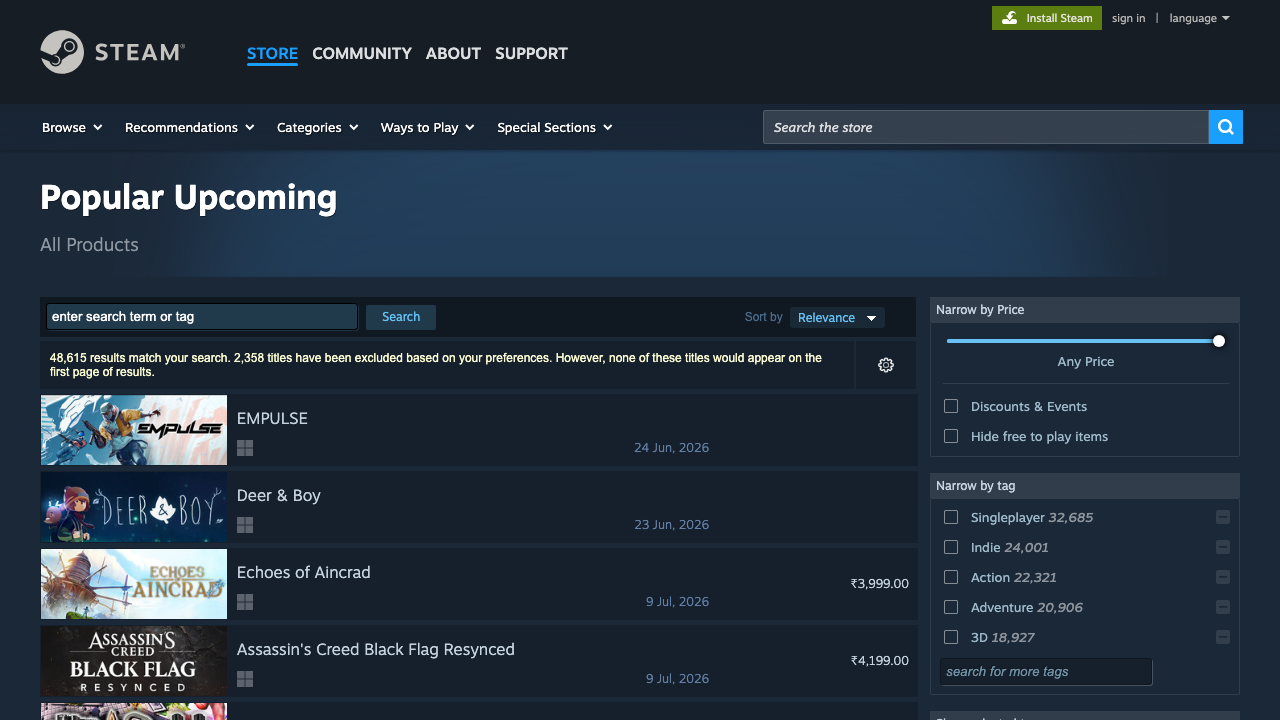
In this tutorial we’ll scrape Steam’s Popular Upcoming listing, visit each app page, extract the user-facing tags, and export the result to CSV.
Steam’s public pages are friendly enough to prototype against, but your launch tracker still benefits from retries, pacing, and a proxy layer once request volume grows. ProxiesAPI slots into that fetch layer without changing your parser.
The page we want
Steam exposes several search filters, but for “coming soon” tracking the useful one is:
https://store.steampowered.com/search/?filter=popularcomingsoon&supportedlang=english
The HTML for each result row is server-rendered, which means we can parse it without browser automation. A result row looks like:
a.search_result_row- title in
span.title - launch date in
.search_released - price in
.discount_final_pricewhen available - app id in
data-ds-appid
The app page gives us the tags:
a.app_tag
Setup
python3 -m venv .venv
source .venv/bin/activate
pip install requests beautifulsoup4 lxml pandas
We’ll use:
requestsfor HTTPBeautifulSoupfor parsingpandasfor CSV export
Step 1: Build a fetch helper with optional ProxiesAPI
Steam pages are public, but a production tracker still needs retries and pacing.
from __future__ import annotations

import os
import random
import time
import urllib.parse
import requests

PROXIESAPI_KEY = os.getenv("PROXIESAPI_KEY", "").strip()
TIMEOUT = (10, 40)

session = requests.Session()
session.headers.update(
    {
        "User-Agent": (
            "Mozilla/5.0 (Macintosh; Intel Mac OS X 10_15_7) "
            "AppleWebKit/537.36 (KHTML, like Gecko) "
            "Chrome/125.0 Safari/537.36"
        ),
        "Accept-Language": "en-US,en;q=0.9",
    }
)


def proxiesapi_url(target_url: str) -> str:
    return (
        "http://api.proxiesapi.com/?auth_key="
        + urllib.parse.quote(PROXIESAPI_KEY, safe="")
        + "&url="
        + urllib.parse.quote(target_url, safe="")
    )


def fetch(url: str, *, use_proxiesapi: bool = False, max_retries: int = 4) -> str:
    last_err = None

    for attempt in range(1, max_retries + 1):
        try:
            final_url = proxiesapi_url(url) if (use_proxiesapi and PROXIESAPI_KEY) else url
            r = session.get(final_url, timeout=TIMEOUT)

            if r.status_code in (403, 429, 500, 502, 503, 504):
                time.sleep(min(12, attempt * 2) + random.random())
                continue

            r.raise_for_status()
            return r.text

        except Exception as exc:
            last_err = exc
            time.sleep(min(12, attempt * 2) + random.random())

    raise RuntimeError(f"Failed to fetch {url}: {last_err}")
For light usage you may not need ProxiesAPI at all. But once you expand to many queries, repeated daily refreshes, or regional comparisons, it becomes useful as a drop-in network layer.
Step 2: Parse the Popular Upcoming results page
The list page already gives us most of the dataset.
import re
from bs4 import BeautifulSoup


def clean_text(value: str | None) -> str | None:
    if value is None:
        return None
    text = re.sub(r"\s+", " ", value).strip()
    return text or None


def parse_upcoming_rows(html: str) -> list[dict]:
    soup = BeautifulSoup(html, "lxml")
    rows = []

    for row in soup.select("a.search_result_row"):
        appid = row.get("data-ds-appid")
        url = row.get("href")

        title = clean_text(row.select_one("span.title").get_text(" ", strip=True)) if row.select_one("span.title") else None
        release_date = clean_text(row.select_one(".search_released").get_text(" ", strip=True)) if row.select_one(".search_released") else None
        price = clean_text(row.select_one(".discount_final_price").get_text(" ", strip=True)) if row.select_one(".discount_final_price") else "Unannounced / Free"

        rows.append(
            {
                "appid": appid,
                "title": title,
                "release_date": release_date,
                "store_url": url.split("?")[0] if url else None,
                "price": price,
            }
        )

    return rows
Those selectors are based on the actual Steam HTML:
a.search_result_rowspan.title.search_released.discount_final_price
Step 3: Visit each app page and extract tags
The search result rows do not include tags, so we make one follow-up request per game.
def parse_tags_from_app_page(html: str, limit: int = 8) -> list[str]:
    soup = BeautifulSoup(html, "lxml")
    tags = []

    for tag in soup.select("a.app_tag"):
        text = clean_text(tag.get_text(" ", strip=True))
        if not text:
            continue
        if text not in tags:
            tags.append(text)
        if len(tags) >= limit:
            break

    return tags


def enrich_with_tags(rows: list[dict], *, use_proxiesapi: bool = False) -> list[dict]:
    enriched = []

    for row in rows:
        url = row["store_url"]
        if not url:
            enriched.append({**row, "tags": []})
            continue

        html = fetch(url, use_proxiesapi=use_proxiesapi)
        tags = parse_tags_from_app_page(html)
        enriched.append({**row, "tags": tags})

        # gentle pacing between app pages
        time.sleep(random.uniform(0.8, 1.8))

    return enriched
This keeps the dataset practical without overcomplicating the parser.
Step 4: Put it together and export CSV
import pandas as pd

UPCOMING_URL = "https://store.steampowered.com/search/?filter=popularcomingsoon&supportedlang=english"


def scrape_steam_upcoming(*, use_proxiesapi: bool = False) -> pd.DataFrame:
    html = fetch(UPCOMING_URL, use_proxiesapi=use_proxiesapi)
    base_rows = parse_upcoming_rows(html)
    rows = enrich_with_tags(base_rows, use_proxiesapi=use_proxiesapi)

    df = pd.DataFrame(rows)
    df["tag_string"] = df["tags"].apply(lambda items: ", ".join(items))
    return df


if __name__ == "__main__":
    df = scrape_steam_upcoming()
    print(df.head(10).to_string(index=False))
    df.to_csv("steam_upcoming_releases.csv", index=False)
    print("saved steam_upcoming_releases.csv rows:", len(df))
Example output shape:
 appid                     title release_date                                           store_url             price                                    tag_string
4323990                   EMPULSE 24 Jun, 2026 https://store.steampowered.com/app/4323990/EMPULSE/ Unannounced / Free Shooter, Multiplayer, Arena Shooter
2244210         Echoes of Aincrad  9 Jul, 2026 https://store.steampowered.com/app/2244210/Echoes_of_Aincrad/        ₹3,999.00 RPG, Action RPG, Anime
Step 5: Normalize dates and prices
If you want to analyze the data instead of just eyeballing it, normalize the text fields.
from datetime import datetime


def parse_release_date(text: str | None) -> str | None:
    if not text:
        return None
    try:
        return datetime.strptime(text, "%d %b, %Y").date().isoformat()
    except ValueError:
        return text


def normalize_price(text: str | None) -> str | None:
    if not text:
        return None
    return text.replace("\xa0", " ").strip()


df = scrape_steam_upcoming()
df["release_date_iso"] = df["release_date"].apply(parse_release_date)
df["price_clean"] = df["price"].apply(normalize_price)
df.to_csv("steam_upcoming_releases_clean.csv", index=False)
That makes it much easier to:
- sort by launch date
- filter “this week” vs “this month”
- build a launch alert or watchlist
Useful extensions
Once the base dataset works, you can expand it in a few practical directions:
| Extension | What it adds | How |
|---|---|---|
| pagination | more upcoming titles | loop &page=2, &page=3, etc. |
| region checks | currency / price comparison | fetch with different locale or proxy geography |
| daily snapshots | change tracking | save a dated CSV each run |
| app-page details | developer / publisher / description snippet | parse more fields from the app page |
If you do add pagination, keep the request rate gentle. Steam is easier than many targets, but the same anti-burst rules still apply.
Common failure modes
| Symptom | Likely cause | Fix |
|---|---|---|
| empty results list | blocked or partial HTML | inspect the raw HTML length and response code |
| missing tags | app page changed or tag list lazy-loaded differently | verify a.app_tag on a live app page |
| weird prices | region / currency differences | pin locale and normalize text |
| intermittent 403/429 | too much burst traffic | add retries, lower concurrency, enable ProxiesAPI |
The parser itself is simple. Most real-world breakage comes from request behavior, not from BeautifulSoup.
Where ProxiesAPI fits
For this workflow, ProxiesAPI is useful when:
- you refresh the list often
- you pull many detail pages in one run
- you want to compare regions or currencies
- your local IP starts seeing unstable responses
That is why the fetch helper keeps the parser and the transport separate. If you need better reliability later, flip use_proxiesapi=True and keep the parsing code the same.
Final thoughts
Steam’s Popular Upcoming page is a strong example of a scraper that is valuable because it is boring:
- no browser automation required
- selectors are visible
- the output is immediately useful
You can turn it into:
- a launch watchlist
- a genre tracker
- a wishlist-research dataset
- a weekly “what’s shipping soon” internal report
Start with the list page, enrich with tags from the app page, and only add more complexity when the dataset proves useful.
Steam’s public pages are friendly enough to prototype against, but your launch tracker still benefits from retries, pacing, and a proxy layer once request volume grows. ProxiesAPI slots into that fetch layer without changing your parser.