
Soft-block Detection
One of the nastiest scraping failures looks like success:
- the server returns
200 OK - your request library is happy
- your parser produces output
- your dataset is quietly wrong
That is a soft block.
Instead of a hard 403 or 429, you get HTML that is technically valid but operationally useless:
- “access denied” pages
- consent interstitials
- login walls
- JavaScript placeholders
- challenge pages
If you do not detect these responses, your scraper will lie to you.
This guide shows a practical soft-block detection strategy you can drop into a Python scraper today.
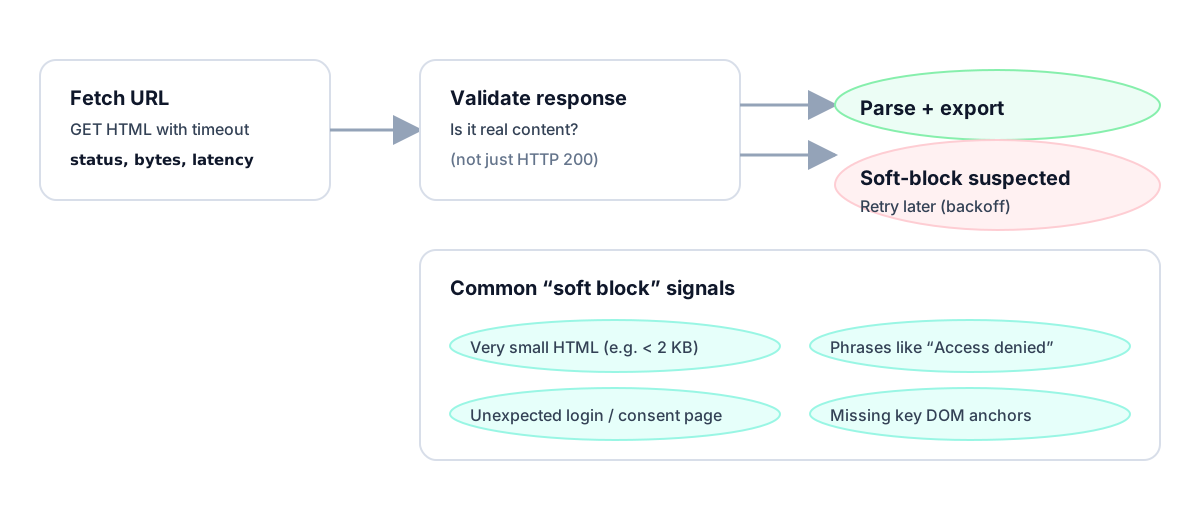
A proxy layer helps reduce failures, but it does not remove the need for validation. ProxiesAPI keeps fetches steadier; your scraper still needs to prove the response is real.
What a soft block looks like
Soft blocks usually share one or more of these traits:
- the HTML is much smaller than a real page
- expected DOM anchors are missing
- keywords like “captcha”, “access denied”, or “enable JavaScript” appear
- the title is generic instead of target-specific
- your record count suddenly drops to zero
The key mindset:
Treat
200 OKas untrusted until the content passes validation.
That single habit prevents a lot of bad downstream data.
Step 1: Separate fetching from validation
Do not mix parsing logic directly into the request call. First fetch, then validate, then parse.
from __future__ import annotations

import requests

TIMEOUT = (10, 30)
UA = "Mozilla/5.0 (compatible; ProxiesAPIGuidesBot/1.0; +https://www.proxiesapi.com/)"

session = requests.Session()
session.headers.update({"User-Agent": UA})


def fetch_html(url: str) -> tuple[int, str]:
    r = session.get(url, timeout=TIMEOUT)
    return r.status_code, r.text
This small separation makes the rest of the reliability layer easier to reason about.
Step 2: Add cheap generic heuristics
Start with a few low-cost checks that work on many targets.
import re

SOFT_BLOCK_PATTERNS = [
    r"access denied",
    r"verify you are human",
    r"enable javascript",
    r"captcha",
    r"unusual traffic",
    r"temporarily blocked",
    r"request unsuccessful",
]


def looks_soft_blocked(html: str) -> bool:
    if not html:
        return True

    if len(html) < 1500:
        return True

    low = html.lower()
    return any(re.search(pattern, low) for pattern in SOFT_BLOCK_PATTERNS)
These rules are intentionally simple. They catch a surprising number of fake-success responses before your parser ever runs.
Step 3: Add target-specific anchor checks
Generic heuristics are not enough on their own.
The strongest validation is domain-aware validation:
- what must be present on a real page?
- what would never be missing on a successful response?
Example for a product page:
from bs4 import BeautifulSoup


def validate_product_page(html: str) -> bool:
    soup = BeautifulSoup(html, "lxml")
    title = soup.select_one("h1")
    price = soup.select_one("[data-testid='price'], .price, .product-price")
    return bool(title and price)
Example for a search result page:
def validate_search_results(html: str) -> bool:
    soup = BeautifulSoup(html, "lxml")
    cards = soup.select(".result, .search-result, li.result-row")
    return len(cards) >= 3
These checks are far stronger than scanning for the word “captcha”.
Step 4: Fail fast and retry cleanly
If validation fails, do not parse anyway. Treat it like a retryable fetch failure.
import random
import time


def backoff(attempt: int, base: float = 0.8, cap: float = 20.0) -> float:
    exp = min(cap, base * (2 ** (attempt - 1)))
    return exp + random.uniform(0, exp * 0.2)


def fetch_validated(url: str, validate_fn=None, attempts: int = 4) -> str:
    last_reason = None

    for attempt in range(1, attempts + 1):
        status, html = fetch_html(url)

        if status in (429, 500, 502, 503, 504):
            last_reason = f"retryable status {status}"
            time.sleep(backoff(attempt))
            continue

        if status != 200:
            raise RuntimeError(f"non-200 status: {status}")

        if looks_soft_blocked(html):
            last_reason = "soft-block heuristics matched"
            time.sleep(backoff(attempt))
            continue

        if validate_fn and not validate_fn(html):
            last_reason = "anchor validation failed"
            time.sleep(backoff(attempt))
            continue

        return html

    raise RuntimeError(f"failed after {attempts} attempts: {last_reason}")
This is the production habit that matters:
- soft blocks are failures
- failures get logged
- retries are explicit
Step 5: Log the failure reason
If you only log “parse failed”, you learn nothing.
Track specific reasons:
- tiny HTML
- known block phrase
- missing anchor
- status 429
- status 503
That lets you answer:
- Is the site rate-limiting?
- Did the layout change?
- Are we getting challenge pages?
A tiny example:
def classify_soft_block(html: str) -> str | None:
    if not html:
        return "empty_html"
    if len(html) < 1500:
        return "tiny_html"

    low = html.lower()
    for marker in ["captcha", "access denied", "enable javascript", "verify you are human"]:
        if marker in low:
            return f"marker:{marker}"

    return None
Granular logs make your retry policy smarter over time.
Step 6: Use success metrics that reveal soft blocks
Do not monitor only request success rate.
Also monitor:
- parsed item count per run
- median HTML length
- share of pages failing validation
- percent of pages with missing anchors
Why this matters:
- a crawl can show 99% HTTP success
- while your useful-data success rate is collapsing
That is exactly how soft blocks hide in production.
Example: wrapping a real parser safely
Here is a minimal end-to-end pattern:
from bs4 import BeautifulSoup


def parse_titles(html: str) -> list[str]:
    soup = BeautifulSoup(html, "lxml")
    return [el.get_text(" ", strip=True) for el in soup.select("h2, h3")]


def scrape_page(url: str) -> list[str]:
    html = fetch_validated(url, validate_fn=validate_search_results)
    items = parse_titles(html)
    if not items:
        raise RuntimeError("validated page parsed zero items")
    return items
That extra validation step is often the difference between a scraper that “works on my laptop” and one that survives real traffic.
Using ProxiesAPI
Soft-block detection still matters when you use a proxy API. A better network layer reduces failures; it does not eliminate the need to validate content.
curl "http://api.proxiesapi.com/?key=API_KEY&url=https://example.com"
Python wrapper:
from urllib.parse import urlencode


def fetch_via_proxiesapi(target_url: str, api_key: str) -> tuple[int, str]:
    api_url = "http://api.proxiesapi.com/?" + urlencode({
        "key": api_key,
        "url": target_url,
    })
    r = session.get(api_url, timeout=TIMEOUT)
    return r.status_code, r.text
Then run the same validation pipeline against the returned HTML.
Common mistakes
1) Only checking status codes
This catches hard blocks, not soft ones.
2) Using only keyword matching
“captcha” detection is useful, but it misses layout drift and placeholder pages.
3) Parsing before validation
Once junk HTML reaches the parser, it is too easy to accidentally emit empty or malformed records.
4) Not tracking result counts
A sudden drop to zero items is often your first sign of trouble.
Recommended default stack
My default soft-block detection stack is:
- status-code handling
- HTML-size threshold
- keyword heuristics
- target-specific anchor validation
- retries with backoff
- monitoring on parsed output, not just transport success
That combination is lightweight, effective, and easy to explain to future-you.
If you add only one reliability layer to an existing scraper, make it this one.
A proxy layer helps reduce failures, but it does not remove the need for validation. ProxiesAPI keeps fetches steadier; your scraper still needs to prove the response is real.