
How to Scrape Apartment Listings from Apartments.com (Python + ProxiesAPI)
Apartments.com aggregates rental listings across many markets. If you’re building a rent analytics dashboard, a neighborhood alert, or a dataset for research, the crawl pattern is consistent:
- scrape listing cards from a city page
- follow listing detail URLs
- extract fields and export
In this guide we’ll build a real Apartments.com scraper in Python that:
- extracts listing URLs from a city results page
- paginates through results
- visits listing pages and pulls key fields (address, price text, beds/baths, amenities snippet)
- exports JSON + CSV
Rental listings are high-churn pages: lots of URLs, lots of retries, and lots of variance. ProxiesAPI helps you keep the fetch layer consistent while you focus on parsing and data quality.
What we’re scraping
We’ll start with a city page like:
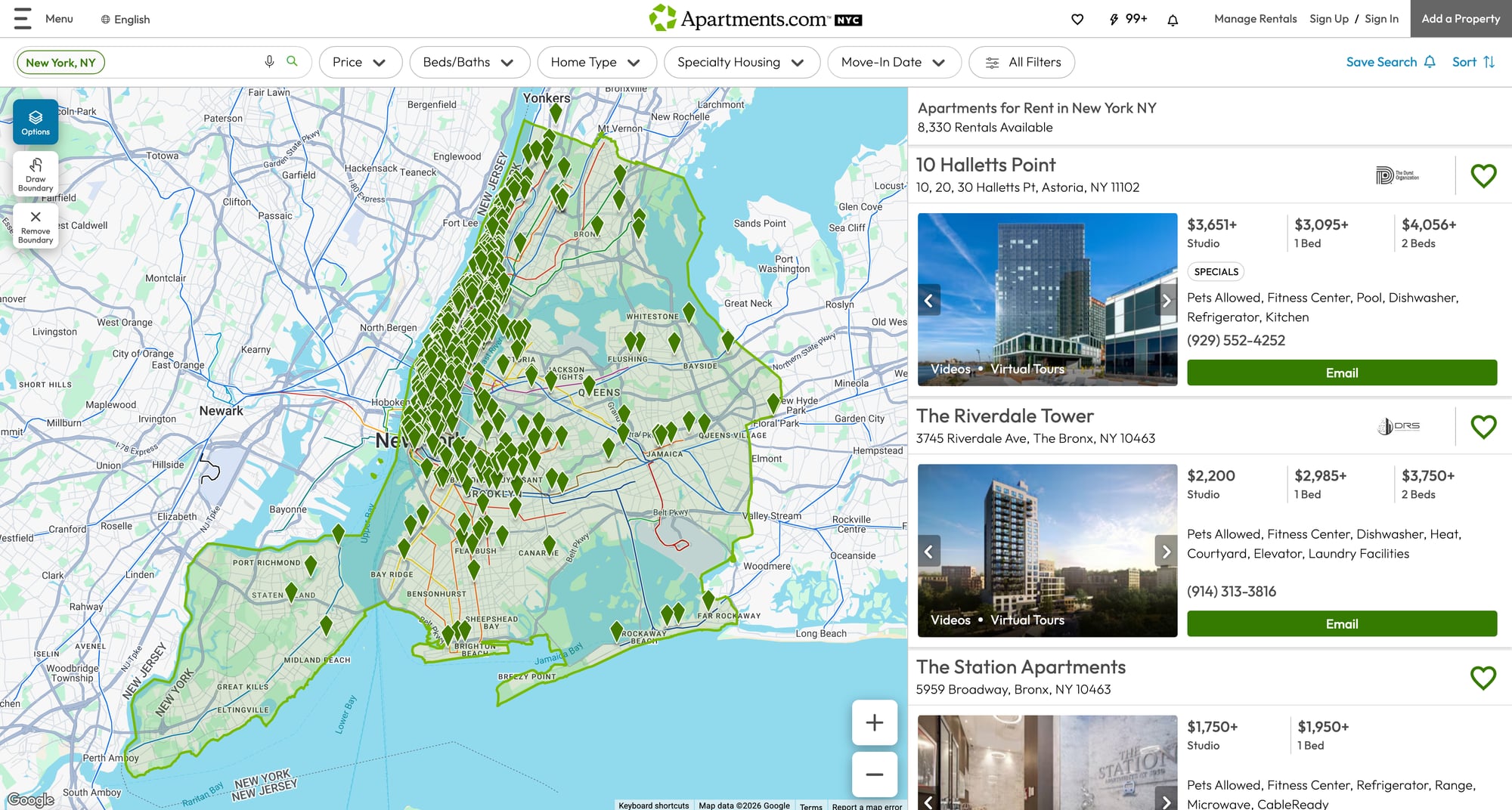
https://www.apartments.com/new-york-ny/
Pagination is straightforward:
- page 2:
https://www.apartments.com/new-york-ny/2/ - page 3:
https://www.apartments.com/new-york-ny/3/
Listing detail pages look like:
https://www.apartments.com/10-halletts-point-astoria-ny/1j2c5h6/
From listing pages we’ll extract best-effort fields:
- name/title
- full address
- rent/price text
- bed/bath text
- key features / amenities (snippet)
Setup
python -m venv .venv
source .venv/bin/activate
pip install requests beautifulsoup4 lxml
Step 1: Fetch with retries + a real timeout
import random
import time
from typing import Optional

import requests

TIMEOUT = (10, 30)

session = requests.Session()
session.headers.update({
    "User-Agent": (
        "Mozilla/5.0 (Macintosh; Intel Mac OS X 10_15_7) "
        "AppleWebKit/537.36 (KHTML, like Gecko) "
        "Chrome/124.0.0.0 Safari/537.36"
    )
})


def fetch_html(url: str, *, max_retries: int = 4, backoff_base: float = 1.5) -> str:
    last_err: Optional[Exception] = None

    for attempt in range(1, max_retries + 1):
        try:
            r = session.get(url, timeout=TIMEOUT)

            if r.status_code in (429, 500, 502, 503, 504):
                raise requests.HTTPError(f"{r.status_code} transient", response=r)

            r.raise_for_status()
            return r.text

        except Exception as e:
            last_err = e
            time.sleep((backoff_base ** attempt) + random.random())

    raise RuntimeError(f"Failed to fetch after {max_retries} attempts: {url} ({last_err})")
Step 2: Fetch via ProxiesAPI
cURL
API_KEY="YOUR_API_KEY"
TARGET="https://www.apartments.com/new-york-ny/"

curl "http://api.proxiesapi.com/?key=${API_KEY}&url=${TARGET}" | head -n 20
Python helper
import os
import urllib.parse

PROXIESAPI_KEY = os.getenv("PROXIESAPI_KEY", "API_KEY")


def proxiesapi_url(target_url: str) -> str:
    return "http://api.proxiesapi.com/?" + urllib.parse.urlencode({
        "key": PROXIESAPI_KEY,
        "url": target_url,
    })


def fetch_html_via_proxiesapi(target_url: str) -> str:
    return fetch_html(proxiesapi_url(target_url))
Step 3: Parse listing URLs from a city results page
From our browser snapshot we can see listing cards link directly to Apartments.com listing URLs.
We’ll capture all anchors that point to https://www.apartments.com/ and look like listing detail pages.
from bs4 import BeautifulSoup


def parse_listing_urls(html: str) -> list[str]:
    soup = BeautifulSoup(html, "lxml")

    urls: list[str] = []
    seen = set()

    # Result cards are commonly inside <article>, but URLs are easiest to find by href.
    for a in soup.select('a[href^="https://www.apartments.com/"]'):
        href = a.get("href")
        if not href:
            continue

        # Heuristic: listing URLs generally end with a trailing slash and contain a short id segment.
        # Example: /10-halletts-point-astoria-ny/1j2c5h6/
        parts = href.rstrip("/").split("/")
        if len(parts) < 2:
            continue

        # Keep only likely listing detail pages (not marketing/blog/sitemap)
        if any(seg in href for seg in ("/blog", "/sitemap", "/local-guide", "/grow")):
            continue

        # de-dupe
        clean = href.split("?")[0]
        if clean in seen:
            continue
        seen.add(clean)
        urls.append(clean)

    return urls
Test it quickly
city_url = "https://www.apartments.com/new-york-ny/"
html = fetch_html_via_proxiesapi(city_url)

listing_urls = parse_listing_urls(html)
print("listing urls:", len(listing_urls))
print(listing_urls[:5])
Step 4: Pagination (crawl N pages)
Apartments.com city pages paginate via path segments.
def city_page_url(base_city_url: str, page: int) -> str:
    base = base_city_url.rstrip("/") + "/"
    return base if page == 1 else f"{base}{page}/"


def crawl_city(base_city_url: str, pages: int = 3, max_urls: int = 60) -> list[str]:
    out: list[str] = []
    seen = set()

    for p in range(1, pages + 1):
        url = city_page_url(base_city_url, p)
        html = fetch_html_via_proxiesapi(url)
        batch = parse_listing_urls(html)

        for u in batch:
            if u in seen:
                continue
            seen.add(u)
            out.append(u)
            if len(out) >= max_urls:
                return out

        print("page", p, "batch", len(batch), "total", len(out))
        time.sleep(2 + random.random())

    return out
Step 5: Parse listing detail pages
Listing pages vary by property type, but common fields are usually available in readable HTML.
We’ll extract best-effort data using multiple fallbacks.
import re


def text_or_none(el):
    return el.get_text(" ", strip=True) if el else None


def parse_listing_page(html: str, url: str) -> dict:
    soup = BeautifulSoup(html, "lxml")

    title = (
        text_or_none(soup.select_one("h1"))
        or text_or_none(soup.select_one("title"))
    )

    # Address is often in <h2> or in an element with itemprop/address
    address = None
    addr_el = soup.select_one('[itemprop="address"], [class*="propertyAddress"], [class*="address"]')
    if addr_el:
        address = text_or_none(addr_el)

    # Price can appear in a rent summary section; we capture the first $-containing line we find.
    price_text = None
    for el in soup.select("span, div"):
        t = el.get_text(" ", strip=True)
        if t and "$" in t and len(t) <= 40:
            # avoid headers like "Save Search"
            if re.search(r"\$\d", t):
                price_text = t
                break

    # Beds/baths often appear as compact text like "Studio", "1 Bed", "2 Beds", etc.
    beds_baths = None
    for el in soup.select("span, div"):
        t = el.get_text(" ", strip=True)
        if not t:
            continue
        if re.search(r"\b(Studio|\d+\s*Bed|\d+\s*Beds)\b", t) and re.search(r"\b(Bath|Baths)\b", t):
            beds_baths = t
            break

    # Amenities/features snippet: collect a few short bullet-like items
    amenities = []
    for el in soup.select("li"):
        t = el.get_text(" ", strip=True)
        if not t:
            continue
        if len(t) > 40:
            continue
        if any(word in t.lower() for word in ("fitness", "pool", "dishwasher", "laundry", "pet", "elevator", "parking", "air")):
            amenities.append(t)
        if len(amenities) >= 8:
            break

    return {
        "url": url,
        "title": title,
        "address": address,
        "price_text": price_text,
        "beds_baths": beds_baths,
        "amenities": amenities,
    }
Step 6: Full scraper (crawl → details → export)
import csv
import json


def scrape_apartments(base_city_url: str, pages: int = 2, max_listings: int = 25) -> list[dict]:
    urls = crawl_city(base_city_url, pages=pages, max_urls=max_listings)

    rows: list[dict] = []

    for i, u in enumerate(urls, start=1):
        print(f"[{i}/{len(urls)}] listing", u)
        html = fetch_html_via_proxiesapi(u)
        rows.append(parse_listing_page(html, u))

        time.sleep(2 + random.random())

    return rows


def export_json(path: str, rows: list[dict]) -> None:
    with open(path, "w", encoding="utf-8") as f:
        json.dump(rows, f, ensure_ascii=False, indent=2)


def export_csv(path: str, rows: list[dict]) -> None:
    fieldnames = ["url", "title", "address", "price_text", "beds_baths", "amenities"]
    with open(path, "w", newline="", encoding="utf-8") as f:
        w = csv.DictWriter(f, fieldnames=fieldnames)
        w.writeheader()
        for r in rows:
            r2 = dict(r)
            r2["amenities"] = ", ".join(r2.get("amenities") or [])
            w.writerow(r2)


if __name__ == "__main__":
    base_city = "https://www.apartments.com/new-york-ny/"
    rows = scrape_apartments(base_city, pages=2, max_listings=20)

    export_json("apartments_listings.json", rows)
    export_csv("apartments_listings.csv", rows)

    print("done", len(rows))
QA checklist
-
crawl_city()returns listing URLs (not marketing/blog URLs) - Detail parser returns a non-empty
titlefor most listings - At least some pages return
price_textand/oramenities - Exports open correctly
Where ProxiesAPI fits (honestly)
Apartments.com pages are URL-heavy: once you crawl a couple pages, you quickly have dozens of detail pages.
As you scale:
- request failures happen
- rate limits happen
- long-running jobs need stability
ProxiesAPI helps by making your network layer more consistent while you focus on:
- parsing correctness
- incremental refresh
- dedupe and storage
Rental listings are high-churn pages: lots of URLs, lots of retries, and lots of variance. ProxiesAPI helps you keep the fetch layer consistent while you focus on parsing and data quality.