
How to Scrape Cars.com Used Car Prices (Python + ProxiesAPI)
Scraping used car marketplaces is a classic “two-layer” job:
- Search results pages (lots of listings, pagination)
- Listing detail pages (the fields you actually care about)
In this guide, we’ll build a production-shaped scraper for Cars.com that collects:
- listing title
- price
- mileage
- location (city/state)
- dealer name (when available)
- VIN (often present on detail pages)
- URL
We’ll use Python + BeautifulSoup for HTML parsing and show where ProxiesAPI fits in the fetch layer.
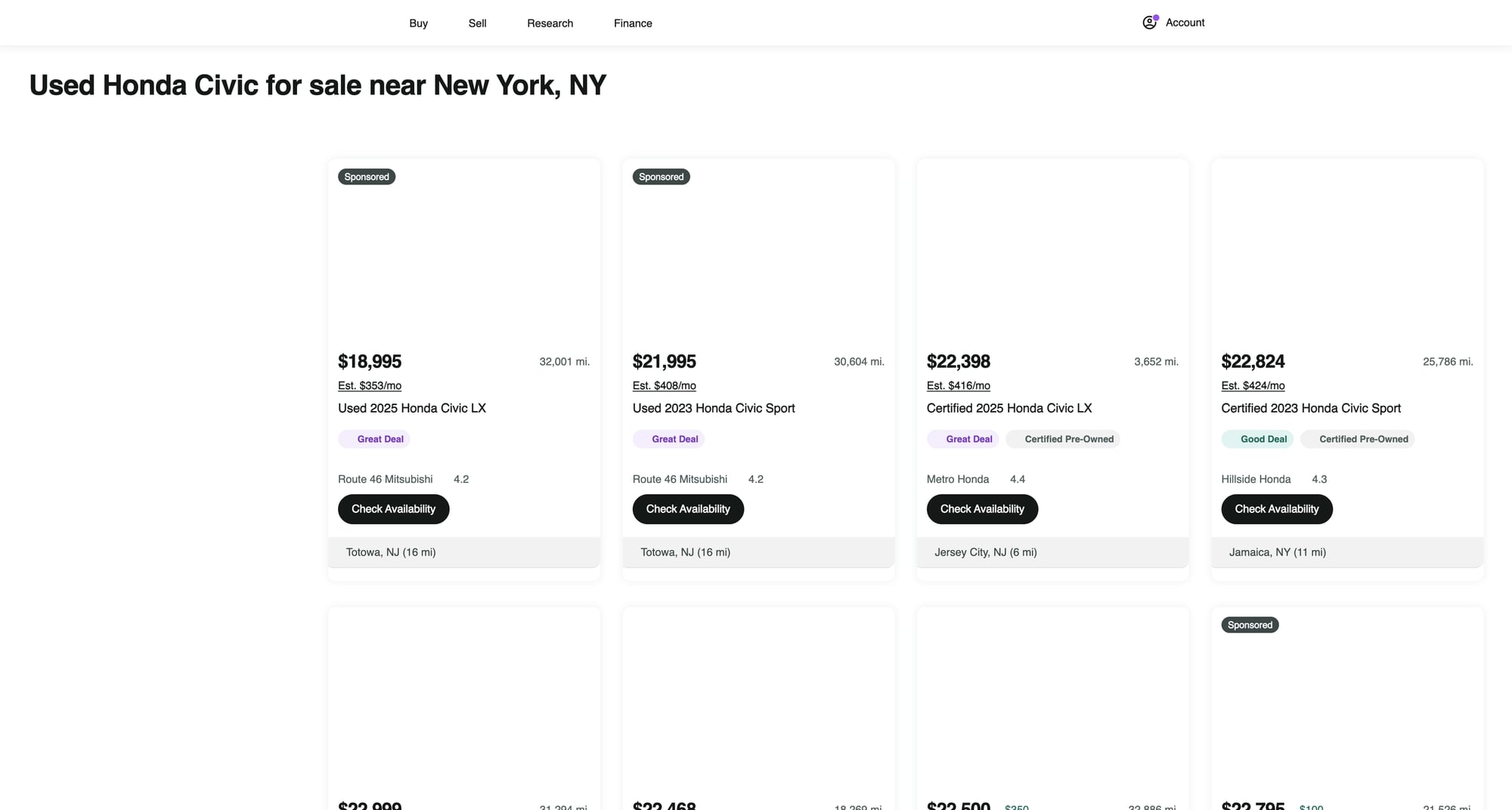
Cars.com is a high-traffic marketplace where repetitive requests can trigger rate limits. ProxiesAPI helps you rotate IPs and keep the network layer consistent as your URL count grows.
What we’re scraping (and why the detail page matters)
Cars.com search results show “cards” with summary info (price, mileage, location, etc.). But:
- some fields are truncated in cards
- dealer details are richer on the detail page
- VIN is more likely on the detail page
So the strategy is:
- crawl search pages → collect listing URLs
- fetch each listing detail page → extract the stable fields
Setup
python -m venv .venv
source .venv/bin/activate
pip install requests beautifulsoup4 lxml tenacity
We’ll use:
requestsfor HTTPBeautifulSoup(lxml)for parsingtenacityfor retry with backoff
Step 1: Fetch HTML with timeouts (+ where ProxiesAPI plugs in)
Start with a “boring but correct” fetch layer:
- sane timeouts
- retries
- a real User-Agent
import os
import time
import random
import requests
from tenacity import retry, stop_after_attempt, wait_exponential, retry_if_exception_type

TIMEOUT = (10, 30)  # connect, read
UA = (
    "Mozilla/5.0 (Macintosh; Intel Mac OS X 10_15_7) "
    "AppleWebKit/537.36 (KHTML, like Gecko) "
    "Chrome/123.0.0.0 Safari/537.36"
)

session = requests.Session()


class FetchError(Exception):
    pass


def _headers():
    return {
        "User-Agent": UA,
        "Accept": "text/html,application/xhtml+xml,application/xml;q=0.9,*/*;q=0.8",
        "Accept-Language": "en-US,en;q=0.9",
        "Connection": "keep-alive",
    }


@retry(
    reraise=True,
    stop=stop_after_attempt(4),
    wait=wait_exponential(multiplier=1, min=1, max=20),
    retry=retry_if_exception_type((requests.RequestException, FetchError)),
)
def fetch_html(url: str) -> str:
    # Polite jitter between retries/requests
    time.sleep(random.uniform(0.5, 1.3))

    # --- Option A (direct): plain request ---
    r = session.get(url, headers=_headers(), timeout=TIMEOUT)

    # --- Option B (via ProxiesAPI): replace Option A with ProxiesAPI gateway ---
    # ProxiesAPI integration varies by plan. Typically you either:
    # 1) use an HTTP proxy (host/port + auth) in requests' proxies=..., OR
    # 2) call a fetch endpoint that returns the upstream HTML.
    #
    # Keep your parsing code identical; only swap the network layer.
    #
    # Example shape if you have an HTTP proxy URL:
    # proxy_url = os.environ.get("PROXIESAPI_PROXY_URL")
    # if proxy_url:
    #     r = session.get(
    #         url,
    #         headers=_headers(),
    #         timeout=TIMEOUT,
    #         proxies={"http": proxy_url, "https": proxy_url},
    #     )

    if r.status_code in (403, 429):
        raise FetchError(f"Blocked or rate-limited: {r.status_code}")

    r.raise_for_status()
    return r.text
Notes:
- Don’t bake proxy logic into parsing. Keep it in
fetch_html(). - Use jitter and retries; most scraping failures are temporary.
Step 2: Build a Cars.com search URL
Cars.com supports many query parameters. For a stable tutorial, we’ll use a simple pattern:
- make/model keyword in the query string
- location (zip)
- radius
- page number
A common public format is:
https://www.cars.com/shopping/results/?stock_type=used&makes[]=honda&models[]=honda-civic&zip=10001&radius=50&page=1
We’ll generate URLs like that.
from urllib.parse import urlencode

BASE = "https://www.cars.com"


def build_search_url(make: str, model: str, zip_code: str, radius: int = 50, page: int = 1) -> str:
    params = {
        "stock_type": "used",
        "makes[]": make.lower(),
        "models[]": model.lower().replace(" ", "-"),
        "zip": zip_code,
        "radius": radius,
        "page": page,
    }
    return f"{BASE}/shopping/results/?{urlencode(params, doseq=True)}"


print(build_search_url("honda", "honda-civic", "10001", 50, 1))
If your make/model slug differs, open Cars.com in a browser, set filters, and copy the resulting URL. That’s the fastest way to get a working parameter set.
Step 3: Parse listing cards from the search results page
Cars.com’s HTML can change. The trick is to:
- inspect the page in DevTools
- choose selectors that match structure (cards + link) rather than brittle class soup
- keep “best effort” parsing with
Nonefallbacks
Below is a parser that:
- extracts the detail URL
- grabs best-effort price / mileage / location / title
import re
from bs4 import BeautifulSoup
from urllib.parse import urljoin


def clean_text(x: str | None) -> str | None:
    if not x:
        return None
    x = re.sub(r"\s+", " ", x).strip()
    return x or None


def parse_money(text: str | None) -> int | None:
    if not text:
        return None
    m = re.search(r"\$\s*([\d,]+)", text)
    return int(m.group(1).replace(",", "")) if m else None


def parse_miles(text: str | None) -> int | None:
    if not text:
        return None
    m = re.search(r"([\d,]+)\s*mi", text.lower())
    return int(m.group(1).replace(",", "")) if m else None


def parse_search_page(html: str) -> list[dict]:
    soup = BeautifulSoup(html, "lxml")

    out = []

    # Cards often contain an <a> to the listing detail page.
    # This selector is intentionally broad; we filter by URL shape.
    for a in soup.select("a[href]"):
        href = a.get("href")
        if not href:
            continue

        # Cars.com listing URLs frequently include /vehicledetail/
        if "/vehicledetail/" not in href:
            continue

        url = urljoin("https://www.cars.com", href)

        # Walk up to a likely card container and extract visible text fields.
        card = a
        for _ in range(5):
            if card and card.name != "article":
                card = card.parent
            else:
                break

        blob = clean_text(card.get_text(" ", strip=True) if card else a.get_text(" ", strip=True))

        title = clean_text(a.get_text(" ", strip=True))

        price = parse_money(blob)
        mileage = parse_miles(blob)

        # location is often like "New York, NY" somewhere in the card text
        loc = None
        m = re.search(r"([A-Za-z .]+,\s*[A-Z]{2})", blob or "")
        if m:
            loc = clean_text(m.group(1))

        out.append({
            "title": title,
            "price": price,
            "mileage": mileage,
            "location": loc,
            "url": url,
        })

    # de-dupe by url
    seen = set()
    uniq = []
    for x in out:
        if x["url"] in seen:
            continue
        seen.add(x["url"])
        uniq.append(x)

    return uniq
Quick sanity test
url = build_search_url("honda", "honda-civic", "10001", radius=50, page=1)
html = fetch_html(url)
items = parse_search_page(html)
print("found", len(items), "listing links")
print(items[:2])
Step 4: Extract structured data from a listing detail page
Detail pages usually provide:
- more complete title
- dealer name
- location
- VIN (sometimes)
- attributes like mileage, exterior color, etc.
The most robust approach is:
- Look for JSON-LD (
<script type="application/ld+json">) — structured data when present - Fall back to HTML selectors
Here’s a parser that tries JSON-LD first.
import json


def extract_jsonld(soup: BeautifulSoup) -> list[dict]:
    out = []
    for s in soup.select('script[type="application/ld+json"]'):
        try:
            data = json.loads(s.string or "")
        except Exception:
            continue
        if isinstance(data, dict):
            out.append(data)
        elif isinstance(data, list):
            out.extend([x for x in data if isinstance(x, dict)])
    return out


def parse_detail_page(html: str, url: str) -> dict:
    soup = BeautifulSoup(html, "lxml")

    jsonlds = extract_jsonld(soup)

    title = None
    price = None
    dealer = None
    location = None
    vin = None
    mileage = None

    # Attempt to find a Vehicle/Offer in JSON-LD
    for obj in jsonlds:
        t = (obj.get("@type") or "")
        if isinstance(t, list):
            t = " ".join(t)

        # Many sites embed Product/Vehicle data; we just harvest what exists.
        if "Vehicle" in t or "Product" in t:
            title = title or clean_text(obj.get("name"))

            offers = obj.get("offers")
            if isinstance(offers, dict):
                price = price or (int(float(offers.get("price"))) if offers.get("price") else None)

        if "AutoDealer" in t or "Organization" in t:
            dealer = dealer or clean_text(obj.get("name"))

    # HTML fallbacks (best effort)
    if not title:
        h1 = soup.select_one("h1")
        title = clean_text(h1.get_text(" ", strip=True) if h1 else None)

    if not price:
        p = soup.select_one("[data-test='vehicle-price'], [data-test='price-badge']")
        price = parse_money(clean_text(p.get_text(" ", strip=True) if p else None))

    # Dealer / location sometimes appear near a dealer section
    if not dealer:
        d = soup.select_one("[data-test='dealer-name'], [data-test='seller-name']")
        dealer = clean_text(d.get_text(" ", strip=True) if d else None)

    if not location:
        loc = soup.select_one("[data-test='dealer-address'], [data-test='seller-location']")
        location = clean_text(loc.get_text(" ", strip=True) if loc else None)

    # VIN sometimes present in a details table
    if not vin:
        text = soup.get_text("\n", strip=True)
        m = re.search(r"\bVIN\b\s*[:#]?\s*([A-HJ-NPR-Z0-9]{11,17})", text)
        if m:
            vin = m.group(1)

    # mileage: look for “miles” pattern on detail page
    if not mileage:
        text = soup.get_text(" ", strip=True)
        mileage = parse_miles(text)

    return {
        "url": url,
        "title": title,
        "price": price,
        "mileage": mileage,
        "location": location,
        "dealer": dealer,
        "vin": vin,
    }
Step 5: Crawl pagination → fetch details → export JSON
We’ll:
- crawl the first N search pages
- collect listing URLs
- fetch each detail page
- export as JSONL
import json
from pathlib import Path


def crawl(make: str, model: str, zip_code: str, pages: int = 3) -> list[dict]:
    listing_urls: list[str] = []
    seen = set()

    for page in range(1, pages + 1):
        search_url = build_search_url(make, model, zip_code, radius=50, page=page)
        html = fetch_html(search_url)
        items = parse_search_page(html)

        for it in items:
            u = it.get("url")
            if not u or u in seen:
                continue
            seen.add(u)
            listing_urls.append(u)

        print("page", page, "listing_urls", len(items), "total_unique", len(listing_urls))

    results = []
    for i, url in enumerate(listing_urls, 1):
        try:
            html = fetch_html(url)
            data = parse_detail_page(html, url)
            results.append(data)
            print(f"{i}/{len(listing_urls)} ok")
        except Exception as e:
            print(f"{i}/{len(listing_urls)} fail", url, str(e))

    return results


rows = crawl("honda", "honda-civic", "10001", pages=2)
print("rows", len(rows))

out_path = Path("cars_com_used_listings.jsonl")
with out_path.open("w", encoding="utf-8") as f:
    for r in rows:
        f.write(json.dumps(r, ensure_ascii=False) + "\n")

print("wrote", out_path, len(rows))
Practical notes (avoid getting blocked)
- Start small: crawl 1–2 pages while you validate selectors.
- Throttle: add delays and jitter between requests.
- Retry on 429/5xx with exponential backoff.
- Separate discovery vs detail: store URLs first, then fetch details.
- Cache HTML during development so you don’t hammer the site while debugging.
Where ProxiesAPI fits (honestly)
Cars.com can rate limit repeated requests, especially if you:
- crawl many pages
- fetch hundreds/thousands of detail URLs
- run from a single IP repeatedly
ProxiesAPI helps by letting you rotate IPs and improve request success rates as volume grows.
Keep your code architecture like this tutorial:
- parsing stays the same
- only the
fetch_html()implementation changes
QA checklist
- Search parser finds a reasonable number of
/vehicledetail/links - Detail parser extracts title + price for a few hand-checked listings
- Exported JSONL has no empty URLs
- Crawl respects delays + retries
- You can rerun safely (URLs de-duped)
Cars.com is a high-traffic marketplace where repetitive requests can trigger rate limits. ProxiesAPI helps you rotate IPs and keep the network layer consistent as your URL count grows.