
How to Scrape Google Flights Prices with Python (Routes, Dates, and Price Quotes)
Google Flights is one of the best “real world” scraping targets because it’s a high-value dataset (prices change constantly) and it’s also a site that will punish sloppy scrapers.
In this tutorial we’ll build a production-minded Python scraper that:
- captures a shareable Google Flights results URL (you choose the route + dates)
- fetches HTML safely (timeouts, retries, and a session)
- parses flight result cards into structured data (airline, times, duration, stops, price)
- exports JSON you can use for alerts, dashboards, or analysis
- shows where ProxiesAPI fits when you scale beyond “a few manual checks”
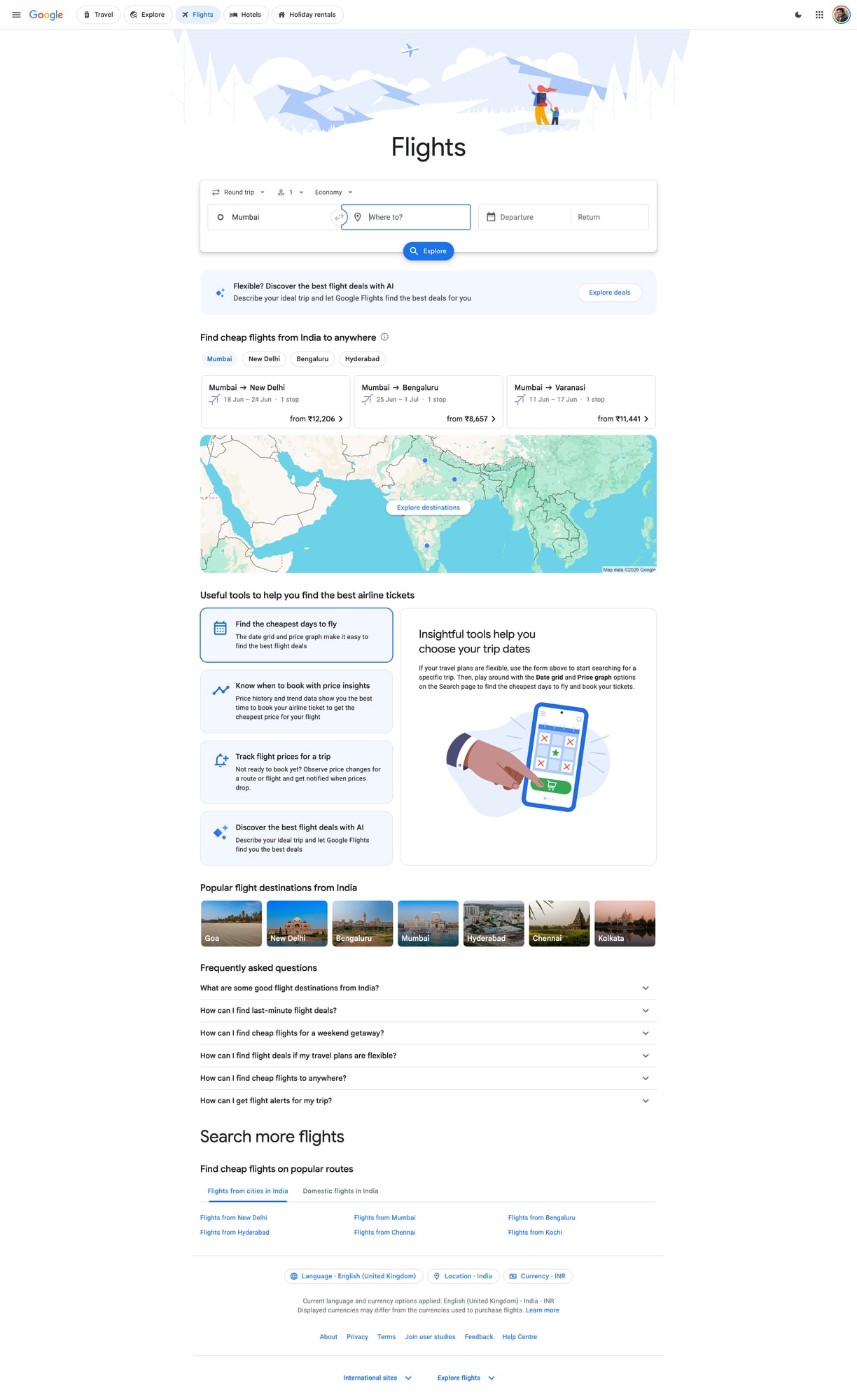
We’ll also include a screenshot of the page we’re scraping so you can visually match selectors.
Google surfaces anti-bot defenses quickly when you scale beyond a handful of requests. ProxiesAPI gives you a clean proxy layer (rotation + reputation) so your scraper can keep running without burning a single IP.
Important note (what we are and aren’t doing)
Google Flights is heavily dynamic and personalized. There are many ways to “scrape Google Flights”, and some are brittle or cross lines you might not want to cross.
This guide focuses on a pragmatic, ethical approach:
- You generate a results page (route + dates) in your browser.
- You use a share URL that loads a results page.
- We fetch the HTML and extract the visible quote cards.
If you need deep automation (searching thousands of date combinations), treat this as the baseline and then add:
- caching
- queueing + backoff
- incremental refresh
- stronger fingerprinting defenses (often via a real browser)
What we’re scraping (page anatomy)
When you open Google Flights results, you’ll typically see a list of options. Each option contains:
- a price (e.g. “₹24,531”)
- departure/arrival times
- airline(s)
- duration and stops
The HTML structure changes. So instead of hardcoding one brittle selector, we’ll:
- Locate result “cards” by looking for repeating blocks that contain a price
- Extract fields using relative selectors within each card
- Keep the parser tolerant of missing fields
This is the same approach you’ll use on most complex sites: identify a repeated item container, then parse inside it.
Setup
python -m venv .venv
source .venv/bin/activate
pip install requests beautifulsoup4 lxml tenacity
We’ll use:
requestsfor HTTPBeautifulSoup(lxml)for parsingtenacityfor retries with backoff
Step 1: Get a Google Flights share URL
- Go to https://www.google.com/travel/flights
- Enter your origin, destination, and dates
- Apply any filters you care about (e.g. “1 stop or fewer”)
- Copy the URL from the address bar
Tip: If the URL is extremely long, that’s fine. We’ll store it in a config file.
Create config.py:
# config.py
FLIGHTS_URL = "PASTE_YOUR_GOOGLE_FLIGHTS_RESULTS_URL_HERE"
Step 2: Fetch HTML reliably (timeouts + retries)
Google will sometimes return:
- an interstitial
- an error page
- truncated HTML
So we want:
- connect/read timeouts
- retries with exponential backoff
- a stable session (cookies)
import random
import time
import requests
from tenacity import retry, stop_after_attempt, wait_exponential

TIMEOUT = (10, 30)  # connect, read

BASE_HEADERS = {
    "User-Agent": (
        "Mozilla/5.0 (Macintosh; Intel Mac OS X 10_15_7) "
        "AppleWebKit/537.36 (KHTML, like Gecko) "
        "Chrome/124.0.0.0 Safari/537.36"
    ),
    "Accept": "text/html,application/xhtml+xml,application/xml;q=0.9,*/*;q=0.8",
    "Accept-Language": "en-US,en;q=0.9",
    "Cache-Control": "no-cache",
    "Pragma": "no-cache",
}

session = requests.Session()


def polite_sleep(min_s=0.7, max_s=1.6):
    time.sleep(random.uniform(min_s, max_s))


@retry(stop=stop_after_attempt(5), wait=wait_exponential(multiplier=1, min=1, max=20))
def fetch_html(url: str) -> str:
    r = session.get(url, headers=BASE_HEADERS, timeout=TIMEOUT, allow_redirects=True)
    r.raise_for_status()

    text = r.text

    # lightweight sanity checks
    if "captcha" in text.lower() or "unusual traffic" in text.lower():
        raise RuntimeError("Blocked (captcha/unusual traffic)")

    if len(text) < 50_000:
        # Results pages are typically much larger; small HTML often means interstitial.
        raise RuntimeError(f"Suspiciously small HTML: {len(text)} bytes")

    return text
Step 3: Parse results cards into structured quotes
Instead of assuming exact class names, we’ll:
- extract all price-like strings
- walk upward to find a container node
- then parse times/airlines/duration inside that container
This is not perfect, but it’s surprisingly effective when the page is mostly server-rendered.
import re
from bs4 import BeautifulSoup

PRICE_RE = re.compile(r"(₹|\$|€|£)\s?\d[\d,\.]*")
TIME_RE = re.compile(r"\b\d{1,2}:\d{2}\s?(AM|PM)?\b", re.IGNORECASE)


def clean_text(s: str) -> str:
    return re.sub(r"\s+", " ", (s or "").strip())


def find_price_nodes(soup: BeautifulSoup):
    # any element whose text looks like a price
    out = []
    for el in soup.find_all(text=True):
        t = str(el)
        if PRICE_RE.search(t):
            out.append(el.parent)
    return out


def parse_quote_from_container(container) -> dict:
    text = clean_text(container.get_text(" ", strip=True))

    # price
    m = PRICE_RE.search(text)
    price = m.group(0) if m else None

    # times (often two per result)
    times = TIME_RE.findall(text)

    # heuristic fields
    airline = None
    duration = None
    stops = None

    # try to capture common tokens
    dur_m = re.search(r"\b(\d+\s?h\s?\d*\s?m|\d+\s?m)\b", text, re.IGNORECASE)
    if dur_m:
        duration = dur_m.group(1)

    stops_m = re.search(r"\b(nonstop|\d+\s?stop(s)?)\b", text, re.IGNORECASE)
    if stops_m:
        stops = stops_m.group(1)

    # airline guess: take first capitalized word sequence before duration/stops/price
    # (keeps this tolerant; you can refine once you inspect your target HTML)
    airline_m = re.search(r"\b([A-Z][A-Za-z&\-\.]+(?:\s+[A-Z][A-Za-z&\-\.]+){0,3})\b", text)
    if airline_m:
        airline = airline_m.group(1)

    return {
        "price": price,
        "times": times,
        "duration": duration,
        "stops": stops,
        "airline_guess": airline,
        "raw": text[:500],
    }


def parse_google_flights(html: str) -> list[dict]:
    soup = BeautifulSoup(html, "lxml")

    # find many candidate price nodes, then dedupe by container identity
    price_nodes = find_price_nodes(soup)

    quotes = []
    seen = set()

    for node in price_nodes:
        # climb up a few levels to get a stable “card”-ish container
        container = node
        for _ in range(5):
            if container.parent:
                container = container.parent

        key = id(container)
        if key in seen:
            continue
        seen.add(key)

        q = parse_quote_from_container(container)
        if q.get("price"):
            quotes.append(q)

    # light cleanup: keep only the best-looking quotes
    # (cards that contain at least one time token)
    quotes = [q for q in quotes if len(q.get("times") or []) >= 1]

    return quotes
This parser is intentionally conservative. Once you run it once, you can look at the raw field and tighten selectors.
Step 4: Put it together (fetch → parse → export)
import json
from config import FLIGHTS_URL


def main():
    html = fetch_html(FLIGHTS_URL)
    polite_sleep()

    quotes = parse_google_flights(html)

    out = {
        "url": FLIGHTS_URL,
        "count": len(quotes),
        "quotes": quotes[:50],
    }

    with open("google_flights_quotes.json", "w", encoding="utf-8") as f:
        json.dump(out, f, ensure_ascii=False, indent=2)

    print("quotes:", len(quotes))
    if quotes:
        print("example:", quotes[0])


if __name__ == "__main__":
    main()
Run:
python scrape_google_flights.py
Where ProxiesAPI fits (honestly)
If you run this once or twice from your laptop, you may be fine.
But price monitoring is rarely “one request”. You typically want to:
- poll multiple routes
- poll multiple dates
- refresh daily/hourly
That’s where blocks and throttling appear.
With ProxiesAPI, you route your requests through a stable proxy layer and rotate IPs so:
- bursts don’t come from one IP
- retries don’t look like a tight bot loop
- you avoid burning a single home/office IP
Minimal integration pattern
You can integrate ProxiesAPI at the network layer by sending requests via a proxy URL.
PROXIES = {
    "http": "http://YOUR_PROXIESAPI_PROXY",
    "https": "http://YOUR_PROXIESAPI_PROXY",
}

r = session.get(FLIGHTS_URL, headers=BASE_HEADERS, proxies=PROXIES, timeout=TIMEOUT)
(Use the proxy endpoint and auth details from your ProxiesAPI dashboard. Keep them in env vars, not hardcoded.)
Practical tips to avoid getting blocked
- Use a session (
requests.Session()) so cookies persist. - Add jitter (random delays) between runs.
- Cache results so you don’t re-fetch the same URL too often.
- Fail fast on interstitials/captcha pages and back off.
- If HTML is inconsistent, switch to a browser-based fetch for the initial capture.
QA checklist
- You can open your
FLIGHTS_URLin a normal browser and see results -
fetch_html()returns large HTML (not an interstitial) - Parser returns at least 5–20 quotes for a busy route
- Export JSON is valid and contains
price+ some time tokens
Next upgrades
- parse fields with stronger selectors after inspecting HTML for your route
- store results in SQLite (dedupe by itinerary)
- add alert rules (e.g. notify when price drops below threshold)
- use Playwright for a “rendered HTML snapshot” when server HTML is insufficient
Google surfaces anti-bot defenses quickly when you scale beyond a handful of requests. ProxiesAPI gives you a clean proxy layer (rotation + reputation) so your scraper can keep running without burning a single IP.