
Scrape Event Data from Eventbrite
Event data is one of the most useful “public web” datasets:
- calendars and city guides
- market research (what’s trending where)
- venue analytics
- lead lists for organizers and promoters
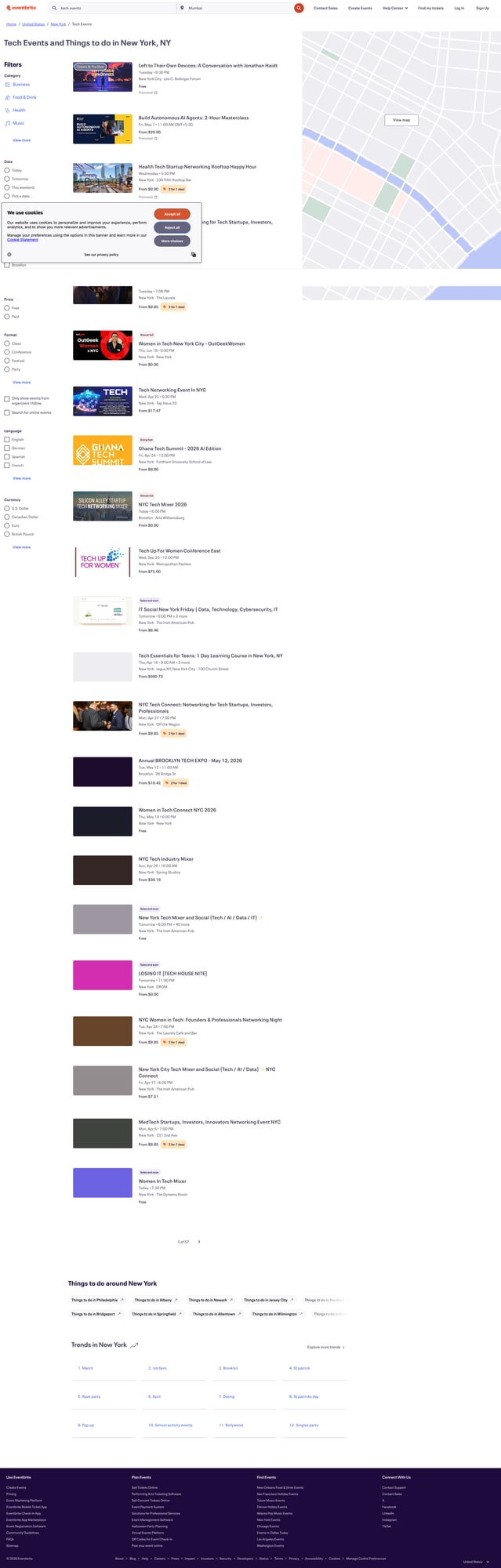
In this tutorial we’ll scrape Eventbrite search results and enrich with detail pages to extract:
- event name
- date/time (best effort)
- venue name + address (when present)
- price / “Free”
- organizer
- event URL
We’ll write real Python with selector notes, pagination, and a crawl plan that doesn’t melt your IP.
Event pages are public, but search + pagination at scale can trigger throttling. ProxiesAPI helps keep your fetch layer resilient as you crawl more categories, cities, and dates.
Important notes before you start
Eventbrite’s HTML (and markup) changes frequently, and some regions can show:
- consent / cookie walls
- localized date formats
- anti-bot checks
This guide focuses on the scraping architecture:
- collect URLs from search pages
- parse “good enough” card fields
- enrich via detail pages
- retry + throttle
If you hit a consent wall, you may need to:
- add header consistency (Accept-Language)
- use a browser to capture cookies and reuse them
- slow down and rotate IPs
Setup
python -m venv .venv
source .venv/bin/activate
pip install requests beautifulsoup4 lxml tenacity python-dateutil
Step 1: A robust fetch layer (and where ProxiesAPI fits)
import os
import time
import random
import requests
from tenacity import retry, stop_after_attempt, wait_exponential, retry_if_exception_type

TIMEOUT = (10, 30)
UA = (
    "Mozilla/5.0 (Macintosh; Intel Mac OS X 10_15_7) "
    "AppleWebKit/537.36 (KHTML, like Gecko) "
    "Chrome/123.0.0.0 Safari/537.36"
)

session = requests.Session()


class FetchError(Exception):
    pass


def headers():
    return {
        "User-Agent": UA,
        "Accept": "text/html,application/xhtml+xml,application/xml;q=0.9,*/*;q=0.8",
        "Accept-Language": "en-US,en;q=0.9",
        "Connection": "keep-alive",
    }


@retry(
    reraise=True,
    stop=stop_after_attempt(4),
    wait=wait_exponential(multiplier=1, min=1, max=20),
    retry=retry_if_exception_type((requests.RequestException, FetchError)),
)
def fetch_html(url: str) -> str:
    time.sleep(random.uniform(0.6, 1.5))

    # Direct fetch (swap to ProxiesAPI at this layer)
    r = session.get(url, headers=headers(), timeout=TIMEOUT)

    # If you have an HTTP proxy URL from ProxiesAPI, the shape is:
    # proxy_url = os.environ.get("PROXIESAPI_PROXY_URL")
    # if proxy_url:
    #     r = session.get(
    #         url,
    #         headers=headers(),
    #         timeout=TIMEOUT,
    #         proxies={"http": proxy_url, "https": proxy_url},
    #     )

    if r.status_code in (403, 429):
        raise FetchError(f"Blocked/throttled: {r.status_code}")

    r.raise_for_status()
    return r.text
Step 2: Build an Eventbrite search URL
Eventbrite search URLs commonly look like:
https://www.eventbrite.com/d/ny--new-york/tech--events/https://www.eventbrite.com/d/ca--san-francisco/startups/
For stability, we’ll treat the search URL as input and only add pagination.
from urllib.parse import urlparse, parse_qs, urlencode, urlunparse


def add_page_param(url: str, page: int) -> str:
    p = urlparse(url)
    qs = parse_qs(p.query)
    qs["page"] = [str(page)]
    new_query = urlencode(qs, doseq=True)
    return urlunparse((p.scheme, p.netloc, p.path, p.params, new_query, p.fragment))


seed = "https://www.eventbrite.com/d/ny--new-york/tech--events/"
print(add_page_param(seed, 1))
print(add_page_param(seed, 2))
If your seed URL already includes filters (date, price, online), keep them.
Step 3: Parse event cards from a search page
Event cards typically include:
- event name
- date/time string
- location or “Online”
- price (or Free)
- link to the event detail page
The key is: extract the event URLs reliably. Everything else on the card can be best-effort.
import re
from bs4 import BeautifulSoup
from urllib.parse import urljoin


def clean_text(s: str | None) -> str | None:
    if not s:
        return None
    s = re.sub(r"\s+", " ", s).strip()
    return s or None


def parse_search_page(html: str) -> list[dict]:
    soup = BeautifulSoup(html, "lxml")

    out = []

    # Event URLs commonly contain /e/ and end with an id.
    for a in soup.select("a[href]"):
        href = a.get("href")
        if not href:
            continue

        if "/e/" not in href:
            continue

        url = urljoin("https://www.eventbrite.com", href)

        # Best-effort card: walk up a bit and scrape text.
        card = a
        for _ in range(6):
            if card and card.name not in ("article", "section"):
                card = card.parent
            else:
                break

        title = clean_text(a.get_text(" ", strip=True))
        blob = clean_text(card.get_text(" ", strip=True) if card else None)

        # cheap heuristics
        price = None
        if blob and re.search(r"\bfree\b", blob, re.I):
            price = "Free"
        else:
            m = re.search(r"\$\s*([\d,.]+)", blob or "")
            if m:
                price = f"${m.group(1)}"

        # location/online
        location = None
        if blob and re.search(r"\bonline\b", blob, re.I):
            location = "Online"
        else:
            # often shows "City, ST" somewhere
            m = re.search(r"([A-Za-z .]+,\s*[A-Z]{2})", blob or "")
            if m:
                location = clean_text(m.group(1))

        out.append({
            "name": title,
            "price": price,
            "location": location,
            "url": url,
        })

    # De-dupe by URL
    seen = set()
    uniq = []
    for x in out:
        if x["url"] in seen:
            continue
        seen.add(x["url"])
        uniq.append(x)

    return uniq
Step 4: Enrich from the event detail page (organizer, venue, date)
The detail page often contains structured data via JSON-LD.
We’ll:
- find
<script type="application/ld+json"> - parse
Eventobjects - extract
name,startDate,endDate,location,organizer,offers
import json
from dateutil import parser as dtparser


def extract_jsonld(soup: BeautifulSoup) -> list[dict]:
    out = []
    for s in soup.select('script[type="application/ld+json"]'):
        try:
            data = json.loads(s.string or "")
        except Exception:
            continue
        if isinstance(data, dict):
            out.append(data)
        elif isinstance(data, list):
            out.extend([x for x in data if isinstance(x, dict)])
    return out


def parse_event_detail(html: str, url: str) -> dict:
    soup = BeautifulSoup(html, "lxml")

    name = None
    start = None
    end = None
    organizer = None
    venue = None
    address = None
    price = None

    for obj in extract_jsonld(soup):
        t = obj.get("@type")
        if isinstance(t, list):
            # sometimes includes multiple types
            if "Event" not in t:
                continue
        else:
            if t != "Event":
                continue

        name = name or obj.get("name")
        start = start or obj.get("startDate")
        end = end or obj.get("endDate")

        org = obj.get("organizer")
        if isinstance(org, dict):
            organizer = organizer or org.get("name")

        loc = obj.get("location")
        if isinstance(loc, dict):
            venue = venue or loc.get("name")
            addr = loc.get("address")
            if isinstance(addr, dict):
                parts = [addr.get("streetAddress"), addr.get("addressLocality"), addr.get("addressRegion"), addr.get("postalCode"), addr.get("addressCountry")]
                address = address or ", ".join([p for p in parts if p])

        offers = obj.get("offers")
        if isinstance(offers, dict):
            if offers.get("price") is not None:
                price = price or str(offers.get("price"))
            elif offers.get("priceSpecification"):
                price = price or "See page"

    # fallbacks
    if not name:
        h1 = soup.select_one("h1")
        if h1:
            name = h1.get_text(" ", strip=True)

    # normalize dates if possible
    def norm(x: str | None) -> str | None:
        if not x:
            return None
        try:
            return dtparser.parse(x).isoformat()
        except Exception:
            return x

    return {
        "url": url,
        "name": name,
        "start": norm(start),
        "end": norm(end),
        "organizer": organizer,
        "venue": venue,
        "address": address,
        "price": price,
    }
Step 5: Crawl multiple pages and export JSONL
import json
from pathlib import Path


def crawl(seed_search_url: str, pages: int = 3, max_events: int = 60) -> list[dict]:
    event_urls: list[str] = []
    seen = set()

    for page in range(1, pages + 1):
        url = add_page_param(seed_search_url, page)
        html = fetch_html(url)
        cards = parse_search_page(html)

        for c in cards:
            u = c.get("url")
            if not u or u in seen:
                continue
            seen.add(u)
            event_urls.append(u)

        print("page", page, "cards", len(cards), "total_unique", len(event_urls))
        if len(event_urls) >= max_events:
            break

    event_urls = event_urls[:max_events]

    out = []
    for i, u in enumerate(event_urls, 1):
        try:
            html = fetch_html(u)
            out.append(parse_event_detail(html, u))
            print(f"{i}/{len(event_urls)} ok")
        except Exception as e:
            print(f"{i}/{len(event_urls)} fail", u, str(e))

    return out


seed = "https://www.eventbrite.com/d/ny--new-york/tech--events/"
rows = crawl(seed, pages=2, max_events=30)

path = Path("eventbrite_events.jsonl")
with path.open("w", encoding="utf-8") as f:
    for r in rows:
        f.write(json.dumps(r, ensure_ascii=False) + "\n")

print("wrote", path, len(rows))
Practical advice (real-world scraping)
- Use URL-first extraction: don’t rely on card fields alone.
- Prefer JSON-LD on detail pages (less brittle than HTML classes).
- Throttle and add jitter.
- Rotate IPs when scaling (especially across many cities/categories).
- Respect robots/terms and avoid scraping private data.
Where ProxiesAPI fits (honestly)
Eventbrite is a public site, but repeated search + detail requests can trigger throttles.
ProxiesAPI helps when you:
- crawl many pages and categories
- run continuously (daily/weekly)
- need higher success rates across geographies
Keep the integration isolated to fetch_html() so your scraper remains testable.
Event pages are public, but search + pagination at scale can trigger throttling. ProxiesAPI helps keep your fetch layer resilient as you crawl more categories, cities, and dates.