
Scrape Podcast Data from Apple Podcasts: Charts + Episode Metadata (Python + ProxiesAPI)
Apple Podcasts is a perfect example of a two-stage scraping workflow:
- Start with a chart page (top shows in a country/category)
- For each show, crawl its show page and extract metadata
- Optionally, crawl episode pages for deeper details
In this guide we’ll build a Python scraper that:
- fetches an Apple Podcasts chart page
- extracts the shows listed (title, url, id)
- pulls show-level metadata (publisher, description, rating, genre)
- extracts recent episode metadata (episode title, publish date, duration when available)
- exports clean JSON + CSV
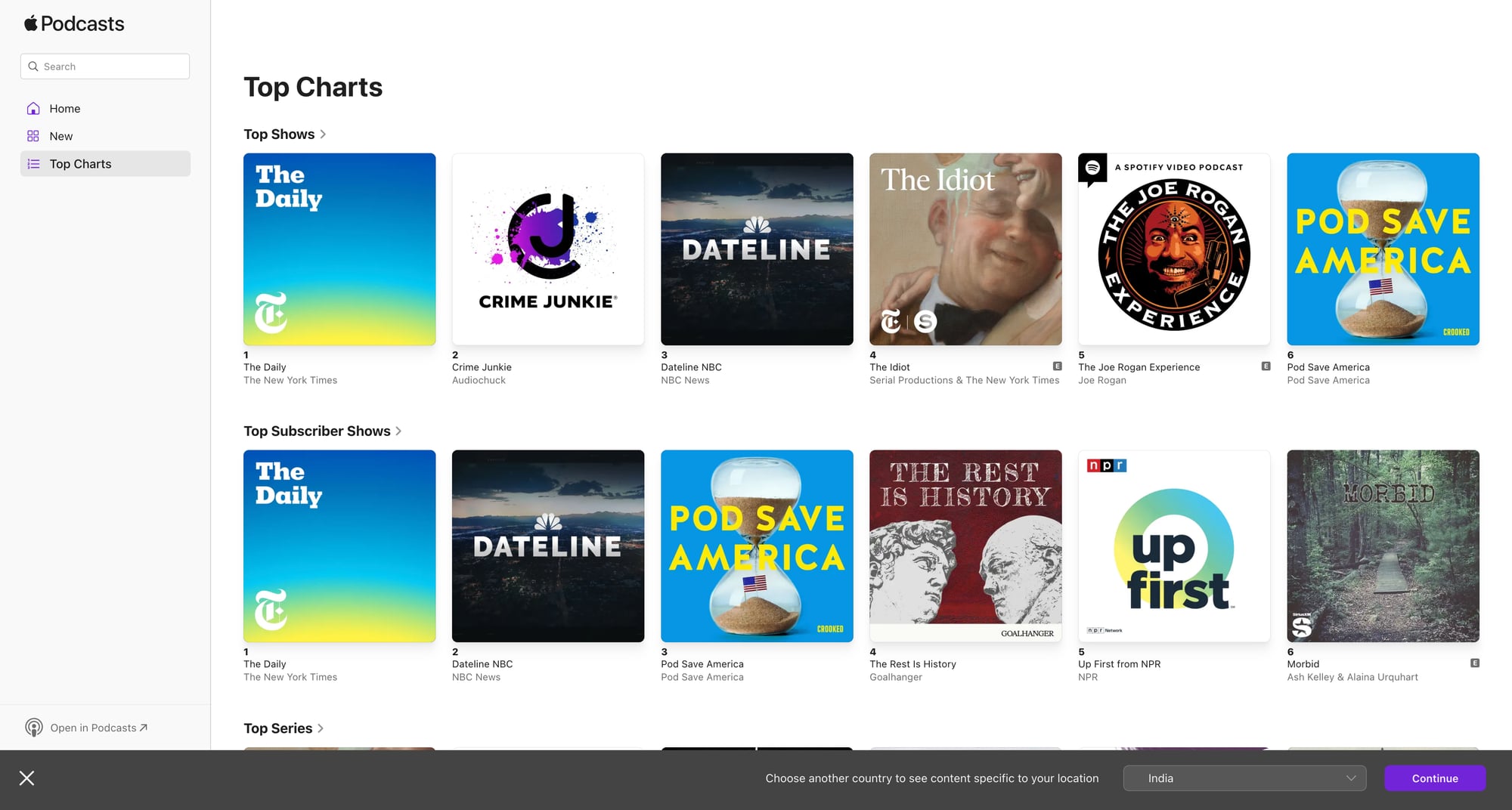
Chart pages are high-traffic and your crawl expands fast once you fetch episodes for each show. ProxiesAPI helps keep those multi-step crawls stable with retries and clean IP rotation.
What we’re scraping (URLs you’ll actually use)
Apple Podcasts has multiple surfaces. The most consistent public HTML endpoints are:
- Charts (web UI) — varies by country and chart type.
- Show pages — each show has a canonical page with an ID.
A practical way to start is:
- Open Apple Podcasts in your browser.
- Navigate to a charts page.
- Copy the URL and use it as your seed.
For example, a chart URL may look like:
https://podcasts.apple.com/us/charts(and then subpaths/filters)
And show URLs look like:
https://podcasts.apple.com/us/podcast/show-name/id123456789
We’ll write code that can handle the common case: show URLs ending in /id<digits>.
Setup
python -m venv .venv
source .venv/bin/activate
pip install requests beautifulsoup4 lxml pandas
Step 1: Fetch HTML (direct or via ProxiesAPI)
import os
import requests

TIMEOUT = (10, 30)

session = requests.Session()

HEADERS = {
    "User-Agent": (
        "Mozilla/5.0 (Macintosh; Intel Mac OS X 10_15_7) "
        "AppleWebKit/537.36 (KHTML, like Gecko) "
        "Chrome/123.0 Safari/537.36"
    ),
    "Accept-Language": "en-US,en;q=0.9",
}


def fetch(url: str, use_proxiesapi: bool = False) -> str:
    if use_proxiesapi:
        api_key = os.environ.get("PROXIESAPI_KEY")
        if not api_key:
            raise RuntimeError("Missing PROXIESAPI_KEY env var")

        proxiesapi_url = "https://api.proxiesapi.com/"  # replace if needed
        r = session.get(
            proxiesapi_url,
            params={"api_key": api_key, "url": url},
            headers=HEADERS,
            timeout=TIMEOUT,
        )
    else:
        r = session.get(url, headers=HEADERS, timeout=TIMEOUT)

    r.raise_for_status()
    return r.text
Step 2: Extract shows from a chart page
Chart pages typically contain repeated show cards with links to /podcast/.../id123.
We’ll:
- find all anchors that link to
/podcast/and contain/id<digits> - normalize them into unique show URLs
import re
from urllib.parse import urljoin
from bs4 import BeautifulSoup

SHOW_ID_RE = re.compile(r"/id(\d+)")


def extract_show_links(chart_html: str, base_url: str) -> list[dict]:
    soup = BeautifulSoup(chart_html, "lxml")

    out = []
    seen = set()

    for a in soup.select('a[href*="/podcast/"]'):
        href = a.get("href")
        if not href:
            continue

        m = SHOW_ID_RE.search(href)
        if not m:
            continue

        show_id = m.group(1)
        url = href if href.startswith("http") else urljoin(base_url, href)

        if show_id in seen:
            continue
        seen.add(show_id)

        text = a.get_text(" ", strip=True)

        out.append({"show_id": show_id, "show_url": url, "anchor_text": text})

    return out
Step 3: Scrape show metadata from a show page
Show pages commonly contain:
- show title
- publisher/author
- description
- category/genre
- rating (when present)
We’ll keep selectors flexible and add fallbacks.
from dataclasses import dataclass
from typing import Optional


@dataclass
class Show:
    show_id: str
    url: str
    title: str
    publisher: Optional[str]
    description: Optional[str]
    genre: Optional[str]


def text_or_none(el) -> Optional[str]:
    if not el:
        return None
    t = el.get_text(" ", strip=True)
    return t or None


def scrape_show(html: str, show_id: str, url: str) -> Show:
    soup = BeautifulSoup(html, "lxml")

    # Title is usually a top-level heading
    title = text_or_none(soup.select_one("h1")) or ""

    # Publisher often appears near the top; look for common patterns
    publisher = None
    for sel in [
        "a[href*='artist']",
        "span[class*='author']",
        "span[class*='provider']",
    ]:
        publisher = text_or_none(soup.select_one(sel))
        if publisher:
            break

    # Description: often in a section with paragraphs
    description = None
    for sel in [
        "section p",
        "div[class*='description'] p",
        "p[class*='description']",
    ]:
        p = soup.select_one(sel)
        description = text_or_none(p)
        if description and len(description) > 40:
            break

    # Genre/category: look for breadcrumb-like links
    genre = None
    for a in soup.select('a[href*="/genre/"]'):
        genre = a.get_text(" ", strip=True)
        if genre:
            break

    return Show(
        show_id=show_id,
        url=url,
        title=title,
        publisher=publisher,
        description=description,
        genre=genre,
    )
Step 4: Extract episode metadata (recent episodes)
Apple Podcasts lists episodes on the show page (or behind a tab).
Common fields you can extract from the HTML:
- episode title
- publish date (sometimes as text)
- episode URL (when linked)
We’ll implement a pragmatic episode parser:
@dataclass
class Episode:
    show_id: str
    title: str
    date_text: Optional[str]
    url: Optional[str]


def extract_episodes(show_html: str, base_url: str, show_id: str, limit: int = 20) -> list[Episode]:
    soup = BeautifulSoup(show_html, "lxml")

    episodes: list[Episode] = []

    # Episode cards often contain an h2/h3 and a link
    # We'll look for anchors containing '/episode/' and then walk up.
    for a in soup.select('a[href*="/episode/"]'):
        href = a.get("href")
        if not href:
            continue

        url = href if href.startswith("http") else urljoin(base_url, href)

        # Title: use the anchor text, fall back to nearby headings
        title = a.get_text(" ", strip=True)
        if not title:
            parent = a.parent
            h = parent.select_one("h2, h3") if parent else None
            title = h.get_text(" ", strip=True) if h else ""

        # Date text: search nearby for a <time> or short date-like text
        date_text = None
        container = a
        for _ in range(4):
            if not container:
                break
            time_el = container.select_one("time")
            if time_el:
                date_text = time_el.get("datetime") or time_el.get_text(" ", strip=True)
                break
            container = container.parent

        episodes.append(Episode(show_id=show_id, title=title, date_text=date_text, url=url))
        if len(episodes) >= limit:
            break

    # De-dupe by url/title
    seen = set()
    uniq = []
    for e in episodes:
        key = e.url or e.title
        if not key or key in seen:
            continue
        seen.add(key)
        uniq.append(e)

    return uniq
Step 5: Crawl a chart → shows → episodes, then export
import json
import pandas as pd


def run(chart_url: str, use_proxiesapi: bool = True, max_shows: int = 25):
    chart_html = fetch(chart_url, use_proxiesapi=use_proxiesapi)
    shows = extract_show_links(chart_html, base_url=chart_url)
    shows = shows[:max_shows]

    show_rows = []
    episode_rows = []

    for s in shows:
        show_html = fetch(s["show_url"], use_proxiesapi=use_proxiesapi)
        show = scrape_show(show_html, show_id=s["show_id"], url=s["show_url"])
        show_rows.append(show.__dict__)

        episodes = extract_episodes(show_html, base_url=s["show_url"], show_id=s["show_id"], limit=20)
        for e in episodes:
            episode_rows.append(e.__dict__)

    pd.DataFrame(show_rows).to_csv("apple_podcasts_shows.csv", index=False)
    pd.DataFrame(episode_rows).to_csv("apple_podcasts_episodes.csv", index=False)

    with open("apple_podcasts_shows.json", "w", encoding="utf-8") as f:
        json.dump(show_rows, f, ensure_ascii=False, indent=2)

    with open("apple_podcasts_episodes.json", "w", encoding="utf-8") as f:
        json.dump(episode_rows, f, ensure_ascii=False, indent=2)

    print("shows:", len(show_rows), "episodes:", len(episode_rows))


if __name__ == "__main__":
    # Pick a chart URL you validated in the browser.
    chart_url = "https://podcasts.apple.com/us/charts"
    run(chart_url)
Reliability notes (why this is a “real” scraper)
Apple Podcasts pages can change. To keep this stable:
- Start from real anchors (
/podcast/…/id123) and (/episode/…). - De-dupe aggressively (charts can repeat links in nav or carousels).
- Limit your crawl and backfill later.
- Add retries + backoff if you crawl at scale.
A minimal retry wrapper:
import random
import time


def fetch_with_retries(url: str, use_proxiesapi: bool, tries: int = 4) -> str:
    last = None
    for i in range(tries):
        try:
            return fetch(url, use_proxiesapi=use_proxiesapi)
        except Exception as e:
            last = e
            time.sleep((2 ** i) + random.random())
    raise last
Where ProxiesAPI fits (honestly)
If you scrape a single chart once, you may be fine without proxies.
ProxiesAPI helps when you:
- fetch multiple charts (countries + categories)
- crawl dozens/hundreds of shows
- fetch episodes for each show
- want fewer failures from rate limits / soft blocks
Keep ProxiesAPI as a swappable network layer, and keep parsing logic separate.
Chart pages are high-traffic and your crawl expands fast once you fetch episodes for each show. ProxiesAPI helps keep those multi-step crawls stable with retries and clean IP rotation.