
Scrape Numbeo Cost of Living Data with Python (cities, indices, and tables)
Numbeo is one of the most referenced sources for cost-of-living comparisons. For scraping, it’s a nice target because the key data is typically in server-rendered HTML tables.
In this guide we’ll build a real Python scraper that:
- pulls a city cost-of-living page
- extracts the headline indices + key tables
- normalizes rows into structured records
- exports JSON + CSV
- includes a screenshot so you can verify structure visually
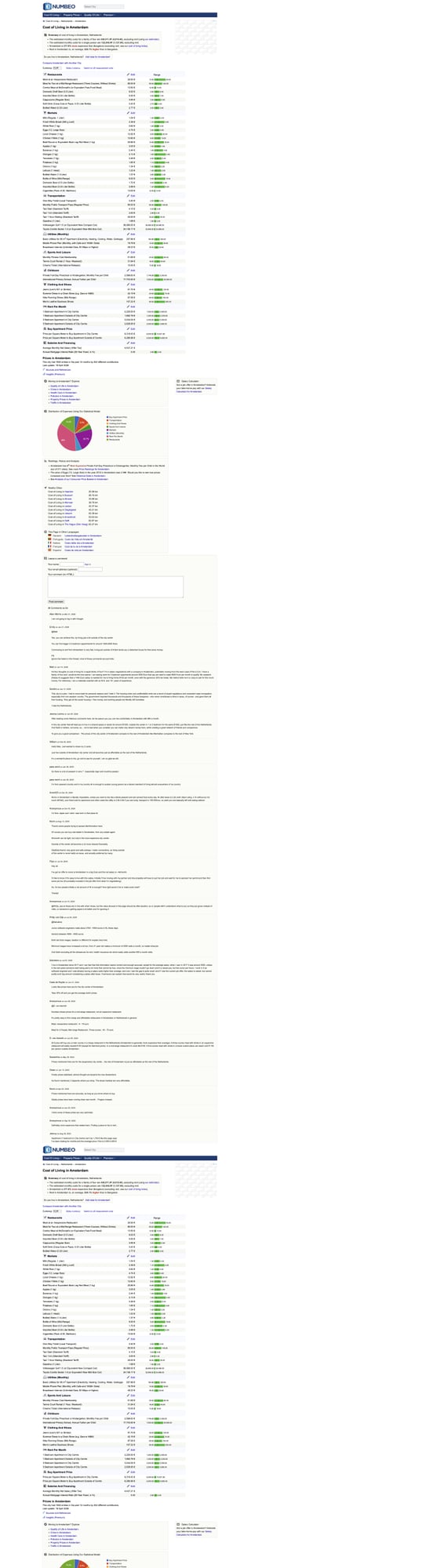
Numbeo pages are HTML-table heavy — perfect for fast parsing. ProxiesAPI helps when you’re pulling dozens or hundreds of city pages without tripping rate limits.
What we’re scraping (Numbeo URL patterns)
Numbeo’s city pages often look like:
https://www.numbeo.com/cost-of-living/in/<City>
Example:
https://www.numbeo.com/cost-of-living/in/Amsterdam
There are also “country” pages and comparison pages, but city pages are the most directly useful if you want a dataset.
Terminal sanity check
curl -s "https://www.numbeo.com/cost-of-living/in/Amsterdam" | head -n 10
If you see HTML with tables, you’re good.
Setup
python -m venv .venv
source .venv/bin/activate
pip install requests beautifulsoup4 lxml pandas tenacity
We’ll use:
requestsfor HTTPBeautifulSoup(lxml)for parsingpandas(optional) for easy CSV handlingtenacityfor retries
ProxiesAPI integration
As your crawl expands (many cities), you’ll want a stable network layer.
The code below supports a ProxiesAPI proxy via an environment variable.
import os
import random
import time
from typing import Optional

import requests
from tenacity import retry, stop_after_attempt, wait_exponential, retry_if_exception_type

TIMEOUT = (10, 30)

# Example: http://USER:PASS@gateway.proxiesapi.com:PORT
PROXIESAPI_PROXY_URL = os.getenv("PROXIESAPI_PROXY_URL")

session = requests.Session()

HEADERS = {
    "User-Agent": (
        "Mozilla/5.0 (Macintosh; Intel Mac OS X 10_15_7) "
        "AppleWebKit/537.36 (KHTML, like Gecko) "
        "Chrome/123.0.0.0 Safari/537.36"
    ),
    "Accept": "text/html,application/xhtml+xml,application/xml;q=0.9,*/*;q=0.8",
    "Accept-Language": "en-US,en;q=0.9",
}


def _proxy_dict() -> Optional[dict]:
    if not PROXIESAPI_PROXY_URL:
        return None
    return {"http": PROXIESAPI_PROXY_URL, "https": PROXIESAPI_PROXY_URL}


@retry(
    reraise=True,
    stop=stop_after_attempt(5),
    wait=wait_exponential(multiplier=1, min=2, max=20),
    retry=retry_if_exception_type((requests.RequestException,)),
)
def fetch(url: str) -> str:
    # jitter
    time.sleep(random.uniform(0.3, 1.0))

    r = session.get(url, headers=HEADERS, timeout=TIMEOUT, proxies=_proxy_dict())
    r.raise_for_status()
    return r.text
Step 1: Extract headline indices + tables
Numbeo pages typically include:
- a “headline” area with key indices (Cost of Living Index, Rent Index, etc.)
- one or more tables (restaurants, markets, transport, utilities, etc.)
We’ll parse:
h1for city label- any “indices” table (two columns like Index + Value)
- price tables with item + range columns
import re
from bs4 import BeautifulSoup


def clean(s: str | None) -> str | None:
    if not s:
        return None
    t = re.sub(r"\s+", " ", s).strip()
    return t or None


def parse_float(s: str | None) -> float | None:
    if not s:
        return None
    # remove commas and non-numeric tokens
    t = re.sub(r"[^0-9\.,-]", "", s)
    t = t.replace(",", "")
    try:
        return float(t)
    except ValueError:
        return None


def parse_city_page(html: str) -> dict:
    soup = BeautifulSoup(html, "lxml")

    title = clean(soup.select_one("h1").get_text(" ", strip=True) if soup.select_one("h1") else None)

    # Many Numbeo pages have tables with class 'data_wide_table' or similar.
    tables = soup.select("table")

    indices = []
    price_tables = []

    for tbl in tables:
        # header cells
        headers = [clean(th.get_text(" ", strip=True)) for th in tbl.select("th")]
        rows = tbl.select("tr")

        # heuristic: an index table often has 2 columns and rows like "Cost of Living Index" + "74.2"
        # We detect by checking if the first column contains "Index" tokens.
        if headers and len(headers) == 2 and ("Index" in (headers[0] or "") or "Index" in (headers[1] or "")):
            out = []
            for tr in rows[1:]:
                tds = tr.select("td")
                if len(tds) != 2:
                    continue
                k = clean(tds[0].get_text(" ", strip=True))
                v_text = clean(tds[1].get_text(" ", strip=True))
                v = parse_float(v_text)
                if k:
                    out.append({"name": k, "value": v, "raw": v_text})
            if out:
                indices.extend(out)
            continue

        # heuristic: price tables often have columns like "Item", "Price", "Range" or similar
        if headers and headers[0] and "Item" in headers[0]:
            # capture rows
            out_rows = []
            for tr in rows[1:]:
                tds = tr.select("td")
                if len(tds) < 2:
                    continue
                item = clean(tds[0].get_text(" ", strip=True))
                price = clean(tds[1].get_text(" ", strip=True))
                range_text = clean(tds[2].get_text(" ", strip=True)) if len(tds) >= 3 else None
                if item:
                    out_rows.append({"item": item, "price": price, "range": range_text})
            if out_rows:
                price_tables.append({"headers": headers, "rows": out_rows})

    return {
        "title": title,
        "indices": indices,
        "tables": price_tables,
    }
Step 2: Turn city names into URLs
Numbeo city URLs usually just capitalize words, but cities can have spaces.
A safe approach is:
- take a known URL list (seed from your own list or a country page)
- or encode city names and let Numbeo redirect
For a simple tutorial, we’ll start with a list of city slugs you control.
from urllib.parse import quote

BASE = "https://www.numbeo.com"


def city_url(city: str) -> str:
    # Numbeo expects spaces as %20
    return f"{BASE}/cost-of-living/in/{quote(city)}"
Step 3: Export JSON + CSV
We’ll write:
- one JSON file per city
- one flattened CSV for the indices table
import json
import csv


def export_city_json(city: str, data: dict, out_dir: str = "out") -> str:
    os.makedirs(out_dir, exist_ok=True)
    path = os.path.join(out_dir, f"numbeo_{city.replace(' ', '_').lower()}.json")
    with open(path, "w", encoding="utf-8") as f:
        json.dump(data, f, ensure_ascii=False, indent=2)
    return path


def export_indices_csv(city: str, indices: list[dict], path: str) -> None:
    # append mode so you can build a dataset across many cities
    exists = os.path.exists(path)
    with open(path, "a", newline="", encoding="utf-8") as f:
        w = csv.DictWriter(f, fieldnames=["city", "name", "value", "raw"])
        if not exists:
            w.writeheader()
        for row in indices:
            w.writerow({"city": city, **row})


if __name__ == "__main__":
    cities = ["Amsterdam", "Berlin", "Paris"]
    for city in cities:
        url = city_url(city)
        html = fetch(url)
        parsed = parse_city_page(html)

        json_path = export_city_json(city, {"city": city, "url": url, **parsed})
        export_indices_csv(city, parsed.get("indices", []), "out/numbeo_indices.csv")

        print("city", city, "json", json_path, "indices", len(parsed.get("indices", [])))
Scaling it up (many cities)
If you want to scrape 200+ cities:
- add caching (don’t refetch unchanged pages)
- add a crawl delay (0.5–2.0s) + random jitter
- use a proxy layer (ProxiesAPI) when you hit rate limits
- store results in SQLite so you can resume
Troubleshooting
Getting 403/429
- slow down
- rotate IPs (ProxiesAPI)
- keep a session cookie jar
Tables missing
- view page source and confirm the table HTML exists
- if the table is populated by JS (rare on Numbeo, but possible), consider Playwright
QA checklist
- City URL fetches HTML
-
parse_city_page()returns at least one table - Indices rows parse to floats
- JSON exports valid UTF-8
- CSV appends across cities
Where ProxiesAPI fits (honestly)
A single Numbeo page is easy.
But a real dataset involves many pages — and any time you scale a crawl, you’ll see intermittent failures.
ProxiesAPI gives you a predictable way to rotate IPs and keep your scraper running when you move from “3 cities for a demo” to “300 cities for a product.”
Numbeo pages are HTML-table heavy — perfect for fast parsing. ProxiesAPI helps when you’re pulling dozens or hundreds of city pages without tripping rate limits.