
Scrape BBC News Headlines and Article URLs with Python (Sections + Deduping)
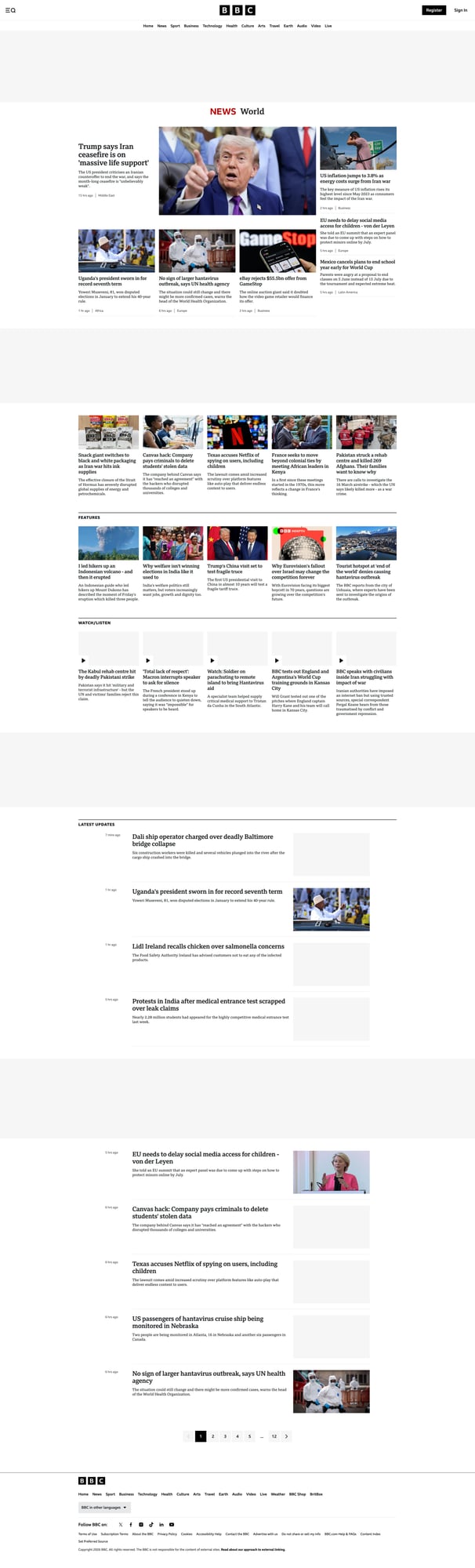
BBC News section pages are a perfect “batch scraping” example:
- there are multiple sections (World, Business, Technology, etc.)
- each section lists many article links
- you’ll want to dedupe (same story appears in multiple sections)
In this tutorial we’ll build a small Python scraper that:
- fetches one or more BBC section pages
- extracts headline text + article URLs
- dedupes results across runs using a tiny JSON store
- outputs a clean JSON list you can feed into your pipeline
- optionally routes requests through ProxiesAPI
News sites change frequently and can be sensitive to repeated requests. ProxiesAPI helps you keep the fetch layer stable while your Python code stays focused on parsing and deduping headlines.
What we’re scraping
BBC News has multiple section landing pages. Examples:
https://www.bbc.com/newshttps://www.bbc.com/news/worldhttps://www.bbc.com/news/businesshttps://www.bbc.com/news/technology
On these pages, BBC uses a mix of components. The safest extraction strategy is:
- look for links that point to news articles
- treat the link text as the “headline” (after cleanup)
- filter obvious navigation links
We’ll also normalize URLs to https://www.bbc.com/....
Setup
python -m venv .venv
source .venv/bin/activate
pip install requests beautifulsoup4 lxml
Step 1: Fetch section HTML with timeouts
import requests

TIMEOUT = (10, 30)

session = requests.Session()
session.headers.update({
    "User-Agent": "Mozilla/5.0 (compatible; ProxiesAPI-Guides/1.0)",
    "Accept-Language": "en-GB,en;q=0.9",
})


def fetch_html(url: str) -> str:
    r = session.get(url, timeout=TIMEOUT)
    r.raise_for_status()
    return r.text


html = fetch_html("https://www.bbc.com/news/world")
print("bytes:", len(html))
Step 2: Extract headline links
BBC pages contain many links, including navigation, account links, and promo modules.
We’ll extract candidate article links using a few practical rules:
- must be an
<a>with anhref hrefshould look like a BBC News article path- link text should be non-trivial (not empty)
from bs4 import BeautifulSoup
from urllib.parse import urljoin

BASE = "https://www.bbc.com"


def clean(text: str | None) -> str | None:
    if not text:
        return None
    t = " ".join(text.split())
    return t or None


def looks_like_article(href: str) -> bool:
    # BBC article paths are commonly under /news/ ...
    # We exclude obvious non-article paths.
    if not href:
        return False
    if href.startswith("#"):
        return False
    if href.startswith("/news"):
        # exclude topic indices, live, and other non-articles conservatively
        banned = ["/news/live", "/news/topics", "/news/av", "/news/video"]
        if any(href.startswith(b) for b in banned):
            return False
        return True
    return False


def extract_headlines(html: str) -> list[dict]:
    soup = BeautifulSoup(html, "lxml")
    out: list[dict] = []
    seen = set()

    for a in soup.select("a[href]"):
        href = a.get("href")
        if not href or not looks_like_article(href):
            continue

        title = clean(a.get_text(" ", strip=True))
        if not title or len(title) < 10:
            continue

        url = urljoin(BASE, href)
        if url in seen:
            continue
        seen.add(url)

        out.append({"headline": title, "url": url})

    return out


items = extract_headlines(html)
print("headlines:", len(items))
print(items[:3])
Make it stricter (optional)
If you find too much noise, you can tighten selectors by focusing on containers that are known to hold headlines (for example, headings wrapping an anchor), but the “link-first” approach tends to survive layout changes better.
Step 3: Crawl multiple sections
SECTIONS = [
    "https://www.bbc.com/news/world",
    "https://www.bbc.com/news/business",
    "https://www.bbc.com/news/technology",
]


def crawl_sections(urls: list[str]) -> list[dict]:
    all_items: list[dict] = []
    seen = set()

    for u in urls:
        html = fetch_html(u)
        batch = extract_headlines(html)

        for it in batch:
            if it["url"] in seen:
                continue
            seen.add(it["url"])
            all_items.append({**it, "source_section": u})

        print("section:", u, "batch:", len(batch), "total unique:", len(all_items))

    return all_items


all_items = crawl_sections(SECTIONS)
print("total:", len(all_items))
Step 4: Deduping across runs (a tiny JSON store)
When you run this hourly/daily, you don’t want to re-process the same URLs.
A simple approach:
- keep a
seen_urls.jsonfile - load it at startup
- only emit “new” items
- update and save at the end
import json
from pathlib import Path

STORE_PATH = Path("bbc_seen_urls.json")


def load_seen() -> set[str]:
    if not STORE_PATH.exists():
        return set()
    return set(json.loads(STORE_PATH.read_text(encoding="utf-8")))


def save_seen(seen: set[str]) -> None:
    STORE_PATH.write_text(json.dumps(sorted(seen), ensure_ascii=False, indent=2), encoding="utf-8")


def diff_new(items: list[dict], seen: set[str]) -> list[dict]:
    out = []
    for it in items:
        if it["url"] in seen:
            continue
        out.append(it)
    return out


seen = load_seen()
items = crawl_sections(SECTIONS)
new_items = diff_new(items, seen)

for it in new_items:
    seen.add(it["url"])

save_seen(seen)

print("new:", len(new_items), "seen_total:", len(seen))
Step 5: Use ProxiesAPI for fetching (optional)
If you need a stable fetch layer (especially across many sections, frequent runs, or many markets), ProxiesAPI gives you a simple wrapper URL.
curl "http://api.proxiesapi.com/?key=API_KEY&url=https://www.bbc.com/news/world" | head
In Python:
from urllib.parse import quote


def proxiesapi_wrap(target_url: str, api_key: str) -> str:
    return f"http://api.proxiesapi.com/?key={api_key}&url={quote(target_url, safe='')}"


API_KEY = "API_KEY"
section = "https://www.bbc.com/news/world"
html = fetch_html(proxiesapi_wrap(section, API_KEY))
items = extract_headlines(html)
print("headlines via proxy:", len(items))
Common mistakes
- Treating every
/news/...link as an article (you’ll capture topic pages and live pages). Filter conservatively. - No dedupe store (you re-process the same stories every run).
- Parsing by brittle CSS classes (BBC changes these frequently).
QA checklist
- Each section returns a non-zero count of headlines
- URLs are absolute and start with
https://www.bbc.com/news... - Dedupe store prevents repeats across runs
- Output is valid JSON and easy to feed into a queue
News sites change frequently and can be sensitive to repeated requests. ProxiesAPI helps you keep the fetch layer stable while your Python code stays focused on parsing and deduping headlines.