
Scrape eBay Listings and Prices
eBay search pages are a great scraping exercise: the structure is consistent, pagination is explicit, and the data is useful for price tracking and market research.
The catch is real: direct repeated requests are often blocked with 403 responses. That is why this tutorial is built around a fetch layer you can route through ProxiesAPI from day one.
We will build a scraper that:
- fetches search results
- extracts title, price, shipping, seller, and URL
- paginates multiple pages
- exports a clean CSV
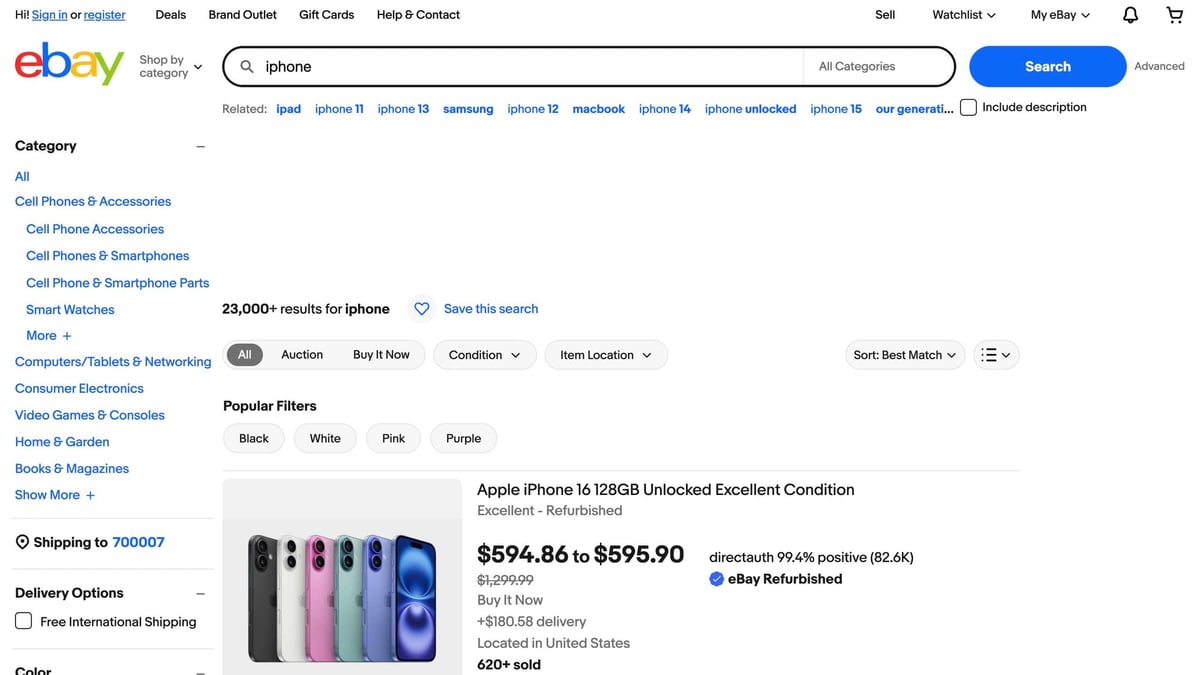
eBay often blocks direct, repeated requests from a single IP. Keeping a clean fetch layer (and routing it through ProxiesAPI when needed) helps you scale searches and pagination without constantly reworking your code.
URL patterns and pagination
A common eBay search URL is:
https://www.ebay.com/sch/i.html?_nkw=iphone
Pagination typically uses _pgn:
https://www.ebay.com/sch/i.html?_nkw=iphone&_pgn=2
Setup
python3 -m venv .venv
source .venv/bin/activate
pip install requests beautifulsoup4 lxml
Step 1: Fetch layer (ProxiesAPI-friendly)
This section is intentionally structured so you can run with normal direct fetches while debugging, then switch to ProxiesAPI when you scale.
This uses the common wrapper format:
http://api.proxiesapi.com/?auth_key=YOUR_KEY&url=https://target.com/...
Set PROXIESAPI_KEY in your environment to enable it.
import os
import random
import time
from urllib.parse import quote, urlencode

import requests
from bs4 import BeautifulSoup

UA_POOL = [
    "Mozilla/5.0 (Macintosh; Intel Mac OS X 10_15_7) AppleWebKit/537.36 (KHTML, like Gecko) Chrome/126.0 Safari/537.36",
    "Mozilla/5.0 (Windows NT 10.0; Win64; x64) AppleWebKit/537.36 (KHTML, like Gecko) Chrome/126.0 Safari/537.36",
]

def proxiesapi_url(target_url: str) -> str:
    key = os.environ.get("PROXIESAPI_KEY")
    if not key:
        return target_url
    return f"http://api.proxiesapi.com/?auth_key={quote(key)}&url={quote(target_url, safe='')}"

session = requests.Session()


def fetch(
    url: str,
    *,
    use_proxiesapi: bool = True,
    timeout: tuple[int, int] = (10, 30),
    max_retries: int = 4,
) -> str:
    last_err: Exception | None = None
    for attempt in range(1, max_retries + 1):
        try:
            final = proxiesapi_url(url) if use_proxiesapi else url
            r = session.get(
                final,
                timeout=timeout,
                headers={
                    "User-Agent": random.choice(UA_POOL),
                    "Accept-Language": "en-US,en;q=0.9",
                },
            )
            r.raise_for_status()
            html = r.text
            if not html or len(html) < 2000:
                raise RuntimeError(f"Suspiciously small HTML ({len(html)} bytes)")
            return html
        except Exception as e:
            last_err = e
            if attempt == max_retries:
                break
            time.sleep(0.8 * (2 ** (attempt - 1)) + random.random() * 0.25)
    raise last_err or RuntimeError("fetch failed")
Step 2: Parse listings
eBay search pages commonly structure results with li.s-item. Useful inner selectors:
- link:
a.s-item__link - title:
.s-item__title - price:
.s-item__price - shipping:
.s-item__shipping(often present, sometimes not) - condition:
.SECONDARY_INFO(often present, sometimes not)
def clean_text(x: str | None) -> str | None:
    if x is None:
        return None
    t = " ".join(x.split()).strip()
    return t or None

def parse_search_results(html: str) -> list[dict]:
    soup = BeautifulSoup(html, "lxml")
    items = soup.select("li.s-item")

    out: list[dict] = []
    for it in items:
        a = it.select_one("a.s-item__link[href]")
        url = a.get("href") if a else None

        title_el = it.select_one(".s-item__title")
        title = clean_text(title_el.get_text(" ", strip=True) if title_el else None)
        if not title or title.lower() in {"shop on ebay", "results matching fewer words"}:
            continue

        price_el = it.select_one(".s-item__price")
        ship_el = it.select_one(".s-item__shipping")
        seller_el = it.select_one(".s-item__seller-info-text") or it.select_one(".s-item__seller-info")
        condition_el = it.select_one(".SECONDARY_INFO")

        out.append({
            "title": title,
            "price": clean_text(price_el.get_text(" ", strip=True) if price_el else None),
            "shipping": clean_text(ship_el.get_text(" ", strip=True) if ship_el else None),
            "seller": clean_text(seller_el.get_text(" ", strip=True) if seller_el else None),
            "condition": clean_text(condition_el.get_text(" ", strip=True) if condition_el else None),
            "url": url,
        })

    return out
Step 3: Pagination and export (CSV + JSON)
import csv
import json

def build_search_url(*, keyword: str, page: int) -> str:
    base = "https://www.ebay.com/sch/i.html"
    params = {"_nkw": keyword, "_pgn": str(page)}
    return f"{base}?{urlencode(params)}"

def crawl_search(keyword: str, *, pages: int = 3) -> list[dict]:
    seen: set[str] = set()
    all_rows: list[dict] = []
    for page in range(1, pages + 1):
        url = build_search_url(keyword=keyword, page=page)
        html = fetch(url)
        batch = parse_search_results(html)
        for row in batch:
            u = row.get("url") or ""
            if not u or u in seen:
                continue
            seen.add(u)
            all_rows.append(row)
        if not batch:
            break
    return all_rows

def write_csv(rows: list[dict], path: str) -> None:
    fieldnames = ["title", "price", "shipping", "seller", "condition", "url"]
    with open(path, "w", newline="", encoding="utf-8") as f:
        w = csv.DictWriter(f, fieldnames=fieldnames)
        w.writeheader()
        for r in rows:
            w.writerow({k: r.get(k) for k in fieldnames})

def write_json(rows: list[dict], path: str) -> None:
    with open(path, "w", encoding="utf-8") as f:
        json.dump(rows, f, ensure_ascii=False, indent=2)

if __name__ == "__main__":
    rows = crawl_search("iphone", pages=2)
    print("rows:", len(rows))
    write_csv(rows, "ebay_search_results.csv")
    write_json(rows, "ebay_search_results.json")
    print("wrote ebay_search_results.csv")
    print("wrote ebay_search_results.json")
Where ProxiesAPI fits
eBay is a site where the difference between a toy script and a useful pipeline is usually the network layer. Keep parsing/export pure, and make ProxiesAPI a switch in fetch; that lets you scale keywords and pages without repeatedly re-architecting.
Practical hardening checklist (so it keeps working)
If you want this to run daily (or for dozens of keywords), treat these as non-optional:
- Don’t hammer pages: add small jitter between requests (even 0.5–1.5s helps).
- Log failures: persist the URL + HTTP error so you can retry later instead of losing data.
- Dedupe early: URLs can repeat across pages and “sponsored” modules.
- Fail fast on bad HTML: if you keep parsing tiny/captcha pages, you’ll quietly write garbage data.
- Keep selectors minimal: eBay changes UI often; fewer selectors survive longer.
When you already have clean functions (fetch → parse → export), swapping use_proxiesapi on/off is one parameter — and you keep the rest of your pipeline stable.
eBay often blocks direct, repeated requests from a single IP. Keeping a clean fetch layer (and routing it through ProxiesAPI when needed) helps you scale searches and pagination without constantly reworking your code.