
Scrape eBay Listings + Sold Prices with Python (Active + Completed Listings)
If you’ve ever tried to answer “what does this actually sell for on eBay?”, you already know why scraping matters:
- active listings show what sellers want
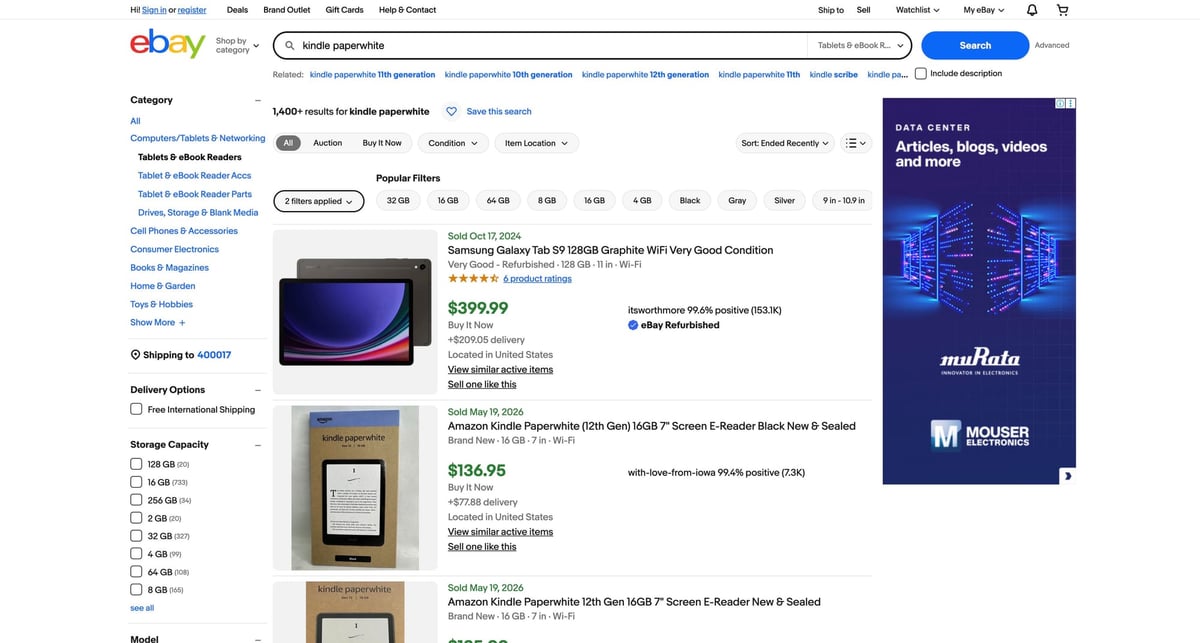
- sold/completed listings show what buyers paid
In this tutorial we’ll build a production-shaped Python scraper that:
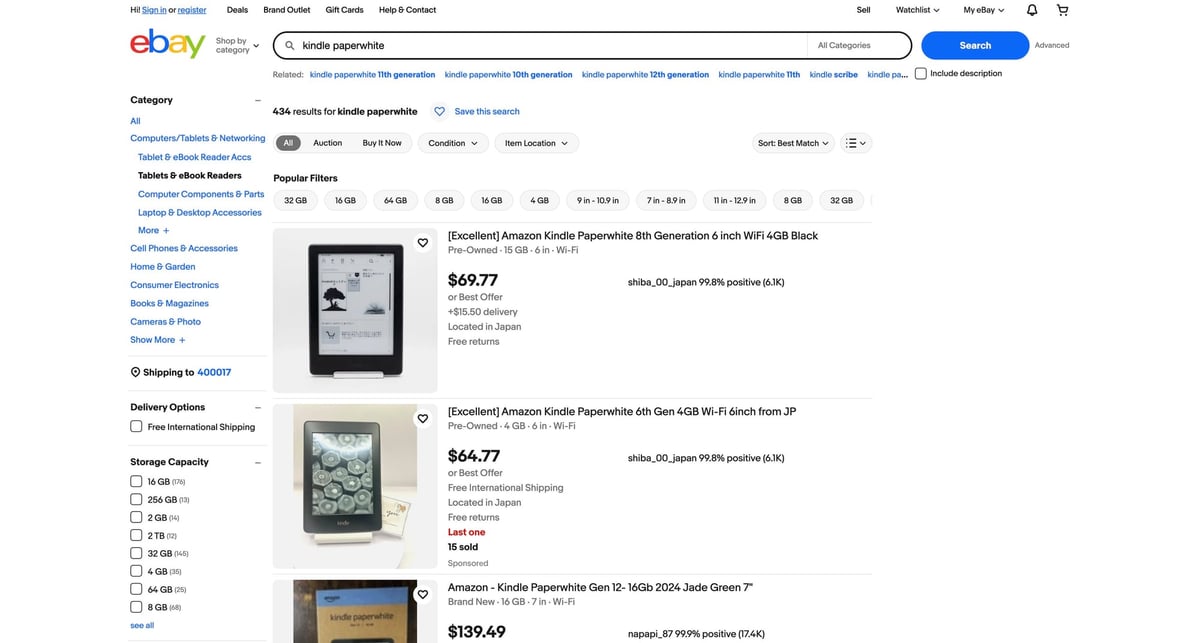
- scrapes an eBay search page (active listings)
- scrapes the same query with Sold + Completed filters enabled
- paginates both datasets
- exports to CSV
- uses ProxiesAPI as the network layer (so parsing code stays the same)
eBay is the opposite of "friendly HTML". If you plan to crawl search pages repeatedly (or scale beyond one query), put ProxiesAPI in your fetch layer so transient blocks and flaky responses don’t ruin your dataset.
What we’re scraping (URLs + filters)
eBay search results live at:
- active listings:
- https://www.ebay.com/sch/i.html?_nkw=YOUR_QUERY&_sacat=0
- sold + completed listings:
- https://www.ebay.com/sch/i.html?_nkw=YOUR_QUERY&_sacat=0&LH_Sold=1&LH_Complete=1
Pagination is usually:
- page 1: no
_pgnparam - page N: add
&_pgn=N
Example:
- ...i.html?_nkw=kindle+paperwhite&_sacat=0&_pgn=2
Setup
python3 -m venv .venv
source .venv/bin/activate
pip install requests beautifulsoup4 lxml
We’ll use:
requestsfor HTTPBeautifulSoup(lxml)for parsing
Step 1: Fetch HTML (with timeouts + UA)
eBay will often respond differently depending on headers, traffic, and region. Start with:
- a real User-Agent
- explicit timeouts
- a Session (connection reuse)
from __future__ import annotations

import time
from urllib.parse import urlencode

import requests

TIMEOUT = (10, 30)  # connect, read
UA = (
    "Mozilla/5.0 (Macintosh; Intel Mac OS X 10_15_7) "
    "AppleWebKit/537.36 (KHTML, like Gecko) "
    "Chrome/123.0.0.0 Safari/537.36"
)

session = requests.Session()
session.headers.update(
    {
        "User-Agent": UA,
        "Accept-Language": "en-US,en;q=0.9",
    }
)


def fetch_html(url: str) -> str:
    r = session.get(url, timeout=TIMEOUT)
    r.raise_for_status()
    return r.text
Step 2: Use selectors that match modern eBay search markup
eBay’s search results are a list where each item is a card:
- list:
ul.srp-results - card:
li.s-card
Inside each card, you can typically extract:
- title:
div.s-card__title(first line is the “real” title) - price:
.s-card__price - link:
a.s-card__link - subtitle/condition:
div.s-card__subtitle(not always present) - shipping: sometimes present, but not always consistent per card
We’ll parse these fields:
titleurlprice_textcondition_text(best-effort)
Step 3: Parse a search page into structured rows
from bs4 import BeautifulSoup


def clean_title(raw: str | None) -> str | None:
    if not raw:
        return None
    # eBay sometimes appends “Opens in a new window or tab”
    first_line = raw.strip().splitlines()[0].strip()
    return first_line or None


def parse_search_results(html: str) -> list[dict]:
    soup = BeautifulSoup(html, "lxml")

    rows: list[dict] = []
    for card in soup.select("ul.srp-results > li.s-card"):
        a = card.select_one("a.s-card__link[href]")
        url = a.get("href") if a else None

        title_el = card.select_one("div.s-card__title")
        title = clean_title(title_el.get_text("\n", strip=True) if title_el else None)

        price_el = card.select_one(".s-card__price")
        price_text = price_el.get_text(" ", strip=True) if price_el else None

        subtitle = card.select_one("div.s-card__subtitle")
        condition_text = subtitle.get_text(" ", strip=True) if subtitle else None

        # Skip placeholders / ad cards that don't have core fields
        if not url or not title or not price_text:
            continue

        rows.append(
            {
                "title": title,
                "url": url,
                "price_text": price_text,
                "condition_text": condition_text,
            }
        )

    return rows
Quick sanity check
q = "kindle paperwhite"
base = "https://www.ebay.com/sch/i.html"
url = f"{base}?{urlencode({'_nkw': q, '_sacat': 0})}"

html = fetch_html(url)
rows = parse_search_results(html)
print("rows:", len(rows))
print(rows[0])
Step 4: Build URLs for active vs sold datasets (+ pagination)
from urllib.parse import urlencode


def ebay_search_url(query: str, *, sold: bool, page: int = 1) -> str:
    params = {
        "_nkw": query,
        "_sacat": 0,
    }

    if sold:
        params["LH_Sold"] = 1
        params["LH_Complete"] = 1

    if page > 1:
        params["_pgn"] = page

    return "https://www.ebay.com/sch/i.html?" + urlencode(params)
Now you can crawl “active” and “sold” independently:
def crawl_query(query: str, *, sold: bool, pages: int = 3, sleep_s: float = 1.0) -> list[dict]:
    all_rows: list[dict] = []
    seen_urls: set[str] = set()

    for p in range(1, pages + 1):
        url = ebay_search_url(query, sold=sold, page=p)
        html = fetch_html(url)
        batch = parse_search_results(html)

        for row in batch:
            u = row["url"]
            if u in seen_urls:
                continue
            seen_urls.add(u)
            row["page"] = p
            row["sold"] = sold
            all_rows.append(row)

        time.sleep(sleep_s)

    return all_rows


active = crawl_query("kindle paperwhite", sold=False, pages=2)
sold = crawl_query("kindle paperwhite", sold=True, pages=2)
print("active:", len(active), "sold:", len(sold))
Step 5: Export to CSV (active + sold)
We’ll write two files:
active.csvsold.csv
import csv


def write_csv(path: str, rows: list[dict]) -> None:
    if not rows:
        raise ValueError("no rows to write")

    fieldnames = list(rows[0].keys())
    with open(path, "w", newline="", encoding="utf-8") as f:
        w = csv.DictWriter(f, fieldnames=fieldnames)
        w.writeheader()
        w.writerows(rows)


write_csv("active.csv", active)
write_csv("sold.csv", sold)
At this point you have “ask prices” vs “sold prices” for the same query — enough to build:
- a simple “market price” estimator
- a listing flipper research tool
- a tracker (daily crawl + diffs)
Step 6: Use ProxiesAPI (keep your parser unchanged)
If you get blocked (403/robot checks) or you scale beyond a tiny crawl, put ProxiesAPI in your fetch layer.
ProxiesAPI is a URL wrapper:
curl "http://api.proxiesapi.com/?key=API_KEY&url=https://www.ebay.com/sch/i.html?_nkw=kindle+paperwhite&_sacat=0" | head
In Python:
def proxiesapi_wrap(target_url: str, api_key: str) -> str:
    base = "http://api.proxiesapi.com/"
    return base + "?" + urlencode({"key": api_key, "url": target_url})


API_KEY = "API_KEY"
target = ebay_search_url("kindle paperwhite", sold=False, page=1)
wrapped = proxiesapi_wrap(target, API_KEY)

html = fetch_html(wrapped)
rows = parse_search_results(html)
print("rows:", len(rows))
Notice the win: parsing doesn’t change. Only the URL you fetch changes.
Practical tips (so your data is usable)
- Normalize prices:
$69.77is a string; convert it to number + currency if you need analytics. - Treat “sold” as a separate dataset: eBay doesn’t guarantee a stable mapping between active and sold items.
- Respect rate limits: add a sleep; don’t hammer pagination in parallel.
- Save raw HTML for debugging: when selectors break, you’ll want to compare “real HTML” vs a bot/interstitial page.
Where ProxiesAPI fits (honestly)
For one-off manual scrapes, you might get away with direct requests.
For anything repeatable (tracking, datasets, monitoring), the hard part becomes:
- stability
- retries
- avoiding blocks over time
That’s what ProxiesAPI is for: keep the fetch layer reliable so your extraction logic stays focused.
eBay is the opposite of "friendly HTML". If you plan to crawl search pages repeatedly (or scale beyond one query), put ProxiesAPI in your fetch layer so transient blocks and flaky responses don’t ruin your dataset.