
Scrape Yahoo Finance Top Gainers/Losers Screener with ProxiesAPI (CSV Export)
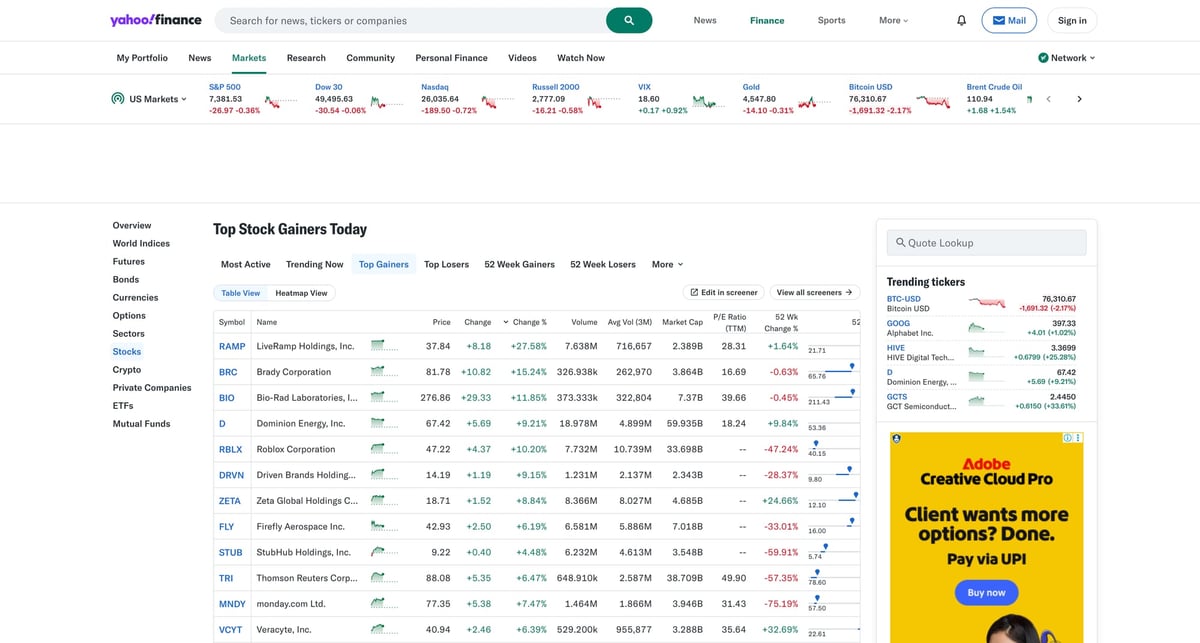
Yahoo Finance publishes daily “movers” tables that are perfect for:
- building a daily movers dataset
- triggering alerts (e.g., “top 10 gainers above 30%”)
- exporting a clean CSV for analysis
In this guide we’ll scrape:
- Top Gainers table
- Top Losers table
…and export both to CSV.
Mover pages can be fast… until you run them daily, add retries, and expand coverage. ProxiesAPI helps keep your fetch layer consistent across time and volume.
What we’re scraping (URLs)
Yahoo Finance movers live here:
- Gainers:
https://finance.yahoo.com/markets/stocks/gainers/ - Losers:
https://finance.yahoo.com/markets/stocks/losers/
The site may redirect from older short URLs like /gainers.
Setup
python3 -m venv .venv
source .venv/bin/activate

pip install requests beautifulsoup4 lxml python-dotenv
ProxiesAPI request pattern
Set your proxy URL (ProxiesAPI will provide the real value):
export PROXIESAPI_PROXY_URL="http://YOUR_USERNAME:YOUR_PASSWORD@gw.proxiesapi.com:8080"
Step 1: Fetch HTML with headers + timeouts
import os
import time
import random
import requests

PROXY_URL = os.getenv("PROXIESAPI_PROXY_URL")
TIMEOUT = (10, 30)

session = requests.Session()


def fetch(url: str) -> str:
    headers = {
        "User-Agent": (
            "Mozilla/5.0 (Macintosh; Intel Mac OS X 10_15_7) "
            "AppleWebKit/537.36 (KHTML, like Gecko) "
            "Chrome/123.0.0.0 Safari/537.36"
        ),
        "Accept-Language": "en-US,en;q=0.9",
        "Accept": "text/html,application/xhtml+xml,application/xml;q=0.9,*/*;q=0.8",
    }

    proxies = None
    if PROXY_URL:
        proxies = {"http": PROXY_URL, "https": PROXY_URL}

    r = session.get(url, headers=headers, proxies=proxies, timeout=TIMEOUT)
    r.raise_for_status()
    return r.text


def polite_sleep(min_s: float = 0.7, max_s: float = 1.6) -> None:
    time.sleep(random.uniform(min_s, max_s))
Step 2: Use stable data-testid-cell anchors
On the movers page, the table rows include stable data-testid / data-testid-cell attributes.
Examples (from the gainers table):
- ticker cell:
td[data-testid-cell="ticker"] - name cell:
td[data-testid-cell="companyshortname.raw"] - price cell:
td[data-testid-cell="intradayprice"] - percent change:
td[data-testid-cell="percentchange"] - volume:
td[data-testid-cell="dayvolume"]
Those are much more reliable than class names.
Step 3: Parse the movers table into rows
import re
from bs4 import BeautifulSoup

NUMBER_RE = re.compile(r"[-+]?\d[\d,]*\.?\d*")


def as_number(text: str) -> float | None:
    if not text:
        return None
    m = NUMBER_RE.search(text.replace("\xa0", " "))
    if not m:
        return None
    return float(m.group(0).replace(",", ""))


def parse_movers(html: str) -> list[dict]:
    soup = BeautifulSoup(html, "lxml")
    table = soup.select_one("table")
    if not table:
        raise ValueError("no table found")

    rows = []

    for tr in table.select("tbody tr"):
        ticker_a = tr.select_one('td[data-testid-cell="ticker"] a')
        symbol = ticker_a.get_text(strip=True) if ticker_a else None

        name = tr.select_one('td[data-testid-cell="companyshortname.raw"]')
        price = tr.select_one('td[data-testid-cell="intradayprice"]')
        pct = tr.select_one('td[data-testid-cell="percentchange"]')
        vol = tr.select_one('td[data-testid-cell="dayvolume"]')

        rows.append(
            {
                "symbol": symbol,
                "name": name.get_text(" ", strip=True) if name else None,
                "price": as_number(price.get_text(" ", strip=True) if price else ""),
                "percent_change": as_number(pct.get_text(" ", strip=True) if pct else ""),
                "volume": as_number(vol.get_text(" ", strip=True) if vol else ""),
            }
        )

    return rows
Step 4: Fetch gainers + losers, then export to CSV
import csv

GAINERS_URL = "https://finance.yahoo.com/markets/stocks/gainers/"
LOSERS_URL = "https://finance.yahoo.com/markets/stocks/losers/"


def write_csv(path: str, rows: list[dict]) -> None:
    if not rows:
        raise ValueError("no rows")

    fieldnames = list(rows[0].keys())
    with open(path, "w", newline="", encoding="utf-8") as f:
        w = csv.DictWriter(f, fieldnames=fieldnames)
        w.writeheader()
        w.writerows(rows)


if __name__ == "__main__":
    gainers_html = fetch(GAINERS_URL)
    polite_sleep()
    losers_html = fetch(LOSERS_URL)

    gainers = parse_movers(gainers_html)
    losers = parse_movers(losers_html)

    for r in gainers:
        r["list"] = "gainers"
    for r in losers:
        r["list"] = "losers"

    write_csv("yahoo_movers.csv", gainers + losers)
    print(f"wrote {len(gainers) + len(losers)} rows")
Common failure modes (and how to handle them)
1) Redirects and region variants
Yahoo Finance may serve slightly different HTML depending on region.
Tips:
- keep
Accept-Language: en-US - keep your parsing anchored on
data-testid-cell
2) Dynamic DOM changes
If Yahoo changes markup, fail loudly:
- if
tableis missing → raise
3) Rate limits
Start with daily runs, then increase frequency only if you need it.
Next steps
- Add a scheduler (cron) to run at open/close
- Store rows in a DB and compute daily deltas
- Expand to other screens (most active, trending)
Mover pages can be fast… until you run them daily, add retries, and expand coverage. ProxiesAPI helps keep your fetch layer consistent across time and volume.