
Scrape Trustpilot Category Rankings (Top Companies + Ratings) with ProxiesAPI
Trustpilot categories are a goldmine when you’re building:
- lead lists (top companies in a niche)
- competitive research (who ranks + how ratings shift)
- review monitoring pipelines (discover new companies automatically)
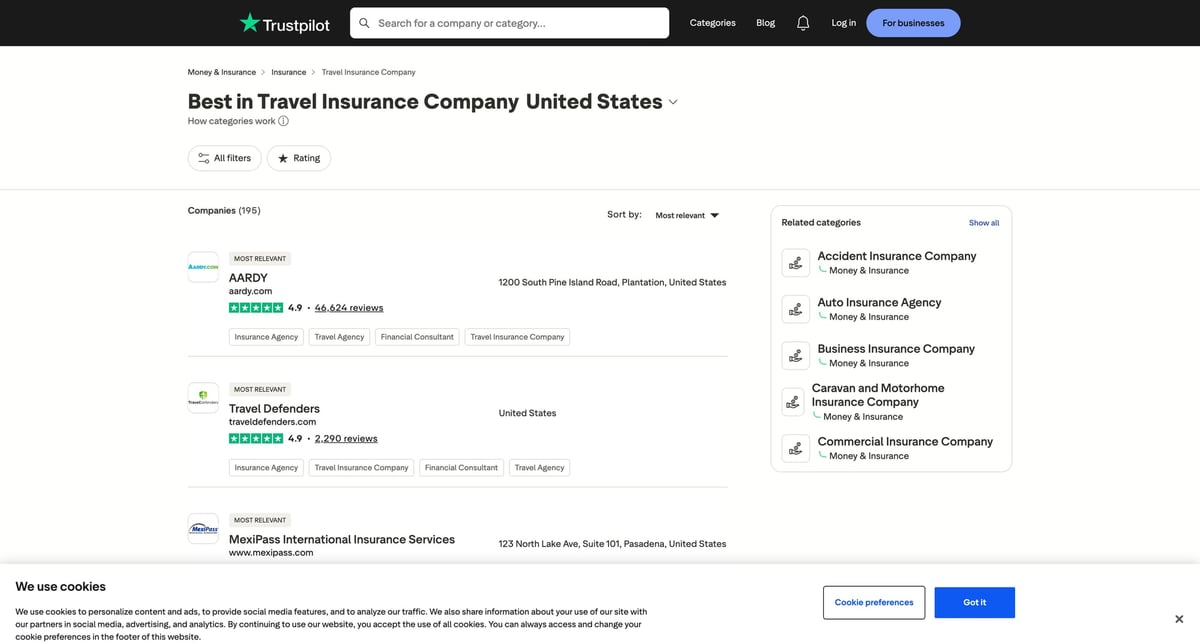
In this guide we’ll scrape a Trustpilot category ranking page and extract:
- company name
- Trustpilot “review URL” (the /review/… page)
- company website domain (when shown)
- rating
- review count
- country/category context
Then we’ll export everything to CSV.
Trustpilot is quick to rate-limit and block bot-like traffic. ProxiesAPI gives you a stable proxy layer so your category crawls stay consistent as you paginate and expand to multiple categories.
What we’re scraping (example URL + pagination)
Trustpilot category pages look like:
- Category:
https://www.trustpilot.com/categories/{category_slug} - Pagination:
https://www.trustpilot.com/categories/{category_slug}?page=2
Example used in this tutorial:
https://www.trustpilot.com/categories/travel_insurance_company
Why this target needs a proxy layer
If you fetch Trustpilot too aggressively from a single IP, you’ll often get a JSON error response describing a bot block.
The goal here isn’t “blast Trustpilot.” The goal is:
- fetch like a normal browser (headers + timeouts)
- paginate slowly
- keep retries and transient blocks from killing your job
That’s exactly where a proxy layer helps.
Setup
python3 -m venv .venv
source .venv/bin/activate

pip install requests beautifulsoup4 lxml python-dotenv
ProxiesAPI request pattern (requests + proxy URL)
Set your proxy URL (ProxiesAPI will give you the exact credentials/host/port):
export PROXIESAPI_PROXY_URL="http://YOUR_USERNAME:YOUR_PASSWORD@gw.proxiesapi.com:8080"
We’ll read this from os.environ.
Step 1: Fetch category HTML with realistic headers
import os
import time
import random
import requests

PROXY_URL = os.getenv("PROXIESAPI_PROXY_URL")
TIMEOUT = (10, 30)  # connect, read

session = requests.Session()


def fetch(url: str) -> str:
    headers = {
        "User-Agent": (
            "Mozilla/5.0 (Macintosh; Intel Mac OS X 10_15_7) "
            "AppleWebKit/537.36 (KHTML, like Gecko) "
            "Chrome/123.0.0.0 Safari/537.36"
        ),
        "Accept-Language": "en-US,en;q=0.9",
        "Accept": "text/html,application/xhtml+xml,application/xml;q=0.9,*/*;q=0.8",
    }

    proxies = None
    if PROXY_URL:
        proxies = {"http": PROXY_URL, "https": PROXY_URL}

    r = session.get(url, headers=headers, proxies=proxies, timeout=TIMEOUT)
    r.raise_for_status()
    return r.text


def polite_sleep(min_s: float = 1.0, max_s: float = 2.2) -> None:
    time.sleep(random.uniform(min_s, max_s))
Two production notes:
- Always set timeouts. Trustpilot can hang on some responses.
- Keep a session. It reduces overhead and looks more browser-like.
Step 2: Find stable anchors (don’t guess classes)
Trustpilot’s CSS classes are often hashed, so don’t anchor on them.
Instead, two stable anchors on category pages are:
- Company links go to
/review/{domain} - Pagination uses
nav[aria-label="Pagination"]
So we’ll scrape cards by finding anchors that match /review/… and then walking up to the “card container”.
Step 3: Parse company cards (name, rating, review count)
import re
from urllib.parse import urljoin
from bs4 import BeautifulSoup

BASE = "https://www.trustpilot.com"

RATING_RE = re.compile(r"(\d+(?:\.\d+)?)")
REVIEWS_RE = re.compile(r"([\d,]+)\s+reviews", re.IGNORECASE)


def parse_rating_and_reviews(text: str) -> tuple[float | None, int | None]:
    rating = None
    reviews = None

    if text:
        m = RATING_RE.search(text)
        if m:
            rating = float(m.group(1))

        m = REVIEWS_RE.search(text)
        if m:
            reviews = int(m.group(1).replace(",", ""))

    return rating, reviews


def parse_category_page(html: str) -> list[dict]:
    soup = BeautifulSoup(html, "lxml")

    rows = []

    # Trustpilot category pages contain many /review/ links.
    # We dedupe by href and only keep the first occurrence.
    seen = set()

    for a in soup.select('a[href^="/review/"]'):
        href = a.get("href")
        if not href or href in seen:
            continue
        seen.add(href)

        # Card-ish container: climb a few parents.
        card = a
        for _ in range(6):
            if not getattr(card, "parent", None):
                break
            card = card.parent

        card_text = " ".join((card.get_text(" ", strip=True) if card else a.get_text(" ", strip=True)).split())

        rating, reviews = parse_rating_and_reviews(card_text)

        name = a.get_text(" ", strip=True)
        review_url = urljoin(BASE, href)

        # The website domain usually appears as plain text near the company name.
        dm = re.search(r"\b([a-z0-9-]+\.[a-z]{2,})\b", card_text, re.IGNORECASE)
        domain = dm.group(1).lower() if dm else None

        rows.append(
            {
                "name": name,
                "review_url": review_url,
                "website": domain,
                "rating": rating,
                "review_count": reviews,
            }
        )

    return rows
Step 4: Paginate with nav[aria-label="Pagination"]
The next-page link is usually present as:
nav[aria-label="Pagination"] a[aria-label="Next page"]
We’ll follow it until it disappears.
from urllib.parse import urljoin


def find_next_page(html: str) -> str | None:
    soup = BeautifulSoup(html, "lxml")
    nav = soup.select_one('nav[aria-label="Pagination"]')
    if not nav:
        return None

    a = nav.select_one('a[aria-label="Next page"], a[rel="next"]')
    if not a:
        return None

    href = a.get("href")
    if not href:
        return None

    return urljoin(BASE, href)


def crawl_category(category_slug: str, max_pages: int = 5) -> list[dict]:
    url = f"{BASE}/categories/{category_slug}"

    all_rows: list[dict] = []
    page = 1

    while url and page <= max_pages:
        html = fetch(url)

        rows = parse_category_page(html)
        for r in rows:
            r["category_slug"] = category_slug
            r["page"] = page
        all_rows.extend(rows)

        url = find_next_page(html)
        page += 1
        polite_sleep()

    return all_rows
Step 5: Export to CSV
import csv


def write_csv(path: str, rows: list[dict]) -> None:
    if not rows:
        raise ValueError("no rows")

    fieldnames = list(rows[0].keys())
    with open(path, "w", newline="", encoding="utf-8") as f:
        w = csv.DictWriter(f, fieldnames=fieldnames)
        w.writeheader()
        w.writerows(rows)


if __name__ == "__main__":
    category = "travel_insurance_company"
    rows = crawl_category(category_slug=category, max_pages=3)
    write_csv("trustpilot_category_rankings.csv", rows)
    print(f"wrote {len(rows)} rows")
Practical tips (what breaks first)
1) You’ll sometimes get a “bot block” response
If the response isn’t HTML, it’s usually a block.
Detect it with a simple guard:
- if the body starts with
{and contains"blocked"→ treat as blocked and retry later
2) Don’t scrape every category every day
Trustpilot has many categories.
Instead:
- keep a category allowlist
- crawl a few categories per run
- store and diff results
3) Keep selectors simple
The most stable signal here is the /review/ link. CSS classes will change.
Next steps
- Add a “top N only” mode (stop after 50 companies)
- Crawl multiple categories in one run
- Store results in a database and alert on rank/rating changes
Trustpilot is quick to rate-limit and block bot-like traffic. ProxiesAPI gives you a stable proxy layer so your category crawls stay consistent as you paginate and expand to multiple categories.