
Scrape Sports Scores from ESPN (Python + ProxiesAPI)
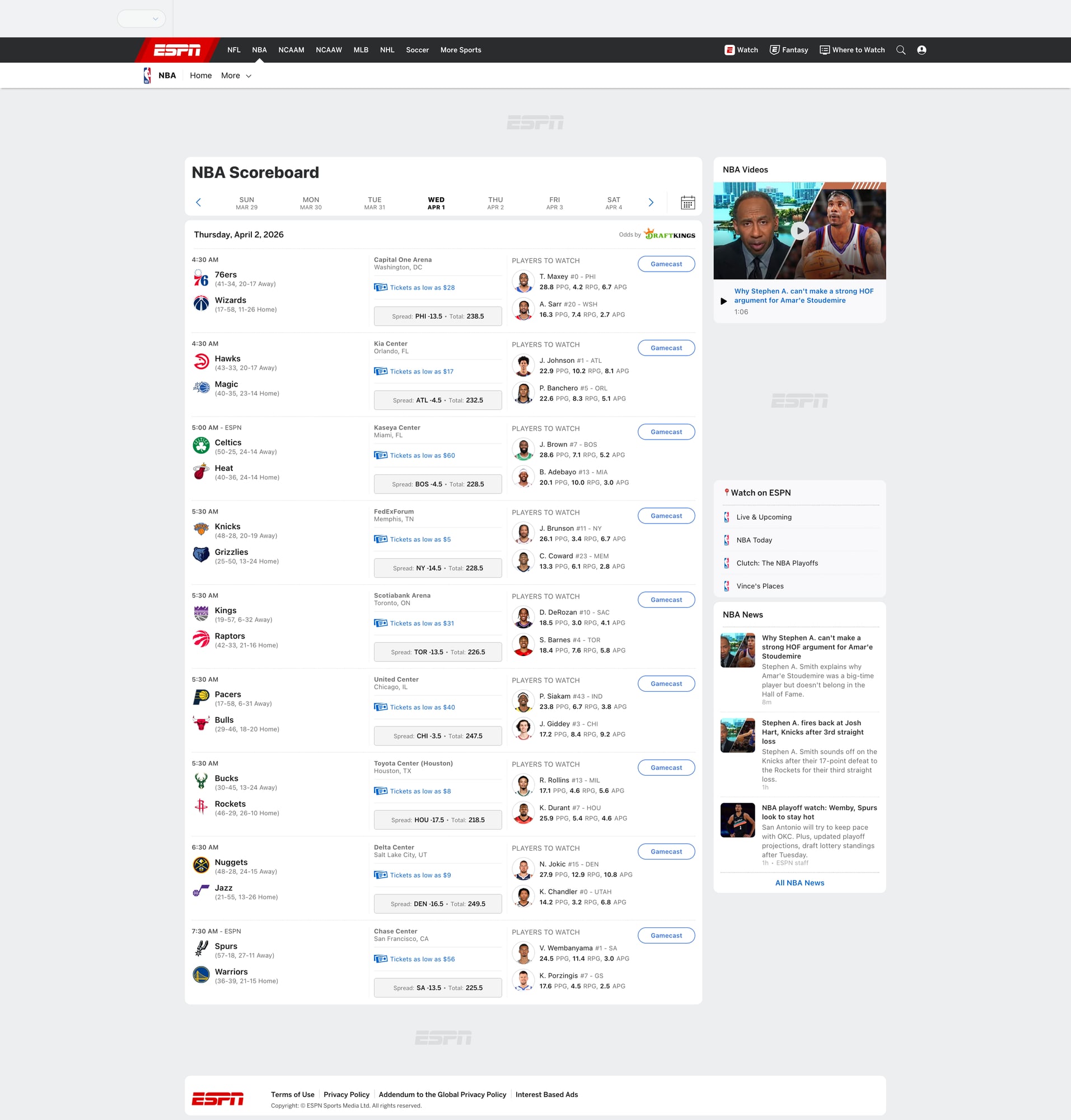
ESPN’s scoreboards are a great real-world scraping target:
- the page changes throughout the day (live + final)
- the same “game” appears in multiple views (desktop, mobile)
- the HTML structure evolves over time
In this guide we’ll build a production-grade ESPN scoreboard scraper in Python that:
- fetches an ESPN scoreboard page for a given sport + date
- extracts each game’s teams, scores, status, and links
- normalizes the data into a tabular format
- exports both CSV and JSON
- includes a screenshot of the scoreboard we scraped
Scoreboards are high-traffic pages and can rate-limit or change quickly. ProxiesAPI helps you keep requests reliable as you crawl multiple sports, dates, and leagues.
What we’re scraping (and why ESPN can be tricky)
ESPN has many “scoreboard” URLs. Common patterns include:
- NFL scoreboard (often redirects / varies by season):
https://www.espn.com/nfl/scoreboard - NBA scoreboard:
https://www.espn.com/nba/scoreboard - MLB scoreboard:
https://www.espn.com/mlb/scoreboard
Many scoreboards also support a ?date=YYYYMMDD query parameter.
Two challenges you’ll typically hit:
- Multiple render paths: ESPN serves different HTML depending on user agent and experiments.
- Selector drift: class names and layout change, so you need robust fallbacks.
So our approach will be:
- parse the page as HTML first (fast, simple)
- look for stable semantic anchors (team names, links, “Final”, “Q1”, etc.)
- keep the extraction code defensive: “best effort” + validation
Setup
python -m venv .venv
source .venv/bin/activate
pip install requests beautifulsoup4 lxml pandas
We’ll use:
requestsfor HTTPBeautifulSoup(lxml)for parsingpandasjust to make CSV export painless
Step 1: Fetch the ESPN scoreboard with sane headers
You can scrape a single page without proxies, but once you scale (multiple sports, dates, refresh every few minutes), you’ll want a more stable network layer.
Below is a minimal fetcher that supports both direct fetch and a ProxiesAPI-backed fetch.
Replace the
PROXIESAPI_*placeholders with your real ProxiesAPI values.
import os
import time
import requests

TIMEOUT = (10, 30)

session = requests.Session()

DEFAULT_HEADERS = {
    "User-Agent": (
        "Mozilla/5.0 (Macintosh; Intel Mac OS X 10_15_7) "
        "AppleWebKit/537.36 (KHTML, like Gecko) "
        "Chrome/123.0 Safari/537.36"
    ),
    "Accept-Language": "en-US,en;q=0.9",
}


def fetch_html(url: str, use_proxiesapi: bool = False) -> str:
    headers = DEFAULT_HEADERS.copy()

    if use_proxiesapi:
        # Example pattern: use your ProxiesAPI endpoint that returns the target page.
        # Many proxy APIs work by hitting an API URL like:
        #   https://api.proxiesapi.com/?api_key=...&url=https%3A%2F%2Fwww.espn.com%2Fnba%2Fscoreboard%3Fdate%3D20260401
        # Adjust to ProxiesAPI’s exact format used in your project.
        api_key = os.environ.get("PROXIESAPI_KEY")
        if not api_key:
            raise RuntimeError("Missing PROXIESAPI_KEY env var")

        # Keep it explicit and inspectable.
        proxiesapi_url = "https://api.proxiesapi.com/"  # <-- replace if your ProxiesAPI base differs
        r = session.get(
            proxiesapi_url,
            params={"api_key": api_key, "url": url},
            headers=headers,
            timeout=TIMEOUT,
        )
    else:
        r = session.get(url, headers=headers, timeout=TIMEOUT)

    r.raise_for_status()
    return r.text


if __name__ == "__main__":
    test_url = "https://www.espn.com/nba/scoreboard?date=20260401"
    html = fetch_html(test_url, use_proxiesapi=False)
    print("bytes:", len(html))
    print(html[:200])
Step 2: Understand the structure (don’t guess selectors)
ESPN scoreboards are usually composed of repeated “event” cards. The exact class names vary.
Instead of hard-coding a single brittle selector, we’ll:
- collect candidate containers that look like game cards
- within each container, attempt to extract:
- team names
- scores
- game status (Final / In Progress / Scheduled)
- ESPN links for details
Practical heuristic
A game card almost always contains two team names.
So we can:
- find elements that include team name anchors (links to team pages)
- group them by their nearest repeated parent container
We’ll implement this as a “best effort” parser and then validate the output.
Step 3: Parse games into normalized rows
import re
from dataclasses import dataclass
from typing import Optional
from bs4 import BeautifulSoup


@dataclass
class GameRow:
    sport: str
    date: str
    home_team: str
    away_team: str
    home_score: Optional[int]
    away_score: Optional[int]
    status: str
    game_url: Optional[str]


def to_int(s: str) -> Optional[int]:
    if s is None:
        return None
    m = re.search(r"\d+", s)
    return int(m.group(0)) if m else None


def normalize_space(s: str) -> str:
    return re.sub(r"\s+", " ", (s or "").strip())


def parse_espn_scoreboard(html: str, sport: str, yyyymmdd: str) -> list[GameRow]:
    soup = BeautifulSoup(html, "lxml")

    # ESPN pages commonly have many links; team links often contain "/team/".
    team_links = soup.select('a[href*="/team/"]')

    # Map: container element -> list of team names encountered
    containers = {}

    for a in team_links:
        name = normalize_space(a.get_text(" ", strip=True))
        if not name or len(name) < 2:
            continue

        # climb to a plausible repeated card container
        card = a
        for _ in range(6):
            if card is None:
                break
            # heuristic: cards often are <section>, <article>, or divs with data attributes
            if card.name in ("section", "article"):
                break
            card = card.parent

        if card is None:
            continue

        containers.setdefault(card, []).append(name)

    # Candidate cards: those with at least 2 team names
    candidate_cards = [c for c, names in containers.items() if len(names) >= 2]

    out: list[GameRow] = []

    for card in candidate_cards:
        names = containers.get(card, [])
        # Keep first two distinct names
        uniq = []
        for n in names:
            if n not in uniq:
                uniq.append(n)
            if len(uniq) == 2:
                break
        if len(uniq) != 2:
            continue

        # ESPN sometimes lists away first, sometimes home first.
        away_team, home_team = uniq[0], uniq[1]

        # Scores: look for numbers near the team names. This is heuristic.
        card_text = normalize_space(card.get_text(" ", strip=True))

        # Try to find two score-like numbers in the card.
        nums = [int(x) for x in re.findall(r"\b(\d{1,3})\b", card_text)]
        home_score = away_score = None
        if len(nums) >= 2:
            # Not perfect, but on most scoreboards the two prominent numbers are scores.
            away_score, home_score = nums[0], nums[1]

        # Status: look for common tokens
        status = ""
        for token in ["Final", "FT", "In Progress", "Live", "Half", "Q1", "Q2", "Q3", "Q4", "Scheduled", "PM", "AM"]:
            if token in card_text:
                status = token
                break
        status = status or "Unknown"

        # Game URL: a link that looks like an event/details page.
        game_url = None
        link = card.select_one('a[href*="/game/"]') or card.select_one('a[href*="/scoreboard/"]')
        if link:
            href = link.get("href")
            if href:
                game_url = href if href.startswith("http") else f"https://www.espn.com{href}"

        out.append(
            GameRow(
                sport=sport,
                date=yyyymmdd,
                home_team=home_team,
                away_team=away_team,
                home_score=home_score,
                away_score=away_score,
                status=status,
                game_url=game_url,
            )
        )

    # De-dupe games by teams (rough)
    deduped = {}
    for g in out:
        key = (g.date, g.away_team, g.home_team)
        deduped[key] = g

    return list(deduped.values())
A quick sanity run
from pprint import pprint

html = fetch_html("https://www.espn.com/nba/scoreboard?date=20260401", use_proxiesapi=False)
games = parse_espn_scoreboard(html, sport="nba", yyyymmdd="20260401")
print("games:", len(games))
pprint(games[:2])
If you get games: 0, it usually means ESPN served a layout variant. In that case:
- confirm the URL loads in your browser
- save the HTML to disk and inspect it
- adjust the card-selection heuristics (see “Making it robust” below)
Step 4: Export to CSV + JSON
import json
import pandas as pd


def export_games(games, csv_path: str, json_path: str) -> None:
    rows = [g.__dict__ for g in games]

    df = pd.DataFrame(rows)
    df.to_csv(csv_path, index=False)

    with open(json_path, "w", encoding="utf-8") as f:
        json.dump(rows, f, ensure_ascii=False, indent=2)


if __name__ == "__main__":
    url = "https://www.espn.com/nba/scoreboard?date=20260401"
    html = fetch_html(url, use_proxiesapi=True)  # switch on when scaling
    games = parse_espn_scoreboard(html, sport="nba", yyyymmdd="20260401")

    export_games(games, "espn_scoreboard.csv", "espn_scoreboard.json")
    print("wrote", len(games), "games")
Making the scraper resilient (what to do when ESPN changes)
For scoreboards, it’s normal for the HTML to change.
Here’s the checklist I use to keep scrapers stable:
- Save failing HTML (don’t debug from memory)
- write it to
debug.html - open locally and search for a known team
- write it to
- Prefer structural selectors
- links that include
/team/are more stable than random class names
- links that include
- Validate output
- require
home_team,away_teamnon-empty - require scores only when status is Final/Live
- require
- Add retries + backoff
- transient failures happen more than you think
Here’s a small retry wrapper:
import random


def fetch_with_retries(url: str, use_proxiesapi: bool, tries: int = 4) -> str:
    last_err = None
    for i in range(tries):
        try:
            return fetch_html(url, use_proxiesapi=use_proxiesapi)
        except Exception as e:
            last_err = e
            sleep = (2 ** i) + random.random()
            time.sleep(sleep)
    raise last_err
Where ProxiesAPI fits (honestly)
If you’re scraping one scoreboard once, you can likely do it without proxies.
ProxiesAPI helps when you:
- scrape multiple sports/leagues
- scrape multiple dates (backfill)
- refresh frequently (live games)
- hit rate limits / soft blocks
The key is to keep your code structured so the network layer is swappable (direct vs ProxiesAPI).
QA checklist
- Screenshot is captured and added to the post
- Parser returns non-zero games for a known date
- Exported CSV opens cleanly (team names + scores)
- Retries don’t create duplicates
- You can switch
use_proxiesapion/off without changing parsing code
Scoreboards are high-traffic pages and can rate-limit or change quickly. ProxiesAPI helps you keep requests reliable as you crawl multiple sports, dates, and leagues.