
Scrape NBA Scores and Standings from ESPN with Python (Box Scores + Schedule)
If you’re building anything in sports—alerts, analytics dashboards, fantasy tooling, betting research—you end up needing two things reliably:
- today’s games (schedule + scores)
- standings (wins/losses, streaks, games back)
ESPN is a common source because it’s consistently updated and human-readable.
In this tutorial we’ll build a Python scraper that:
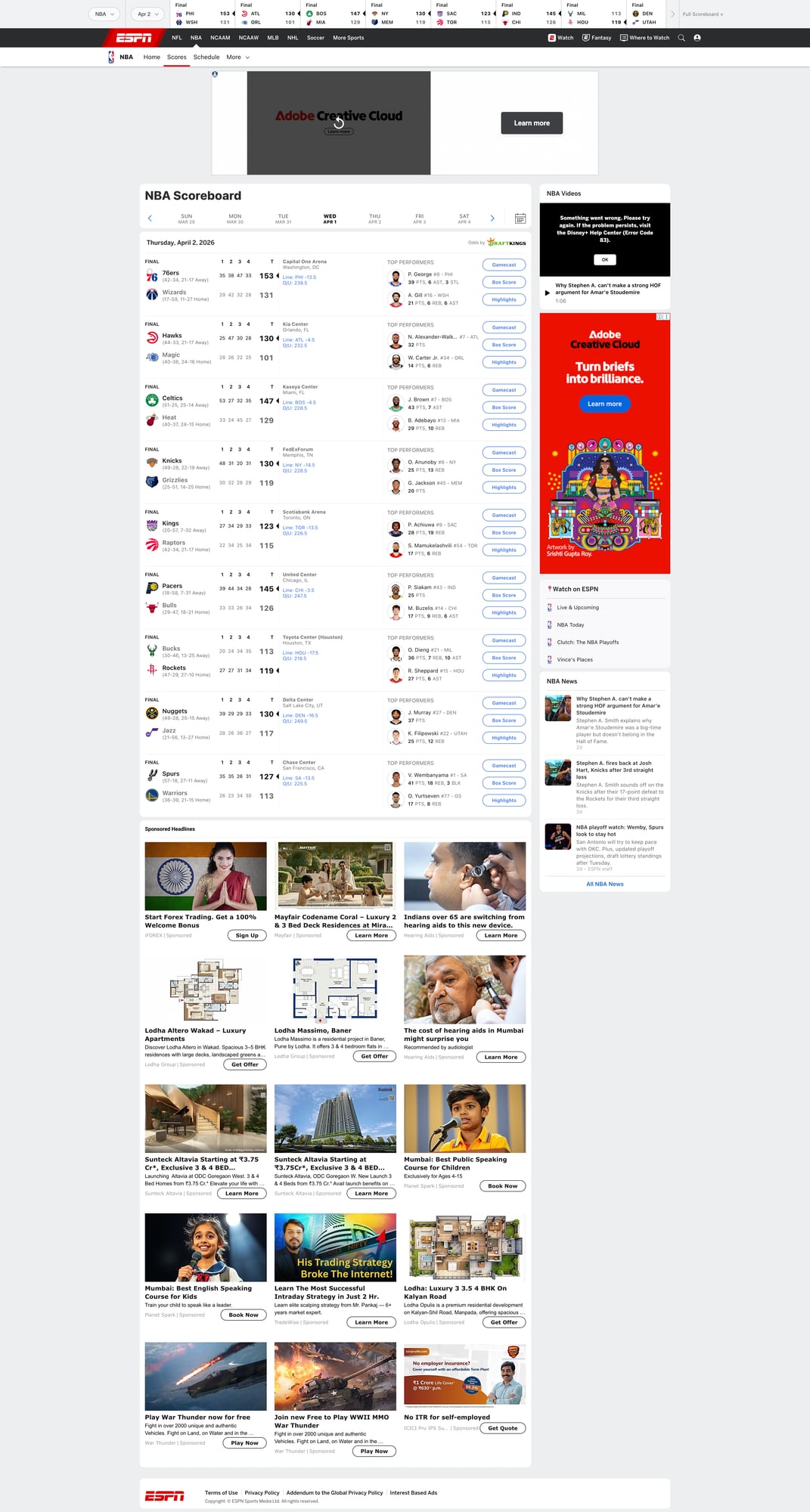
- scrapes the NBA scoreboard (today’s games)
- optionally scrapes a box score page for richer details
- scrapes standings
- exports clean JSON
- uses ProxiesAPI + retries to reduce random failures
ESPN pages are high-traffic and can throttle bursty scrapers. ProxiesAPI gives you a rotating, retry-friendly network layer so your scoreboard job runs on schedule.
Targets (URLs we’ll scrape)
ESPN NBA scoreboard:
https://www.espn.com/nba/scoreboard
Standings:
https://www.espn.com/nba/standings
A box score page is linked from each game. It usually contains /nba/boxscore/_/gameId/.....
Setup
python -m venv .venv
source .venv/bin/activate
pip install requests beautifulsoup4 lxml python-dotenv
.env:
PROXIESAPI_KEY="YOUR_KEY_HERE"
ProxiesAPI fetch helper (timeouts + backoff)
Same philosophy as any production scraper: network failures are normal, so make them boring.
import os
import time
import urllib.parse
import requests

PROXIESAPI_KEY = os.environ.get("PROXIESAPI_KEY", "")
TIMEOUT = (10, 30)

session = requests.Session()
session.headers.update({
    "User-Agent": (
        "Mozilla/5.0 (Macintosh; Intel Mac OS X 10_15_7) "
        "AppleWebKit/537.36 (KHTML, like Gecko) "
        "Chrome/123.0.0.0 Safari/537.36"
    ),
    "Accept-Language": "en-US,en;q=0.9",
})


def proxiesapi_url(target_url: str) -> str:
    qs = urllib.parse.urlencode({"auth_key": PROXIESAPI_KEY, "url": target_url})
    return f"https://api.proxiesapi.com/?{qs}"


def fetch(url: str, retries: int = 5) -> str:
    last_exc = None
    for attempt in range(1, retries + 1):
        try:
            r = session.get(proxiesapi_url(url), timeout=TIMEOUT)
            if r.status_code in (403, 429, 500, 502, 503, 504):
                time.sleep(min(2 ** attempt, 20))
                continue
            r.raise_for_status()
            return r.text
        except requests.RequestException as e:
            last_exc = e
            time.sleep(min(2 ** attempt, 20))
    raise RuntimeError(f"Failed to fetch: {url}") from last_exc
Step 1: Scrape the scoreboard (today’s games)
ESPN renders game “cards” with links to the matchup and box score.
The exact classes change, so we’ll use a resilient approach:
- treat each game as an anchor/link that contains a
gameId - then collect the nearest container text for teams/scores/status
import re
from bs4 import BeautifulSoup

SCOREBOARD_URL = "https://www.espn.com/nba/scoreboard"


def extract_game_id(href: str) -> str | None:
    if not href:
        return None
    # Typical patterns:
    # /nba/game/_/gameId/401585XXX
    # /nba/boxscore/_/gameId/401585XXX
    m = re.search(r"gameId/(\d+)", href)
    return m.group(1) if m else None


def clean(s: str) -> str:
    return re.sub(r"\s+", " ", (s or "")).strip()


def parse_scoreboard(html: str) -> list[dict]:
    soup = BeautifulSoup(html, "lxml")

    # Find links that contain a gameId
    links = soup.select('a[href*="gameId/"]')

    games = {}

    for a in links:
        href = a.get("href") or ""
        gid = extract_game_id(href)
        if not gid:
            continue

        # keep a canonical URL for boxscore if we find it
        url = href if href.startswith("http") else f"https://www.espn.com{href}"

        # Walk up to a reasonable container to extract text.
        container = a
        for _ in range(8):
            if not container:
                break
            if container.name in ("section", "article", "div"):
                # game cards often have role/group-ish semantics
                if container.get("data-testid") or container.get("class"):
                    break
            container = container.parent

        text = clean(container.get_text(" ", strip=True) if container else a.get_text(" ", strip=True))

        entry = games.get(gid) or {
            "game_id": gid,
            "game_url": None,
            "boxscore_url": None,
            "summary_text": None,
        }

        # Prefer explicit boxscore URL when seen
        if "/boxscore/" in href:
            entry["boxscore_url"] = url
        elif "/game/" in href:
            entry["game_url"] = url

        # Store a short text snapshot for debugging/validation
        if text and (not entry.get("summary_text") or len(text) > len(entry["summary_text"])):
            entry["summary_text"] = text

        games[gid] = entry

    return list(games.values())


if __name__ == "__main__":
    html = fetch(SCOREBOARD_URL)
    games = parse_scoreboard(html)
    print("games:", len(games))
    print(games[0] if games else None)
This gets you a stable list of games + IDs (the thing you can key on), even if ESPN changes card markup.
Step 2: Scrape standings
Standings pages are usually tables. We’ll extract per-team rows.
STANDINGS_URL = "https://www.espn.com/nba/standings"


def parse_standings(html: str) -> list[dict]:
    soup = BeautifulSoup(html, "lxml")

    out = []

    # ESPN often has multiple tables (East/West). Grab all table rows.
    tables = soup.select("table")
    for t in tables:
        # Header labels help us understand which columns we’re reading.
        headers = [clean(th.get_text(" ", strip=True)) for th in t.select("thead th")]

        for tr in t.select("tbody tr"):
            cells = [clean(td.get_text(" ", strip=True)) for td in tr.select("td")]
            if not cells:
                continue

            # Try to find a team name link
            team_a = tr.select_one('a[href*="/nba/team/"]')
            team = clean(team_a.get_text(" ", strip=True)) if team_a else cells[0]

            row = {
                "team": team,
                "raw": cells,
                "headers": headers,
            }
            out.append(row)

    # Basic de-dupe
    uniq = {}
    for r in out:
        key = r.get("team")
        if key and key not in uniq:
            uniq[key] = r

    return list(uniq.values())


if __name__ == "__main__":
    standings_html = fetch(STANDINGS_URL)
    standings = parse_standings(standings_html)
    print("teams:", len(standings))
    print(standings[0] if standings else None)
This stores the row with headers + raw cells so you can map fields later even if ESPN’s column order shifts.
Step 3 (optional): Fetch a box score page for richer data
Once you have a game_id, you can construct a box score URL:
https://www.espn.com/nba/boxscore/_/gameId/{game_id}
From there you can parse:
- final score
- team names
- basic leader stats
The exact markup is more volatile than the scoreboard, so keep it simple.
def parse_boxscore_basics(html: str) -> dict:
    soup = BeautifulSoup(html, "lxml")

    title = clean(soup.title.get_text(" ", strip=True) if soup.title else "")

    # Scores are often in prominent <span> elements; we’ll do a minimal extraction.
    # If you need deep stats, consider an API provider or store the raw HTML snapshot.

    scores = [clean(x.get_text(" ", strip=True)) for x in soup.select("span.ScoreCell__Score")]
    teams = [clean(x.get_text(" ", strip=True)) for x in soup.select("span.ScoreCell__TeamName")]

    return {
        "page_title": title,
        "teams": teams[:2],
        "scores": scores[:2],
    }


if __name__ == "__main__":
    games = parse_scoreboard(fetch(SCOREBOARD_URL))
    g = next((x for x in games if x.get("game_id")), None)
    if g:
        gid = g["game_id"]
        html = fetch(f"https://www.espn.com/nba/boxscore/_/gameId/{gid}")
        print(parse_boxscore_basics(html))
Export: one JSON file you can ingest
import json


def run(date_label: str = "today"):
    scoreboard = parse_scoreboard(fetch(SCOREBOARD_URL))
    standings = parse_standings(fetch(STANDINGS_URL))

    payload = {
        "date_label": date_label,
        "scoreboard": scoreboard,
        "standings": standings,
    }

    with open("nba_espn_snapshot.json", "w", encoding="utf-8") as f:
        json.dump(payload, f, ensure_ascii=False, indent=2)

    print("wrote nba_espn_snapshot.json")


if __name__ == "__main__":
    run()
Where ProxiesAPI fits (honestly)
Sports sites are bursty workloads:
- you scrape the scoreboard frequently
- you may hit box scores for every game
- you run the job at predictable times (which can look bot-like)
ProxiesAPI doesn’t make ESPN “scrapable forever”, but it does make your scraper:
- more resilient to transient 403/429s
- less dependent on a single IP
- easier to retry safely
QA checklist
- scoreboard parser finds a non-zero number of game IDs
- standings parser yields ~30 teams
- exports valid JSON
- you can spot-check one game ID by opening its boxscore URL
ESPN pages are high-traffic and can throttle bursty scrapers. ProxiesAPI gives you a rotating, retry-friendly network layer so your scoreboard job runs on schedule.