
Scrape ESPN Team Schedules and Game Results with Python
ESPN team schedule pages are a great scraping target because they expose much more than the visible table. The rendered page ships a large serialized data blob containing:
- upcoming games
- completed game results
- opponents and links
- dates and time status
- network information
- home/away symbols
So instead of scraping table cells that may change visually, we can parse the underlying schedule data already embedded in the page.
In this guide we’ll pull a real ESPN team schedule page, extract normalized rows, and export JSON and CSV for dashboards or sports research.
Team pages refresh constantly during a season. ProxiesAPI helps long-running sports data jobs handle retries, geo variance, and IP reputation without changing your parser.
What we’re scraping
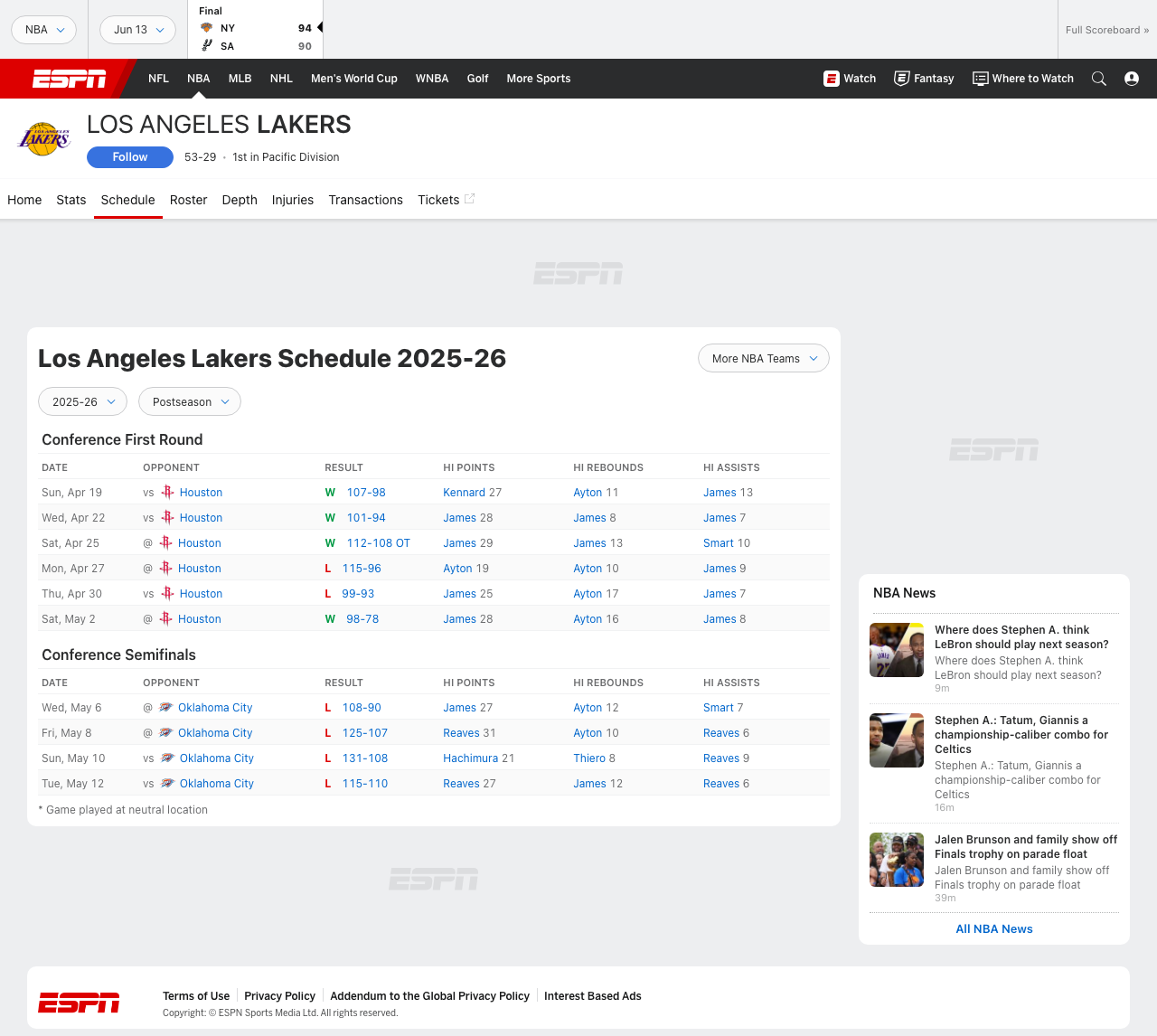
A typical team page looks like this:
https://www.espn.com/nba/team/schedule/_/name/lal/los-angeles-lakers
The visible schedule table is useful for humans, but for a scraper the better source is the serialized page payload. In the live HTML, ESPN includes a scheduleData object with rows like:
date.dateopponent.displayNameopponent.homeAwaySymboltime.linkresult.currentTeamScoreresult.opponentTeamScorenetwork[].name
That means we can scrape the team page exactly as requested while still using the stable structured data behind it.
Setup
python3 -m venv .venv
source .venv/bin/activate
pip install requests tenacity
We do not need BeautifulSoup for the main parse. We’ll treat the page as text, isolate the embedded JSON, then decode it.
Step 1: Fetch the team schedule page
Create espn_team_schedule.py:
from __future__ import annotations

import json
import os
import random
import re
import time
from dataclasses import asdict, dataclass
from typing import Any

import requests
from tenacity import retry, stop_after_attempt, wait_exponential

TIMEOUT = (10, 30)
HEADERS = {
    "User-Agent": (
        "Mozilla/5.0 (Macintosh; Intel Mac OS X 10_15_7) "
        "AppleWebKit/537.36 (KHTML, like Gecko) "
        "Chrome/126.0.0.0 Safari/537.36"
    ),
    "Accept": "text/html,application/xhtml+xml,application/xml;q=0.9,*/*;q=0.8",
    "Accept-Language": "en-US,en;q=0.9",
}

session = requests.Session()
session.headers.update(HEADERS)


def build_proxies() -> dict[str, str] | None:
    proxy = os.getenv("PROXIESAPI_PROXY")
    if not proxy:
        return None
    return {"http": f"http://{proxy}", "https": f"http://{proxy}"}


PROXIES = build_proxies()


def sleep_jitter(low: float = 0.5, high: float = 1.2) -> None:
    time.sleep(random.uniform(low, high))


@retry(stop=stop_after_attempt(5), wait=wait_exponential(multiplier=1, min=1, max=20))
def fetch_html(url: str) -> str:
    response = session.get(url, timeout=TIMEOUT, proxies=PROXIES)
    response.raise_for_status()
    html = response.text
    if "scheduleData" not in html:
        raise RuntimeError("ESPN schedule payload not found in HTML")
    return html
ProxiesAPI integration point
This is the same pattern as most production scrapers:
response = session.get(url, timeout=TIMEOUT, proxies=PROXIES)
When you move from “one page manually” to “every team every day,” that one line becomes the difference between a hobby script and a reliable pipeline.
Step 2: Extract the embedded scheduleData
The ESPN HTML includes a giant serialized app state object. We do not need the whole thing; we only need the scheduleData slice.
SCHEDULE_RE = re.compile(r'"scheduleData":(\{.*?\}),"noData":"No Data Available"', re.DOTALL)


def extract_schedule_data(html: str) -> dict[str, Any]:
    match = SCHEDULE_RE.search(html)
    if not match:
        raise RuntimeError("Could not isolate scheduleData from page HTML")

    raw_json = match.group(1)
    return json.loads(raw_json)
Why this approach works:
- the page payload is already valid JSON
scheduleDataincludes the season tabs and row data we care about- we avoid brittle DOM scraping of the visual table
If ESPN changes the trailing noData key later, adjust the regex anchor. The important idea is unchanged: scrape the serialized page data, not the painted cells.
Step 3: Normalize season sections into flat game rows
Within scheduleData, the rows live inside each season section. Each row contains nested objects for the opponent, time, result, and networks.
We’ll flatten that into one row per game.
@dataclass
class GameRow:
    team: str | None
    team_slug: str | None
    season_label: str | None
    season_type: str | None
    game_date_utc: str | None
    date_label: str | None
    opponent: str | None
    opponent_abbrev: str | None
    home_away_symbol: str | None
    result_flag: str | None
    team_score: int | None
    opponent_score: int | None
    status_state: str | None
    status_detail: str | None
    game_url: str | None
    networks: str | None


def to_int(value: Any) -> int | None:
    try:
        return int(value)
    except Exception:
        return None


def parse_schedule_rows(schedule_data: dict[str, Any]) -> list[GameRow]:
    rows: list[GameRow] = []

    team_name = schedule_data.get("teamName")
    team_slug = schedule_data.get("teamAbbrev")

    for season_block in schedule_data.get("schedule", []):
        season_label = season_block.get("label")
        season_type = season_block.get("value")

        for game in season_block.get("events", []) or []:
            opponent = game.get("opponent") or {}
            result = game.get("result") or {}
            status = game.get("status") or {}
            networks = game.get("network") or []
            time_info = game.get("time") or {}
            game_date = game.get("date") or {}

            rows.append(
                GameRow(
                    team=team_name,
                    team_slug=team_slug,
                    season_label=season_label,
                    season_type=season_type,
                    game_date_utc=game_date.get("date"),
                    date_label=game_date.get("format"),
                    opponent=opponent.get("displayName"),
                    opponent_abbrev=opponent.get("abbrev"),
                    home_away_symbol=opponent.get("homeAwaySymbol"),
                    result_flag=result.get("winLossSymbol"),
                    team_score=to_int(result.get("currentTeamScore")),
                    opponent_score=to_int(result.get("opponentTeamScore")),
                    status_state=status.get("state"),
                    status_detail=status.get("detail") or status.get("shortDetail"),
                    game_url=time_info.get("link") or result.get("link"),
                    networks=", ".join(n.get("name", "") for n in networks if n.get("name")) or None,
                )
            )

    return rows
That one function gives you both completed games and future schedule rows from the same page.
Step 4: Keep upcoming games and completed games in the same dataset
A nice detail in ESPN’s schedule data is that future and finished games share almost the same shape.
For completed games, you usually get:
result_flaglikeWorL- final scores
- a post-game status
For upcoming games, you usually get:
- a kickoff/tipoff time
- network information
- no final score yet
So instead of splitting the parser into two different branches, we can keep one normalized row model and let nullable fields stay empty when the game has not happened yet.
def classify_row(row: GameRow) -> str:
    if row.result_flag in {"W", "L", "T"}:
        return "completed"
    return "upcoming"
This makes downstream analysis much easier because the CSV schema stays stable throughout the season.
Step 5: Run the scraper
def scrape_team_schedule(url: str) -> list[GameRow]:
    html = fetch_html(url)
    schedule_data = extract_schedule_data(html)
    return parse_schedule_rows(schedule_data)


if __name__ == "__main__":
    url = "https://www.espn.com/nba/team/schedule/_/name/lal/los-angeles-lakers"
    rows = scrape_team_schedule(url)

    print(f"rows: {len(rows)}")
    print(json.dumps(asdict(rows[0]), indent=2))
Example output:
{
  "team": "Los Angeles Lakers",
  "team_slug": "lal",
  "season_label": "Postseason",
  "season_type": "3|",
  "game_date_utc": "2026-05-08T02:00Z",
  "date_label": "ddd, MMM D",
  "opponent": "Oklahoma City Thunder",
  "opponent_abbrev": "OKC",
  "home_away_symbol": "@",
  "result_flag": "W",
  "team_score": 112,
  "opponent_score": 104,
  "status_state": "post",
  "status_detail": "Final",
  "game_url": "https://www.espn.com/nba/game/_/gameId/...",
  "networks": "TNT"
}
Step 6: Export to JSON and CSV
import csv
from pathlib import Path


def export(rows: list[GameRow], out_dir: str = "output") -> None:
    Path(out_dir).mkdir(parents=True, exist_ok=True)

    with open(f"{out_dir}/espn_schedule.json", "w", encoding="utf-8") as f:
        json.dump([asdict(r) for r in rows], f, ensure_ascii=False, indent=2)

    with open(f"{out_dir}/espn_schedule.csv", "w", newline="", encoding="utf-8") as f:
        writer = csv.DictWriter(f, fieldnames=list(asdict(rows[0]).keys()))
        writer.writeheader()
        for row in rows:
            writer.writerow(asdict(row))
If you want only completed games:
completed = [r for r in rows if classify_row(r) == "completed"]
If you want only upcoming games:
upcoming = [r for r in rows if classify_row(r) == "upcoming"]
Why not scrape the visible table directly?
You can, but it is the weaker choice.
Here’s the tradeoff:
| Approach | Pros | Cons |
|---|---|---|
| HTML table selectors | Easy to demo visually | More brittle when ESPN changes layout |
Serialized scheduleData | Cleaner fields, easier exports, closer to source data | Requires regex/JSON extraction step |
For production work, the serialized page data is the better source. You are still scraping the team page, but you are scraping the structured state that powers it instead of the final presentation layer.
Common ESPN scraping issues
1. Missing payload with weak headers
If you fetch with a bare client and no realistic headers, you may get an incomplete or alternate response. Use a normal desktop User-Agent.
2. Large HTML documents
ESPN pages are heavy. Do not repeatedly parse the whole HTML with expensive DOM traversals if a direct regex extraction can get you to the embedded JSON faster.
3. Seasonal tabs
Preseason, regular season, and postseason may appear together in the payload. Keep season_label or season_type in your output so you can filter later instead of throwing data away during parsing.
Final takeaway
If your goal is “scrape ESPN team schedules and game results,” the cleanest implementation is:
- fetch the team schedule page
- isolate the embedded
scheduleData - flatten it into stable rows
- export JSON and CSV
You get upcoming games and completed results from one source, and you avoid tying your scraper to fragile table markup. Start with direct requests, then route through ProxiesAPI when your sports pipeline becomes frequent enough to need better failure tolerance.
Team pages refresh constantly during a season. ProxiesAPI helps long-running sports data jobs handle retries, geo variance, and IP reputation without changing your parser.