
Scrape Financial Data from Yahoo Finance
Yahoo Finance is still one of the fastest ways to assemble a practical market dataset for internal dashboards, side projects, and research.
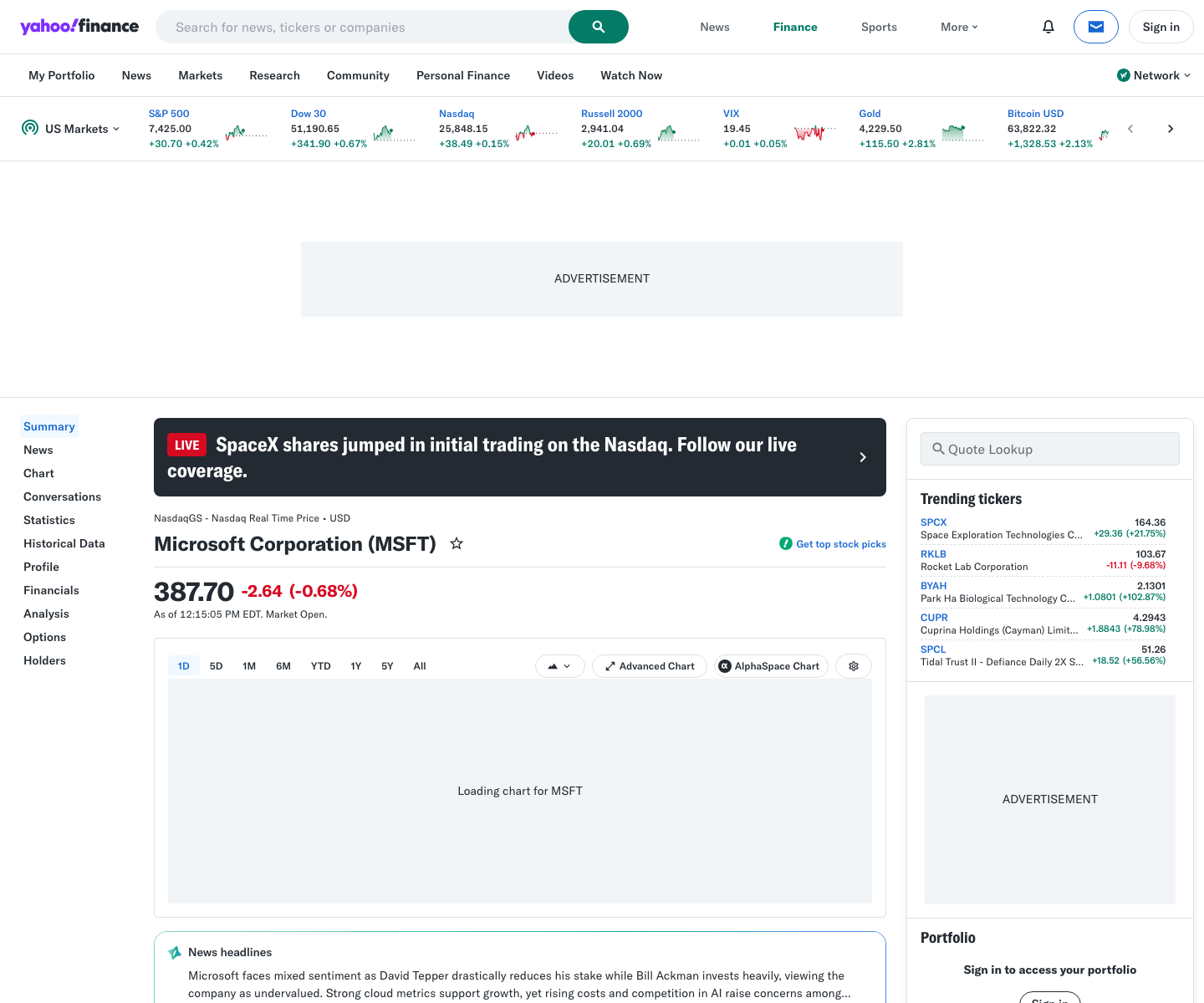
In one page you can usually find:
- the quote header
- current market price
- day range / 52-week range
- valuation fields like market cap or PE ratio
- historical price tables linked from the same symbol
The catch is reliability. Yahoo Finance is not a public, officially supported scraping API. HTML layouts move around, some background endpoints are throttled, and direct curl requests from one IP can return rate limits quickly.
That makes this a good example of where a simple, honest scraping stack matters:
- parse the rendered quote page
- normalize the fields you need
- retry conservatively
- add ProxiesAPI when your request volume grows
Yahoo Finance pages are useful, but they do rate-limit and occasionally block aggressive requests. ProxiesAPI fits cleanly into the fetch layer so your scraper can retry politely without tying the whole workflow to one IP.
What we are scraping
For each ticker we want three buckets of data:
-
Quote header
- company name
- ticker
- current market price
-
Summary statistics
- previous close
- open
- bid / ask
- market cap
- PE ratio
- 52-week range
-
Historical rows
- date
- open / high / low / close
- adjusted close
- volume
In practice, quote headers and summary stats usually come from the HTML quote page, while historical rows are easiest to export from the table page once you already know which symbols you care about.
Setup
python3 -m venv .venv
source .venv/bin/activate
pip install requests beautifulsoup4 lxml pandas python-dotenv
Create a .env file:
PROXIESAPI_PROXY_URL="http://USER:PASS@gateway.example:9000"
PROXIESAPI_PROXY_URL is intentionally generic here because teams wire ProxiesAPI in different ways. The scraper below expects a standard proxy URL that requests can pass as both the HTTP and HTTPS proxy.
Step 1: Build a fetch layer that can survive rate limits
import os
import random
import time
from dataclasses import dataclass
from typing import Optional

import requests
from dotenv import load_dotenv

load_dotenv()

PROXY_URL = os.getenv("PROXIESAPI_PROXY_URL")
TIMEOUT = (10, 30)


@dataclass
class FetchResult:
    url: str
    status_code: int
    text: str


def make_session() -> requests.Session:
    session = requests.Session()
    session.headers.update(
        {
            "User-Agent": (
                "Mozilla/5.0 (Macintosh; Intel Mac OS X 10_15_7) "
                "AppleWebKit/537.36 (KHTML, like Gecko) "
                "Chrome/125.0 Safari/537.36"
            ),
            "Accept-Language": "en-US,en;q=0.9",
        }
    )
    return session


def fetch(url: str, session: requests.Session, attempts: int = 4) -> FetchResult:
    last_error: Optional[Exception] = None
    proxies = {"http": PROXY_URL, "https": PROXY_URL} if PROXY_URL else None

    for attempt in range(1, attempts + 1):
        time.sleep(random.uniform(0.8, 1.8))
        try:
            response = session.get(url, timeout=TIMEOUT, proxies=proxies)
            if response.status_code in (403, 429, 500, 502, 503, 504):
                wait = min(10, 1.6 ** attempt) + random.uniform(0, 0.5)
                time.sleep(wait)
                continue

            response.raise_for_status()
            return FetchResult(url=url, status_code=response.status_code, text=response.text)
        except Exception as exc:
            last_error = exc
            wait = min(10, 1.6 ** attempt) + random.uniform(0, 0.5)
            time.sleep(wait)

    raise RuntimeError(f"Failed to fetch {url}") from last_error
This is where ProxiesAPI belongs. It does not magically fix selectors. It gives the fetch layer a cleaner network path so retries are less likely to come from the exact same IP that just got throttled.
Step 2: Parse the quote page
The quote page URL pattern is simple:
def quote_url(symbol: str) -> str:
    return f"https://finance.yahoo.com/quote/{symbol}/"
Now parse the rendered HTML:
import re
from bs4 import BeautifulSoup


def clean(text: str) -> str:
    return re.sub(r"\s+", " ", (text or "").strip())


def parse_quote_page(html: str) -> dict:
    soup = BeautifulSoup(html, "lxml")

    heading = soup.select_one("h1")
    price = soup.select_one('fin-streamer[data-field="regularMarketPrice"]')

    stats = {}
    for row in soup.select("table tr"):
        cells = row.select("td")
        if len(cells) < 2:
            continue
        label = clean(cells[0].get_text(" ", strip=True))
        value = clean(cells[1].get_text(" ", strip=True))
        if label and value:
            stats[label] = value

    return {
        "name": clean(heading.get_text(" ", strip=True)) if heading else None,
        "price": clean(price.get_text(" ", strip=True)) if price else None,
        "previous_close": stats.get("Previous Close"),
        "open": stats.get("Open"),
        "bid": stats.get("Bid"),
        "ask": stats.get("Ask"),
        "days_range": stats.get("Day's Range"),
        "fifty_two_week_range": stats.get("52 Week Range"),
        "volume": stats.get("Volume"),
        "avg_volume": stats.get("Avg. Volume"),
        "market_cap": stats.get("Market Cap"),
        "beta": stats.get("Beta (5Y Monthly)"),
        "pe_ratio": stats.get("PE Ratio (TTM)"),
        "eps": stats.get("EPS (TTM)"),
        "earnings_date": stats.get("Earnings Date"),
        "target_est": stats.get("1y Target Est"),
    }
The main trick is not trying to overfit to one exact card container. Yahoo often keeps the row pattern stable even when it moves sections around.
Step 3: Pull historical rows and export to CSV
Yahoo’s historical price pages are easier to scrape if you already know the symbol list and only need a small number of rows per ticker.
import pandas as pd


def history_url(symbol: str) -> str:
    return f"https://finance.yahoo.com/quote/{symbol}/history/"


def parse_history_table(html: str) -> list[dict]:
    soup = BeautifulSoup(html, "lxml")
    rows = []

    for row in soup.select("table tbody tr"):
        cells = [clean(td.get_text(" ", strip=True)) for td in row.select("td")]
        if len(cells) != 7:
            continue
        rows.append(
            {
                "date": cells[0],
                "open": cells[1],
                "high": cells[2],
                "low": cells[3],
                "close": cells[4],
                "adj_close": cells[5],
                "volume": cells[6],
            }
        )

    return rows


def scrape_symbol(symbol: str, session: requests.Session) -> tuple[dict, list[dict]]:
    quote = parse_quote_page(fetch(quote_url(symbol), session).text)
    history = parse_history_table(fetch(history_url(symbol), session).text)
    quote["symbol"] = symbol
    return quote, history


def export(symbols: list[str], out_csv: str = "yahoo_finance_quotes.csv") -> None:
    session = make_session()
    quote_rows = []

    for symbol in symbols:
        quote, history = scrape_symbol(symbol, session)
        quote["history_rows"] = len(history)
        quote_rows.append(quote)

        pd.DataFrame(history).to_csv(f"{symbol.lower()}_history.csv", index=False)

    pd.DataFrame(quote_rows).to_csv(out_csv, index=False)


if __name__ == "__main__":
    export(["MSFT", "AAPL", "NVDA"])
That produces:
- one summary CSV with the latest quote metadata
- one historical CSV per symbol
Practical notes for production
1. Expect partial failures
Some symbols will work while others rate-limit. Log those separately and retry later instead of killing the whole batch.
2. Validate labels across a sample set
Before trusting the scraper, test 5 to 10 symbols across:
- mega-cap stocks
- ETFs
- ADRs
- one symbol with an upcoming earnings date
That helps catch empty fields early.
3. Store raw HTML for debugging
When a selector breaks, having the original response saved locally is much faster than re-running blind.
4. Be honest about the source
Yahoo Finance is great for internal monitoring and exploratory datasets. If you need contractual uptime, licensing guarantees, or intraday precision, use a paid market-data vendor instead.
When ProxiesAPI is worth it
If you scrape 3 symbols once a day, you might not need a proxy layer at all.
You should consider ProxiesAPI when:
- you scrape hundreds of quote pages per run
- jobs run from CI or one static cloud IP
- 429s start appearing regularly
- retries from the same IP keep failing
In that setup, ProxiesAPI is not “the scraper.” It is the infrastructure that makes your scraper less fragile.
Wrap-up
The reliable Yahoo Finance workflow is simple:
- fetch quote pages conservatively
- parse the table rows you actually need
- export normalized CSV files
- add ProxiesAPI when scaling the request volume makes one-IP scraping unreliable
That gives you a useful finance dataset without pretending Yahoo Finance is a formal API product.
Yahoo Finance pages are useful, but they do rate-limit and occasionally block aggressive requests. ProxiesAPI fits cleanly into the fetch layer so your scraper can retry politely without tying the whole workflow to one IP.