
Scrape Live Stock Data from Yahoo Finance
Yahoo Finance is one of the fastest ways to build a stock scraping pipeline because it has:
- a consistent quote page URL per ticker
- highly structured content (even though the DOM can be noisy)
- data you can validate quickly (price/change)
In this guide we’ll build a real Python scraper that:
- fetches quote pages through ProxiesAPI
- extracts key metrics (price, change, percent change, market cap)
- writes everything to CSV
We’ll also capture a screenshot of the page we’re scraping.
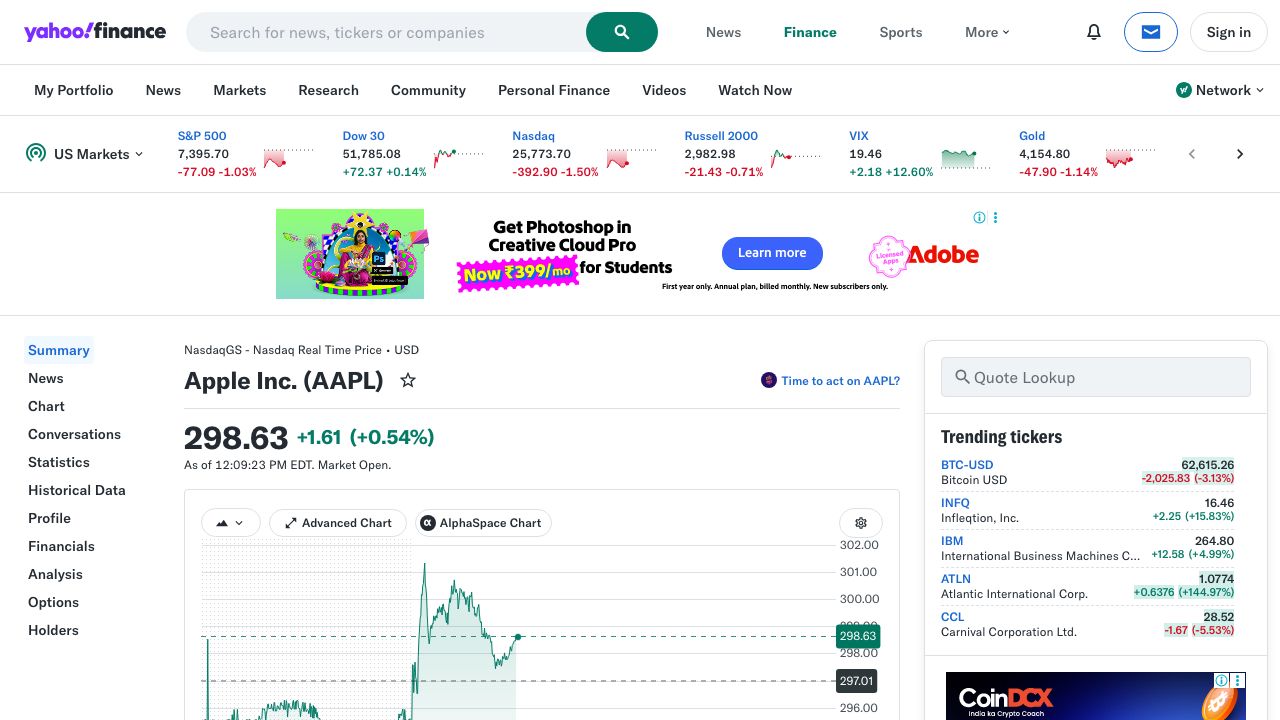
Quote pages are usually easy… until you scale to hundreds of tickers and start seeing intermittent blocks/timeouts. ProxiesAPI gives you a stable proxy layer so your scraper can keep moving.
What we’re scraping (URL + page structure)
Yahoo Finance quote pages follow a predictable pattern:
- Quote page:
https://finance.yahoo.com/quote/{TICKER}
Examples:
https://finance.yahoo.com/quote/AAPLhttps://finance.yahoo.com/quote/MSFT
Quick HTML sanity check
curl -s "https://finance.yahoo.com/quote/AAPL" | head -n 15
On modern sites, the DOM can be large and dynamic. That’s fine.
The key is: don’t guess selectors. We’ll target stable attributes and add fallbacks.
Setup
python -m venv .venv
source .venv/bin/activate

pip install requests beautifulsoup4 lxml python-dotenv
We’ll use:
requestsfor HTTPBeautifulSoup(lxml)for parsingpython-dotenvfor local env vars
ProxiesAPI request pattern (requests + proxy URL)
ProxiesAPI typically gives you a proxy endpoint you plug into your HTTP client.
Set an environment variable:
export PROXIESAPI_PROXY_URL="http://YOUR_USERNAME:YOUR_PASSWORD@gw.proxiesapi.com:8080"
If your ProxiesAPI account provides a different host/port or auth style, keep the code the same and only change the URL.
Step 1: Fetch quote HTML with timeouts + headers
Yahoo Finance may return different HTML depending on headers and region. Use a realistic User-Agent and always set timeouts.
import os
import time
import random
import requests

PROXY_URL = os.getenv("PROXIESAPI_PROXY_URL")
BASE = "https://finance.yahoo.com"
TIMEOUT = (10, 30)  # connect, read

session = requests.Session()


def fetch(url: str) -> str:
    headers = {
        "User-Agent": (
            "Mozilla/5.0 (Macintosh; Intel Mac OS X 10_15_7) "
            "AppleWebKit/537.36 (KHTML, like Gecko) "
            "Chrome/123.0.0.0 Safari/537.36"
        ),
        "Accept-Language": "en-US,en;q=0.9",
        "Accept": "text/html,application/xhtml+xml,application/xml;q=0.9,*/*;q=0.8",
    }

    proxies = None
    if PROXY_URL:
        proxies = {"http": PROXY_URL, "https": PROXY_URL}

    r = session.get(url, headers=headers, proxies=proxies, timeout=TIMEOUT)
    r.raise_for_status()

    # light jitter so you don’t look like a metronome
    time.sleep(random.uniform(0.6, 1.4))

    return r.text
Step 2: Parse price + daily change
On Yahoo Finance, the “headline” price and change typically appear near the top of the quote page.
A practical approach:
- attempt to read the price from an element with
data-field="regularMarketPrice" - fall back to meta tags (when available)
- fall back to scanning nearby text
Here’s a parser that uses a few layered strategies.
import re
from bs4 import BeautifulSoup


def _to_float(s: str):
    if s is None:
        return None
    s = s.replace(",", "").strip()
    m = re.search(r"[-+]?\d+(?:\.\d+)?", s)
    return float(m.group(0)) if m else None


def parse_quote(html: str) -> dict:
    soup = BeautifulSoup(html, "lxml")

    # 1) Headline price by data-field
    price = None
    price_el = soup.select_one('[data-field="regularMarketPrice"]')
    if price_el:
        price = _to_float(price_el.get_text(" ", strip=True))

    # 2) Change and % change often sit nearby
    change = None
    change_pct = None
    change_el = soup.select_one('[data-field="regularMarketChange"]')
    if change_el:
        change = _to_float(change_el.get_text(" ", strip=True))

    change_pct_el = soup.select_one('[data-field="regularMarketChangePercent"]')
    if change_pct_el:
        change_pct = _to_float(change_pct_el.get_text(" ", strip=True))

    # 3) Fallback: meta tags (not always present)
    if price is None:
        meta = soup.select_one('meta[name="price"]')
        if meta and meta.get("content"):
            price = _to_float(meta["content"])

    return {
        "price": price,
        "change": change,
        "change_percent": change_pct,
    }
Selector rationale
We prefer attribute-based selectors like data-field="regularMarketPrice" because:
- they change less often than long class names
- they express meaning (market price) rather than layout
Step 3: Parse “Market Cap” from the summary table
Yahoo quote pages include a “summary” section with key-value pairs.
We’ll find a row labeled “Market Cap” and read the adjacent value.
def parse_market_cap(html: str) -> str | None:
    soup = BeautifulSoup(html, "lxml")

    # Look for table-like rows containing the label.
    # Yahoo’s markup changes, so we’re flexible: find any element whose
    # text is exactly "Market Cap" then read the closest sibling cell.
    label = soup.find(string=re.compile(r"^Market\s*Cap$"))
    if not label:
        return None

    # Walk up to a row container, then find the next "td"/"span" with a value.
    row = label.find_parent(["tr", "li", "div"])
    if not row:
        return None

    # Common pattern: label in one cell, value in the next cell
    cells = row.find_all(["td", "span", "div"], recursive=True)
    texts = [c.get_text(" ", strip=True) for c in cells]

    # Heuristic: after "Market Cap" comes the value like "2.91T"
    for i, t in enumerate(texts):
        if re.fullmatch(r"Market\s*Cap", t):
            if i + 1 < len(texts):
                val = texts[i + 1]
                return val if val else None

    return None
This returns the market cap as displayed (e.g., 2.91T). That’s usually what you want for reporting.
If you need a numeric value, convert suffixes (K, M, B, T) to multipliers.
Step 4: Scrape multiple tickers + export to CSV
Now we’ll put it together.
import csv
from datetime import datetime


def scrape_ticker(ticker: str) -> dict:
    url = f"{BASE}/quote/{ticker}"
    html = fetch(url)

    q = parse_quote(html)
    market_cap = parse_market_cap(html)

    return {
        "ticker": ticker,
        "url": url,
        "scraped_at": datetime.utcnow().isoformat(timespec="seconds") + "Z",
        "price": q["price"],
        "change": q["change"],
        "change_percent": q["change_percent"],
        "market_cap": market_cap,
    }


def export_csv(rows: list[dict], path: str):
    fields = [
        "ticker",
        "url",
        "scraped_at",
        "price",
        "change",
        "change_percent",
        "market_cap",
    ]

    with open(path, "w", newline="", encoding="utf-8") as f:
        w = csv.DictWriter(f, fieldnames=fields)
        w.writeheader()
        for r in rows:
            w.writerow(r)


if __name__ == "__main__":
    tickers = ["AAPL", "MSFT", "GOOGL", "TSLA"]

    out = []
    for t in tickers:
        try:
            row = scrape_ticker(t)
            print("ok", t, row["price"], row["market_cap"])
            out.append(row)
        except Exception as e:
            print("err", t, repr(e))

    export_csv(out, "yahoo_quotes.csv")
    print("wrote yahoo_quotes.csv", len(out))
Example output
ok AAPL 173.24 2.67T
ok MSFT 412.10 3.08T
...
wrote yahoo_quotes.csv 4
Common failure modes (and fixes)
-
403/consent pages
- add realistic headers
- use a stable proxy layer (ProxiesAPI)
- reduce concurrency; add jitter
-
Selector drift
- prefer attribute selectors (
data-field=...) - keep 2–3 fallbacks
- add a tiny “smoke test” that fails loudly if price is missing
- prefer attribute selectors (
-
Rate limiting
- keep a queue of tickers
- retry with exponential backoff
- avoid re-scraping too frequently (cache results)
Where ProxiesAPI fits (no hype)
Scraping one ticker from your laptop usually works.
Scraping hundreds of tickers, repeatedly, across different networks and over time is where you start seeing:
- intermittent timeouts
- soft blocks
- inconsistent HTML responses
A proxy layer like ProxiesAPI helps your fetch layer stay predictable so the rest of your pipeline (parse → export → store) stays stable.
QA checklist
- Price parses for at least 3 tickers
- Change and % change are not
Nonemost of the time - Market cap value appears as a human-readable string
- CSV exports with the expected columns
- You can rerun without getting blocked (or with acceptable retry rate)
Quote pages are usually easy… until you scale to hundreds of tickers and start seeing intermittent blocks/timeouts. ProxiesAPI gives you a stable proxy layer so your scraper can keep moving.