
Scrape Game Prices and Reviews from Steam with Python (Search + App Pages)
Steam’s store is a goldmine for:
- price monitoring and deal detection
- review sentiment and “trend watching”
- tagging / genre analysis
In this guide we’ll build a scraper that:
- crawls Steam search results
- extracts price + discount + review summary per game
- optionally follows each app page to enrich details (tags + release date)
- exports clean CSV/JSON
Steam pages are public, but they still throttle and vary by region/currency. ProxiesAPI fits cleanly into your fetch layer so retries + rotation are a small change — not a rewrite of your parser.
What we’re scraping (Steam structure)
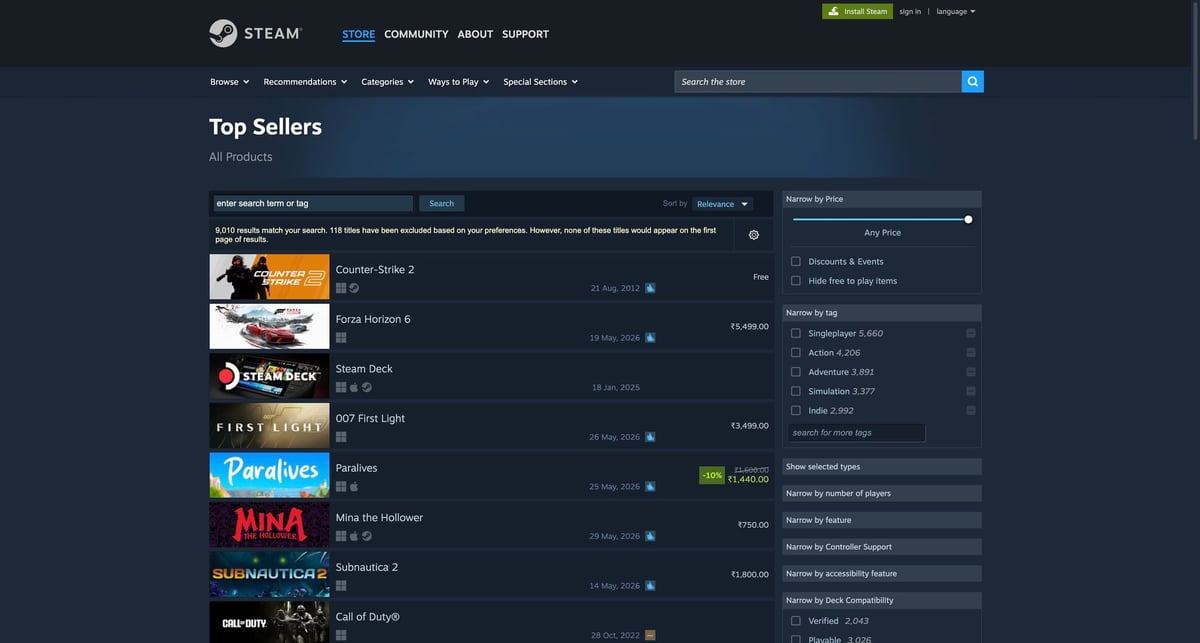
Steam search pages are rendered server-side and include consistent, parseable HTML.
Example search URL:
https://store.steampowered.com/search/?filter=topsellers
Each listing is typically an anchor:
a.search_result_row(one per game)data-ds-appid(appid or an appid list)- nested fields for title, price, discount, and review summary
We’ll parse:
appidtitleprice/original_price/discount_pctreview_summary(text in a tooltip)url
Then (optional) we’ll enrich from:
https://store.steampowered.com/app/{appid}/
Setup
python3 -m venv .venv
source .venv/bin/activate
pip install requests beautifulsoup4 lxml tenacity
Step 1: Fetch layer (timeouts + retries + optional ProxiesAPI)
Create steam_scrape.py:
from __future__ import annotations

import os
import random
import re
import time
from dataclasses import dataclass, asdict

import requests
from bs4 import BeautifulSoup
from tenacity import retry, stop_after_attempt, wait_exponential

TIMEOUT = (10, 30)
BASE = "https://store.steampowered.com"

HEADERS = {
    "User-Agent": "Mozilla/5.0 (compatible; ProxiesAPI-Guides/1.0; +https://proxiesapi.com)",
    "Accept-Language": "en-US,en;q=0.9",
}

session = requests.Session()
session.headers.update(HEADERS)


def build_proxies() -> dict[str, str] | None:
    proxy = os.getenv("PROXIESAPI_PROXY")
    if not proxy:
        return None
    return {"http": f"http://{proxy}", "https": f"http://{proxy}"}


PROXIES = build_proxies()


def sleep_jitter(min_s=0.3, max_s=0.9) -> None:
    time.sleep(random.uniform(min_s, max_s))


@retry(stop=stop_after_attempt(5), wait=wait_exponential(multiplier=1, min=1, max=20))
def fetch(url: str) -> str:
    r = session.get(url, timeout=TIMEOUT, proxies=PROXIES)
    r.raise_for_status()
    html = r.text
    if len(html) < 10_000:
        raise RuntimeError(f"Small HTML ({len(html)} bytes) — possible interstitial")
    return html
ProxiesAPI integration point
Set:
export PROXIESAPI_PROXY="YOUR_PROXIESAPI_PROXY"
No other code changes needed.
Step 2: Parse Steam search results
PRICE_RE = re.compile(r"([0-9]+(?:[\\.,][0-9]+)?)")


def parse_price_block(text: str) -> tuple[float | None, float | None]:
    if not text:
        return None, None
    cleaned = " ".join(text.split())
    nums = [m.group(1).replace(",", "") for m in PRICE_RE.finditer(cleaned)]
    if not nums:
        return None, None
    if len(nums) == 1:
        return float(nums[0]), None
    # often: original then discounted
    return float(nums[-1]), float(nums[0])


def pick_appid(attr: str | None) -> str | None:
    if not attr:
        return None
    # can be "12345" or "12345,67890"
    return attr.split(",")[0].strip()


@dataclass
class SearchRow:
    appid: str | None
    title: str | None
    url: str | None
    price: float | None
    original_price: float | None
    discount_pct: int | None
    review_summary: str | None


def parse_search(html: str) -> list[SearchRow]:
    soup = BeautifulSoup(html, "lxml")
    rows: list[SearchRow] = []

    for a in soup.select("a.search_result_row"):
        appid = pick_appid(a.get("data-ds-appid"))
        url = a.get("href")

        title_el = a.select_one("span.title")
        title = title_el.get_text(" ", strip=True) if title_el else None

        discount_el = a.select_one("div.search_discount span")
        discount_pct = None
        if discount_el:
            m = re.search(r"(\\d+)", discount_el.get_text(" ", strip=True))
            discount_pct = int(m.group(1)) if m else None

        price_el = a.select_one("div.search_price")
        price, original = parse_price_block(price_el.get_text(" ", strip=True) if price_el else "")

        review_el = a.select_one("span.search_review_summary")
        review_summary = review_el.get("data-tooltip-html") if review_el else None
        if review_summary:
            review_summary = BeautifulSoup(review_summary, "lxml").get_text(" ", strip=True)

        rows.append(
            SearchRow(
                appid=appid,
                title=title,
                url=url,
                price=price,
                original_price=original,
                discount_pct=discount_pct,
                review_summary=review_summary,
            )
        )

    return rows
Step 3: (Optional) Enrich from the app page
@dataclass
class AppDetail:
    appid: str
    release_date: str | None
    tags: list[str]


def parse_app_page(html: str, appid: str) -> AppDetail:
    soup = BeautifulSoup(html, "lxml")

    release = None
    rd = soup.select_one("div.release_date div.date")
    if rd:
        release = rd.get_text(" ", strip=True)

    tags = []
    for t in soup.select("a.app_tag"):
        tag = t.get_text(" ", strip=True)
        if tag and tag not in tags:
            tags.append(tag)

    return AppDetail(appid=appid, release_date=release, tags=tags[:12])
Step 4: Crawl + export
import csv
import json


def crawl_search(url: str, limit: int = 50) -> list[SearchRow]:
    html = fetch(url)
    rows = parse_search(html)
    return rows[:limit]


def crawl_details(appids: list[str]) -> dict[str, AppDetail]:
    out: dict[str, AppDetail] = {}
    for appid in appids:
        if not appid:
            continue
        html = fetch(f"{BASE}/app/{appid}/")
        out[appid] = parse_app_page(html, appid=appid)
        sleep_jitter()
    return out


def export(rows: list[SearchRow], details: dict[str, AppDetail]) -> None:
    payload = []
    for r in rows:
        d = details.get(r.appid or "")
        payload.append(
            {
                **asdict(r),
                "release_date": d.release_date if d else None,
                "tags": d.tags if d else [],
            }
        )

    with open("steam-games.json", "w", encoding="utf-8") as f:
        json.dump(payload, f, ensure_ascii=False, indent=2)

    with open("steam-games.csv", "w", newline="", encoding="utf-8") as f:
        w = csv.DictWriter(
            f,
            fieldnames=[
                "appid",
                "title",
                "url",
                "price",
                "original_price",
                "discount_pct",
                "review_summary",
                "release_date",
                "tags",
            ],
        )
        w.writeheader()
        for item in payload:
            item = dict(item)
            item["tags"] = ", ".join(item.get("tags") or [])
            w.writerow(item)

    print("wrote steam-games.json + steam-games.csv", "rows:", len(payload))


if __name__ == "__main__":
    search_url = f"{BASE}/search/?filter=topsellers"
    rows = crawl_search(search_url, limit=40)
    appids = [r.appid for r in rows if r.appid]
    details = crawl_details(appids[:20])  # adjust for your budget
    export(rows, details)
Notes for production use
- Currency/locale varies: Steam pricing changes by region. Keep your runs anchored to one locale by fixing headers and running from the same region.
- Be polite: add jitter + cap concurrency; Steam will throttle bursty crawls.
- Treat prices as strings if you need precision: currency formats vary; for many trackers a float is “good enough”.
Where ProxiesAPI fits (honestly)
If you scrape a single page manually, you won’t need it.
But if you’re doing hourly/daily monitoring, many search queries, and enrichment across thousands of app pages, you’ll hit intermittent blocks and 5xxs. ProxiesAPI reduces those failures by giving you a rotation + retry-friendly network layer.
Steam pages are public, but they still throttle and vary by region/currency. ProxiesAPI fits cleanly into your fetch layer so retries + rotation are a small change — not a rewrite of your parser.