
Scrape GitHub Pull Requests into a Review Queue (Labels, States, Draft Status)
GitHub already has an API, so why scrape the pull request list HTML?
- you want a quick queue builder without auth tokens
- you want one workflow that works from any public repo URL
- you care about the exact list UI maintainers look at: labels, draft badges, comment counts, and timestamps
In this guide we will turn a public GitHub PR list into a review queue you can sort or export. We will collect:
- PR number
- title and URL
- labels
- open vs closed view
- draft status
- author
- updated timestamp
- comment count
Mandatory screenshot of the page we are scraping:
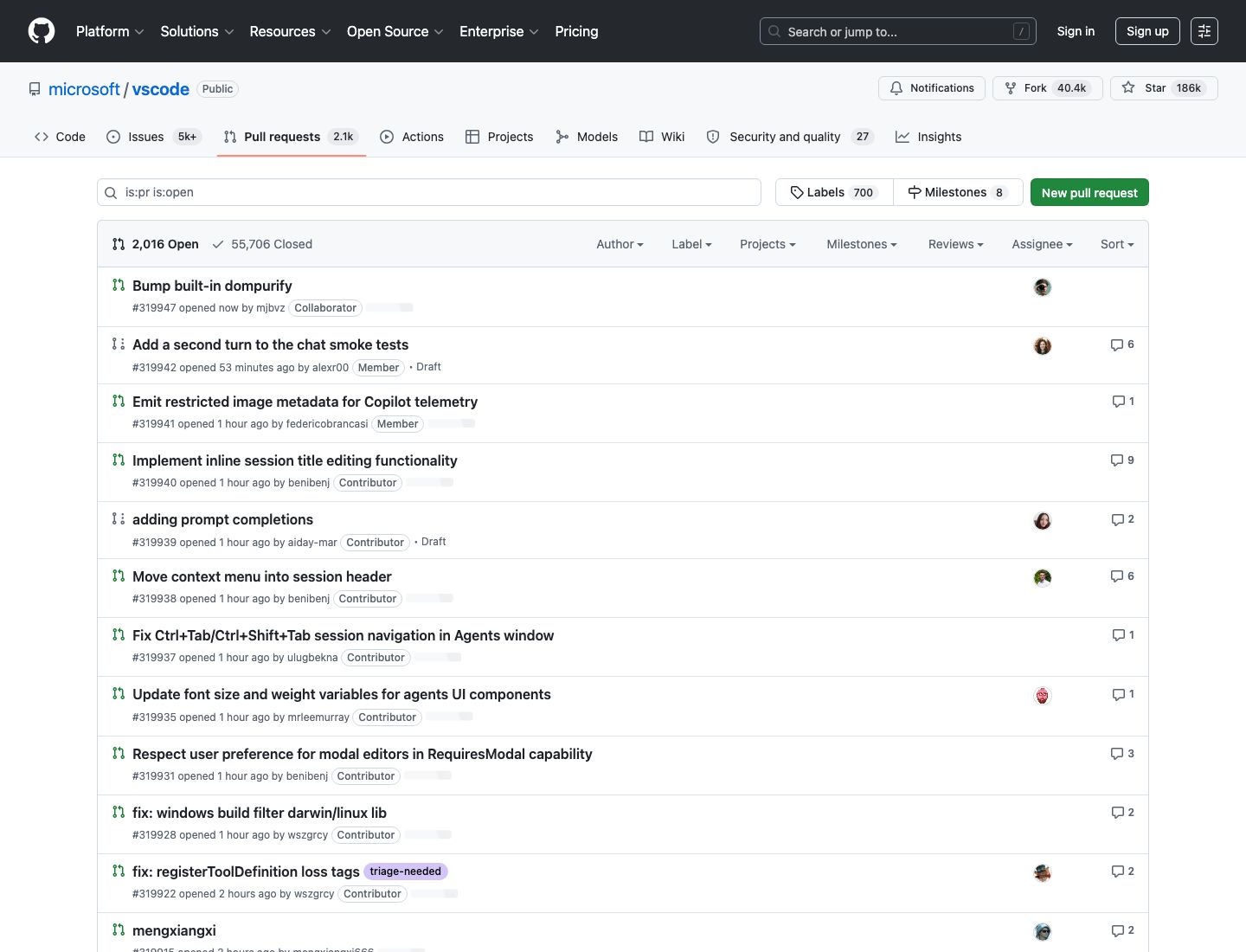
GitHub often works fine at low volume. When you start scanning many repos, pages, or filtered views, ProxiesAPI is the smallest useful upgrade: keep your parser, swap the transport.
What we are scraping
GitHub pull request list pages look like this:
- https://github.com/OWNER/REPO/pulls
- filtered open: https://github.com/OWNER/REPO/pulls?q=is%3Apr+is%3Aopen
- filtered closed: https://github.com/OWNER/REPO/pulls?q=is%3Apr+is%3Aclosed
- pagination: same query plus &page=2
For the examples below I will use:
That page currently renders PR rows as div.js-issue-row, with the PR link in:
<a
  class="Link--primary ... markdown-title"
  data-hovercard-type="pull_request"
  href="/microsoft/vscode/pull/319942">
  Add a second turn to the chat smoke tests
</a>
Draft rows expose a visible draft marker in the row, and labels appear as a.IssueLabel.
Setup
python3 -m venv .venv
source .venv/bin/activate
pip install requests beautifulsoup4 lxml pandas
Step 1: build a fetch layer with optional ProxiesAPI
Keep the network layer isolated. That way you can debug the parser locally and only add ProxiesAPI when rate limits or IP reputation become the real problem.
import os
import random
import time
import urllib.parse

import requests

PROXIESAPI_KEY = os.getenv("PROXIESAPI_KEY", "")
TIMEOUT = (10, 40)

session = requests.Session()
session.headers.update(
    {
        "User-Agent": (
            "Mozilla/5.0 (Macintosh; Intel Mac OS X 10_15_7) "
            "AppleWebKit/537.36 (KHTML, like Gecko) "
            "Chrome/126.0 Safari/537.36"
        ),
        "Accept-Language": "en-US,en;q=0.9",
    }
)


def proxiesapi_url(target_url: str) -> str:
    if not PROXIESAPI_KEY:
        raise RuntimeError("Set PROXIESAPI_KEY before enabling ProxiesAPI")
    return (
        "http://api.proxiesapi.com/?auth_key="
        + urllib.parse.quote(PROXIESAPI_KEY, safe="")
        + "&url="
        + urllib.parse.quote(target_url, safe="")
    )


def fetch(url: str, *, use_proxiesapi: bool = False, max_retries: int = 4) -> str:
    final_url = proxiesapi_url(url) if use_proxiesapi else url
    last_err = None

    for attempt in range(1, max_retries + 1):
        try:
            response = session.get(final_url, timeout=TIMEOUT)
            response.raise_for_status()
            html = response.text or ""
            if "js-issue-row" not in html:
                raise RuntimeError("Expected PR rows not found in HTML")
            return html
        except Exception as exc:
            last_err = exc
            time.sleep(min(8, 2 ** (attempt - 1)) + random.random())

    raise RuntimeError(f"Fetch failed after {max_retries} attempts: {last_err}")
Step 2: parse one PR row
The simplest robust approach is:
- iterate over div.js-issue-row
- find the main PR link via data-hovercard-type="pull_request"
- collect labels from .IssueLabel
- detect draft status from row text or the draft badge
- pull timestamps from relative-time
import re
from urllib.parse import urljoin

from bs4 import BeautifulSoup

BASE_URL = "https://github.com"


def parse_pr_number(url: str) -> int | None:
    match = re.search(r"/pull/(\\d+)", url or "")
    return int(match.group(1)) if match else None


def parse_comment_count(row) -> int:
    for link in row.select("a[aria-label]"):
        label = (link.get("aria-label") or "").strip().lower()
        match = re.match(r"(\\d+) comments?", label)
        if match:
            return int(match.group(1))
    return 0


def is_draft_row(row) -> bool:
    row_text = row.get_text(" ", strip=True)
    if "Draft Pull Request" in row_text:
        return True
    for node in row.select('[aria-label="Draft Pull Request"]'):
        return True
    for link in row.select('a[href$="#partial-pull-merging"]'):
        if link.get_text(" ", strip=True).lower() == "draft":
            return True
    return False


def parse_pr_row(row, *, state: str) -> dict | None:
    title_a = row.select_one('a[data-hovercard-type="pull_request"]')
    if not title_a:
        return None

    href = title_a.get("href")
    url = urljoin(BASE_URL, href) if href else None
    title = title_a.get_text(" ", strip=True)

    labels = [
        label.get_text(" ", strip=True)
        for label in row.select("a.IssueLabel, a.hx_IssueLabel")
    ]

    author_link = row.select_one('a[data-hovercard-type="user"]')
    author = author_link.get_text(" ", strip=True) if author_link else None

    updated = None
    time_node = row.select_one("relative-time")
    if time_node and time_node.get("datetime"):
        updated = time_node["datetime"]

    return {
        "number": parse_pr_number(url or ""),
        "title": title,
        "url": url,
        "state": state,
        "is_draft": is_draft_row(row),
        "labels": labels,
        "author": author,
        "updated_at": updated,
        "comments": parse_comment_count(row),
    }
Step 3: parse the page and follow pagination
GitHub exposes the next page as a[rel="next"], so there is no reason to hard-code page numbers.
def parse_pr_page(html: str, *, state: str) -> tuple[list[dict], str | None]:
    soup = BeautifulSoup(html, "lxml")

    rows = []
    for row in soup.select("div.js-issue-row"):
        parsed = parse_pr_row(row, state=state)
        if parsed:
            rows.append(parsed)

    next_link = soup.select_one('a[rel="next"]')
    next_url = urljoin(BASE_URL, next_link.get("href")) if next_link else None
    return rows, next_url


def crawl_view(start_url: str, *, state: str, max_pages: int = 3, use_proxiesapi: bool = False) -> list[dict]:
    rows = []
    seen = set()
    url = start_url
    pages = 0

    while url and pages < max_pages:
        pages += 1
        html = fetch(url, use_proxiesapi=use_proxiesapi)
        batch, url = parse_pr_page(html, state=state)

        for item in batch:
            key = item["url"]
            if key in seen:
                continue
            seen.add(key)
            rows.append(item)

        time.sleep(0.8 + random.random())

    return rows
Step 4: build a real review queue
If you want a useful triage queue, crawl more than one filtered view and flatten the labels.
import pandas as pd


def build_review_queue(repo: str, *, use_proxiesapi: bool = False) -> pd.DataFrame:
    views = [
        ("open", f"https://github.com/{repo}/pulls?q=is%3Apr+is%3Aopen"),
        ("closed", f"https://github.com/{repo}/pulls?q=is%3Apr+is%3Aclosed"),
    ]

    all_rows = []
    for state, url in views:
        all_rows.extend(crawl_view(url, state=state, max_pages=2, use_proxiesapi=use_proxiesapi))

    df = pd.DataFrame(all_rows)
    if df.empty:
        return df

    df["labels_csv"] = df["labels"].apply(lambda xs: ",".join(xs))
    df["review_ready"] = (~df["is_draft"]) & (df["state"] == "open")
    df = df.sort_values(["review_ready", "updated_at"], ascending=[False, False])
    return df[
        ["number", "title", "state", "is_draft", "review_ready", "labels_csv", "author", "comments", "updated_at", "url"]
    ]


if __name__ == "__main__":
    df = build_review_queue("microsoft/vscode", use_proxiesapi=False)
    df.to_csv("github_pr_review_queue.csv", index=False)
    print(df.head(10).to_string(index=False))
    print(f"rows: {len(df)}")
Typical output:
 number                                             title state  is_draft  review_ready         labels_csv      author  comments            updated_at                                               url
 319942     Add a second turn to the chat smoke tests  open     False          True                         alexr00         6 2026-06-04T15:09:40Z https://github.com/microsoft/vscode/pull/319942
 319939                         adding prompt completions open      True         False                         aiday-mar        2 2026-06-04T14:53:01Z https://github.com/microsoft/vscode/pull/319939
Why this queue is useful
A plain PR export becomes much more useful when you add two extra fields:
- review_ready: open and not draft
- labels_csv: so reviewers can filter by areas like triage-needed or ownership labels
That gives you a lightweight review operations feed without touching the GitHub API at all.
Where ProxiesAPI fits
You probably do not need ProxiesAPI for one repo and one page.
You probably do want it when:
- you scan many public repos every hour
- you run from cloud infrastructure with weak IP reputation
- you mix GitHub with less friendly sites in the same pipeline
- you want one network wrapper across all scrapers
That is the right framing for ProxiesAPI here. It is not replacing your parser. It is making the fetch layer more repeatable when your coverage expands.
Practical caveats
- Public GitHub HTML changes over time, so keep selectors narrow and obvious.
- For authenticated or private repo workflows, use the API instead.
- Respect rate limits and do not hammer large repos just because the list pages are scrapeable.
If your goal is triage, this HTML-first approach is usually enough: PR title, state, draft badge, labels, timestamps, comments, done.
GitHub often works fine at low volume. When you start scanning many repos, pages, or filtered views, ProxiesAPI is the smallest useful upgrade: keep your parser, swap the transport.