
Scrape GitHub Repository Stars, Forks, and Topics with Python
GitHub already has an API, so why scrape the HTML at all?
Because sometimes the page itself is the product surface you care about. If you are building a lightweight market-intel workflow, you may want to:
- collect public repository signals without handling API auth
- enrich a lead list that only contains repo URLs
- snapshot stars, forks, and topics exactly as they appear on the public page
- grab README headings for quick categorization
In this guide we will scrape a real public repository page and export:
- repository name
- stars
- forks
- topics
- short about text
- README section headings
Public GitHub pages are easy to inspect, but high-volume collection can still hit throttling and burst failures. ProxiesAPI gives you a proxy layer you can switch on without rewriting the parser.
What we are scraping
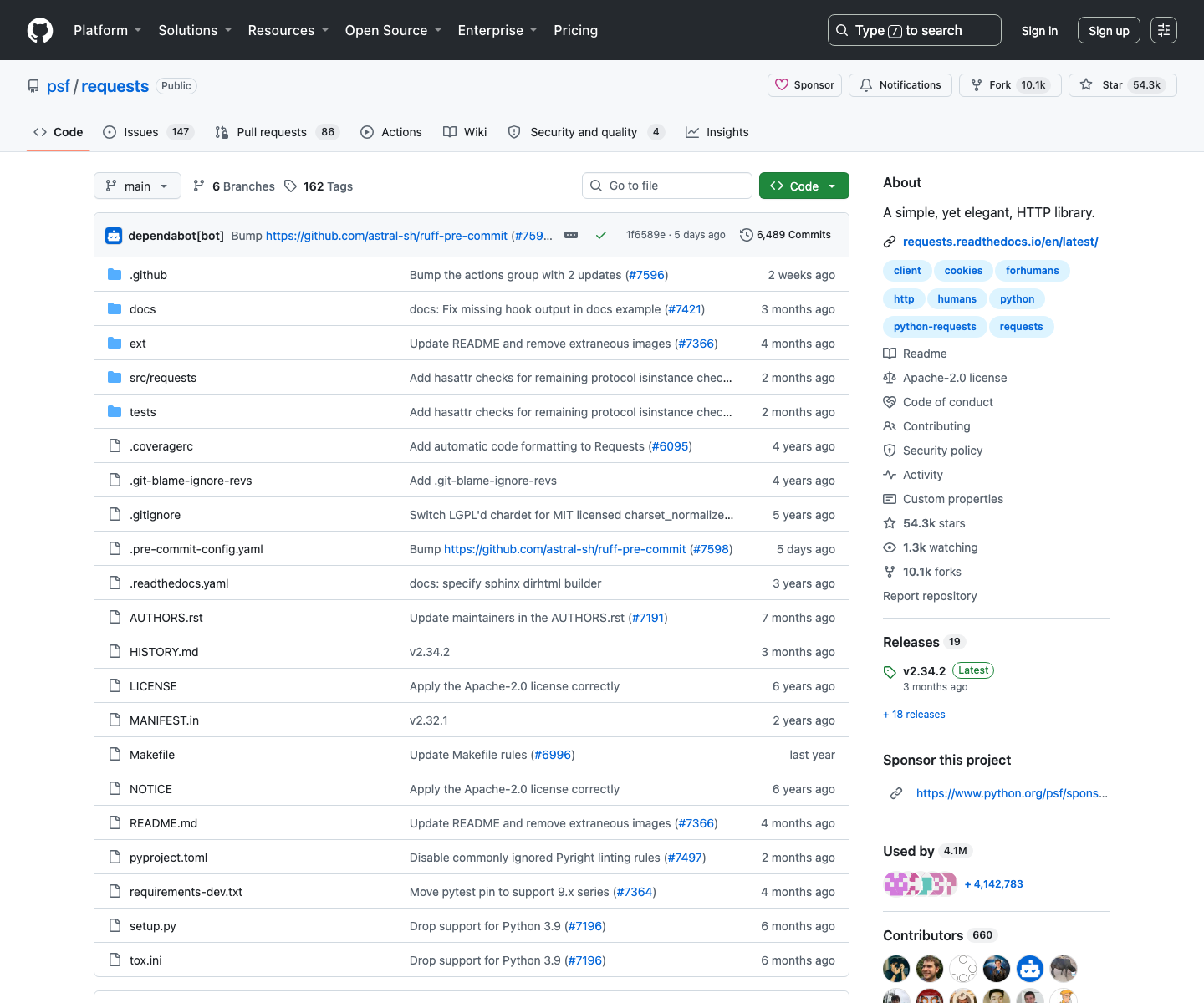
A public repository page lives at:
https://github.com/{owner}/{repo}
For example:
https://github.com/psf/requests
The public HTML currently exposes several useful signals:
- a page-level
h1with owner and repo - star and fork counts in the right sidebar
- topics as links under
/topics/ - rendered README content lower on the page
Quick sanity check:
curl -L -A "Mozilla/5.0" -s "https://github.com/psf/requests" | head -n 20
You should see full HTML, not a blank shell. That is the first clue that a plain HTTP scraper is enough here.
Setup
python3 -m venv .venv
source .venv/bin/activate
pip install requests beautifulsoup4 lxml
Step 1: Build a reliable fetcher
The parser is the easy part. The scraper gets much more stable if you make the network layer explicit.
from __future__ import annotations

import os
import random
import time
from urllib.parse import quote

import requests

TIMEOUT = (10, 30)
MAX_ATTEMPTS = 4

HEADERS = {
    "User-Agent": (
        "Mozilla/5.0 (Macintosh; Intel Mac OS X 10_15_7) "
        "AppleWebKit/537.36 (KHTML, like Gecko) "
        "Chrome/127.0.0.0 Safari/537.36"
    ),
    "Accept-Language": "en-US,en;q=0.9",
}

session = requests.Session()


def build_proxiesapi_url(target_url: str) -> str:
    api_key = os.environ.get("PROXIESAPI_KEY")
    if not api_key:
        return target_url
    return f"http://api.proxiesapi.com/?key={quote(api_key)}&url={quote(target_url, safe='')}"


def fetch_html(url: str) -> str:
    final_url = build_proxiesapi_url(url)

    last_error = None
    for attempt in range(1, MAX_ATTEMPTS + 1):
        try:
            response = session.get(final_url, headers=HEADERS, timeout=TIMEOUT)
            if response.status_code in {429, 500, 502, 503, 504}:
                raise RuntimeError(f"retryable status {response.status_code}")
            response.raise_for_status()
            return response.text
        except Exception as exc:
            last_error = exc
            if attempt == MAX_ATTEMPTS:
                break
            time.sleep(min(12, 2 ** attempt) + random.random())

    raise RuntimeError(f"failed to fetch {url}: {last_error}")
This keeps the ProxiesAPI integration optional. If PROXIESAPI_KEY is missing, the script still works directly against the target URL.
Step 2: Parse counters, topics, and README headings
GitHub's markup moves around from time to time, so avoid brittle class-name assumptions where possible. The most stable anchors are usually:
- links whose
hrefends with/stargazersor/forks - topic links that contain
/topics/ - the rendered README article under
article.markdown-body
import re
from bs4 import BeautifulSoup


def clean_int(text: str | None) -> int | None:
    if not text:
        return None
    t = text.strip().lower().replace(",", "")
    m = re.match(r"^(\d+(?:\.\d+)?)([km])?$", t)
    if m:
        value = float(m.group(1))
        suffix = m.group(2)
        if suffix == "k":
            return int(value * 1000)
        if suffix == "m":
            return int(value * 1_000_000)
        return int(value)
    m = re.search(r"(\d+)", t)
    return int(m.group(1)) if m else None


def pick_counter(soup: BeautifulSoup, href_piece: str) -> int | None:
    node = soup.select_one(f'a[href$="{href_piece}"] strong')
    if node:
        return clean_int(node.get_text(" ", strip=True))

    fallback = soup.select_one(f'a[href*="{href_piece}"]')
    if fallback:
        return clean_int(fallback.get_text(" ", strip=True))
    return None


def parse_repo_page(html: str, url: str) -> dict:
    soup = BeautifulSoup(html, "lxml")

    h1 = soup.select_one("h1")
    repo_name = h1.get_text(" ", strip=True) if h1 else None

    about_node = soup.select_one("p.f4") or soup.select_one('[data-testid="repository-about"]')
    about = about_node.get_text(" ", strip=True) if about_node else None

    topics = []
    seen = set()
    for topic_link in soup.select('a[href*="/topics/"]'):
        label = topic_link.get_text(" ", strip=True)
        if label and label not in seen:
            seen.add(label)
            topics.append(label)

    readme_headings = []
    for heading in soup.select("article.markdown-body h1, article.markdown-body h2, article.markdown-body h3"):
        text = heading.get_text(" ", strip=True)
        if text:
            readme_headings.append(text)

    return {
        "url": url,
        "repo": repo_name,
        "stars": pick_counter(soup, "/stargazers"),
        "forks": pick_counter(soup, "/forks"),
        "topics": topics,
        "about": about,
        "readme_headings": readme_headings[:20],
    }
The main trick is accepting that selectors should be descriptive, not clever. If you cannot explain why a selector should survive the next redesign, it is probably too fragile.
Step 3: Turn repository URLs into rows
import csv


def scrape_repo(url: str) -> dict:
    html = fetch_html(url)
    return parse_repo_page(html, url)


def write_csv(rows: list[dict], path: str = "github_repos.csv") -> None:
    with open(path, "w", newline="", encoding="utf-8") as handle:
        writer = csv.DictWriter(
            handle,
            fieldnames=["url", "repo", "stars", "forks", "topics", "about", "readme_headings"],
        )
        writer.writeheader()
        for row in rows:
            writer.writerow(
                {
                    **row,
                    "topics": " | ".join(row["topics"]),
                    "readme_headings": " | ".join(row["readme_headings"]),
                }
            )
Now run it against a few public repositories:
if __name__ == "__main__":
    urls = [
        "https://github.com/psf/requests",
        "https://github.com/encode/httpx",
        "https://github.com/scrapy/scrapy",
    ]

    rows = [scrape_repo(url) for url in urls]
    write_csv(rows)

    for row in rows:
        print(row["repo"], row["stars"], row["forks"], row["topics"][:4])
Typical output:
psf / requests 54300 10100 ['client', 'cookies', 'forhumans', 'http']
encode / httpx 19000 1600 ['api', 'async', 'http', 'http2']
scrapy / scrapy 58000 11000 ['crawler', 'python', 'scraping', 'spider']
Step 4: Normalize owner and repo explicitly
If you already have mixed GitHub URLs in a spreadsheet, normalize them before fetching:
from urllib.parse import urlparse


def normalize_repo_url(url: str) -> str:
    parsed = urlparse(url)
    parts = [p for p in parsed.path.split("/") if p]
    if len(parts) < 2:
        raise ValueError(f"not a repository URL: {url}")
    owner, repo = parts[0], parts[1]
    return f"https://github.com/{owner}/{repo}"
That small cleanup step prevents duplicate rows caused by:
- trailing slashes
/tree/main/issues- query parameters copied from search pages
Practical scraping advice for GitHub pages
GitHub is friendlier than many ecommerce or travel targets, but you still want to stay disciplined:
- keep concurrency low for public HTML collection
- cache HTML when you are debugging selectors
- separate parser logic from fetch logic
- do not assume counts stay in the same class names forever
The stable idea here is not "this exact CSS class will last forever." The stable idea is "GitHub still needs a star link, a fork link, topics, and a rendered README."
That is what you code against.
When to use the API instead
Scrape the HTML when:
- you already have repository page URLs
- you want quick enrichment with zero auth setup
- you need page-level presentation signals
Use the official API when:
- you need issues, commits, contributors, or release objects
- you want stronger change guarantees
- you are collecting at larger scale and can manage tokens cleanly
For lightweight market intelligence, the page scrape is often enough.
Where ProxiesAPI helps
One repository page is trivial. A few thousand repository pages collected on a schedule are not.
That is where ProxiesAPI becomes useful:
- swapping away from one-IP collection when volume rises
- smoothing transient failures with a single fetch endpoint
- keeping your Python parser unchanged while the network layer evolves
You should still be polite with pacing and retries. ProxiesAPI helps reliability, not judgment.
Final takeaway
GitHub repository pages already expose a compact public dataset:
- stars and forks for traction
- topics for categorization
- README headings for quick product context
If your goal is market research, competitor mapping, or lead enrichment, that is often enough to get moving fast with a small Python scraper.
Public GitHub pages are easy to inspect, but high-volume collection can still hit throttling and burst failures. ProxiesAPI gives you a proxy layer you can switch on without rewriting the parser.