
Scrape Hacker News Ask HN Threads with Python
Ask HN is one of the best public sources for unscripted founder pain points.
People post:
- tool recommendations
- workflow frustrations
- hiring problems
- migration questions
- buyer-side research
That makes Ask HN useful if you want a startup-signal feed built from actual questions instead of polished marketing content.
In this guide we will scrape:
- thread title
- item id
- points
- author
- age
- comment count
- full thread URL
- top-level comments from the detail page
Mandatory screenshot of the page we will parse:
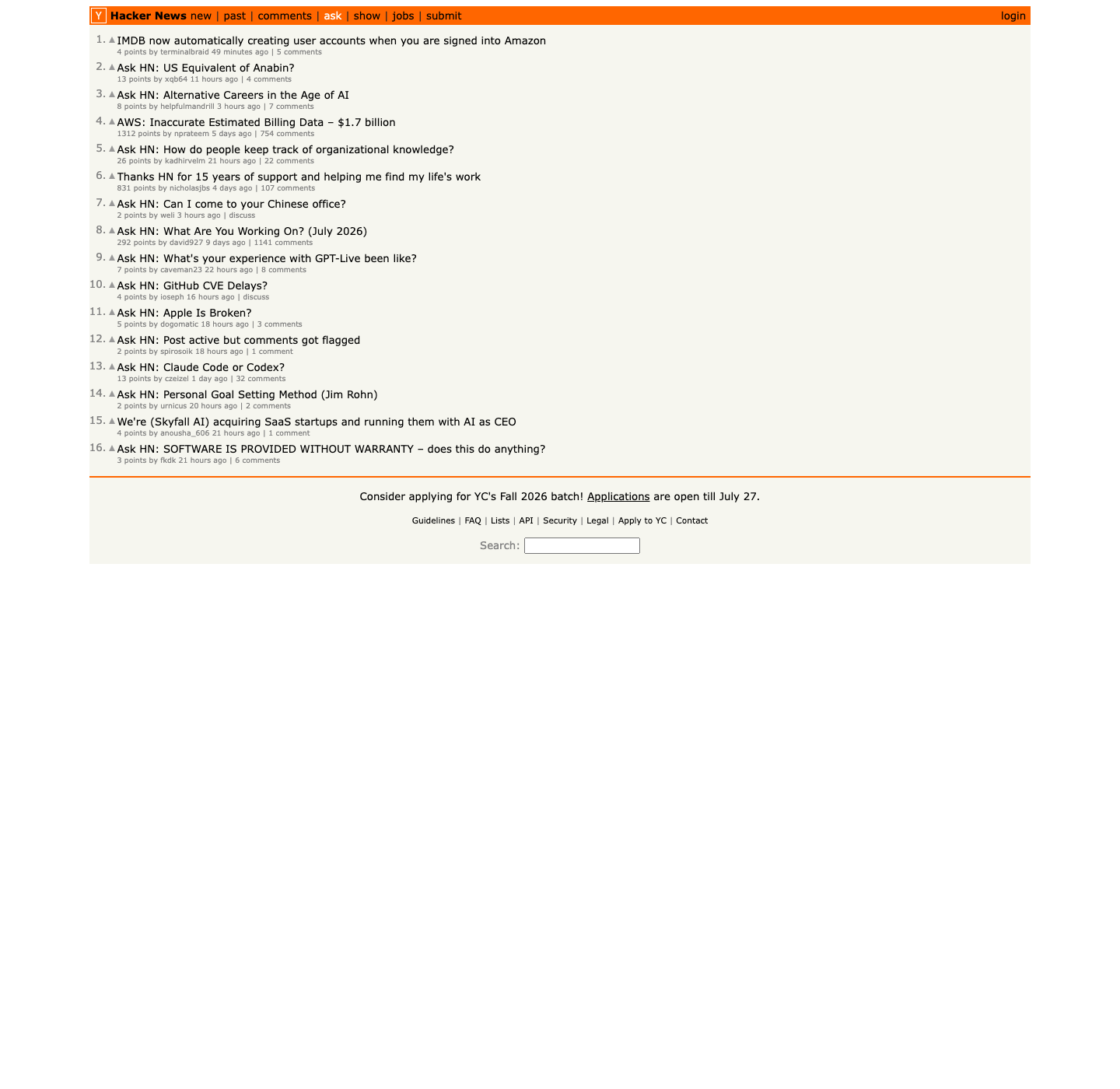
Ask HN itself is lightweight, but founders rarely stop at one source. ProxiesAPI helps when your monitoring job grows into forums, directories, and other sites with stricter anti-bot behavior.
The Ask HN page structure
The page lives at:
https://news.ycombinator.com/ask
The current HTML is classic Hacker News markup:
- each listing row:
tr.athing.submission - title link:
span.titleline > a - metadata row right after it:
td.subtext - points:
span.score - author:
a.hnuser - thread link:
span.age aor the last comments link
One small wrinkle: the current /ask page can contain a few non-Ask HN: discussions. We will filter those out in code so the final dataset only contains true Ask HN threads.
Unlike many modern sites, the data is visible in the initial HTML response, so requests plus BeautifulSoup is enough.
Setup
python3 -m venv .venv
source .venv/bin/activate
pip install requests beautifulsoup4 lxml pandas
Step 1: Build a fetch helper
We will keep the same parser whether you fetch directly or route through ProxiesAPI.
from __future__ import annotations

import os
import random
import re
import time
from urllib.parse import quote, urljoin

import requests

BASE = "https://news.ycombinator.com"
TIMEOUT = (10, 30)
PROXIESAPI_KEY = os.getenv("PROXIESAPI_KEY", "").strip()

session = requests.Session()
session.headers.update(
    {
        "User-Agent": (
            "Mozilla/5.0 (Macintosh; Intel Mac OS X 10_15_7) "
            "AppleWebKit/537.36 (KHTML, like Gecko) "
            "Chrome/137.0.0.0 Safari/537.36"
        ),
        "Accept-Language": "en-US,en;q=0.9",
    }
)


def proxiesapi_url(target_url: str) -> str:
    if not PROXIESAPI_KEY:
        return target_url
    return (
        "https://api.proxiesapi.com/?auth_key="
        + quote(PROXIESAPI_KEY, safe="")
        + "&url="
        + quote(target_url, safe="")
    )


def fetch(url: str, retries: int = 4) -> str:
    last_exc = None
    for attempt in range(1, retries + 1):
        try:
            response = session.get(proxiesapi_url(url), timeout=TIMEOUT)
            response.raise_for_status()
            html = response.text or ""
            if 'tr class="athing submission"' not in html and 'class="fatitem"' not in html:
                raise RuntimeError("unexpected Hacker News HTML returned")
            return html
        except Exception as exc:
            last_exc = exc
            time.sleep(min(8, (1.8 ** attempt) + random.random()))
    raise RuntimeError(f"failed to fetch {url}: {last_exc}")
Step 2: Parse the Ask HN list page
Each story spans two rows: the main title row and the following metadata row.
from bs4 import BeautifulSoup, Tag


def parse_int(text: str | None) -> int | None:
    if not text:
        return None
    match = re.search(r"(\\d+)", text)
    return int(match.group(1)) if match else None


def clean(text: str | None) -> str | None:
    if not text:
        return None
    return re.sub(r"\\s+", " ", text).strip() or None


def parse_ask_page(html: str) -> list[dict]:
    soup = BeautifulSoup(html, "lxml")
    rows = []

    for row in soup.select("tr.athing.submission"):
        story_id = row.get("id")
        title_a = row.select_one("span.titleline > a")
        if not title_a:
            continue

        title = clean(title_a.get_text(" ", strip=True))
        if not title:
            continue
        if not title.startswith("Ask HN:"):
            continue

        subtext_row = row.find_next_sibling("tr")
        subtext = subtext_row.select_one("td.subtext") if subtext_row else None

        points = parse_int(subtext.select_one("span.score").get_text(" ", strip=True) if subtext and subtext.select_one("span.score") else None)
        author = clean(subtext.select_one("a.hnuser").get_text(" ", strip=True) if subtext and subtext.select_one("a.hnuser") else None)
        age = clean(subtext.select_one("span.age a").get_text(" ", strip=True) if subtext and subtext.select_one("span.age a") else None)

        comment_links = subtext.select("a") if subtext else []
        comments = parse_int(comment_links[-1].get_text(" ", strip=True) if comment_links else None)

        rows.append(
            {
                "id": story_id,
                "title": title,
                "points": points,
                "author": author,
                "age": age,
                "comments": comments or 0,
                "thread_url": f"{BASE}/item?id={story_id}" if story_id else None,
            }
        )

    return rows
That already gives you a good daily signal feed, but the real value is often inside the replies.
Step 3: Parse top-level comments from a thread
On an item page, comments are in rows like tr.comtr, and the indentation width tells you the depth.
def parse_thread_comments(html: str) -> list[dict]:
    soup = BeautifulSoup(html, "lxml")
    comments = []

    for row in soup.select("tr.comtr"):
        comment_id = row.get("id")
        author = clean(row.select_one("a.hnuser").get_text(" ", strip=True) if row.select_one("a.hnuser") else None)
        age = clean(row.select_one("span.age a").get_text(" ", strip=True) if row.select_one("span.age a") else None)
        text_node = row.select_one("div.commtext")
        text = clean(text_node.get_text(" ", strip=True) if text_node else None)

        ind = row.select_one("td.ind")
        indent = int(ind.get("indent", "0")) if ind and ind.get("indent") else 0

        comments.append(
            {
                "comment_id": comment_id,
                "author": author,
                "age": age,
                "indent": indent,
                "text": text,
            }
        )

    return comments
If you only want the main responses, keep indent == 0.
Step 4: Build a reusable Ask HN export
from datetime import datetime, timezone


def scrape_ask_threads(limit: int = 10) -> list[dict]:
    index_html = fetch(f"{BASE}/ask")
    threads = parse_ask_page(index_html)[:limit]
    scraped_at = datetime.now(timezone.utc).isoformat()

    for thread in threads:
        if not thread["thread_url"]:
            thread["top_level_comments"] = []
            continue

        thread_html = fetch(thread["thread_url"])
        comments = parse_thread_comments(thread_html)
        thread["top_level_comments"] = [c for c in comments if c["indent"] == 0]
        thread["scraped_at"] = scraped_at

    return threads
This is enough to turn Ask HN into a structured research input for:
- idea mining
- problem clustering
- quote gathering
- founder sentiment review
Step 5: Save it as JSON and CSV
import json
import pandas as pd

threads = scrape_ask_threads(limit=12)

with open("ask_hn_threads.json", "w", encoding="utf-8") as f:
    json.dump(threads, f, ensure_ascii=False, indent=2)

flat_rows = []
for thread in threads:
    flat_rows.append(
        {
            "id": thread["id"],
            "title": thread["title"],
            "points": thread["points"],
            "author": thread["author"],
            "age": thread["age"],
            "comments": thread["comments"],
            "thread_url": thread["thread_url"],
            "top_level_comment_count": len(thread["top_level_comments"]),
        }
    )

pd.DataFrame(flat_rows).to_csv("ask_hn_threads.csv", index=False)
print("saved", len(flat_rows), "Ask HN threads")
Why this works well for startup research
Ask HN is unusually good because the titles are already framed as questions or requests:
- "What tool do you use for X?"
- "How do you solve Y?"
- "Is there an alternative to Z?"
That makes the dataset easier to cluster than generic social chatter.
A few good follow-up columns to add later:
- whether the title starts with "Ask HN:"
- keyword buckets like hiring, infra, AI, finance, immigration
- presence of phrases like "alternative", "recommend", "looking for", "frustrated"
Those lightweight enrichments often produce better product signals than a heavy LLM pass on day one.
Final script
from __future__ import annotations

import json
import os
import random
import re
import time
from datetime import datetime, timezone
from urllib.parse import quote

import pandas as pd
import requests
from bs4 import BeautifulSoup

BASE = "https://news.ycombinator.com"
TIMEOUT = (10, 30)
PROXIESAPI_KEY = os.getenv("PROXIESAPI_KEY", "").strip()

session = requests.Session()
session.headers.update(
    {
        "User-Agent": (
            "Mozilla/5.0 (Macintosh; Intel Mac OS X 10_15_7) "
            "AppleWebKit/537.36 (KHTML, like Gecko) "
            "Chrome/137.0.0.0 Safari/537.36"
        ),
        "Accept-Language": "en-US,en;q=0.9",
    }
)


def proxiesapi_url(target_url: str) -> str:
    if not PROXIESAPI_KEY:
        return target_url
    return (
        "https://api.proxiesapi.com/?auth_key="
        + quote(PROXIESAPI_KEY, safe="")
        + "&url="
        + quote(target_url, safe="")
    )


def fetch(url: str, retries: int = 4) -> str:
    last_exc = None
    for attempt in range(1, retries + 1):
        try:
            response = session.get(proxiesapi_url(url), timeout=TIMEOUT)
            response.raise_for_status()
            html = response.text or ""
            if 'tr class="athing submission"' not in html and 'class="fatitem"' not in html:
                raise RuntimeError("unexpected Hacker News HTML returned")
            return html
        except Exception as exc:
            last_exc = exc
            time.sleep(min(8, (1.8 ** attempt) + random.random()))
    raise RuntimeError(f"failed to fetch {url}: {last_exc}")


def parse_int(text: str | None) -> int | None:
    if not text:
        return None
    match = re.search(r"(\\d+)", text)
    return int(match.group(1)) if match else None


def clean(text: str | None) -> str | None:
    if not text:
        return None
    return re.sub(r"\\s+", " ", text).strip() or None


def parse_ask_page(html: str) -> list[dict]:
    soup = BeautifulSoup(html, "lxml")
    rows = []
    for row in soup.select("tr.athing.submission"):
        story_id = row.get("id")
        title_a = row.select_one("span.titleline > a")
        if not title_a:
            continue
        title = clean(title_a.get_text(" ", strip=True))
        if not title or not title.startswith("Ask HN:"):
            continue
        subtext_row = row.find_next_sibling("tr")
        subtext = subtext_row.select_one("td.subtext") if subtext_row else None
        comment_links = subtext.select("a") if subtext else []
        rows.append(
            {
                "id": story_id,
                "title": title,
                "points": parse_int(subtext.select_one("span.score").get_text(" ", strip=True) if subtext and subtext.select_one("span.score") else None),
                "author": clean(subtext.select_one("a.hnuser").get_text(" ", strip=True) if subtext and subtext.select_one("a.hnuser") else None),
                "age": clean(subtext.select_one("span.age a").get_text(" ", strip=True) if subtext and subtext.select_one("span.age a") else None),
                "comments": parse_int(comment_links[-1].get_text(" ", strip=True) if comment_links else None) or 0,
                "thread_url": f"{BASE}/item?id={story_id}" if story_id else None,
            }
        )
    return rows


def parse_thread_comments(html: str) -> list[dict]:
    soup = BeautifulSoup(html, "lxml")
    comments = []
    for row in soup.select("tr.comtr"):
        ind = row.select_one("td.ind")
        comments.append(
            {
                "comment_id": row.get("id"),
                "author": clean(row.select_one("a.hnuser").get_text(" ", strip=True) if row.select_one("a.hnuser") else None),
                "age": clean(row.select_one("span.age a").get_text(" ", strip=True) if row.select_one("span.age a") else None),
                "indent": int(ind.get("indent", "0")) if ind and ind.get("indent") else 0,
                "text": clean(row.select_one("div.commtext").get_text(" ", strip=True) if row.select_one("div.commtext") else None),
            }
        )
    return comments


def scrape_ask_threads(limit: int = 12) -> list[dict]:
    threads = parse_ask_page(fetch(f"{BASE}/ask"))[:limit]
    scraped_at = datetime.now(timezone.utc).isoformat()
    for thread in threads:
        detail_html = fetch(thread["thread_url"])
        comments = parse_thread_comments(detail_html)
        thread["top_level_comments"] = [c for c in comments if c["indent"] == 0]
        thread["scraped_at"] = scraped_at
    return threads


if __name__ == "__main__":
    threads = scrape_ask_threads(limit=12)
    with open("ask_hn_threads.json", "w", encoding="utf-8") as f:
        json.dump(threads, f, ensure_ascii=False, indent=2)
    pd.DataFrame(
        [
            {
                "id": t["id"],
                "title": t["title"],
                "points": t["points"],
                "author": t["author"],
                "age": t["age"],
                "comments": t["comments"],
                "thread_url": t["thread_url"],
                "top_level_comment_count": len(t["top_level_comments"]),
            }
            for t in threads
        ]
    ).to_csv("ask_hn_threads.csv", index=False)
    print("saved", len(threads), "Ask HN threads")
That gives you a lightweight but useful startup-signal dataset built from real questions and replies.
Ask HN itself is lightweight, but founders rarely stop at one source. ProxiesAPI helps when your monitoring job grows into forums, directories, and other sites with stricter anti-bot behavior.