
How to Scrape GitHub Trending with Python (and Export to CSV/JSON)
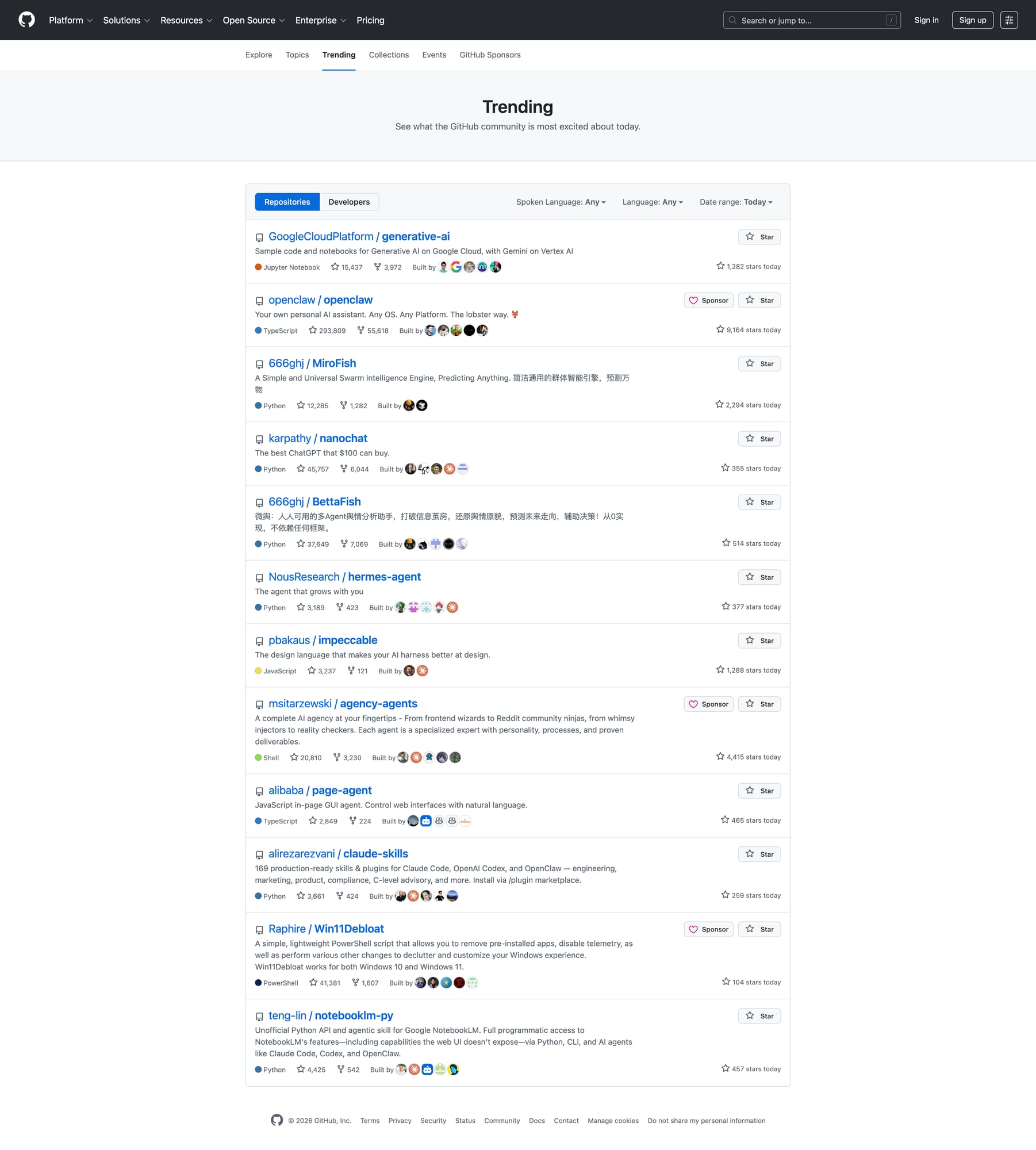
GitHub Trending is a simple, high-signal dataset:
- What repos are spiking today?
- Which languages are “hot” this week?
- What should you keep an eye on?
This guide shows how to scrape it without guessing selectors, and export a clean dataset you can use in a cron job.
Once you run this every day (or across multiple languages/time windows), reliability becomes the bottleneck. ProxiesAPI helps keep the fetch layer stable and predictable.
Target URL
https://github.com/trending
You can also filter by language and timeframe (same page, query params).
Setup
python -m venv .venv
source .venv/bin/activate
pip install requests beautifulsoup4 lxml
Step 1: Fetch HTML
import requests

URL = "https://github.com/trending"
TIMEOUT = (10, 30)
UA = "Mozilla/5.0 (compatible; ProxiesAPIGuidesBot/1.0; +https://www.proxiesapi.com/)"

html = requests.get(URL, timeout=TIMEOUT, headers={"User-Agent": UA}).text
print(len(html))
print(html[:200])
Step 2: Inspect the DOM (what to extract)
Each repo entry contains:
- owner/name
- description (sometimes)
- language (sometimes)
- total stars + forks
- “stars today” (the core metric)
GitHub markup changes over time, so treat selectors as versioned.
The safe approach:
- find the list of repo cards
- inside each card, extract fields with defensive fallbacks
Step 3: Parse trending repos
import re
from bs4 import BeautifulSoup


def to_int(s: str) -> int | None:
    s = (s or "").replace(",", "")
    m = re.search(r"(\d+)", s)
    return int(m.group(1)) if m else None


def scrape_trending(html: str) -> list[dict]:
    soup = BeautifulSoup(html, "lxml")

    cards = soup.select('article.Box-row')
    out = []

    for c in cards:
        a = c.select_one('h2 a')
        name = a.get_text(" ", strip=True).replace("\n", " ") if a else None
        href = a.get("href") if a else None
        repo_url = f"https://github.com{href}" if href and href.startswith("/") else href

        desc = None
        p = c.select_one('p')
        if p:
            desc = p.get_text(" ", strip=True)

        lang = None
        lang_el = c.select_one('[itemprop="programmingLanguage"]')
        if lang_el:
            lang = lang_el.get_text(strip=True)

        # total stars/forks
        links = c.select('a.Link--muted')
        stars_total = to_int(links[0].get_text(" ", strip=True)) if len(links) >= 1 else None
        forks_total = to_int(links[1].get_text(" ", strip=True)) if len(links) >= 2 else None

        stars_today = None
        today = c.select_one('span.d-inline-block.float-sm-right')
        if today:
            stars_today = to_int(today.get_text(" ", strip=True))

        out.append({
            "repo": name,
            "url": repo_url,
            "description": desc,
            "language": lang,
            "stars_total": stars_total,
            "forks_total": forks_total,
            "stars_today": stars_today,
        })

    return out


rows = scrape_trending(html)
print("repos:", len(rows))
print(rows[0])
Step 4: Export to CSV + JSON
import csv
import json

with open("github_trending.csv", "w", newline="", encoding="utf-8") as f:
    w = csv.DictWriter(f, fieldnames=list(rows[0].keys()))
    w.writeheader()
    w.writerows(rows)

with open("github_trending.json", "w", encoding="utf-8") as f:
    json.dump(rows, f, ensure_ascii=False, indent=2)

print("wrote github_trending.csv and github_trending.json")
Running this daily (what actually matters)
- Dedupe by repo URL
- Store historical snapshots (date → list) so you can compute deltas
- Cache the HTML (so debugging doesn’t re-fetch repeatedly)
ProxiesAPI usage (canonical)
When you want to route fetches through ProxiesAPI, use the API-style call:
curl "http://api.proxiesapi.com/?key=API_KEY&url=https://github.com/trending"
(Then your scraper parses the returned HTML.)
QA checklist
- Parsed ~25 repos
- Repo URLs are absolute
- CSV opens cleanly in Sheets
- Missing fields are handled (language/description)
Once you run this every day (or across multiple languages/time windows), reliability becomes the bottleneck. ProxiesAPI helps keep the fetch layer stable and predictable.